Quick answer
The WordPress white screen of death is almost always a PHP error, most often a plugin conflict, a theme edit gone wrong, or exhausted memory, and it is nearly always reversible without paying anyone. Work through the six fixes below in order: check for the recovery-mode email, disable plugins by renaming their folder, switch to a default theme, raise the memory limit, restore your backup, then ask your host. Most white screens are fixed inside 30 minutes at a cost of £0. If you would rather never do this yourself, managed care exists from £20 a month, but read the fixes first; this one is genuinely doable.
What the white screen actually is
When PHP hits a fatal error, WordPress stops building the page and the browser shows nothing at all: no error, no branding, just white. Since version 5.2, WordPress often catches these fatals and shows “There has been a critical error on this website” instead, and emails the site admin a recovery link. A pure white screen usually means the error happened too early for that safety net, or the notification email went to an address nobody reads. Either way the underlying story is the same: one piece of code, usually a plugin or theme, is crashing the whole assembly line.
Before anything else: three things not to do
Do not repeatedly reinstall WordPress; core files are rarely the problem and you risk making it worse. Do not delete plugins from the dashboard you cannot reach anyway by finding sketchy “fix it” tools that want your admin password. And do not panic-buy an emergency rescue service in the first ten minutes; the fixes below resolve the overwhelming majority of cases for free. If the site is down and taking orders with it, our guide on what to do when your website is down covers the customer-facing triage that runs alongside the technical fix.
Fix 1: check your email for recovery mode
Search the admin inbox for a message from your own site with a subject about a technical issue. It contains a special login link that opens WordPress in recovery mode, with the crashing plugin or theme paused and named. Deactivate the offender, and the site is back before your tea cools. This is the single highest-success first move, and it is skipped constantly because the admin email is an old address nobody checks. Fix that today regardless.
Fix 2: disable all plugins by renaming the folder
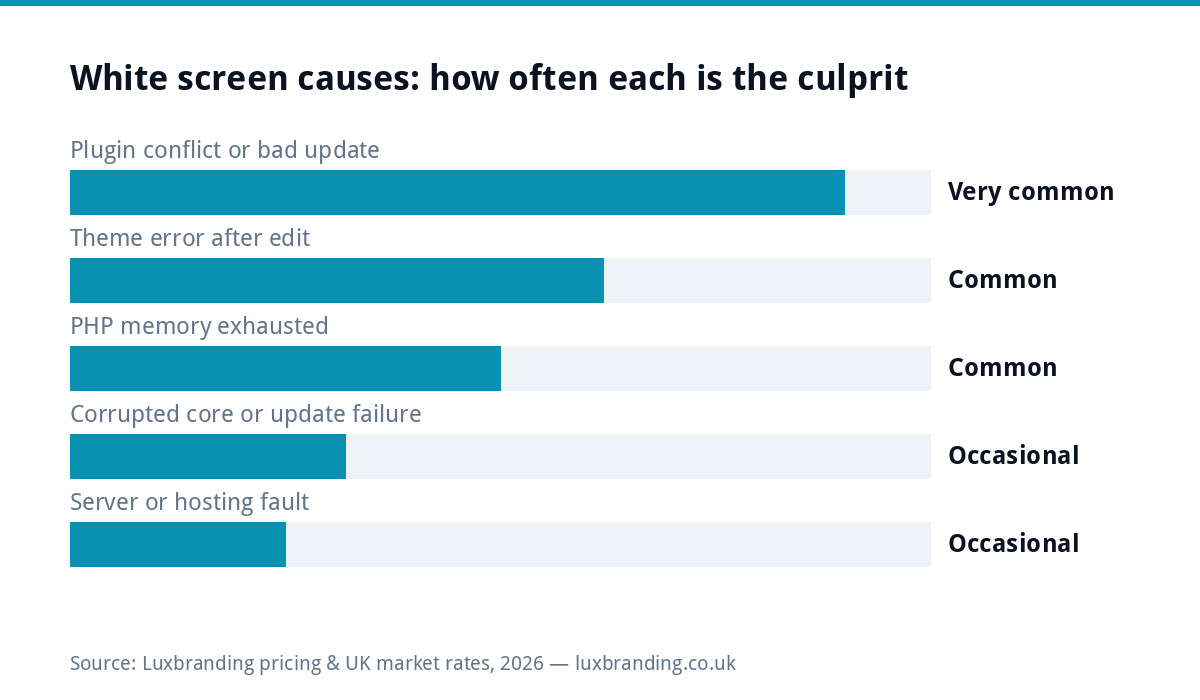
No email? Connect to your hosting account’s file manager, or FTP, and navigate to wp-content. Rename the plugins folder to plugins-off. Reload the site: if it comes back, a plugin was the culprit. Rename the folder back to plugins, then reactivate plugins one at a time in the dashboard until the crash reappears; the last one you activated is your offender. Update it, replace it, or leave it off. The chart below shows why this step catches most cases.
Fix 3: switch to a default theme
If plugins were innocent, rename your active theme’s folder inside wp-content/themes the same way. WordPress falls back to a default theme if one is installed, and if the site returns, the error lives in your theme, usually a recent edit to functions.php. Undo the edit or restore the file from backup. This is the classic aftermath of pasting a code snippet from a tutorial straight into a live theme, which is exactly why staging copies and child themes exist.
Fix 4: raise the memory limit and read the actual error
Exhausted memory produces white screens under load or on image-heavy admin pages. Adding a memory limit line to wp-config.php raises the ceiling, and enabling debug logging writes the true error to a file so you stop guessing. The official WordPress debugging guide shows the exact lines to add. One caution: turn debug display off again afterwards, because error output on a live site leaks server paths to the world. If the white screen arrived alongside general slowness rather than out of nowhere, work through our slow website checklist too, because the two share causes.
Seeing a different message instead? Our guide to the error establishing a database connection covers the five usual fixes.
Fix 5: restore last night’s backup
If you have daily backups, and your host almost certainly offers them even if you never set them up, restoring to yesterday is a legitimate fix, not an admission of defeat. It costs you at most a day of content changes and buys you a working site while you identify what broke. The order of operations matters: restore first, then reproduce the change that caused the crash on a staging copy, not on the live site a second time.
Fix 6: ask your host what changed
If none of the above works, the fault may be server-side: a PHP version bump, a corrupted update, or a hosting fault. Open a ticket and ask directly what changed on the server in the last 48 hours, and whether the error logs show a fatal for your domain. Hosts see white screens daily and can usually read you the exact failing file and line from their logs, which converts the mystery into a two-minute fix. The WordPress.org support forums are the free second opinion if the host is unhelpful.
When the white screen keeps coming back
A recurring white screen means a structural problem: a plugin that is abandoned and incompatible with modern PHP, a theme carrying years of hacked-in edits, or chronically underpowered hosting. At that point stop treating symptoms. Audit the plugin list down to what the business uses, replace abandoned code, and consider whether the site has simply outgrown its foundations, a decision we map in our guide on outgrowing a DIY website.
What it costs to have someone else fix it
One-off emergency fixes from freelancers typically run £50 to £150 depending on urgency. The structural answer costs less per incident: managed care at £20 a month on our price list keeps updates applied, backups running and someone on the hook before the crash, which is when this problem is cheap. Prevention here is not a platitude; every white screen above traces to an update, edit or limit that maintenance routines exist to handle.
The six fixes at a glance
| Fix | Where you do it | When it works |
|---|---|---|
| 1. Recovery-mode email link | Admin email inbox | WordPress caught the fatal and named the culprit |
| 2. Rename the plugins folder | Hosting file manager or FTP | Plugin conflict or bad plugin update |
| 3. Switch to a default theme | Rename theme folder in wp-content | Theme edit or functions.php error |
| 4. Memory limit + debug log | wp-config.php | Memory exhaustion, or you need the real error |
| 5. Restore last backup | Hosting panel or backup plugin | Anything recent and unclear; buys a working site |
| 6. Ask the host | Support ticket with your error logs | PHP version bumps and server-side faults |
Print or screenshot this table now, while the site works. Every step is easier to follow calmly from a saved copy than to research in a panic on your phone while the site is white.
Most of these problems are prevented by routine upkeep, and our WordPress maintenance checklist sets out what needs doing, how often and what it costs.
The boring routine that prevents the next one
Weekly plugin and theme updates applied deliberately rather than automatically on a Friday night. Daily off-server backups tested twice a year. A staging copy for any code change bigger than a typo. An admin email address someone actually reads, so recovery mode can do its job. And a written note of what changed and when, because the first question in any outage is “what did we touch last”, and the answer should never be a shrug.
Get the UK Website Project Brief Template (free)
A two-page template for briefing any UK web designer: sitemap, integrations, audience and deliverables. Cuts revision rounds in half.
No spam. UK GDPR compliant. We only use your email to send this resource, unless you tick the box to hear from us.
Frequently asked questions
What causes the WordPress white screen of death? +
A fatal PHP error, most commonly a plugin conflict or bad update, a theme edit gone wrong, or exhausted memory. Server-side changes like a PHP version bump cause a smaller share. It is almost always reversible without data loss.
How do I fix the white screen if I cannot log in to WordPress? +
Use your hosting file manager or FTP: rename wp-content/plugins to disable all plugins, and if needed rename your theme folder to force a default theme. If the site returns, reactivate items one at a time to find the offender.
What is WordPress recovery mode? +
Since WordPress 5.2, many fatal errors trigger an email to the site admin with a special login link. It opens the dashboard with the crashing plugin or theme paused and named, so you can deactivate it in one click. Check that inbox first.
How much does it cost to fix a white screen of death? +
Usually £0 if you follow the standard fixes yourself. Freelance emergency fixes typically run £50 to £150. Managed website care at £20 a month prevents most occurrences by handling updates, backups and monitoring routinely.
How do I stop the white screen happening again? +
Apply updates deliberately each week, keep daily off-server backups, test code changes on a staging copy rather than the live site, and make sure the admin email is monitored so recovery mode can reach you. Recurring crashes mean an abandoned plugin or outgrown setup.