Quick answer
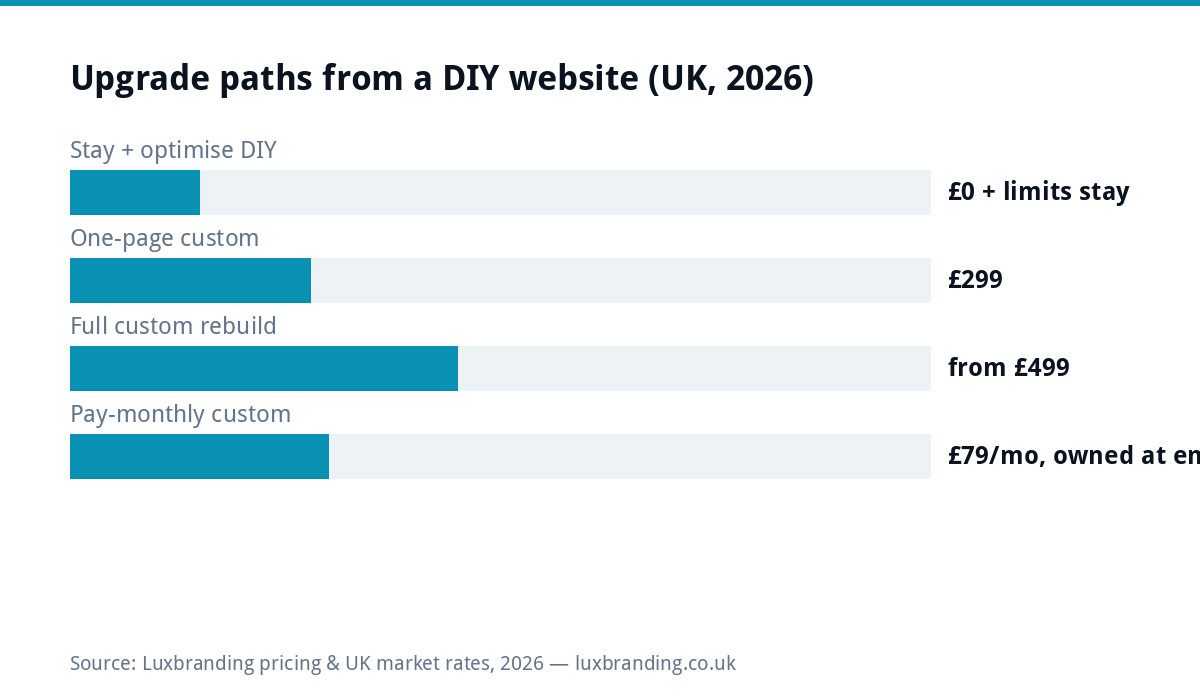
Outgrowing a DIY site is a milestone, not a failure: the builder did its placeholder job and the business became real. The upgrade paths and their prices: £299 for a custom one-page replacement, from £499 for the full build with a page per service, £79/month pay-monthly if cashflow shapes the decision. The move keeps your domain and rankings when done in the right order, and the right order is most of this guide.
The signs, honestly listed
You already suspect it, or you would not be reading; here is the checklist that confirms it. You hesitate before sending a serious prospect the link. Competitors’ sites make yours feel like the junior option in a market where you are not. Search barely knows you: the builder ceiling on structure and speed (the export trap and SEO limits in full) keeps “your-service [town]” searches going elsewhere. Every improvement the business now needs (a booking flow, per-service pages that rank, a faster mobile experience) means wrestling the template. And the arithmetic has flipped: years of £15 to £30 monthly fees have exceeded the professional build you deferred, with the meter still running. Three or more of those, and the question is only which path below.
Pick your path by situation
| Your situation | Path | What you pay |
|---|---|---|
| The DIY site is genuinely fine, you just neglected it | Stay: refresh content, fix images, keep the savings | £0 and honesty |
| One clear service, site exists to convert referrals + local searches | One-page custom replacement | £299 |
| Multiple services that should each rank | Full custom rebuild, page per service | from £499 |
| Convinced, but cashflow says monthly | Pay-monthly custom subscription (buy-out by agreement) | £79/mo |
| Site plus bookings/portal ambitions | Rebuild + scoped system | £499 + scope |
The migration order that protects your rankings
Everything that goes wrong in builder exits comes from sequence errors, so here is the sequence. First, secure the domain: confirm it is registered to YOU at your own registrar; if the builder bundled it, transfer it out before touching anything else (the same un-hostage-able rule our supplier-disappeared guides teach applies to platforms too). Second, copy everything out: text into documents, images at full size, because builder exports range from partial to nonexistent. Third, build the replacement on owned WordPress while the old site stays live; no gap, no “under construction”. Fourth, switch with redirects: point the domain at the new site and 301 every old URL to its successor so Google transfers the equity (the checklist from our redesign guide). Last, cancel the subscription, after confirming the new site serves and Search Console shows no 404 wave. Total downtime when done in this order: none.
What the upgrade actually buys (beyond looking the part)
Ownership: standard code you can move between hosts on an afternoon, versus a design mortgaged to a platform’s pricing decisions. Structure that ranks: real per-service pages, clean headings, schema, the technical layer builders gate or garble. Speed: custom builds on decent hosting routinely halve builder load times, and speed is both a ranking input and a conversion one (Google’s Core Web Vitals are the public yardstick). Room: the booking system, the client portal, the fee calculator the business will want next year plug into WordPress; on the builder they were feature requests. And the fee stops: hosting at £20/month replaces the subscription, with a human on the end of it.
What to salvage from the DIY era (more than you think)
The rebuild is not a reset of everything; the DIY years produced assets worth carrying. Your content, edited: the service descriptions you refined by living with them beat any writer’s first draft, and they migrate wholesale. Your data: analytics history and Search Console records show which pages earned attention, which is the blueprint for what the new build should emphasise (connect both to the new site so the history continues). Your photos, re-exported at full size from wherever the originals live, because builders often compressed them brutally. Your reviews and profile: untouched by the move, and stronger once the site they link to improves. Even the builder experience itself: you now know exactly what you need from a website, which makes you the best-briefing client a designer gets; the redesign guide’s gather-list takes an evening instead of a fortnight when the DIY era already answered its questions.
The one move to make this week regardless
Whether you rebuild this month or next year: confirm the domain is yours today. Log into wherever it is registered, check the registrant details name your business at your email, and if the builder holds it inside a bundle, start the transfer to an independent registrar now, because transfers take days when easy and weeks when contested, and every other decision on this page waits calmly behind that one. A domain in your own hands turns “trapped on a builder” into “shopping for an upgrade”, which is a much better negotiating position with everyone, including us. Full ownership rules in our domain guide.
Two questions that pick your tier in a minute
Cut the four paths to a decision fast. One service and a local reputation to convert: the £299 one-pager replaces the builder outright and probably beats it on day one. Several services that deserve their own rankings, or ambitions the builder gated (bookings, portals, proper SEO): the from-£499 build is the honest tier, and pretending otherwise just re-runs the outgrowing in miniature. If neither answer is obvious, the impressions test settles it: search your three money terms and see whether any of your pages appear at all; invisibility on all three is the multi-page case making itself.
Timing the move (and the one bad time)
Good times: your quiet season (fixes surface for a fortnight post-launch and February forgives what December does not), before a marketing push (pointing ads or a mailshot at the site you are about to replace wastes the spend twice), and at the builder’s renewal date if one is looming. The one genuinely bad time: mid-campaign or peak season, when even a perfect migration’s small wobbles cost real revenue. If peak season is now and the site embarrasses you anyway, bridge it: fix the worst content on the builder today for free, book the rebuild for the lull, and let the deadline make the project real. Businesses that “wait until things calm down” are the ones still paying builder fees in year six; a date in the diary is the whole difference.
For the whole market in one place, from DIY builders to full agency builds and the running costs after launch, see how much a website costs across the UK.
The graduation maths, one last time
A typical case: three years on a £22/month builder plan is £792 paid, with the meter running and the ceiling untouched. The £499 rebuild plus £20/month hosting costs £739 over the SAME three years, ends owning the asset, and starts from a faster, better-ranking position on day one. The builder was still the right first chapter (it got you trading online for pennies when that was what mattered); this is just the page where the chapter ends. Prices, per house rules, all public on the price list.
Get the UK Website Project Brief Template (free)
A two-page template for briefing any UK web designer: sitemap, integrations, audience and deliverables. Cuts revision rounds in half.
No spam. UK GDPR compliant. We only use your email to send this resource, unless you tick the box to hear from us.
Frequently asked questions
How do I know I have outgrown my DIY website? +
The recurring signs: you avoid sending prospects to it, competitors' sites visibly outclass it, Google barely finds you, adding what the business now needs means fighting the builder, and the monthly fees have quietly exceeded what a professional build would have cost.
What does upgrading from Wix or Squarespace to a proper site cost? +
A custom one-page replacement is £299; a full multi-page build from £499; pay-monthly custom runs £79/month with ownership at the end. Add ~£20/month managed hosting. Content moves with you; builder design and structure do not, which is why it is a rebuild rather than a transfer.
Will I lose my Google rankings if I move off a website builder? +
Handled properly, no: keep your domain (the rankings attach to it), map every old URL to its successor with 301 redirects, and carry over page content that ranks. Losing rankings happens when moves silently delete or rename pages, not from moving platforms.
Can I keep my domain when leaving a website builder? +
Yes if you own it. If the builder registered it under their bundle, transfer it into your own registrar account before anything else; that domain is the asset every ranking and every printed business card points at.
What happens to my builder subscription and content when I leave? +
Copy all text and images out first (builders export poorly or not at all), rebuild on owned WordPress, redirect, then cancel the subscription. Nothing on the builder transfers by itself; plan the copy-out as step one, not an afterthought.