
Quick answer
If your website contact form has stopped working, send yourself a test message and find out where it stops. Most of the time the form is fine and the email is not: it is sent without authentication and lands in spam, or the mail settings broke when a password changed. The fix is authenticated sending through a proper mail service, followed by a test every month. Diagnosis takes minutes, and the usual fix is a settings change rather than a rebuild.
The nastiest website failure is the silent one
A broken contact form does not look broken. The visitor fills it in, sees “Thanks, we’ll be in touch”, and waits. You see nothing, because nothing arrived. There is no error page, no alert, no downtime monitor going red; just a quiet month and a creeping sense that business has slowed. Website owners typically discover a dead form weeks or months after it failed, usually when a customer mentions “I messaged you twice”. If leads have gone quiet, test the form before you blame the market: it takes five minutes and it is the single most common silent failure we find on small business websites.
The five-minute test protocol
Open your site in a private browser window, submit the form with a personal address (not your business one) in the message, something searchable like “FORM TEST 14 MAY”, and a made-up phone number. Then check four places in order: your inbox, your spam folder, the email account’s quarantine if you use Microsoft 365 or Google Workspace, and the form plugin’s own entries screen in WordPress, which stores submissions in the database on most modern form plugins. Where the message stopped tells you which cause below you have. If it landed in spam, you have a deliverability problem. If it is in the plugin’s entries but no email exists anywhere, sending is broken. If even the entry is missing, the form itself is.
Cause 1: your emails are unauthenticated, so they get binned
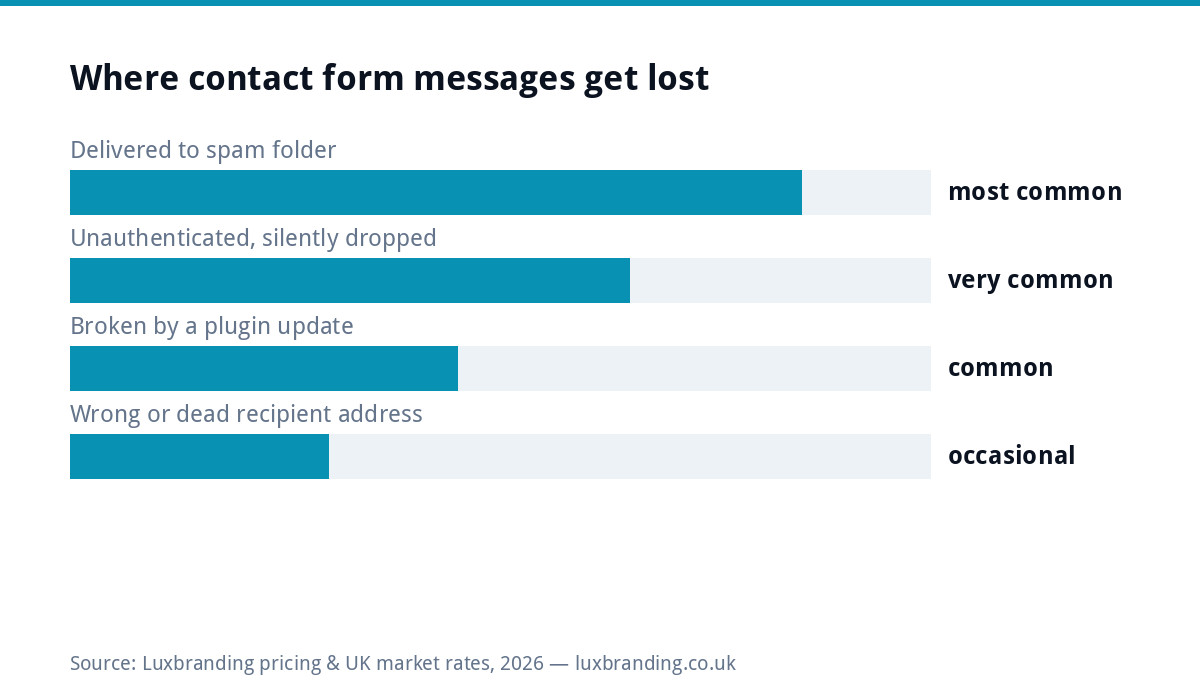
By default, WordPress sends form notifications via the web server’s own PHP mail function, with no authentication at all: no SPF alignment, no DKIM signature, sent from a server IP shared with hundreds of strangers. Mailbox providers have spent the last two years tightening exactly this: Google and Yahoo’s email sender guidelines now effectively require SPF and DKIM authentication, and unauthenticated mail is increasingly dropped outright rather than spam-foldered. This is why forms that “worked for years” die without anyone touching the site. The fix is to stop sending through PHP mail and route notifications through an authenticated SMTP service, which is a configuration job, not a rebuild.
Cause 2: SMTP was set up, then a password changed
The opposite failure: someone did configure SMTP properly, and then the mailbox password was changed, the app password was revoked, or the sending account hit a limit. The form plugin keeps accepting submissions and the SMTP plugin quietly logs authentication failures nobody reads. If your test message is sitting in the plugin’s entries screen, open the SMTP plugin’s email log: a wall of red “could not authenticate” entries, dated from the day the password changed, is the classic signature. Re-enter the credentials and the backlog problem ends, though the lost messages are usually gone.
Cause 3: an update broke the form
Plugin and theme updates occasionally break the form itself: the submit button spins forever, a JavaScript error stops validation, or a caching plugin serves an old security token that makes every submission fail. The tell is that your test never even reaches the plugin’s entries screen. Test again with the browser’s private mode after clearing the site cache; if it works logged-in but not for visitors, caching is your culprit. This class of breakage is a strong argument for updates being applied by someone who tests afterwards, which is most of what a managed hosting arrangement is for.
Cause 4: the message went to the wrong place
Forms are often configured to notify an address chosen years ago: an ex-employee’s inbox, an old ISP address, or the web designer’s own email from the build. The submissions arrive somewhere, just nowhere you look. Check the notification address in the form settings and change it to a monitored role address like enquiries@ on your own domain. If you are still running the business on a free webmail address, this is also the moment to fix that; our business email setup guide covers costs and the SPF and DKIM records that make cause 1 go away permanently.
Cause 5: overzealous spam protection blocks humans
Captchas and honeypot fields stop bot spam, but a misconfigured captcha (expired keys are common after a site migration) rejects every submission, including real ones, sometimes with no visible error. Meanwhile the absence of any protection produces the opposite problem: hundreds of junk submissions burying the real enquiry you then miss. The balance that works: a modern invisible captcha with current keys, tested from a phone as well as a desktop, because mobile is where marginal configurations fail first.
Where the test stopped, and what it means
| What you found | Most likely cause | First fix |
|---|---|---|
| Test email in spam or quarantine | Unauthenticated sending | Send through an authenticated mail service with SPF and DKIM set up |
| Entry saved in WordPress, no email anywhere | Mail settings broken, often after a password change | Update the SMTP login and send another test |
| No entry and no email | The form itself failed, often after an update | Check the form plugin and anything updated recently |
| Email arrived at an old address | Notifications set to the wrong inbox | Change the recipient in the form settings |
| Visitors see an error when they submit | Spam protection blocking real people | Loosen or replace the spam check |
Keep a note of each test and its date. If the form fails again in six months, the record shows whether the same cause has come back, which usually points to something that keeps changing, such as a password your email provider makes you rotate.
What a dead form actually costs
| Scenario | Enquiries lost | Cost of the outage |
|---|---|---|
| Tradesperson, 2 enquiries/week, form dead 6 weeks | ~12 | 2-3 jobs, often £1,000+ |
| Clinic, 5 bookings/week via form, dead 4 weeks | ~20 | £1,000+ in first appointments alone |
| Agency-class enquiry, one £2,000 project missed | 1 | More than a decade of hosting |
The arithmetic is brutal because the failure is invisible and open-ended: it costs whatever walked past while nobody was looking. If you are paying for traffic while the form is dead, it is worse still; our post on ad spend producing no leads starts with exactly this check for the same reason.
The proper fix: authenticated sending plus a paper trail
The durable setup has three layers. First, notifications routed through authenticated SMTP on your own domain, so SPF and DKIM pass and providers trust the mail. Second, database storage of every submission in the plugin’s entries screen, so even a delivery failure loses nothing permanently. Third, a second notification address as a safety net. You can verify the authentication side in two minutes by sending a test to a scoring service such as mail-tester.com: below 7 out of 10, deliverability is costing you enquiries beyond the form.
Make the test a habit
Put a monthly reminder in the calendar: submit the form, confirm it arrives, done in ninety seconds. Pair it with a quick glance at site speed and uptime, because slow sites lose the enquiries before the form is even reached; our guide to a suddenly slow website and the broader website down checklist cover those neighbouring failures. Websites do not fail loudly; they fail like this, quietly, in the plumbing.
Recovering the enquiries you already lost
Once the form works again, spend twenty minutes on salvage. Open the form plugin’s entries screen and work backwards through every stored submission since the failure date: each one is a real person who wanted to hear from you, and a reply that opens “your message reached us but our system failed to flag it, sorry” recovers a surprising share of them even weeks later. Check the SMTP plugin’s log for addresses that bounced, and search the mailbox’s spam folder for the notification subject line, because some of the missing messages are sitting there unread rather than gone.
When to hand it to someone
Everything above is diagnosable by a patient owner in an afternoon. The case for handing it over is not difficulty but attention: the failure recurs every time a password rotates or a plugin updates, and the cost of missing the recurrence is a jobs pipeline. Our website management service at £20 a month includes the SMTP configuration, the updates, and a monthly form test as routine, and if the form turns out to be the tip of a neglected-site iceberg, everything else we charge is public on the pricing page.
Get the UK Website Project Brief Template (free)
A two-page template for briefing any UK web designer: sitemap, integrations, audience and deliverables. Cuts revision rounds in half.
No spam. UK GDPR compliant. We only use your email to send this resource, unless you tick the box to hear from us.
Frequently asked questions
Why is my website contact form not sending emails? +
Most often because WordPress sends via unauthenticated PHP mail, which providers now spam-folder or drop under tightened sender rules. Other causes: broken SMTP credentials, a plugin update, a wrong recipient address, or a misconfigured captcha blocking real submissions.
How do I test if my contact form works? +
Submit it from a private browser window using a personal email address with a searchable phrase, then check your inbox, spam folder, mail quarantine, and the form plugin's entries screen in that order. Where the message stopped tells you which layer failed.
Are my old form submissions lost forever? +
Check the form plugin's entries screen first: most modern plugins store every submission in the database even when the email never sent, so the enquiries are often recoverable there. Messages lost to spam filters or authentication drops are usually gone.
What is SMTP and why does my form need it? +
SMTP routes your form notifications through a real, authenticated mailbox on your domain instead of the web server's anonymous PHP mail. That makes SPF and DKIM pass, which is what mailbox providers now effectively require before they will deliver your mail.
How often should I test my website contact form? +
Monthly, as a ninety-second calendar habit, and additionally after any plugin update, email password change or site migration, because those are the three events that most commonly break sending silently.