
How much does a professional business email address cost in the UK?
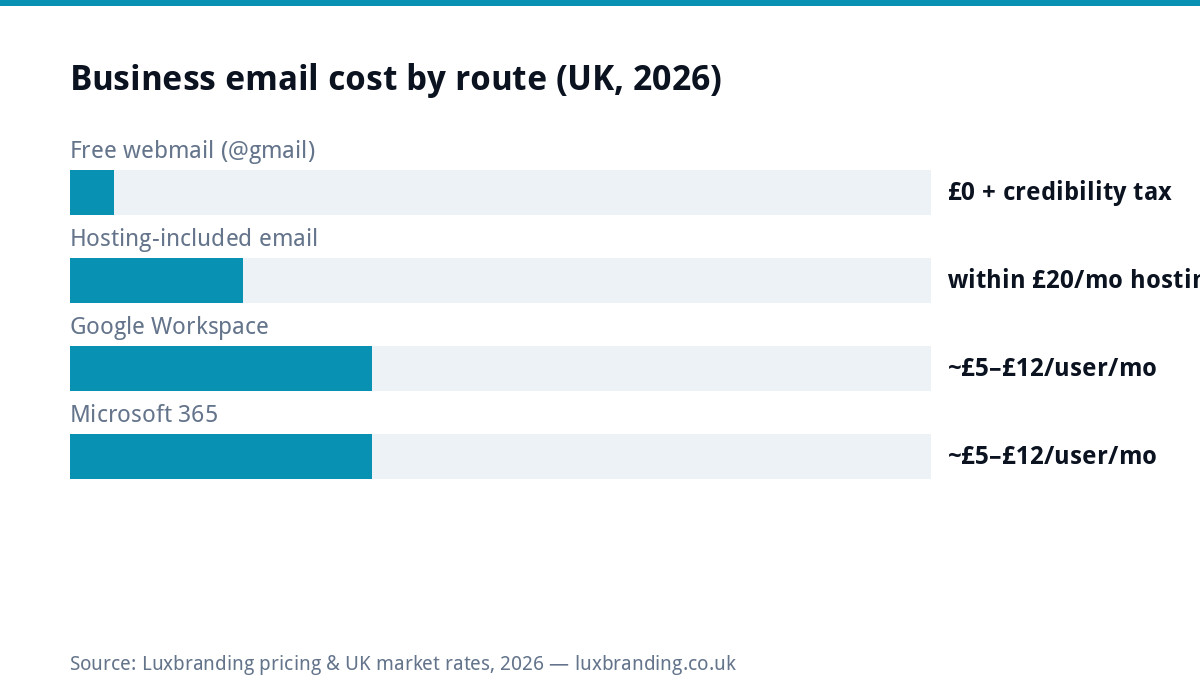
A business email address at your own domain costs from £0 to about £12 per user a month in the UK: free through domain forwarding or a free plan (with limits), included with many hosting plans, or roughly £5 to £12 per user a month for Google Workspace or Microsoft 365. The one essential cost is the domain itself, about £10 to £20 a year. Setting it up takes an afternoon, and the step that decides whether your emails reach the inbox is adding the SPF, DKIM and DMARC records.
| Route | Typical cost | Best for | Trade-off |
|---|---|---|---|
| Forwarding or a free plan | £0 | A sole trader in the first weeks | Sending limits, webmail only, or replies that go out from your old address |
| Mailboxes included with hosting | Within the hosting fee (ours: up to 3 mailboxes in £20 a month managed hosting) | Small teams that need email, not an office suite | Webmail and phone apps; no Docs or Teams attached |
| Google Workspace | About £5 to £12 per user a month | Teams living in Gmail, Docs, Drive and Meet | Paid per person for as long as you use it |
| Microsoft 365 | About £5 to £12 per user a month | Teams living in Outlook, Word, Excel and Teams | The same per-person maths, the other ecosystem |
Google and Microsoft publish their current UK prices on their own sites; check them before you buy, as tiers and introductory offers change.
Why the @gmail address quietly costs you
Customers read joebloggsplumbing@gmail.com and, fairly or not, discount it, surveys on consumer trust in business email consistently favour branded addresses, and every competitor whose van says info@theirname.co.uk banks the difference. There’s a structural cost too: a free-webmail address welds your business identity to one provider’s account (and its recovery processes, and its ads), while name@yourdomain is YOURS, providers become interchangeable behind it. And practically: domain email is what invoicing tools, Google Business Profile verification and half of B2B expects. For the price of nothing extra on hosting you already need, the upgrade argues for itself.
Which route to choose
Honest guidance: the suites are worth it when you’d use the apps anyway, you’re buying an office, email included. If you just need professional email, hosting-included mailboxes do the job for £0 marginal, and you can graduate to a suite later without changing address (that’s the domain-ownership dividend again).
The setup that separates inbox from spam folder
Whoever provides the mailbox, delivery depends on three DNS records most cheap setups skip: SPF (lists which servers may send as your domain), DKIM (cryptographically signs your messages), and DMARC (tells receiving servers what to do with failures, and protects your name from spoofing). Without them, modern inboxes treat your quotes and invoices with suspicion; with them, you’re authenticated like the big firms. They’re ten minutes of DNS work with the right access, included in any proper email setup, ours included, and their absence is the answer to 90% of “why do my emails go to junk?” All three matter double if you ever send marketing: authentication is table stakes for bulk delivery.
Finish the job with one of our free email signature templates.
How to set up a business email address, step by step
A professional email address is simply one at your own domain, such as jo@yourbusiness.co.uk, rather than at a free webmail provider. Setting one up takes an afternoon of work, and most of the elapsed time is waiting for DNS changes to take effect. The order matters:
- Own the domain in your own registrar account. If a web designer registered it for you, have it moved into an account in your name first. Everything else depends on this.
- Choose the mailbox provider. Google Workspace, Microsoft 365, or one of the free or low-cost options in the table below.
- Prove you own the domain. The provider gives you a verification record, usually a TXT record, to add wherever your DNS is managed. Google, for example, asks for domain verification before Gmail can be switched on.
- Create the mailboxes and aliases. One mailbox per person, and role addresses such as info@ and accounts@ as aliases or shared mailboxes, as set out further down.
- Point the MX records at the provider. These tell other mail servers where to deliver your email. Remove any old MX records at the same time: Google warns that leftover records can stop email working properly, and that new ones can take up to 72 hours to be recognised.
- Add SPF, DKIM and DMARC. The three authentication records described above, so your emails are trusted rather than filtered.
- Connect phones and computers, then test. Send a test to a Gmail and an Outlook address you control and check both land in the inbox.
For a business already trading, make the MX change early in the week rather than on a Friday. While the change spreads, some mail can still arrive at the old provider, and you want to be at your desk if anything needs checking.
Is there a free business email?
Yes, with limits, and it helps to know which limit you are accepting. An address at a free webmail provider is not really a business email, because it is not at your domain. The free and low-cost routes to an address at your own domain look like this:
| Option | Cost | What you get | The limit |
|---|---|---|---|
| Email forwarding from your registrar | Often included with the domain | Mail sent to you@yourdomain arrives in an inbox you already have | Receiving only, unless sending is set up separately; replies can go out from your old address |
| Zoho Mail Forever Free | £0 | Up to five users, 5GB each, one domain | Web and mobile app only, with no IMAP or POP, and Zoho says it is available only in select data centres |
| Google Workspace or Microsoft 365 | ~£5 to £12 per user a month | A full mailbox plus the office apps | Paid per person for as long as you use it |
Forwarding is a reasonable stopgap for a sole trader in the first weeks. A free plan can work for a very small team happy to use webmail, but read the provider’s current terms when you sign up, because free plans change. Once email is how quotes, invoices and customer conversations travel, a paid mailbox with proper support is the safer home. For clients on our website hosting, we help set up Google Workspace or Microsoft 365.
The credibility bundle, priced as one decision
Business email rarely travels alone, it’s one corner of the “is this business real?” triangle customers check in thirty seconds: a domain (£10 to £20/yr), email at that domain (£0 extra on hosting, per this guide), and SOMETHING at the domain’s web address, because name@yourbusiness.co.uk on a quote invites a visit to yourbusiness.co.uk, and a hosting parking page undoes the email’s good work. The complete set, domain, branded mailboxes, a £299 one-page site, managed hosting, lands around £320 up front plus £20/month, which is the entire “look established” problem solved for less than most businesses’ monthly ad spend. Sequence for a brand-new business: domain today (it’s the scarce asset, see our domain guide), email the same week on whichever route above fits, site when your materials are ready. Each step compounds the others; none needs redoing when you grow.
Your email stops when your domain lapses. If you are dealing with an expired domain, here are the four steps to get it back.
Which addresses to create (a five-minute strategy)
The mailbox plan for a typical small business, so you set it up once: firstname@ for each human (the address on your signature and cards, people buy from people); info@ as the public catch-all for the website and directories (alias it to whoever triages); accounts@ for invoicing in AND out, keeping money-mail out of personal boxes pays off at year-end and survives staff changes; support@ only if you’ll actually staff it (a dead support@ is worse than none). Resist the urge to mint ten role addresses on day one, each is a box someone must watch. Two configuration savers: make the role addresses aliases or shared mailboxes rather than separate paid seats where your provider allows (that’s most of them, per-user fees apply to humans, not addresses), and give every mailbox the same signature template so the brand looks intentional from day one. This structure is exactly what gets configured in the included-with-hosting route, ask for it by name and the setup call takes ten minutes.
Escaping @gmail: the two-week playbook
The migration fear is overblown, here’s the low-drama sequence. Week one: set up name@yourdomain alongside the old address (nothing breaks, both work), import old mail if you want history in one place (providers’ migration tools do this in an afternoon), and set the old account to forward everything to the new one. Week two: update the addresses that matter in order of pain, bank, HMRC/accountant, suppliers, Google Business Profile, directories, social logins, then switch your signature, cards and van at the next natural reprint. Leave the forward running indefinitely (it costs nothing and catches stragglers for years), and reply from the new address always, which retrains every correspondent automatically. Two focused hours across two weeks, and the @gmail era ends without a single lost message. The only genuinely fiddly part is remembering everywhere the old address was a LOGIN rather than a contact, password managers’ export lists solve that hunt.
Sender habits that keep you out of junk (beyond the DNS)
Authentication records get you judged fairly; behaviour wins the verdict. For everyday business email the rules are light: send from the domain consistently (not sometimes-Gmail), avoid attachment-only messages to strangers (invoice PDFs to established contacts are fine; a bare attachment to a first-time recipient trips filters), and keep any group emails small and personal. The sharper rules arrive if you ever do MARKETING sends, newsletters, offers: consent you can evidence, working unsubscribe, steady volumes rather than sudden blasts, and a reply-able from-address. That’s a different discipline with its own infrastructure (and UK PECR rules), which is why business email and email marketing are separate line items, conflating them is how legitimate businesses end up blocklisted. For the everyday version: authenticate once, behave normally, and deliverability simply stops being a topic. One last check worth thirty seconds: send a test to a Gmail and an Outlook address you control and confirm both arrive in the inbox with your name displayed correctly, because that is the whole system proving itself end to end.
Practical choices that save later pain
Set up role addresses alongside personal ones, info@, accounts@, support@, as aliases or shared boxes, so staff changes never orphan an address printed on ten thousand flyers. Keep the domain in your own registrar account (the un-hostage-able rule from our developer-disappeared guide applies to email doubly: lose domain control, lose every address at once). Add a proper signature, name, business, number, website link, a small correctly-sized logo (the 2MB-logo-in-every-email epidemic remains undefeated; our handover checklist includes the email-sized export). And if the “website” attached to your new professional email is still a Facebook page, the £299 one-pager completes the credibility set. Email setup comes bundled in our hosting; prices on the price list.
Further reading: Google Workspace published pricing · Microsoft 365 Business published pricing.
Get the UK Website Project Brief Template (free)
A two-page template for briefing any UK web designer: sitemap, integrations, audience and deliverables. Cuts revision rounds in half.
No spam. UK GDPR compliant. We only use your email to send this resource, unless you tick the box to hear from us.
Frequently asked questions
How much does a business email address cost in the UK? +
Three routes: included within managed hosting (~£20/month covers the site plus up to 3 branded mailboxes), Google Workspace at published prices from roughly £5/user/month, or Microsoft 365 similar. The domain itself (£10 to £20/year) is the only true prerequisite.
How do I set up a business email address? +
Own the domain in your own registrar account, choose a mailbox provider, add the verification record the provider gives you, create the mailboxes and aliases, point the MX records at the provider, then add SPF, DKIM and DMARC so your emails are trusted. Finish by sending a test to a Gmail and an Outlook address and checking both land in the inbox. Most of the elapsed time is waiting for DNS changes to take effect.
Is info@mybusiness.co.uk worth it over Gmail? +
Yes, disproportionately. A branded address is the cheapest credibility upgrade in business (surveys consistently show customers trust it more than @gmail), and it keeps your email independent of any provider: change hosts or suites later, the address goes with you because you own the domain.
Google Workspace or Microsoft 365 for a small business? +
Both are excellent at similar published prices (~£5 to £12/user/month). Pick by ecosystem: if you live in Docs, Sheets and Meet, choose Workspace; if you live in Word, Excel and Teams, choose 365. Hosting-included email suits smaller needs where the apps don't matter.
Why do my business emails go to spam? +
Almost always missing authentication records: SPF, DKIM and DMARC are DNS entries that prove your emails really come from your domain. Any competent setup includes them; without them, modern inboxes distrust you by default. It is usually a quick fix once you have access to your domain's DNS settings.
Can I move my email later without losing everything? +
Yes. Because you own the domain, the ADDRESS moves freely. The mailbox contents need migrating (providers and hosts have tools; small mailboxes are an hour's job). This portability is exactly what @gmail addresses never give you.