
Three signatures you can copy today
Every email your business sends is a tiny advert, and most small businesses either waste the space entirely (“Sent from my iPhone”) or cram it with banners, quotes and a wall of social icons that lands them in spam folders. Below are three copy-ready signature layouts (minimal, standard and full company) with the sizing rules that keep them rendering cleanly in Gmail and Outlook, plus the legal lines UK limited companies are actually required to include. Set aside fifteen minutes: ten to build it, five to roll it out to everyone in the business, because a signature only works when the whole team’s match.
The rules before the templates
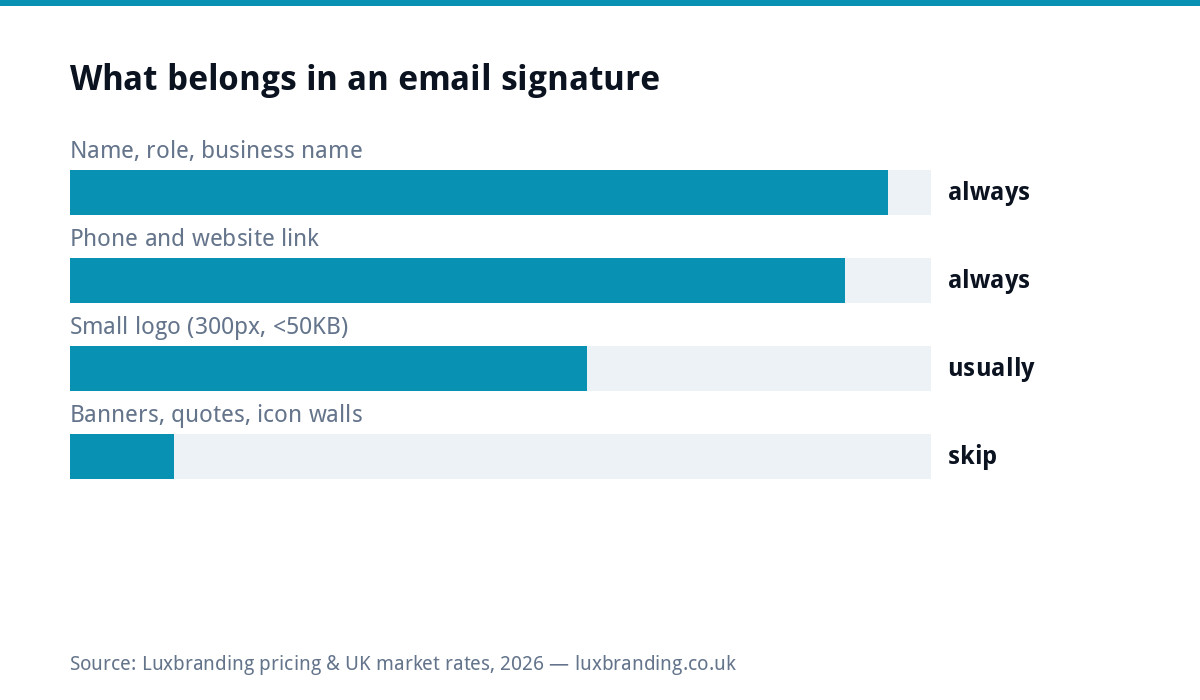
Signatures break in predictable ways, so obey five constraints whichever layout you pick. Keep any logo image around 300 pixels wide and under 50KB, because oversized images get clipped, attached as files, or flagged by filters. Use a standard system font (Arial, Helvetica, Georgia); a beautiful brand font will silently fall back to something ugly on the recipient’s machine anyway. Keep it to four to seven lines. Use one colour beyond black, ideally your brand colour on the name or business line; your exact hex codes should already be written down, and if they are not, that is a separate problem worth fixing. And put links on text (“luxbranding.co.uk”), not on icon images, because icons are what spam filters and dark mode mangle first.
Template 1: the minimal (sole traders, replies, phones)
Four lines, no image, renders perfectly everywhere including from your phone. This is also the right signature for replies and forwards, where repeating a full company block every message reads as noise.
Sam Carter
Carter Plumbing & Heating
07700 900123 | cartersplumbing.co.uk
That is genuinely it. Name, business, phone, clickable website. If you only upgrade from “Sent from my iPhone” to this, you have captured most of the value on offer.
Template 2: the standard (most businesses)
The workhorse: adds a role, a small logo and one call to action. The pipe characters keep it compact; each block below is one line.
[logo, 300px wide, links to your website]

Sam Carter | Director
Carter Plumbing & Heating
07700 900123 | sam@cartersplumbing.co.uk
cartersplumbing.co.uk | Book a boiler service
The call to action line is the underused trick: link “Book a boiler service” (or your equivalent: “Get a quote”, “See our menu”) to the exact page, and rotate it seasonally. It converts better than any banner because it reads as a sentence, not an advert.
Template 3: the full company block (limited companies)
Everything in template 2, plus the small-print block UK limited companies should carry on business email:
[logo, 300px wide, links to your website]

Sam Carter | Director
Carter Plumbing & Heating Ltd
07700 900123 | sam@cartersplumbing.co.uk
cartersplumbing.co.uk | Book a boiler service

Carter Plumbing & Heating Ltd is registered in England & Wales,
company no. 12345678. Registered office: 1 Example Street, Leeds LS1 1AA.
Style the legal block two sizes smaller and grey. It is boring on purpose; its job is compliance, not persuasion.
The legal bit: what UK limited companies must include
Under the Companies Act rules on business stationery, which extend to emails, a UK limited company must show its registered name, company number, place of registration and registered office address on business correspondence; the plain-English version lives on gov.uk. Sole traders have no equivalent obligation, though trading name and contact details remain sensible. If you are VAT registered, adding the VAT number is optional on email but customers ordering by email often ask, so it saves a round trip.
What to leave out
| Common inclusion | Verdict | Why |
|---|---|---|
| Inspirational quote | Cut | Reads as unprofessional in every industry except possibly life coaching |
| Full-width promotional banner | Cut | Clipped by Gmail, flagged by filters, ignored by readers |
| Six social media icons | Cut to one link, if any | Icon images break in dark mode; link the one profile you actually maintain |
| “Please consider the environment” | Optional, dated | Adds a line, changes no behaviour |
| Long confidentiality disclaimer | Cut unless regulated | Legally near-worthless boilerplate; keep only if your sector genuinely requires it |
Installing it: Gmail and Outlook in two minutes each
In Gmail: Settings, See all settings, General, scroll to Signature, create it with the formatting toolbar (insert the logo via the image button, then click the image and set it to link to your site), and set it as default for new emails; Google’s own signature help page covers the corners. In Outlook: Settings, Mail, Compose and reply, build it in the signature editor and assign it to new messages. In both, set a shorter reply signature (template 1) so threads do not fill with repeated logos. Build it once in the desktop version, then check how it looks from your phone before rolling it out.
The logo file matters more than the layout
The image you paste in should be a PNG with a transparent background, exported at roughly 600 pixels wide and displayed at 300 for sharpness on high-density screens, and compressed under 50KB. What you must not do is paste a white-boxed JPEG or a screenshot of your logo, which is the single most common signature crime and instantly undermines the professionalism the signature exists to project. If you do not have the right file, our logo size cheat sheet lists exactly what to export, and a £79 file rebuild sorts businesses whose master files are lost.
Roll it out to the whole team, identically
A signature earns trust through repetition, and repetition requires uniformity: same layout, same logo, same order of lines, with only names and roles changing. Send the team the template with their fields marked, or better, set it centrally if you run Google Workspace or Microsoft 365. Mismatched signatures are the email equivalent of the inconsistency that plagues invoices and quotes; while you are standardising paperwork, our free quote template applies the same one-hour discipline to the documents that win work.
Dark mode and mobile: the two places signatures break
Test the finished signature in dark mode before declaring victory, because that is where logo choices come home to roost: a dark-text logo on a transparent background disappears entirely against a dark theme, which is why many businesses keep a version with a subtle light keyline or use a logo mark that survives both. On mobile, long lines wrap ugly; keep each line under roughly sixty characters and the layout holds. And send one test to an Outlook address even if you live in Gmail, because your customers are split across both and the two render images differently.
One signature system, two jobs
Keep correspondence signatures and marketing emails separate in your head. The signature on quotes and replies is trust infrastructure: consistent, quiet, legally complete. Newsletters and campaign emails have their own footers with unsubscribe links and different rules. Copying a marketing footer into daily email, or a personal signature into campaigns, gets the compliance of each wrong. Build the signature once as described here, and let campaign tools handle campaign footers.
Where the signature fits in your email setup
A polished signature on a @gmail.com address is a suit worn with slippers. The signature, the domain address and the authentication records that get your mail delivered are one system, and the full picture (what a proper domain mailbox costs, SPF and DKIM, and why unauthenticated mail increasingly just vanishes) is in our business email setup guide. If email is a marketing channel for you as well as a correspondence tool, our email marketing service handles the campaign side, and everything we charge, from £79 file fixes upward, is public on the pricing page.
Get the UK SEO DIY Audit Checklist (free)
A 32-point checklist UK SMEs can run against their own website in an afternoon. Surfaces the quick wins before paying for a paid audit.
No spam. UK GDPR compliant. We only use your email to send this resource, unless you tick the box to hear from us.
Frequently asked questions
What should a professional email signature include? +
Name, role, business name, phone number and a clickable website link, plus optionally a small logo (about 300px wide, under 50KB) and one text call-to-action line. Four to seven lines total, in a standard font, with links on text rather than icons.
What must a UK limited company put in its email signature? +
Business emails count as business stationery, so a limited company must show its registered name, company number, place of registration and registered office address. Style the block smaller and grey; sole traders have no equivalent requirement.
What size should an email signature logo be? +
Display it around 300 pixels wide, exported at double that for sharp high-density screens, as a transparent PNG under 50KB. Oversized or white-boxed images get clipped by Gmail, attached as files, or mangled in dark mode.
Should I put social media icons in my signature? +
Generally no. Icon images are the first thing dark mode and spam filters break, and six icons dilute the one action you want taken. If a profile genuinely matters to your business, link it as text on its own line.
Do I need a different signature for replies? +
Yes: set a short reply signature (name, business, phone, website) so long threads do not fill with repeated logos and legal blocks. Gmail and Outlook both support separate new-message and reply signatures.