
Quick answer: what this audit catches
Small UK Google Ads accounts leak money quietly: a broad match keyword buying rubbish searches at £2 a click, a conversion tag that silently stopped firing, a location setting showing ads to people who merely read about your town. This free 20-check audit takes about 30 minutes, costs £0, and is scored so you get a number at the end. Print it, work through your account with the search terms report open, and tick honestly. Sixteen or more passes is healthy; below twelve, stop increasing budget until the foundations are fixed.
Before you start: open these three screens
You need the campaigns overview, the search terms report under insights and reports, and the conversions summary under goals. Almost everything below is read straight off those three screens. Set the date range to the last 90 days so patterns are visible rather than anecdotal.
Section A: account and campaign structure (5 checks)
| # | Check | Pass if |
|---|---|---|
| 1 | Campaigns map to real business lines | Each campaign is a service or product family with its own budget, not one bucket for everything |
| 2 | Ad groups are tight | Each ad group covers one theme with a handful of closely related keywords, so ads can match the search |
| 3 | Location targeting is honest | Set to presence in your service area, not the default that includes people interested in it |
| 4 | Networks are deliberate | Search campaigns are not silently opted into Display; any Display spend is a conscious choice |
| 5 | Auto-apply recommendations is off | Settings show recommendations applied by you, not automatically |
Section B: keywords and match types (5 checks)
| # | Check | Pass if |
|---|---|---|
| 6 | Match types are chosen, not defaulted | You can say why each keyword is broad, phrase or exact; broad match only exists alongside solid conversion data |
| 7 | No keyword duplicates competing | The same term does not appear across multiple ad groups bidding against itself |
| 8 | Brand and generic are separated | Searches for your name run in their own campaign so cheap brand clicks do not flatter generic results |
| 9 | Keywords match commercial intent | Terms describe someone ready to buy, not someone researching how to do it themselves |
| 10 | Landing pages match keywords | Each ad group lands on the page for that service, never the homepage by default |
Section C: search terms and negatives (3 checks)
| # | Check | Pass if |
|---|---|---|
| 11 | Search terms reviewed monthly | You recognise the report and have added negatives in the last month |
| 12 | A negative keyword list exists | Free, jobs, courses, DIY, wrong locations and cheap-intent terms are excluded at account level |
| 13 | Waste share is known | You can estimate what share of last month’s clicks were irrelevant; if you cannot, that is the finding |
Section D: conversion tracking, the killer section (4 checks)
| # | Check | Pass if |
|---|---|---|
| 14 | Conversions are defined and meaningful | Calls, form fills or purchases are tracked; page views and button hovers are not counted as conversions |
| 15 | The tag actually fires | Recent conversions show in the account and match reality: if the report says 30 leads and the inbox says 6, the tag is lying |
| 16 | Phone calls are captured | Call conversions or call tracking exist if the phone is how customers actually buy |
| 17 | Bidding uses the data | Smart bidding strategies only run where conversion data is trustworthy; otherwise manual or maximise clicks with caps |
Section E: ads and assets (3 checks)
| # | Check | Pass if |
|---|---|---|
| 18 | Ads say the price or the promise | Copy contains something concrete: a price, a timeframe, a guarantee you can keep |
| 19 | Assets are populated | Sitelinks, callouts and call assets exist and point somewhere useful |
| 20 | Someone answers | Calls and forms get a same-day response; the most expensive waste is a lead nobody answers |
Scoring: what your number means
| Score | Reading | Do next |
|---|---|---|
| 16 to 20 | Healthy account | Monthly search-terms hygiene; test budget increases |
| 12 to 15 | Leaking | Fix failed checks this week, starting with section D |
| Under 12 | Foundations broken | Freeze budget rises; fix tracking, negatives and locations before anything else |
The five costliest mistakes, and their fixes
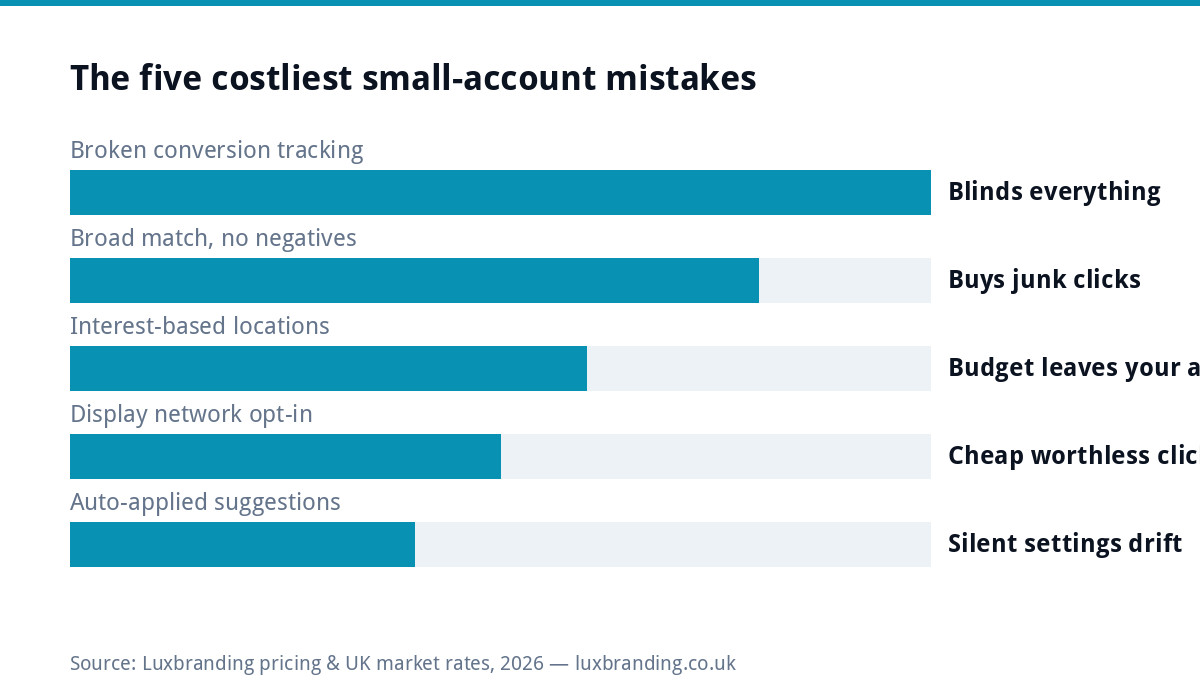
Broken conversion tracking (checks 14 and 15) tops the list because it blinds every other decision; re-verify the tag and reconcile against your inbox monthly. Broad match with no negatives (6 and 12) buys adjacent junk by design; tighten to phrase and exact until the search terms report earns broad back. Interest-based location targeting (3) quietly ships budget outside your van’s range; switch to presence. Display opt-in on search campaigns (4) fills reports with cheap, worthless clicks; untick it. Auto-applied recommendations (5) rewrite your settings toward automation-friendly defaults; review by hand instead. Google’s own documentation covers the mechanics: the match types reference and the auto-apply recommendations controls are the two pages worth bookmarking.
The 20-minute monthly routine between audits
Quarterly is for the full checklist; monthly is triage. Open the search terms report, scan the last thirty days, add negatives for anything irrelevant that spent money, and note any term converting well that deserves its own exact-match keyword. Then glance at three numbers: spend versus plan, conversions versus your inbox reality, and cost per conversion versus last month. Fifteen to twenty minutes, coffee-sized, and it prevents the slow drift that makes quarterly audits painful. Put it in the calendar for the first Monday of the month; unscheduled hygiene does not happen.
Reading the search terms report without drowning
Sort by cost, not clicks: the expensive mistakes float to the top. Ask one question per row: would I pay this amount for a lead from someone typing that? Terms with buying intent and your service stay; questions, jobs, courses, competitor brands you cannot convert, and areas you do not cover become negatives. Ignore one-click curiosities under a pound until they repeat. Twenty rows honestly triaged beats three hundred skimmed, and after two or three months the report gets noticeably cleaner, which is the audit paying its rent.
A worked example: the £4-a-click electrician
An electrician spending steadily scored eleven: broad match everywhere, no negatives, locations on default, conversions counting contact-page views. The search terms report showed clicks on training courses, DIY questions and towns forty miles away. The afternoon fix: phrase match, a 40-term negative list, presence-only targeting, and form-plus-call conversions installed properly. Same budget, roughly half the wasted clicks gone, and for the first time the account could say which keyword produced actual jobs. Nothing clever, just the checklist applied.
Printing and reusing this checklist
Print the five section tables and score by hand, or copy them into a spreadsheet with a pass column and a notes column per check. Keep each quarter’s scores: the trend matters more than any single number, because a healthy account should climb toward and then hold the sixteen-plus band while spend grows. If a check keeps failing quarter after quarter, that is not a reminder problem but a capability one, and it belongs on the list you delegate.
When to stop DIYing
If the audit passes but leads still disappoint, the problem is usually the offer, the landing page or the market, and that is where structured help earns its fee. Benchmark spend expectations with our guides to Google Ads costs in the UK and the diagnosis order in spending with no leads; trades should sanity-check the channel against Checkatrade versus Google Ads, and if the account was recently penalised, start with the suspension recovery guide. When you would rather hand the keys over, our Google Ads management service runs accounts exactly to this checklist, with pricing on the public price list.
Get the UK SEO DIY Audit Checklist (free)
A 32-point checklist UK SMEs can run against their own website in an afternoon. Surfaces the quick wins before paying for a paid audit.
No spam. UK GDPR compliant. We only use your email to send this resource, unless you tick the box to hear from us.
Frequently asked questions
How often should I audit my own Google Ads account? +
A 20-minute search-terms and budget check monthly, and this full 20-point audit quarterly. Accounts drift: match types loosen, Google auto-applies suggestions, and costs creep. Quarterly is frequent enough to catch drift before it compounds.
What wastes the most money in small Google Ads accounts? +
Missing or broken conversion tracking, because it hides every other problem. After that: broad match keywords with no negative list, default location settings including people merely interested in your area, and auto-applied recommendations quietly changing settings.
What is a good score on this audit? +
Sixteen or more of the twenty checks passing is a healthy account. Twelve to fifteen means real money is leaking and an afternoon of fixes pays for itself. Below twelve, pause spend increases until the foundations are fixed, starting with conversion tracking.
Should I let Google auto-apply recommendations? +
No. Review recommendations manually and turn auto-apply off. Some suggestions are sensible, but auto-apply optimises toward Google's goals for spend and automation, not necessarily toward your cost per lead.
Do I need an agency to fix a failing audit? +
Not always: most checks on this list are fixable by a careful owner in an afternoon with the linked Google documentation. Hand it over when the fixes hold but results still disappoint, or when your time is worth more than the management fee.