
Quick answer
Work through the causes in order of likelihood, not in order of how alarming they sound. In practice that means: check whether the drop is real before anything else, then check whether you changed something, then check whether Google changed something.
Most sudden drops are one of six things, and the first is not a drop at all.
Step one: is the traffic actually gone?
Before investigating a loss, confirm there is one. A broken tracking tag produces a chart identical to a catastrophe, and it is far more common than a catastrophe.
Open Search Console and look at Performance. That data comes from Google’s own records of your results being shown and clicked, and it does not depend on any code on your site. If Search Console shows normal impressions and clicks while your analytics shows a cliff, the site is fine.
This happens after theme updates, plugin changes, consent banner changes and content security policy edits. It is worth knowing that a script blocked by a security header fails silently: nothing breaks visibly, the data simply stops.
Step two: what changed on your side?
If the drop is real, the next question is whether you caused it, because that is both the most likely explanation and the one you can fix immediately.
| Recent change | How it causes a drop | How to check |
|---|---|---|
| Site redesign or rebuild | URLs changed without redirects | Search Console Pages report, look for a spike in 404s |
| Moved host or domain | Redirect chain or missing mapping | Request a few old URLs and follow the redirects |
| Staging site went live | A noindex tag shipped with it | View source, look for noindex in the head |
| robots.txt edited | A disallow rule too broad | Open yourdomain/robots.txt and read it |
| Pages deleted or merged | Removed pages that were earning clicks | Compare the top pages before and after |
| Plugin or security update | Blocked crawling or broke rendering | Use the URL Inspection tool on a key page |
The noindex case deserves emphasis. A staging site is normally set to discourage indexing, and that setting travels with the site when it is pushed live unless someone remembers to turn it off. The result is a site that looks perfect and disappears from search within days.
Step three: did Google change something?
If nothing on your side changed, check the timing of the drop against Google’s published update history. Core updates are announced with a start and end date, and a drop that begins precisely on one of those dates is strong evidence.
Google documents these in its ranking updates list, which is the authoritative record rather than a commentary site.
The honest position on core updates is that there is usually no single fix. They reassess what results serve a query best, and recovery tends to come from the page becoming genuinely more useful rather than from a technical adjustment.
Step four: did you lose a position rather than a page?
This is the most overlooked cause, because nothing is broken. A competitor published something better, or an existing page was overtaken, and your click volume fell without any error anywhere.
Find it in Search Console by comparing the last 28 days against the previous period, sorted by the biggest click losses per query. If one or two queries account for most of the loss, search those queries yourself and look at what now outranks you.
Losing a single high volume query can move the whole chart. That is a competitive problem rather than a technical one, and it is fixed by improving the page.
Step five: is it simply the calendar?
Seasonality is real and frequently mistaken for a fault. Many trades and services have genuine annual troughs, and a bank holiday week, the fortnight after Christmas, or the school holidays can each produce a convincing looking cliff.
The check is a year on year comparison rather than a month on month one. If last year has the same shape at the same time, there is nothing to fix.
Step six: the rare causes
Manual actions are uncommon and they are always reported. Open the Manual actions report in Search Console. If it is clean, that is settled.
Security problems are also reported, under Security issues. A hacked site can be flagged in results in a way that collapses click rate without changing rankings, and it is worth ruling out.
Server problems deserve one check. If the site was intermittently slow or returning errors during the period, crawling and rankings can both suffer. Our guide on a site that has suddenly become slow covers the diagnosis, and what to do when a site is down covers the harder failures.
A diagnostic order that saves time
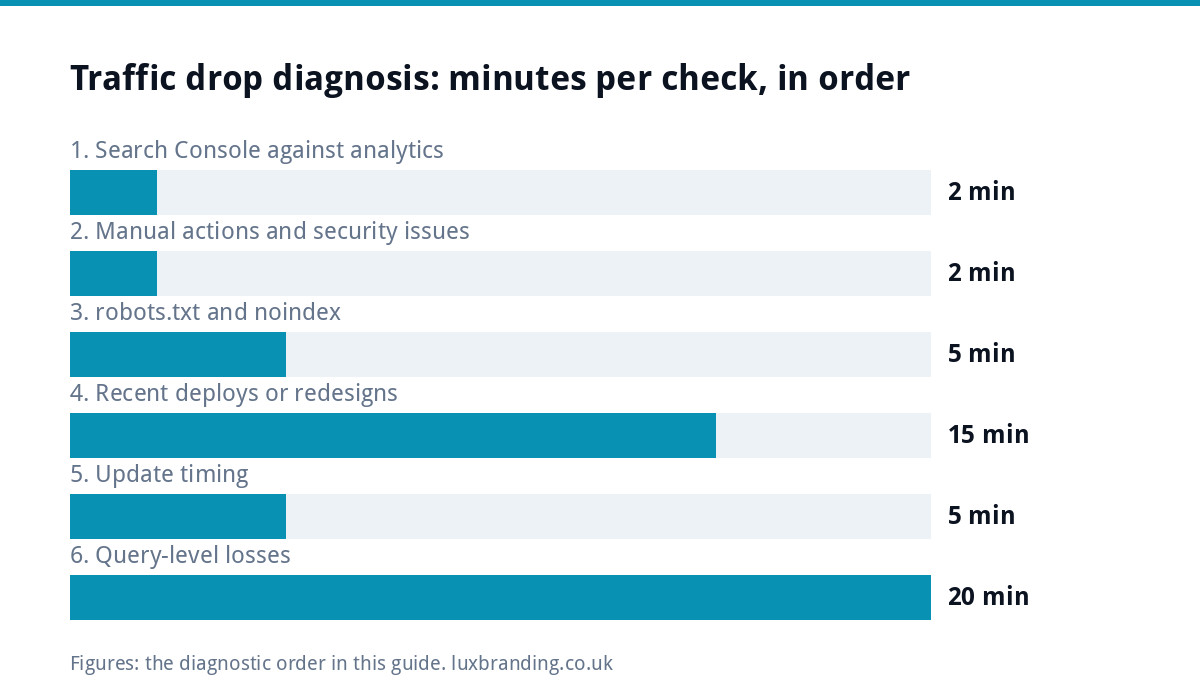
| Order | Check | Time | If this is it |
|---|---|---|---|
| 1 | Search Console vs analytics | 2 minutes | Tracking is broken, not the site |
| 2 | Manual actions and Security issues | 2 minutes | Follow the report’s instructions |
| 3 | robots.txt and noindex | 5 minutes | Remove the block, request indexing |
| 4 | Recent deploys or redesigns | 15 minutes | Map old URLs to new ones |
| 5 | Update timing | 5 minutes | Improve the page, do not panic |
| 6 | Query level losses | 20 minutes | A competitive problem |
| 7 | Year on year comparison | 5 minutes | Seasonality, nothing to fix |
The drop that is not a traffic drop
There is a version of this problem where your rankings are unchanged, your impressions are unchanged, and your clicks fall anyway. It is worth separating because the cause and the fix are different from everything above.
In Search Console, compare impressions and clicks over the same window. If impressions held steady while clicks fell, you did not lose visibility. You lost the click.
Three things cause that. Your title or description changed, and the new one is less compelling. A competitor’s result became more attractive, often by adding a price or a date. Or the result page itself changed, with an answer appearing above the results that satisfies the search without anyone needing to visit a site.
The third is increasingly common on informational queries and there is no technical remedy for it. The practical response is to compete where a summary cannot finish the job, which means pages that state prices, give specifics, and answer the question after the obvious one.
Where the cause is your own title, the fix is quick and the effect is measurable within a couple of weeks. Where it is the result page changing shape, the honest answer is that the query is worth less than it was, and effort is better spent on queries that still end in a visit.
Reading the shape of the drop
The shape of the line in Search Console narrows the cause before you open a single report. Look at the longest date range available first, then at the last twenty-eight days.
- A vertical cliff on one day points to something binary: a tracking tag removed, a noindex tag shipped, a redirect gone wrong or an outage. Check your own changes first.
- A slide over one to three weeks that starts inside a published update window points to a ranking change. Compare the pages and queries that lost the most.
- A drop on a handful of pages while the rest of the site holds steady is almost always a competitor or a page-level change, not a sitewide problem.
- The same dip at the same point last year is the calendar. Plan around it rather than fixing it.
Write down which shape you are looking at before you change anything. It keeps the investigation honest, and it prevents the most common mistake: fixing three things at once and never learning which one mattered.
What not to do
Do not rewrite everything. A drop with an unknown cause is not an instruction to change all your pages, and doing so removes your ability to tell what fixed it.
Do not delete pages that lost rankings. A page at position eleven still earns something, and deleting it converts a recoverable position into nothing.
Do not buy links. It is the reflex response to a ranking loss and it introduces a genuine risk where previously there was only a disappointing month.
Do not judge anything on fewer than seven days. Search Console data is also incomplete for the most recent two or three days, which makes any chart look like it is falling off a cliff at the right hand edge. That edge is always an artefact.
Getting back what you lost
Where the cause was technical, recovery usually follows within a few weeks of the fix being crawled. Where it was competitive or an update, recovery comes from the page deserving the position, which is slower and more durable.
If you would rather have someone work through it, our free SEO audit runs the technical checks automatically, and ongoing content work at £199 a month is the route back for the competitive case. Our pricing page lists everything else.
Google’s own search documentation is the reference worth trusting over most advice you will find while panicking.
Get the UK SEO DIY Audit Checklist (free)
A 32-point checklist UK SMEs can run against their own website in an afternoon. Surfaces the quick wins before paying for a paid audit.
No spam. UK GDPR compliant. We only use your email to send this resource, unless you tick the box to hear from us.
Frequently asked questions
Why did my website traffic drop suddenly? +
The common causes, roughly in order of likelihood, are a broken or removed tracking tag, a Google algorithm update, a technical change that blocked crawling, losing a ranking to a competitor, seasonality, or a manual action. The first is the most frequent and the easiest to mistake for a real drop.
How do I tell a real drop from a tracking problem? +
Check Search Console rather than your analytics. Search Console records impressions and clicks independently of any tag on your site, so if it shows normal activity while analytics shows a collapse, the site is fine and the measurement is broken.
How long should I wait before acting? +
Confirm the drop is real, then wait a few days before making changes. Traffic is noisy, and single day dips are common. Reacting to a two day dip by rewriting pages is how people turn a temporary wobble into a genuine problem.
Can a site redesign cause a traffic drop? +
Very often, yes, and it is one of the most predictable causes. If URLs changed without every old address redirecting to its new equivalent, the accumulated value of those pages is lost rather than moved. The drop usually shows up within a fortnight of launch.
What is a Google core update and how do I know one happened? +
A core update is a broad change to how results are ranked, published by Google with a start and end date. If your drop lines up with a confirmed update window, it is a strong candidate. If it does not line up with anything, look at your own site first.
Does a traffic drop mean I have been penalised? +
Almost never. Manual actions are rare and they are reported to you in Search Console under the Manual actions report. If that report is clean, the cause is something else, and assuming a penalty tends to send people chasing the wrong fix.