Quick answer
Breathe, then work the order: is it down for everyone or just you (one minute), hosting outage (status page), domain expiry (the classic, a WHOIS lookup), recent changes (updates, DNS, migrations), then fatal error or worse. Most causes are £0 fixes or someone else’s outage resolving itself, and the fifteen minutes below routes each to the right person with the right brief. What downtime punishes is not the fault; it is flailing.
Minute one: everyone, or just you?
Half of “the website is down” is local: your wifi, your cached error, your office DNS. Rule it out before anything: load the site on your phone with wifi OFF (mobile data takes a different road), try a private window, and check a public down-checker like downforeveryoneorjustme. Just you? Restart the router, clear the cache, move on with your morning. Down for everyone: note the exact error the browser shows (cannot find server, connection timed out, a WordPress error, a suspension page), because that wording is the biggest routing clue in the whole diagnosis, and continue.
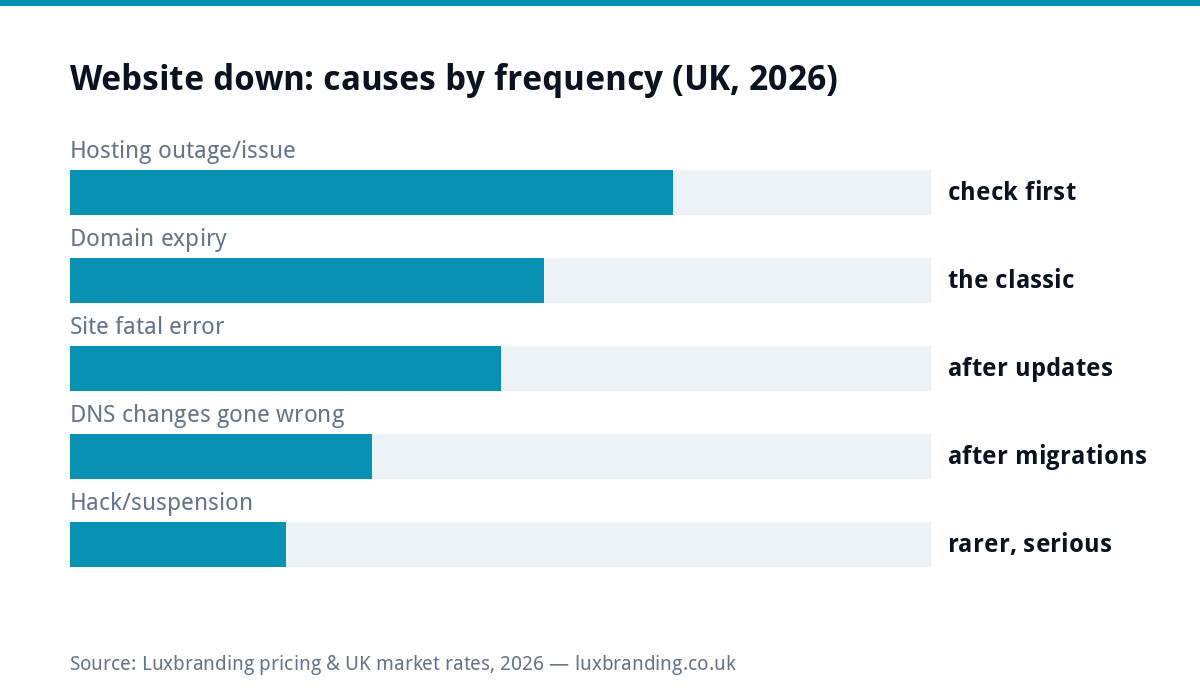
The symptom-to-cause table (pin this)
| What you see | Probable cause | Do |
|---|---|---|
| Timeout / server not responding | Hosting outage or server fault | Host’s status page, then a support ticket |
| Parking page, ads, or “domain expired” | Domain lapsed | WHOIS check, renew NOW at your registrar |
| “Server not found” after a recent change | DNS edit or migration gone wrong | Whoever changed it reverts; propagation takes hours |
| “There has been a critical error” | WordPress fatal, usually a plugin/theme update | Recovery-mode email link; deactivate the newest suspect |
| Suspension notice from the host | Billing lapse, resource abuse, or malware found | Read it fully; call the host; it names the reason |
| Browser security warning instead of the site | Certificate expiry or a hack | Certificate first; oddities beyond that, treat as security |
The domain-expiry classic (five minutes to check, months to regret)
The most preventable outage in small business: the domain quietly lapsed because the renewal card expired or the reminder went to an old inbox, and with it died the website AND every email address on the domain, which is why this failure feels like the business vanishing. Check in seconds with a WHOIS lookup: the expiry date is right there. If lapsed: renew immediately at the registrar; grace periods forgive the prompt, redemption periods charge for the tardy, and full expiry returns the name to the open market where domain squatters harvest exactly these mistakes. Then fix the cause: auto-renew ON, a payment card that will not expire first, and renewal emails going somewhere humans read, per the ownership rules our domain guide drills. If email rides the same domain, restored DNS can take a few hours to settle; the messages sent to you meanwhile mostly queue and retry, another reason speed matters.
Fatal errors and the update that did it
The WordPress “critical error” screen is dramatic but usually shallow: a plugin or theme update disagreed with something, PHP stopped, and the fix is deactivating the culprit. Check the admin email inbox for WordPress’s recovery-mode link (it names the failing plugin more often than not); no email, and the host’s file manager route works: renaming the newest plugin’s folder deactivates it, and the site returns. Two disciplines turn this from crisis to non-event: backups before updates (so rollback is a click) and updates applied attentively rather than never, because the unpatched site’s alternative failure mode is the hacked-site guide, a far worse read. If the site returns but limps, the sudden-slowness diagnostic picks up from here.
Who to call, and the brief that halves the wait
Downtime tickets resolve at the speed of their brief. To the host: “Site [domain] down since [time]; down for everyone per external checker; static files also unreachable; no recent changes our side; please check server status”, and you have skipped the first three rounds of support ping-pong. To the registrar: domain name, proof of account ownership, “renew and restore”. To your developer: the exact error text, what changed in the last 48 hours, and what you have already ruled out. The pattern from our developer-disappeared guide applies in miniature: whoever holds the access fixes it fastest, which is an argument for knowing TODAY where your hosting, domain and admin logins live, before the outage that tests it.
If the site is down AND you have a launch, ad campaign or busy day running
Downtime’s cost is context-sensitive, so triage spending accordingly: ads pointing at a dead site burn budget per click, so pause campaigns FIRST (thirty seconds in the ads account) before diagnosing anything; a mailshot mid-send can usually be paused too; and a launch-day outage justifies paying for speed, which means opening the host ticket at the highest severity honestly available and simultaneously getting whoever holds admin access working the fatal-error route. This is also the argument for never scheduling launches, sends and migrations into the same window: one moving part per day is a rule that has saved more launch mornings than any monitoring tool. When the crisis passes, do the post-mortem while it is fresh: what failed, who fixed it, which credential or renewal was the single point of failure, and which line of the prevention stack below would have caught it.
The recovery order when multiple things broke at once
Cascade failures happen (an expired domain takes email down, panic edits then break DNS further), and the untangling order matters: domain first (nothing else can work without it resolving), then DNS pointed back at known-good values (the host’s records, not memory), then hosting/server health, then the site’s own errors, then certificates, which often self-resolve once the rest settles. Change one thing at a time and wait for it to take effect; the classic self-inflicted extension of an outage is three simultaneous fixes whose interactions create a fourth problem. Keep a plain note of what was changed and when, both for the support ticket and for the calmer human you will be tomorrow reading it.
Most of these problems are prevented by routine upkeep, and our WordPress maintenance guide sets out what needs doing, how often and what it costs.
What downtime actually costs (and the £20 answer)
For a lead-generation site, downtime is invisible loss: the emergency searcher clicks the next result and never knew you existed; for a store it is measurable abandoned revenue per hour. Both argue for the boring stack that makes this page unnecessary: uptime monitoring (free tools ping your site and email you at the first failure, so you learn before your customers do), auto-renew everything with cards that will not lapse, backups tested once, and hosting where a human answers, which is the whole case for £20/month managed care: renewals watched, updates handled with backups, monitoring included, and outages someone else’s 7am problem. The unmanaged site does not avoid these costs; it defers them to the worst possible morning, with interest. Prices, as ever, on the price list.
The calm summary: check if it is just you, then host, then domain, then recent changes, one fix at a time with notes as you go, and let this be the outage that finally switches on auto-renew, monitoring and the backups that make the next one boring.
Get the UK Website Project Brief Template (free)
A two-page template for briefing any UK web designer: sitemap, integrations, audience and deliverables. Cuts revision rounds in half.
No spam. UK GDPR compliant. We only use your email to send this resource, unless you tick the box to hear from us.
Frequently asked questions
My website is down. What do I check first? +
Whether it is down for everyone: test on mobile data and via a public down-checker. If it is just you, it is your network or cache. If it is down for all, check your host's status page, then your domain's expiry date, then whether anything changed recently (updates, DNS, migrations).
How do I know if my domain has expired? +
A WHOIS lookup on your domain shows the expiry date in seconds. Expired domains show branded parking pages or nothing at all, and email on the domain dies too. Renew immediately: registrars give a grace window, then redemption gets expensive, then the name goes back to the open market.
What is the WordPress critical error message? +
"There has been a critical error on this website" means PHP crashed, usually a plugin or theme update. WordPress emails the admin a recovery-mode link; from there (or via the host's file manager) deactivating the newest plugin usually restores the site in minutes.
Who do I contact when my website is down? +
Match the symptom: hosting status page and support ticket for server issues, your registrar for domain expiry, whoever changed DNS recently for DNS, your developer or host for fatal errors. A brief that says what you checked gets answers hours faster.
How do I stop my website going down again? +
Auto-renew on the domain with a working payment card, updates applied with backups, uptime monitoring so the site tells you before customers do, and decent managed hosting. Most downtime is unmanaged-website debt arriving; £20/month managed care exists to carry it.