Quick answer
Breathe: hacked small-business sites are cleaned up every day, usually for between £0 (backup restore) and £300 (specialist cleanup). The first-24-hours order: host first (they can isolate the site and often name the entry point), passwords everywhere, restore a clean backup if one predates the hack, then patch the hole, or you’ll repeat this quarter. If the site was elderly and unmaintained anyway, a clean rebuild from £299 to £499 frequently beats archaeology on infected foundations.
Hour by hour: the first day
| When | Do | Why |
|---|---|---|
| Hour 1 | Contact your host’s support; ask them to isolate/quarantine | They stop ongoing damage and see the server logs you can’t |
| Hour 1 | Change hosting, admin, database AND your own email passwords | If your email fell first, every reset flows to the attacker |
| Hours 2 to 4 | Find your most recent clean backup; note its date vs the hack’s | Restore-then-patch is the fastest reliable recovery there is |
| Hours 4 to 8 | Restore, or book a cleanup if no clean backup exists | Manual cleanup without expertise misses backdoors, the reinfection classic |
| Same day | Update EVERYTHING: core, plugins, themes; delete unused ones | The hole was almost certainly a known vulnerability with a patch waiting |
| Same day | Check Search Console for security flags; request review post-cleanup | Google’s “site may be hacked” label costs most of your clicks until cleared |
Restore, clean, or rebuild, choosing honestly
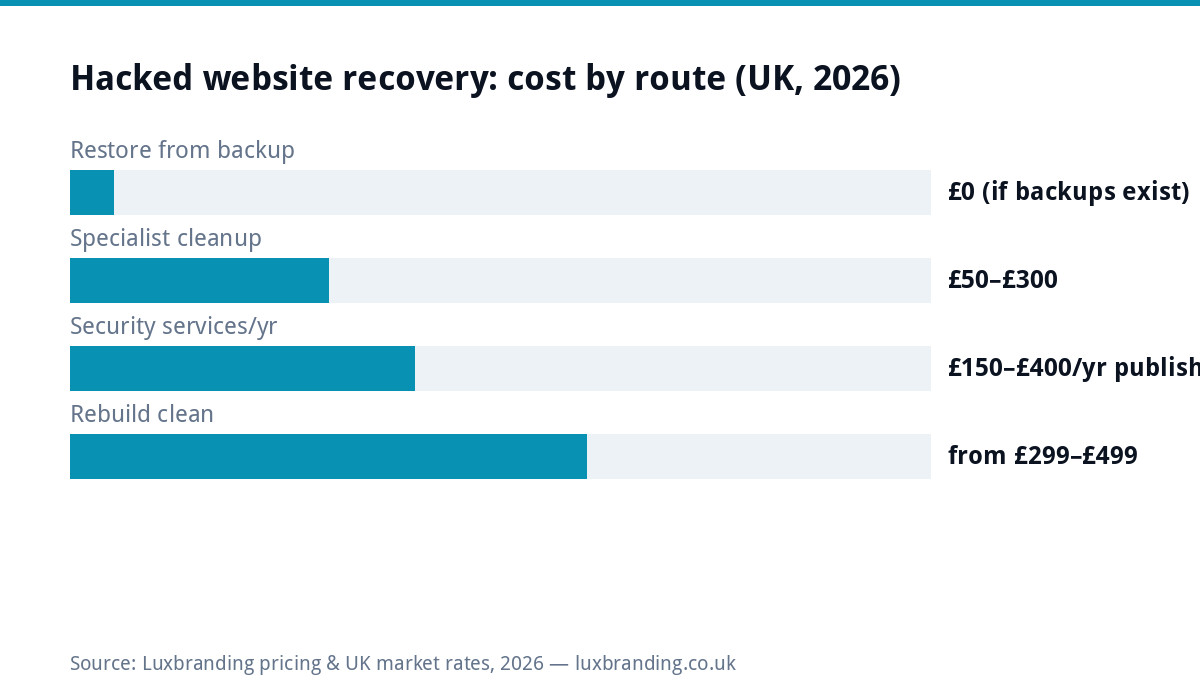
Restore wins when a clean backup exists: fastest, free, reliable, provided you then patch, because restoring an unpatched site restores the hole too. Professional cleanup (£50 to £300 at published specialist rates, or via security-service subscriptions at £150 to £400/year) is for no-backup situations and e-commerce sites where recent orders can’t be rolled back; insist on backdoor-sweeping, not just visible-malware removal, reinfection within weeks is the signature of half-done cleanups. Rebuild is the underrated third door: if the hacked site was an ageing, plugin-heavy liability you’d half-planned to replace, £299 to £499 buys a clean, fast, modern site (our redesign cost guide covers it) instead of paying to resurrect technical debt. Copy the content out, start clean, keep the domain.
Working out how they got in (plain-English forensics)
You don’t need a security researcher for the common cases, the evidence points bluntly. Ask your host for access logs around the infection date and look for these signatures. Logins from unknown locations into wp-admin = credential compromise: a guessed/reused/phished password (was yours on a breach list? one search tells you). New files with odd names in plugin or upload folders, timestamps clustering minutes apart = automated exploit of a known vulnerability, cross-check which plugin versions you were running against its changelog; the word “security release” a version ahead of yours is your culprit. Spam pages in Japanese or pharma-speak appearing in Google = the classic SEO-spam infection riding either route. Multiple sites on the same hosting account all infected = cross-contamination; one hole, shared server space. The point isn’t attribution, it’s that the patch matches the hole: rotate credentials for case one, update-and-remove for case two, isolate accounts for case four. Guess wrong and the cleanup is temporary.
The e-commerce escalation
A hacked shop is a different severity class from a hacked brochure site, because the attack may target payments themselves: card-skimming injections harvest checkout details invisibly while the site works normally. If you run WooCommerce or any checkout: take payments offline first (maintenance mode beats processing one more skimmed card), don’t just restore-and-relaunch without a skim-focused check of checkout templates and scripts, involve your payment provider early (they’ve seen it; they’d rather help than discover it via chargebacks), and treat the GDPR assessment above as mandatory rather than theoretical, payment-adjacent breaches are exactly what the 72-hour ICO clock was written for. It’s also the strongest version of the prevention argument: a shop’s £20/month managed care guards revenue, not just uptime.
The data question UK businesses skip at their peril
Beyond fixing the site: did the breach touch personal data? A brochure site holding nothing but your own content, usually no exposure. But contact-form submissions, customer accounts or order data mean UK GDPR obligations: assess what was accessible, document your assessment, and report to the ICO within 72 hours where there’s likely risk to individuals (the ICO’s site has a self-assessment tool). E-commerce breaches also mean telling affected customers and rotating any stored credentials. None of this is legal advice, it’s the prompt to take that part seriously rather than quietly hoping; documented good-faith response is worth a lot if questions come later.
What to tell customers (and when silence is worse)
If the hack was visible, defacement, spam pages, Google’s warning label, weird emails “from” you, customers noticed before you hoped, and a short honest note beats detected silence: “Our website was compromised by an automated attack this week. It’s been cleaned and secured, and no customer data was affected [only if verified true]. If you received any unusual email appearing to come from us, please delete it, we’ll never ask for passwords or payments by email.” Send it where your customers actually are (email list, socials, a site banner for a few days). Two rules: never claim data was unaffected unless you’ve actually established it (the GDPR section above is the homework), and never over-apologise into implying negligence you’re not sure of, factual, brief, forward-looking. Handled this way, incidents routinely cost zero customers; discovered cover-ups cost plenty. The same template scales down to “we’re aware and fixing it” on day one if cleanup is still running.
The prevention checklist (print this half)
| Measure | Effort | Stops |
|---|---|---|
| Updates within days of release (core, plugins, themes) | Weekly habit or managed | The #1 entry route: known vulnerabilities |
| Delete unused plugins/themes entirely | One afternoon, once | Abandoned-code holes that updates never fix |
| Strong unique passwords + 2FA on admin & hosting | One hour with a password manager | Credential stuffing and guessing |
| Daily off-site backups, restore TESTED once | Managed, or an hour to configure | Turns any disaster into an inconvenience |
| Limit admin accounts; unique logins per person | Ten minutes | One phished contractor sinking the ship |
| Someone actually watching (uptime + file changes) | Managed hosting’s job | Week-old infections becoming month-old ones |
Read the effort column honestly: everything on it fits inside either one diligent afternoon plus weekly habits, or the £20/month that makes it somebody’s literal job. The businesses in this article’s opening paragraph are, almost without exception, the ones for whom it was nobody’s job.
Staying un-hacked (the boring £20/month truth)
Post-mortems on small-business hacks find the same three causes on repeat: outdated plugins/core (bots scan for published vulnerabilities within days of disclosure), weak or reused passwords, and abandoned themes/plugins nobody remembered installing. Which means prevention is genuinely boring: updates applied promptly, daily off-site backups you’ve seen restore, strong unique passwords, and someone actually watching. That’s the literal job description of managed hosting (£20/month), updates, daily backups, security monitoring, and a human to contact at hour one instead of a support queue, and it’s why our WordPress security guide reads like a maintenance checklist rather than a thriller. Today’s incident is the argument for it; every price is on the price list.
Further reading: Fixing hacked sites (Google) · Report a breach (ICO).
Get the UK Website Project Brief Template (free)
A two-page template for briefing any UK web designer: sitemap, integrations, audience and deliverables. Cuts revision rounds in half.
No spam. UK GDPR compliant. We only use your email to send this resource, unless you tick the box to hear from us.
Frequently asked questions
My website has been hacked. What do I do first? +
In order: contact your host (they see this daily and can isolate the site), change every password (hosting, admin, database, your own email), and check for a clean backup predating the hack; restoring one is the fastest full fix. Then patch how they got in, or it repeats.
How much does it cost to fix a hacked website? +
Backup restore: free if backups exist. Specialist malware cleanup: £50 to £300 at published rates (security firms' one-off cleanups). Security service subscriptions: £150 to £400/year published. If the site was old and messy anyway, a clean rebuild from £299 to £499 is often the better spend.
Why does Google say my site "may be hacked" and how do I clear it? +
Google flags sites serving malware or spam to protect searchers. After cleanup, request a review in Search Console (Security Issues section); the warning clears in days once Google re-verifies. Until then the flag costs you most of your clicks, so cleanup speed matters.
How did my small business site get hacked? Nobody would target us. +
Nobody did. Bots scan every WordPress site on the internet for known holes: outdated plugins, weak passwords, abandoned themes. Small sites get hacked BECAUSE they're unattended, not because they're valuable. That's also why prevention is cheap: updates and backups defeat automated attacks.
Do I need to tell anyone if my UK business website was hacked? +
If personal data may have been accessed (customer forms, accounts, orders), UK GDPR requires assessing the breach, and reporting to the ICO within 72 hours where there's a risk to individuals. A brochure site with no stored personal data usually has nothing reportable; an e-commerce breach very likely does.