
Quick answer
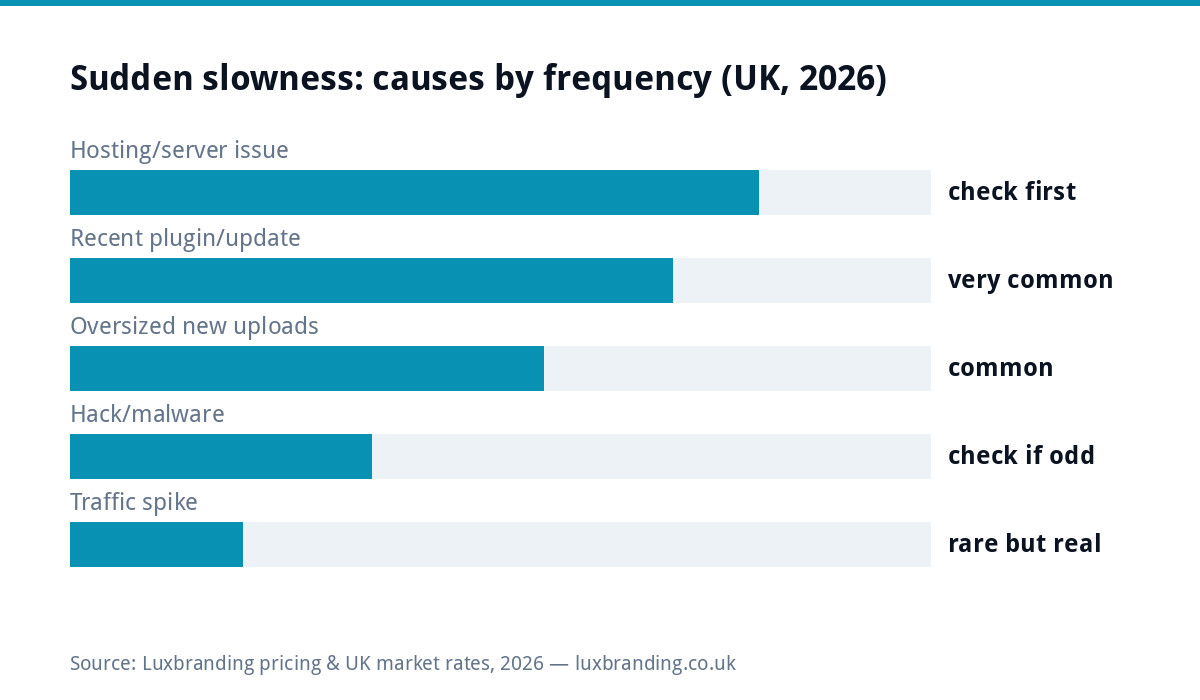
Fine-last-week-slow-today has a short suspect list: your hosting, a recent plugin or update, oversized new uploads, malware, or (rarely, congratulations) a traffic spike. The 20-minute sequence below identifies which, most fixes cost £0, and a professional pass is £99 if the rabbit hole goes deeper. This guide is for SUDDEN slowness; a site that has always been slow wants the full speed optimisation guide instead.
Minute 1 to 3: is it actually slow for everyone?
Rule out the observer first. Test the site on your phone with wifi OFF (mobile data is a different route to your server), and run it through PageSpeed Insights or a ping tool from outside your network. If it is fast for the outside world and slow only on your machine or office wifi, the site is fine and your afternoon just improved. Genuinely slow for everyone: continue, and note WHEN it started as precisely as you can, because “when” is the biggest clue in the whole diagnosis.
Minute 4 to 8: server or site?
One test splits the universe in half: load a static file straight from your server, any image, by its direct URL. Static file also slow? The server itself is struggling: check your host’s status page, raise a ticket, and know that on cheap shared hosting a NEIGHBOUR’s runaway site can be your slowdown (the strongest argument for hosting where someone answers: our hosting guide covers what £20/month should buy). Static file instant, pages slow? The problem lives in your site’s code or database. Continue to the plugin check, which finds most of those.
Minute 9 to 15: the recent-change checklist
| Suspect | Check | Fix and its cost |
|---|---|---|
| Plugin updated/added recently | Deactivate the newest suspects one at a time, retest after each | Free: replace or roll back the guilty one |
| Theme or core update | Did slowness start the day something major updated? | Free: check the changelog; roll back if needed |
| Huge new uploads | Media library sorted by date: any recent multi-MB images on busy pages? | Free: compress with a Squoosh-class tool and re-upload |
| Cache switched off/broken | Was a caching plugin deactivated or reconfigured? | Free: re-enable defaults |
| Database bloat event | New chatty plugin logging thousands of rows? | Free to £99: the plugin check usually catches its owner |
Minute 16 to 20: the two special cases
Malware. Infected sites slow down because they are busy doing someone else’s work: sending spam, mining, serving hidden pages. If slowness arrived with any other oddity (admin users you don’t recognise, strange files, browser warnings, unexplainable traffic in analytics), stop diagnosing speed and start the security sequence in our WordPress security guide: security first, speed will follow. The good-news spike. Check analytics: did something go viral, or a mailshot land? A traffic spike slowing the site is your hosting tier failing a success test, and the fix is an upgrade conversation, not a bug hunt. Rare, but worth thirty seconds to rule in, because it changes everything about the response.
What to tell whoever helps you (the two-minute brief)
If you hand this to your host, a freelancer or us, the diagnosis above becomes a precise brief instead of “it’s slow, help”: when it started, what changed in the days before (updates, new plugins, uploads, traffic events), the static-file test result (server or site), which pages are worst, and the mobile PageSpeed reading now versus any older one you have. That paragraph routinely turns a day of exploratory billing into an hour of targeted fixing, which at any hourly rate pays for the twenty minutes this page took. Support tickets that include the when-and-what-changed answer get visibly better answers from hosts too; vagueness is expensive everywhere in this trade.
One reading to write down today
The whole diagnosis gets easier with a baseline, so take one now while things are (presumably) fine: your homepage’s mobile PageSpeed score and load time, dated, in whatever note you keep for the business. When someday the site feels sluggish, that number turns “is it me?” into an instant answer and turns your support ticket into evidence. Thirty seconds of admin that future-you, mid-slowdown, will genuinely thank you for; Keep the service-page reading alongside the homepage one, since money pages sometimes slow independently, and it is the same before/after discipline every paid speed job should hand you anyway.
By situation: the fastest route for yours
Sells online: every slow hour is abandoned carts; do the server-or-site split now and escalate to paid help same-day rather than weekend-DIYing, because the £99 pass is cheaper than a slow Saturday. Lead-generation site: the twenty-minute sequence in order; most causes fall to it. Brochure site you rarely touch: suspect the host and updates-debt first, since nothing else changed by definition. On a DIY builder: your diagnostic options are narrower (no plugins to audit); test from outside, then it is the platform’s status page and support, which is itself a data point about the builder ceiling.
Prevent the next one (the boring checklist)
Sudden slowdowns are usually maintenance debt arriving in a lump, so the prevention list is short and dull: updates applied within days rather than quarters (with a backup before each, so rollback is one click), a compression habit for every image before upload, one caching plugin configured once and left alone, quarterly speed spot-checks with the same public tool so drift shows early, and uptime monitoring so the site tells YOU when something changes rather than a customer mentioning it a fortnight later. All of it fits in either a monthly half-hour of your own or the £20/month care plan whose whole job is this list; our maintenance cost guide prices the wider market for the same routine.
The speed numbers worth knowing while you test
Context for the readings you will see: Google’s published thresholds call a main-content load under 2.5 seconds good; between that and 4 seconds needs improvement; beyond it, poor. Test the MOBILE number (most local traffic, and the stricter judge), test a service page as well as the homepage, and keep the before reading when you start fixing, because the after comparison is how you know which change mattered. A site that was passing these numbers last month and fails them today is the textbook subject of this guide; one that has never passed them belongs with the full optimisation guide instead.
Most of these problems are prevented by routine upkeep, and our UK guide to WordPress maintenance sets out what needs doing, how often and what it costs.
What it costs, honestly, and when to stop DIYing
The full price landscape: the checks above are free and find the culprit for most sudden slowdowns. Pay when: the plugin at fault is load-bearing and needs a careful replacement, the diagnosis points at the database or theme internals, or twenty minutes became two hours; that is the £99 professional pass, which includes the before/after numbers so you know it worked. And if this is the third sudden slowdown this year, the pattern is the finding: unmaintained sites decay in lurches, and £20/month managed care exists precisely so updates, backups and monitoring happen before the symptoms do. Prices, as always, on the price list.
Get the UK Website Project Brief Template (free)
A two-page template for briefing any UK web designer: sitemap, integrations, audience and deliverables. Cuts revision rounds in half.
No spam. UK GDPR compliant. We only use your email to send this resource, unless you tick the box to hear from us.
Frequently asked questions
Why has my website suddenly become slow? +
Sudden slowness (fine last week, crawling now) is nearly always one of five things: a struggling host or server issue, a recently updated or added plugin, huge images uploaded recently, a malware infection, or a genuine traffic spike. The 20-minute check below identifies which.
How do I check if it is my hosting that is slow? +
Test something that bypasses your site's code: load a plain image file directly by its URL. If even that crawls, the server itself is struggling and your host's support (and status page) is the first call. If images are instant but pages are slow, the problem is in your site.
Can one plugin really slow a whole website? +
Easily. A single plugin update with a slow query or an external call that times out can add seconds to every page. The classic tell: slowness began within days of an update. Deactivate recent suspects one at a time and retest; the guilty one is usually obvious.
Is sudden slowness a sign of being hacked? +
Sometimes: malware sending spam or mining from your server steals the resources your pages need. Check for other signs (unknown admin users, odd files, security warnings) and see our hacked-site guide if they appear. Slowness plus weirdness is a security question, not a speed one.
What does fixing sudden slowness cost? +
Usually nothing: identifying a rogue plugin or resizing images is free, and host-side issues are the host's job. If diagnosis finds deeper structural problems, a one-off professional pass is £99. Ongoing prevention is what £20/month managed care exists for.