
Quick answer
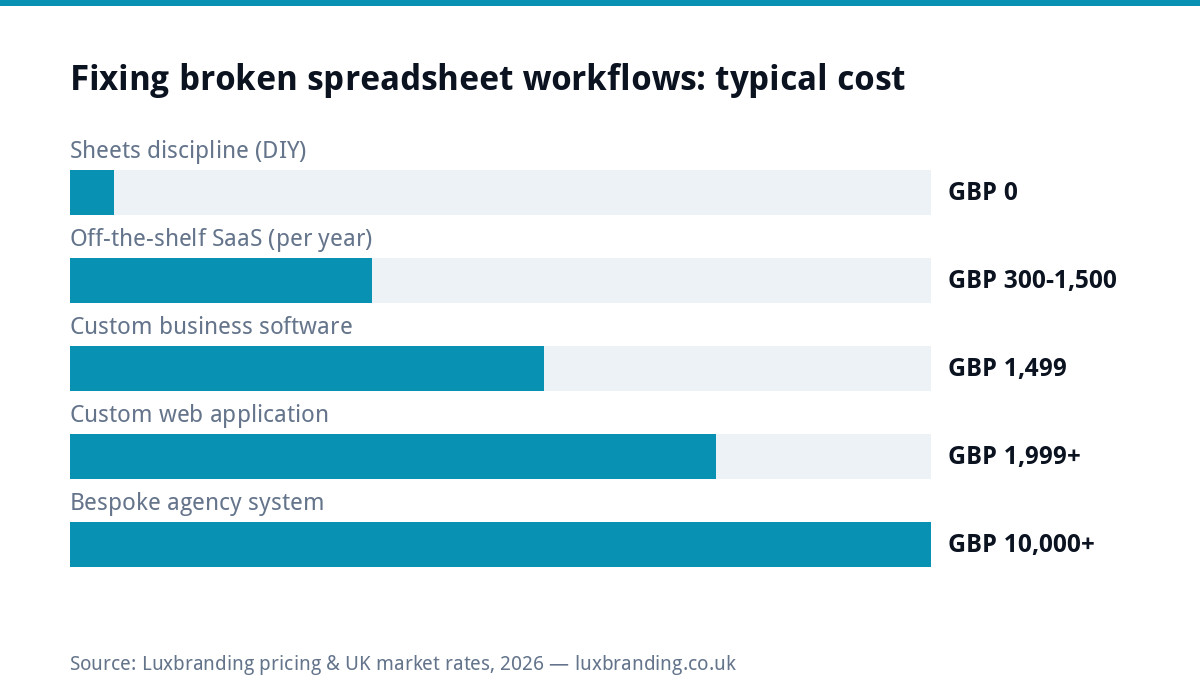
Spreadsheets are breaking your business when they stop being a tool one person uses and become a system several people depend on. The tell-tale signs: versions emailed around, formulas nobody dares touch, silent errors reaching customers, and hours of retyping between sheets. The fixes escalate in price: better spreadsheet discipline costs £0, off-the-shelf software runs roughly £300 to £1,500 a year in subscriptions, and custom business software starts at £1,499 as a one-off on our public price list. This guide covers the warning signs, what should stay in spreadsheets forever, and the worked maths for when each upgrade pays.
Seven signs the spreadsheet era is ending
One: the file has a version number in its name, and two people are editing different versions right now. Two: a formula built by someone who left is load-bearing and unexplained. Three: you retype the same data into a second sheet, an invoice, or an email, weekly. Four: a customer has seen a wrong price, date or total that traced back to a copy-paste. Five: the sheet is slow enough that people keep local copies, which is versioning chaos with extra steps. Six: access control means “hoping nobody sorts column B”. Seven: reporting means an afternoon of manual assembly rather than a glance. Two or more of these and the spreadsheet is no longer saving you money; it is quietly spending it.
What spreadsheets are still brilliant at
Fairness first: spreadsheets are unmatched for one-person analysis, quick modelling, budgeting, and any task where the structure changes every time you open the file. The problem is never the spreadsheet; it is using a single-player analysis tool as multi-player operational software. Keep the modelling and the scratchpads. Replace the workflows: the job tracker, the booking log, the stock list, the quote generator, anything where several people read and write the same rows daily and an error costs real money. That distinction, analysis versus operations, is the entire decision framework, and we expand it in spreadsheets versus custom software.
The real cost of spreadsheet errors
Spreadsheet risk is studied seriously: the EuSpRIG horror stories archive catalogues public failures from misplaced minus signs to copy-paste range errors costing organisations millions, and its research consistently finds that a large share of real-world spreadsheets contain errors. Small businesses are not immune; they are just uninsured. A mispriced quote, a double-booked crew, a stock count that was right last Tuesday: each error costs money invisibly because nobody books “spreadsheet mistake” as a line item. The escalation maths below only makes sense once you honestly count those incidents.
Upgrade path 1: discipline, £0
Before spending anything, try the free fix: one master file in shared cloud storage with editing history on, named owner per sheet, locked formula cells, data validation on entry columns, and a ban on emailed copies. This genuinely rescues sheets that were only suffering from chaos, and it costs a Monday morning. Its limit is structural: discipline cannot add user permissions, automation, customer-facing output or an audit trail. If your seven-signs count came from those gaps, skip ahead.
Upgrade path 2: off-the-shelf software
For standard workflows, someone has already built the product: CRMs for pipeline (we price the options in our CRM cost guide), booking tools for appointments (see booking system costs), accounting platforms for invoicing. Typical spend lands between £300 and £1,500 a year across a couple of subscriptions. The strength is instant maturity; the weakness is the workflow tax: you adapt your process to the product, pay per seat forever, and usually still keep a side-spreadsheet for the bits that do not fit. When the side-spreadsheet grows load-bearing again, that is the signal you have outrun off-the-shelf.
Upgrade path 3: custom software from £1,499
Custom software inverts the trade: the system matches your process exactly, lives on your infrastructure, has no per-seat fees, and does only what you need. At our fixed £1,499 starting price, the honest break-even against a £100-a-month SaaS stack is around 15 months, and faster once you price the retyping hours it removes. It is the right call when your workflow is genuinely non-standard, when subscriptions are stacking, or when the spreadsheet errors have a customer-facing blast radius. It is the wrong call for a standard need a mature product already serves well; paying custom prices to rebuild a generic CRM is its own overcharge.
Worked example: the double-booked fitting crew
A flooring firm runs jobs from a shared sheet: two office staff, six fitters, colour-coded rows. Twice a quarter, a row edit collides and a crew is double-booked; each incident costs a day of one crew’s revenue, call it £600, plus an unhappy customer. That is roughly £4,800 a year in collisions alone, before the five hours a week of retyping quotes into invoices, perhaps another £3,000 a year at modest rates. A £1,499 job-management build with proper locking, a calendar view and quote-to-invoice flow removes both. Payback arrives inside four months, and the sheet survives, demoted to the analysis it was always good at.
Costs compared over three years
| Route | Year 1 | 3-year total | Strengths | Limits |
|---|---|---|---|---|
| Sheets discipline | £0 | £0 | Free, immediate | No permissions, automation or audit trail |
| Off-the-shelf SaaS | £300–£1,500 | £900–£4,500 | Mature, instant | Per-seat fees, workflow tax, data in their cloud |
| Custom build | £1,499 | £1,499 + modest hosting | Fits exactly, owned, no seat fees | Upfront cost, scoping effort |
| Bespoke agency system | £10,000+ | £10,000+ | Handles complex scale | Overkill for small teams |
Which fix fits your team
The right upgrade depends less on how big the spreadsheet is and more on how many people depend on it and how often it has to be right. Use this as a starting point rather than a rule.
| Your situation | Usually the right move | Rough cost |
|---|---|---|
| One person, analysis and planning | Keep the spreadsheet and add discipline | £0 |
| Two to five people, one standard process such as bookings or invoicing | Off-the-shelf software built for that process | About £300 to £1,500 a year |
| Several people, a process unique to how you work | Custom software shaped around the process | From £1,499 once |
| Customers see the output, such as quotes or schedules | Whichever option removes the retyping | Depends on the route |
The last row matters most. An internal error costs you an afternoon; an error a customer sees costs you trust, and sometimes the job. If the spreadsheet feeds anything a customer reads, remove the manual copying before any other improvement, even if the first step is simply linking two sheets so nobody retypes a figure. When a process is standard across your industry, such as booking appointments, buying is almost always cheaper than building, and our guide to booking system costs covers that case. Build only when the software you would buy forces you to change a way of working that is genuinely part of why customers choose you.
Questions to ask before commissioning a custom build
If the maths points to custom software, scope it like a purchase, not a project. Which single workflow hurts most, and can the first version solve only that? What does the fixed price include, and what would a later phase cost? Where does the system live, and who owns the code and the data? How does existing spreadsheet history get imported? What happens when a fitter, driver or front-desk person needs access from a phone on site? And what does support look like after launch? A good builder answers in plain English with a fixed number; a worrying one answers with a day rate and a shrug. In the meantime, turn on version history in your current sheets today, following Google’s own version-history documentation, so the next collision is at least recoverable while you decide.
Migrating without losing your data
Whatever route you choose, the migration rules are the same. Export everything to clean CSV first and archive the originals read-only. Migrate one workflow at a time, not the whole business in a weekend. Run old and new in parallel for two weeks with one person owning the comparison. And only delete the spreadsheet’s operational role after the parallel run, never before. Most migration horror stories are really cutover horror stories: the tool was fine, the big-bang switch was not.
Mistakes to avoid
Buying software for the business you wish you had rather than the workflow you actually run. Letting each department pick its own tool, which recreates the versioning problem at subscription prices. Scoping a custom build around edge cases that happen twice a year. And the quiet one: doing nothing because the spreadsheet “mostly works”, while its errors bill you invisibly. If reading the seven signs felt like being described, the cheapest day to act was the last collision; the second cheapest is today. Start with the free discipline pass, and if the gaps are structural, the £1,499 scoped build is the fixed-price way out.
Get the UK Software Project Brief Template (free)
A two-page template for scoping any custom software project: user roles, features, integrations, timeline and success criteria.
No spam. UK GDPR compliant. We only use your email to send this resource, unless you tick the box to hear from us.
Frequently asked questions
How do I know when my business has outgrown spreadsheets? +
The reliable signs: multiple versions in circulation, formulas nobody understands, weekly retyping between systems, errors reaching customers, and reporting that takes an afternoon. Two or more of these means the spreadsheet is costing more than it saves.
What should stay in a spreadsheet? +
Single-person analysis: modelling, budgeting, quick calculations, anything where the structure changes each time. Spreadsheets fail when used as multi-user operational software for jobs, bookings, stock or quoting.
How much does it cost to replace spreadsheets with proper software? +
Discipline fixes are free. Off-the-shelf subscriptions typically total £300 to £1,500 a year. Custom business software starts at £1,499 as a one-off fixed price, with break-even against a £100-a-month SaaS stack around 15 months.
Is custom software better than off-the-shelf for a small business? +
Only when the workflow is genuinely non-standard, subscriptions are stacking, or errors have customer-facing consequences. For standard needs like basic CRM or accounting, mature off-the-shelf products are better value than rebuilding them.
How do I migrate from spreadsheets without losing data? +
Export everything to CSV and archive originals read-only, migrate one workflow at a time, run old and new in parallel for two weeks with a named owner, and only retire the spreadsheet after the parallel run confirms the new system.