
Quick answer
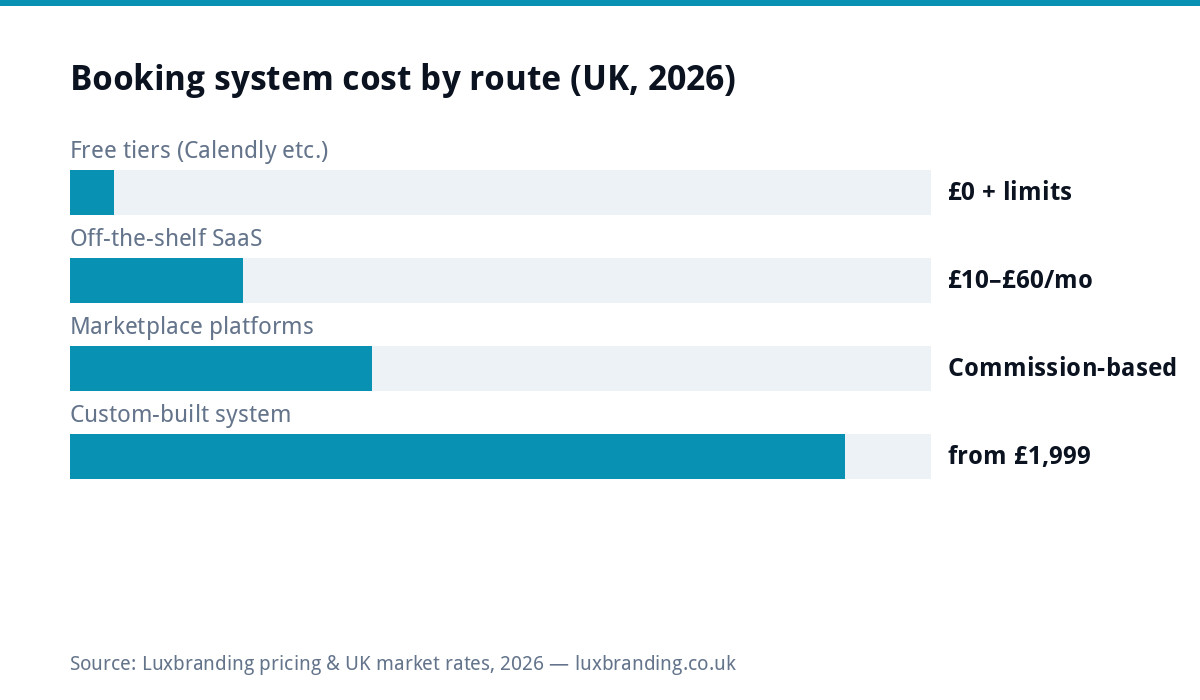
UK booking system costs in 2026 fall into four tiers: free plans (Calendly-style single diaries with real limits), off-the-shelf SaaS at £10 to £60/month per published pricing, commission-based platforms (no monthly fee, a percentage of every booking forever), and custom-built systems from £1,999 as a one-off. The right tier is almost entirely a function of two numbers: how many bookings a month, and how far your rules stray from the template. Our booking systems guide covers choosing and setting one up; this page is purely the money.
The four tiers, honestly
| Route | Published cost | Best for | The catch |
|---|---|---|---|
| Free tier | £0 | One person, simple appointments | Branding, limits and upgrade prompts; your data on their terms |
| SaaS subscription | £10 to £60/mo | Salons, trades, clinics with standard needs | Fees per staff member add up; template rules only |
| Marketplace/commission | % per booking | New businesses wanting demand, not just a diary | The percentage never stops; they own the customer relationship |
| Custom build | from £1,999 one-off | Volume businesses, non-standard rules, owned data | Upfront cost; scope it properly or don’t start |
The arithmetic that decides SaaS vs custom
Do this on the back of an envelope before any sales call. Take your realistic monthly bookings and your SaaS/commission cost at that volume, projected over three years. A salon with three staff on a £40/month plan spends £1,440 over three years, custom makes no sense; stay on SaaS. A driving school doing 400 bookings/month on a platform taking even a small percentage of each lesson can be spending several thousand a year, a £1,999 owned system pays back inside eighteen months and then books for free, forever. The crossover is rarely where people guess: monthly fees feel small and build costs feel big, which is exactly backwards once volume is real. It’s the same subscription arithmetic as websites, with commissions sharpening it.
What “custom” actually buys beyond the fee maths
Owned data and the customer relationship: every booking, email and preference lives in your database, not a platform’s, which matters the day you want to email your customer base (legally, with consent) or the platform changes its terms. Your rules, exactly: deposits that match how you actually take them, buffer times per service, staff skills routing, the cancellation policy you enforce rather than the one the template offers. Your brand end to end: booking happens inside your site, not on a widget that looks like everyone else’s. And integration: calendar sync both ways, payments through your existing account, reminders through your channels. This is standard web application territory (from £1,999), booking systems are one of the most commonly scoped builds, alongside quoting and client portals, as our web app cost guide lays out.
The integrations that separate “diary” from “system”
Whatever tier you buy, four connections decide whether the booking tool reduces admin or adds a silo. Two-way calendar sync (a booking blocks your personal calendar AND a dentist appointment blocks bookings, one-way sync is how double-bookings happen); payment flow into your actual accounts rather than a platform wallet you drain manually; automatic reminders by text or email (the single biggest no-show reducer after deposits, and the feature free tiers most reliably cap); and customer records that connect to however you track clients, even if that’s the CRM question you haven’t answered yet. On SaaS, check each is in YOUR tier rather than the pricing page’s tallest column; on custom, they’re simply part of the sentence you scope. A booking system without reminders and sync isn’t cheap at any price, it’s a second diary to reconcile.
Deposits and no-shows: the feature that pays for the system
Whatever tier you choose, one capability outearns every other on the feature list: taking a deposit or card-at-booking. Hospitality and appointment businesses consistently find no-shows collapse once a card is involved, the booking stops being a maybe and becomes a commitment. Check the mechanics per route before buying: free tiers usually gate deposits behind paid plans; SaaS tools support them with their processor (fees apply); marketplaces handle payment but on their terms and timeline; custom builds implement exactly your policy, full deposit for Saturday nights, card-hold for first-timers, nothing for regulars, because the policy IS the spec. If no-shows cost you real money monthly, this single feature decides the route more than any pricing table.
Before you commit: the data-ownership questions
Booking systems accumulate your most valuable dataset, who your customers are, how often they come, what they book, so ask the exit questions on the way in. Can you export customers and booking history, in a usable format, without begging support? Who may email your customers, you, or also the platform (marketplaces famously market competitors to YOUR clients)? What happens to future bookings if you leave, do they transfer, or evaporate? And is your customer list yours contractually, or “platform data”? SaaS answers vary from excellent to alarming; marketplaces are structurally worst (the relationship is their asset); a custom system makes every answer “yours, obviously”, which, for a business past the volume threshold, is a large share of what the £1,999 buys.
Costs people forget to count (every route)
Payment processing is separate everywhere: card fees (typically 1.4 to 2.9% + pence per transaction at published UK processor rates) apply whether SaaS or custom takes the booking. No-shows cost more than software: whichever tier you pick, deposits or card-on-file reduce them more than any feature list, make sure your route supports the deposit flow you actually want. Migration is the hidden exit fee: customer history and future bookings rarely export cleanly from platforms, so the longer you stay, the heavier leaving gets, worth knowing on the way IN. And your time: “free” tiers are priced in admin hours and workarounds; count yours honestly.
Three worked examples
The mobile hairdresser (60 bookings/month). Free tier chafes on reminder limits; the £15/month SaaS plan solves everything she actually needs. Three-year cost ~£540, custom would be vanity. Verdict: SaaS, spend the difference on photos of her work. The driving school (2 instructors, 350 lessons/month, currently on a platform taking a cut per lesson). Even a modest percentage of 350 lessons dwarfs subscription pricing, and the platform owns the pupils’ contact details. A £1,999 owned system with lesson credits, instructor diaries and card-on-file pays back within the year and ends the percentage forever. Verdict: custom, urgently; the napkin maths embarrasses the status quo. The tattoo studio (4 artists, deposits non-negotiable, consultations before booking). Template SaaS fights the consultation-first flow; artists’ individual deposit policies break the per-seat model’s assumptions. This is the “non-standard rules” case where custom wins on fit before fee arithmetic even starts. Verdict: scope a custom build; SaaS would be configured workarounds forever. The pattern: volume × rules, exactly as the tiers predict.
Route by business type (the short version)
Solo practitioner, standard appointments: free tier or cheapest SaaS, spend the money on marketing instead. Multi-staff salon/clinic/trade with steady volume: mid-tier SaaS until fees per staff annoy you; you’re the classic custom-crossover candidate within a couple of years. Anything with non-standard logic, resources plus rooms plus staff, package bookings, B2B scheduling: template systems will fight you daily; scope a custom build early rather than after two failed SaaS migrations. Marketplace-dependent businesses: use the marketplace for demand, but drive repeat bookings to an owned system, paying acquisition commission on a loyal regular’s fiftieth visit is the most expensive software mistake in the sector. Custom scoping is exactly what our web application service quotes flat after a short discovery, and every list price is on the price list.
Further reading: Calendly published pricing · Booksy for business.
Get the UK Software Project Brief Template (free)
A two-page template for scoping any custom software project: user roles, features, integrations, timeline and success criteria.
No spam. UK GDPR compliant. We only use your email to send this resource, unless you tick the box to hear from us.
Frequently asked questions
How much does a booking system cost for a UK small business? +
Off-the-shelf SaaS runs £10 to £60/month at published prices (Calendly, Booksy, Fresha tiers and similar), marketplace platforms charge commission instead, and a custom-built booking system starts around £1,999 as a one-off build. Free tiers exist and genuinely work for simple diaries.
When is a custom booking system worth it over SaaS? +
When the monthly fees and commissions exceed build amortisation, or when your booking logic doesn't fit the templates: multi-staff rules, resource allocation, deposits with your pricing structure, integration with your existing systems. High-volume businesses often cross that line sooner than they check.
What's wrong with commission-based booking platforms? +
Nothing at low volume. You only pay when you earn. The trap is scale: percentage fees grow with your success, forever, and the platform owns the customer relationship and data. Many businesses graduate from commission platforms to flat-fee SaaS to owned systems as volume grows.
Can a booking system integrate with my existing website? +
SaaS tools embed via widgets: quick, but generic-looking and another monthly fee. A custom system is built into your site natively: your design, your rules, your data, no per-booking costs. Which is right depends almost entirely on booking volume and complexity.
How long does a custom booking system take to build? +
A scoped booking build within a business website project typically adds two to four weeks. A standalone system with staff management, payments and notifications is a proper web application project, scoped individually.