
Quick answer
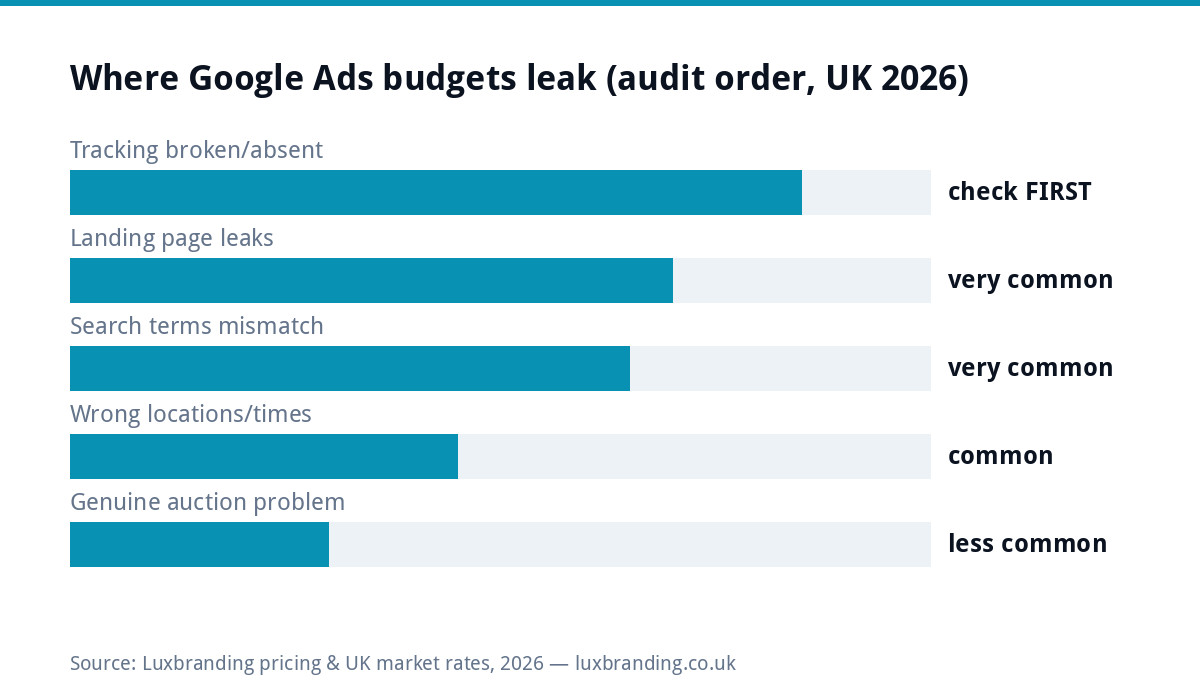
Money out, leads absent has an audit order, and the order matters because each step can fake the symptoms of the ones below it: 1) tracking (are leads happening uncounted?), 2) search terms (what queries are you actually paying for?), 3) the landing page (do the clicks land anywhere that converts?), 4) locations and schedule, 5) the auction itself. Most “Ads doesn’t work for us” verdicts dissolve at steps 1 to 3, at a repair price of £0.
Step 1: trust nothing until tracking is proven
The most common finding in small-business Ads audits is not wasted spend; it is uncounted success or unmeasured failure. Verify before touching anything else: does the account’s conversion setup actually fire when a form is sent or a call is made? Test it yourself (submit the form, check the conversion registers), confirm phone tracking covers calls from ads, and make sure the counted action is a LEAD, not a page view wearing a lead’s name badge. A campaign optimising toward broken signals gets steadily worse at the real job, because Google’s automation feeds on whatever you count; Google’s own conversion tracking docs cover the mechanics. Nothing else in this audit means anything until this step passes.
Step 2: read what you are actually buying
The search terms report is the account’s truth serum: the real queries behind your spend. Typical small-business discoveries: jobs you do not do (“free boiler grant” clicks on a heating installer’s budget), places you do not serve, students researching, competitors’ names, and DIY-intent searches (“how to fix” rather than “fix my”). The repairs are free: negative keywords added ruthlessly and revisited weekly, match types tightened where broad has wandered, and campaigns split so emergency terms and considered-purchase terms stop sharing one budget and one message. Ten minutes in this report often refunds more waste than any bid strategy change ever will.
Step 3: the landing page, where good clicks go to die
| Leak | The tell | The fix and its price |
|---|---|---|
| Ads land on the homepage | Visitor must hunt for the thing they searched | A matching page per offer: landing pages from £199 |
| Slow on mobile | Paid visitors bounce before paint | £99 speed pass; ads also price speed in via landing page experience |
| No visible phone number | Emergency searchers won’t form-fill | Free: tappable number above the fold |
| Form asks for a biography | Starts high, submits low | Free: name, contact, job, done |
| Message mismatch | Ad promises £99 service, page never mentions it | Free: say the same thing both sides of the click |
Steps 4 to 5: settings, then (and only then) the auction
Locations and schedule: confirm targeting means “people IN my areas” rather than “interested in” (a classic default), that radius matches where you will actually travel, and that ads run when you can answer, because an 11pm click for an office that opens at 9 is a cold lead by breakfast unless something catches it (this is where an after-hours capture bot quietly pays for itself). The genuine auction problems, once everything above is clean: budgets too thin to exit learning, bids uncompetitive for the term, or a market where the click economics simply do not work for your margins, which is a strategy conclusion, not a settings fix; our Google Ads cost guide and the trades channel comparison help you judge it honestly. Reaching step 5 with steps 1 to 3 verified is rare; that is the point of the order.
If the account has been stopped altogether, see our guide to Google Ads suspension and recovery.
A worked audit: one trades account, £600/month, “no leads”
Composite but true to type: a heating firm spending £600 a month, convinced Ads does not work. Step 1 finds conversion tracking counting page views, so the account has optimised toward readers for months; rebuilt to count quote forms and calls, week one shows leads DID exist, uncounted, at roughly break-even. Step 2’s search terms report is the horror show: a third of spend on “free boiler grant” and out-of-area towns; forty negatives added, effective budget instantly up by that third. Step 3 moves ads off the homepage onto a boiler-replacement landing page with a tappable number and a from-price; conversion rate roughly doubles on the same clicks. No bid strategy changed, no budget added: the same £600 now produces multiples of the counted leads it started with, and the “Ads doesn’t work” verdict quietly retires. Most accounts are this account with different nouns, which is why the audit order exists.
The metrics that matter (and the ones that flatter)
Judge the account on three numbers only: cost per LEAD (spend divided by counted enquiries), lead-to-job rate (are the leads any good, which the search-terms cleanup drives), and cost per JOB against your margin on one. The flattering metrics to ignore: impressions (billboards count those), clicks without conversions (traffic is a cost, not a result), and click-through rate in isolation (a brilliant ad for the wrong search is efficient waste). Write the three real numbers down monthly; three months of them beats every dashboard, and they are exactly what a managed account’s report should lead with, ours included.
The weekly fifteen minutes that keeps it fixed
Post-audit, the account stays healthy on one small ritual: open the search terms report, add the week’s junk as negatives, glance at cost per lead against last week, and check the landing page still loads fast on your phone. Fifteen minutes, same day each week, calendar-protected. Accounts decay when this stops, because Google’s automation keeps exploring and your negatives are the fence; the audit above is what rebuilding the fence looks like after a year of not doing this. Managed clients pay us partly to be this ritual’s calendar; DIY accounts just need the calendar.
What a healthy small-business account looks like (so you know the destination)
For calibration, the shape of a working local-service account: a handful of tightly themed campaigns rather than one catch-all, search terms reports that read like your actual order book, negatives grown weekly into the hundreds without drama, every ad group landing on a page that repeats its promise, conversion counts a human has personally tested, and the three real metrics trending across months: cost per lead drifting down, lead quality steady, cost per job comfortably inside margin. Accounts like this are not exotic; they are what the audit above produces after two or three honest passes. The distance between yours and that description is the to-do list, in the order this page gave it to you.
DIY the audit or hand it over
Everything above is doable in an afternoon with the account open and this page beside it, and the fixes are mostly free. Hand it over when: the account has history you cannot read, the losses are big enough that a week of learning costs more than a month of management, or you fixed 1 to 3 and still cannot make the auction pay. Management at £199/month flat includes this audit as week one, tracking rebuilt properly, and the weekly negative-keyword discipline that keeps the account clean; the same flat-fee logic as everything else on the price list. And if the audit’s honest conclusion is that ads are not your channel yet, the budget’s better home is usually the profile and organic foundation ads would otherwise paper over.
Get the UK SEO DIY Audit Checklist (free)
A 32-point checklist UK SMEs can run against their own website in an afternoon. Surfaces the quick wins before paying for a paid audit.
No spam. UK GDPR compliant. We only use your email to send this resource, unless you tick the box to hear from us.
Frequently asked questions
Why is my Google Ads spending money but getting no leads? +
Audit in this order: broken or missing conversion tracking (leads may exist uncounted), search terms showing your ads for the wrong queries, a landing page that leaks the clicks, wrong locations or schedules, and only then genuine auction problems like budget or bids. The first three explain most wasted spend.
How do I check what searches my Google Ads show for? +
The search terms report (inside your campaign's insights) lists the real queries that triggered your ads. Small-business accounts on broad settings routinely discover jobs they don't do, places they don't serve and freebie-hunters. Add negatives ruthlessly; it is the fastest saving in Ads.
Is it my ads or my landing page? +
If the search terms are right and clicks arrive but nobody enquires, the page is the leak: slow load, no visible phone number, a generic homepage instead of a matching landing page, or a form asking too much. Ads buy the visit; the page does the converting.
How long should I give Google Ads before judging results? +
With tracking verified: a few weeks and a few hundred pounds of data for a local service campaign. Judging in week one punishes the learning phase; running six months on broken tracking punishes only you. Fix measurement first, then let it earn a verdict.
Should I pause Google Ads while I fix things? +
Pause if tracking is absent (you are flying blind) or search terms show mostly junk (you are buying the wrong clicks). Keep running through landing-page fixes; you want the before/after data. Fix-then-measure beats stop-start guessing.