Quick answer
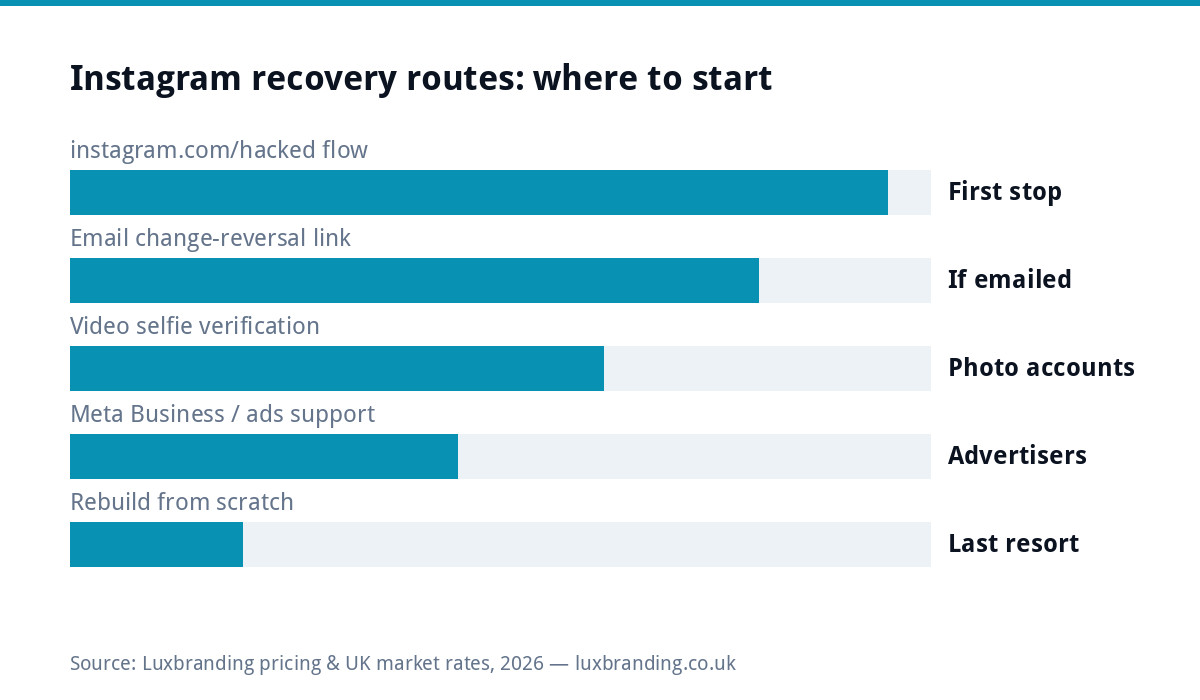
If your Instagram business account is hacked, act in this order: open instagram.com/hacked on a device you have used with the account before, check every inbox for the “your email was changed” message and hit its reversal link, request video selfie verification if your account has photos of you, and if you run ads, raise it through Meta Business support where response times are dramatically better. Recovery costs £0 through official routes. Never pay a stranger in your DMs who “knows someone at Meta”; that is the second scam. The deeper fix, covered below, is making sure a rented channel can never again hold your whole business hostage.
First, work out what actually happened
Three situations look identical from the outside. Genuinely hacked: someone changed your email and password, and you received notification emails about it. Locked for suspicious activity: Instagram itself suspended access and asks you to verify identity. Or disabled for a claimed policy violation, which has its own appeal path. Check your email before anything else, because the messages Instagram sent in the first minutes tell you which situation you are in, and each has a different best route. This guide covers the hacked and locked cases; for the multi-platform version of this playbook, including Facebook and TikTok, see our guide to getting locked out of social accounts.
Route 1: the official hacked flow
Go straight to instagram.com/hacked, ideally on the phone that normally uses the account, on the same wifi you usually use. Familiar devices and networks materially improve automated recovery, because Meta’s systems weigh them as identity evidence. Select “My account was hacked” and follow the flow: it will try known emails and phone numbers, offer login links, and escalate to identity checks when those fail. Do this within hours, not days; the trail is warmest immediately after the takeover.
Route 2: the email reversal link
When a hijacker changes your email, Instagram sends the old address a message saying so, with a link to reverse the change. That link is the single fastest recovery route in existence, and it expires. Search every mailbox connected to the account for recent messages from Instagram, including spam folders. If you find it, revert the change, reset the password, and immediately check that your phone number and email are correct before the attacker’s session catches up. Then log out all other devices from settings.
Route 3: video selfie verification
For accounts that show your face in posts, Instagram offers video selfie verification: you record a short clip turning your head, and it is matched against your photos. It exists precisely for the case where the attacker changed every contact detail. It does not work for accounts that never show a human, which is one of several reasons a faceless brand account is more fragile than founders expect. If your account is a logo grid with no humans, your realistic routes are 1, 2 and 4.
Route 4: the advertiser back door
If your Instagram is connected to a Facebook Page and you have ever run ads, you have access to Meta Business support, including live chat in many regions. Advertiser support can see account status, escalate compromised-account cases, and moves in days where the free-tier forms move in weeks, if at all. This is the strongest practical argument for wiring your Instagram into Business Manager with two admins before anything goes wrong: it upgrades your support tier for the entire account.
The four routes at a glance
| Route | Where | Best when | Typical speed |
|---|---|---|---|
| 1. Official hacked flow | instagram.com/hacked on a familiar device | Always your first stop | Hours to days |
| 2. Email reversal link | The old email address’s inbox | Attacker changed your email recently | Minutes, if caught early |
| 3. Video selfie verification | Prompted within the recovery flow | Your account shows your face in posts | Days |
| 4. Meta Business support | Business Help Centre chat | You run ads or use Business Manager | Days, with a human |
Run routes one and two in the first hour; they cost nothing and decay fastest. Start route four in parallel the same day if you qualify, because a support case aging in the queue while you wait on automated flows is free progress.
While you are locked out: hold your trade
Your business does not pause because a login did. Post the situation on the channels you still hold: Facebook Page, Google Business Profile, your website banner and your email list, with a short “our Instagram is compromised, do not respond to DMs from it” warning. That last part matters, because hijacked business accounts are routinely used to scam the followers, usually with fake giveaways or crypto pitches, and the reputational damage lands on your name, not the attacker’s. Screenshot everything the attacker posts; you may need evidence later.
Prevention: the ten-minute hardening job
Turn on two-factor authentication with an authenticator app rather than SMS, which survives SIM-swap attacks. Remove ex-staff and unknown devices from the logins list. Stop sharing one password around the team; use Meta’s proper role system through the Page connection instead. Revoke third-party apps you no longer use, because a compromised scheduling tool is a side door into the account. And check the email on the account is a live, monitored address, since every recovery route above begins there. The same hygiene applies to your ads accounts, where our guide to rejected Facebook ads shows how policy trouble compounds access trouble.
The deeper problem: your audience was rented
The fortnight of panic reveals the structural issue: the follower list, the DMs, the content archive all live on a platform that owes you nothing and offers no phone number. The businesses that shrug off a hijack are the ones whose customers also exist somewhere owned: an email list, and a website that takes orders directly. Our own stack for that costs less than most people assume, with a one-page website at £299 and email marketing setup at £149, both fixed on the public price list. Rebuild the moat before the next flood, because platform lockouts are a category of weather, not a one-off storm.
If the account is truly gone: the rebuild checklist
Sometimes recovery fails, and the decision becomes when to stop burning weeks. Register a clean handle as close to the old one as possible, announce it everywhere you still control, and report the old account as impersonating your business if it is actively scamming, which at least gets it disabled. Rebuild follows the same playbook that grew the first account, but this time capture emails from day one and link every bio to a site you own. Painful, but survivable, and the businesses that document their brand assets, as our social media design guide recommends, restart in days rather than months because the templates, colours and content pillars all live outside the platform.
What this costs in money and time
Official recovery is free and typically resolves in hours to two weeks depending on route. Paid “recovery services” advertising in your DMs are scams almost without exception, and the legitimate specialist firms that do exist charge hundreds with no guarantee. Spend the money on prevention instead: the hardening steps above are free, and the owned-channel stack from £299 converts this from an existential threat into an annoyance. That trade is available today, before the next lockout, and it is the cheapest insurance in your marketing budget.
Get the UK SEO DIY Audit Checklist (free)
A 32-point checklist UK SMEs can run against their own website in an afternoon. Surfaces the quick wins before paying for a paid audit.
No spam. UK GDPR compliant. We only use your email to send this resource, unless you tick the box to hear from us.
Frequently asked questions
How do I recover a hacked Instagram business account? +
Start at instagram.com/hacked on a device and network you normally use, check every inbox for Instagram's email-change reversal link, request video selfie verification if your account shows your face, and escalate through Meta Business support if you run ads.
How long does Instagram account recovery take? +
The email reversal link works in minutes if you catch it before it expires. The hacked flow and selfie verification typically resolve in hours to days. Advertiser support cases usually move within days, while free-tier forms can take weeks.
Should I pay a service to recover my Instagram account? +
No. Accounts offering recovery in your DMs are almost always the second scam, often run by the same people. Official routes are free. Legitimate specialists exist but charge hundreds with no guarantee; that money is better spent on prevention and owned channels.
What should my business do while locked out of Instagram? +
Announce the compromise on channels you still control, including your website, Google Business Profile and email list, warn followers to ignore DMs from the account, and screenshot everything the attacker posts as evidence for reports.
How do I protect my Instagram business account from hackers? +
App-based two-factor authentication, no shared passwords, proper roles through Business Manager with a second admin, removing stale devices and third-party apps, and a monitored email address on the account. Then build an email list and website so no platform holds your whole audience.