Quick answer
Locked business social accounts recover along four different routes, and picking the right one first saves days: simple lockout (reset flow; fails only when recovery details are stale), hacked (the platforms’ dedicated compromised-account flows, identity-verified), policy suspension (the appeal in the notification, once, properly), and orphaned admin (nobody in the business has access: the slow business-verification lane). Do not create a lookalike account meanwhile, and treat the incident as the argument for the two-admin, 2FA hygiene at the end, which retires the whole category for ten minutes’ work.
First: name your lockout (the routes differ completely)
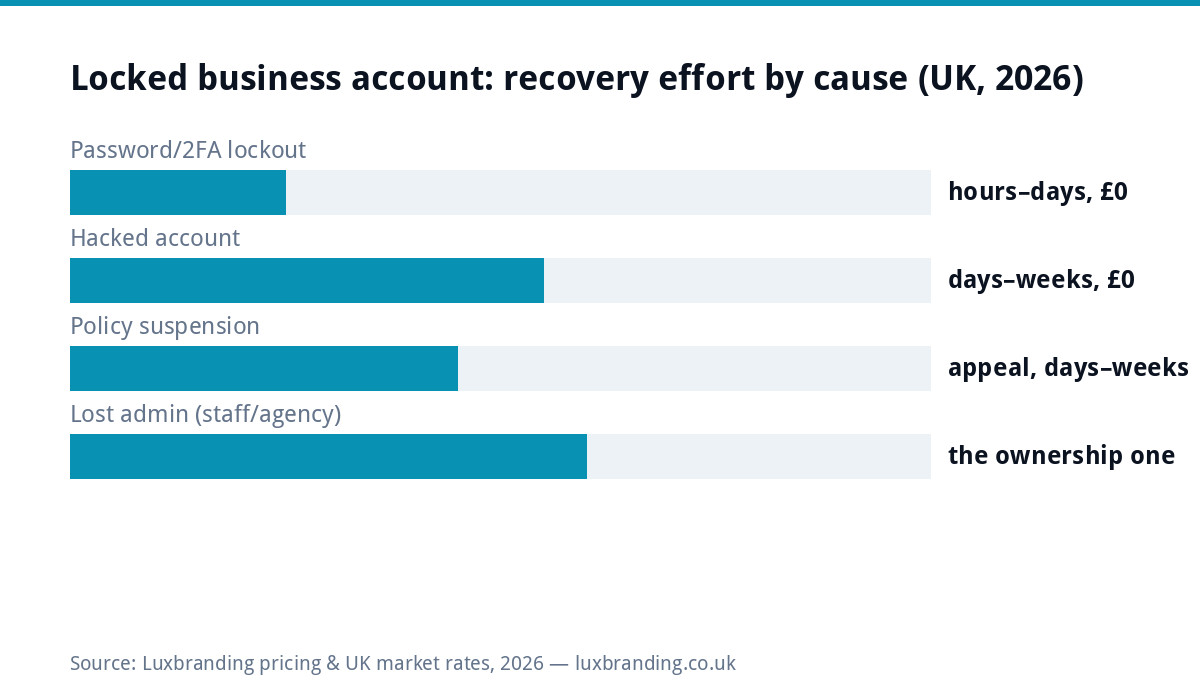
Thirty seconds of diagnosis prevents days on the wrong queue. Can’t log in, no other symptoms: credentials problem, the easy lane. Password changed without you, strange posts or messages sent, email notifications about logins from elsewhere: hacked, urgent lane, because an attacker with your audience is spending your trust. A notification citing community standards, commerce or impersonation rules: suspension, appeal lane. The account is fine but the only person who could access it has gone (left the company, fell out with you, died, or was an agency): orphaned admin, the ownership lane, slowest and most paperwork-bound. Mixed cases (hacked THEN suspended for the hacker’s spam) run the hacked lane first; reinstatement follows identity, and the platforms’ flows understand the sequence.
The routes, platform by platform
| Cause | Meta (Facebook/Instagram) | Elsewhere |
|---|---|---|
| Hacked | facebook.com/hacked and instagram.com/hacked: identity-verified recovery that overrides the attacker’s changes | TikTok/LinkedIn/X each run compromised-account flows from their help centres; same shape, ID-led |
| Suspended | The appeal path inside the notification; via Business Support Home for business assets: one thorough appeal beats five hasty ones | Platform help centres; same one-good-appeal rule as our ads-rejection guide |
| Simple lockout | Normal reset; if recovery email/phone are stale, the flow degrades toward ID verification | Same, and the stale-recovery-details lesson is universal |
| Orphaned admin | Any current role-holder escalates from within; otherwise business verification (domain email, documents) through Meta’s business channels | LinkedIn pages have an admin-claim flow tied to company email domains; others vary, all slow |
The hacked lane: hours matter, order matters
An attacker inside a business account does compounding damage (scam messages to your followers, dodgy posts, ad spend on your saved card), so the hacked lane runs same-day: start the platform’s compromised-account flow immediately; from any device still logged in, change the password and log out all other sessions; check the linked email account FIRST if there is any chance it fell too, because whoever holds the email wins every reset war (the same rule as our developer-recovery guide applies to platforms); revoke unfamiliar connected apps; and if an ad account is attached, check for and stop any campaigns the attacker launched, disputing the spend through the platform. Tell your audience from another channel (“our Instagram was compromised; ignore any messages about crypto/deals”) the same day: it protects them, and public warnings age far better than silent embarrassment. Payment-card exposure follows the same logic as the hacked-website guide: tell the bank early, not after.
The orphaned-admin lane: the preventable tragedy
The most painful lockouts involve no attacker at all: the page was created years ago on a personal profile belonging to a founder’s ex-partner, a departed manager, or an agency that has stopped answering. Escalation order: inventory who holds ANY role (editors can’t add admins, but they prove the business’s connection and can post while you recover); ask the departed admin directly, once, politely, with a deadline, exactly like the supplier-recovery template; if they are unreachable or hostile, the business-verification route (proving ownership via your domain email and business documents) exists on the major platforms and grinds slowly but genuinely works; and if an agency holds it, contract and invoice records strengthen the claim. What NOT to do: threaten publicly, create a duplicate page (it fragments your audience and can trip impersonation rules against YOU), or pay “account recovery services” on social media, which are overwhelmingly scams fishing for exactly the credentials you still have.
Rebuild or wait? The judgement call, honestly
Recovery beats rebuild while any route remains open, because the account’s value is the audience, the reviews, the message history and the ad account attached to it. The rebuild moment arrives only at a confirmed dead end: final appeal rejected, verification refused, or weeks of silence on the last available lane. Rebuilding done right is a campaign, not a shrug: announce the new account everywhere you still control (website banner, email list, other platforms, the Business Profile), report the old account as impersonation IF an attacker still runs it, and treat the follower rebuild as the price of the hygiene lesson below. The deeper strategic lesson is channel balance: businesses whose entire presence lived on one rented platform lose everything in one lockout, while those with an owned website and email list lose a channel, not a business. Rent reach, own the base.
While locked out: keep the business visible (the bridge week)
Recovery lanes take days, and the business should not go dark meanwhile: post the situation and the temporary contact route on every channel you still hold (the website banner takes five minutes and reassures anyone who saw strange activity), make sure the Google Business Profile carries current hours and posts, since for local businesses it out-reaches social anyway, and lean on the email list if one exists, because it is the one audience channel no platform can lock. Customers are far more forgiving of “we got hacked, bear with us” than of silence, and several businesses discover during the bridge week that the owned channels they neglected convert better than the rented one they lost, which is a lesson worth keeping after the account comes back. If the bridge stretches past a fortnight, put a proper notice on the website naming the official replacement account so search traffic lands on truth rather than on whatever the attacker is doing with your name.
The ten-minute hygiene that ends this forever
Run this today, locked out or not: two admins minimum on every business page and ad account (the second admin is the entire disaster-recovery plan); 2FA on for every admin, with backup codes stored somewhere findable; recovery email and phone current on the accounts and on the email behind them; roles, never passwords: staff and agencies get invited at the right permission level and removed the day they leave, so departures cost nothing; and an access inventory in the business’s files listing every platform, who holds what, and which email anchors it, reviewed twice a year alongside the email ownership rules. Ten minutes, £0, and the whole article you just read becomes something that happens to other businesses. The paid escapes on the price list are for building the owned channels; this one is pure housekeeping, and it is the highest-ROI ten minutes in this entire series.
Last word: the account will probably come back, the hours lost will not, and the two-admin, 2FA, roles-not-passwords hygiene above is the entire difference between this being a story you tell and a story you repeat. Run it today while the lesson is warm.
Get the UK SEO DIY Audit Checklist (free)
A 32-point checklist UK SMEs can run against their own website in an afternoon. Surfaces the quick wins before paying for a paid audit.
No spam. UK GDPR compliant. We only use your email to send this resource, unless you tick the box to hear from us.
Frequently asked questions
How do I recover a locked business Facebook or Instagram account? +
Route depends on cause: hacked accounts go through facebook.com/hacked and instagram.com/hacked (identity-verified recovery), policy suspensions through the appeal in the notification, and simple lockouts through normal reset, which fails only when the recovery email or phone is stale.
My page admin left the business and nobody has access. What now? +
If any current staff hold ANY role on the page, escalate their permissions from there. If literally nobody does, Meta's business-verification recovery (proving domain and business ownership) is the route; it takes patience and paperwork. Prevention is two admins, always.
How long does social account recovery take? +
Password lockouts: hours. Hacked-account flows: days to a couple of weeks with identity verification. Policy appeals: days to weeks. Orphaned-admin business verification: the slowest, sometimes weeks. During any wait, do not create lookalike accounts; it muddies the claim.
Should I just start a new business account instead? +
Last resort only: followers, reviews, message history and any ad account attached to the old one are assets, and duplicate accounts can complicate recovery or trip impersonation rules. Exhaust recovery first; rebuild only after a final dead end, announcing it on every other channel.
How do I stop this happening again? +
Five habits: two admins minimum on every business asset, 2FA on all of them, recovery email and phone kept current, agencies and staff invited with roles (never given the password), and access removed the day anyone leaves. Ten minutes of hygiene ends the whole category.