Quick answer
Cost depends on whether the feature is a setting, a plugin or custom code. Switching on something your platform already has can cost little or nothing. A ready-made tool, such as a booking plugin listed at £190 a year, adds licence fees plus setup time. Custom features, such as a client portal, are projects: our Web Applications start from £1,999.
Most small business websites need something new within a year or two of launch: online booking, a shop, a quote form, a client login, a newsletter sign-up. The price for adding it can range from nothing to more than the original website cost, and quotes often look random. This guide explains what drives the price, the three routes for any feature, the fees that continue after launch and how to get a quote you can compare.
What drives the cost of a new feature
Five things decide most of the price:
- The route: a built-in setting, an off-the-shelf plugin or service, or custom development.
- How your site was built. A clean, well-maintained site takes changes easily. A site built on an old theme or page builder may fight every addition.
- Design work. A feature that has to match your branding and work well on phones takes longer than one dropped in as it comes.
- Connections to other systems, such as your calendar, accounts package, payment provider or CRM.
- Data and security. Anything that takes payments, stores personal details or adds logins needs more care and testing.
Three routes for any feature
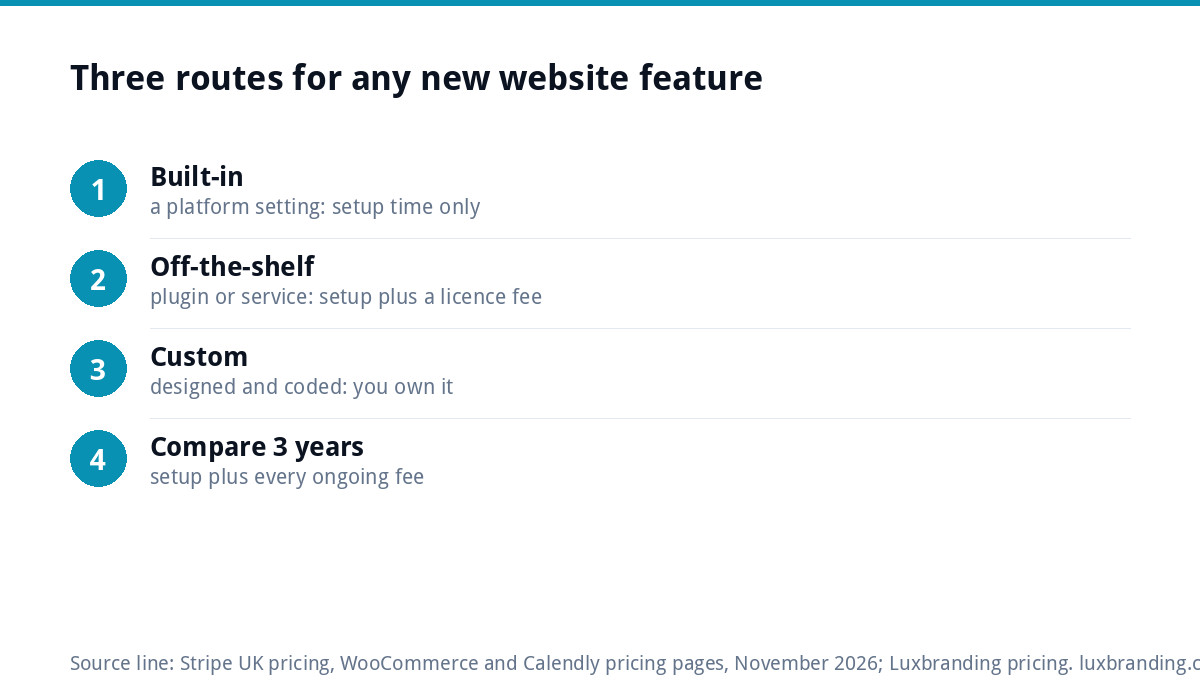
Almost every request falls into one of three routes, and the route matters more than the feature itself.
- Built-in. WordPress, Shopify and most platforms already do many things out of the box: extra pages, simple forms, a blog, galleries. The cost is mostly the time to set it up and style it.
- Off-the-shelf. A plugin, app or third-party service does the job, and your site is connected to it. You pay setup time and usually a yearly or monthly fee.
- Custom. Nothing ready-made fits, so the feature is designed and coded for you. This costs the most upfront, but you own it and it does exactly what you need.
A good developer will tell you which route a request needs before quoting. If you are told everything must be custom, or everything is a plugin, ask why.
Feature prices at a glance
| Feature | Usual route | What you pay for | Ongoing costs |
|---|---|---|---|
| New page or section | Built-in | Design, copy and build time | None |
| Quote or contact form | Built-in or plugin | Setup, styling, email routing, spam protection | Sometimes a form plugin licence |
| Online booking | Plugin or booking service | Setup, calendar sync, styling | Plugin licence or monthly service fee |
| Taking payments | Payment provider | Connecting checkout, testing | Transaction fees per payment |
| Small online shop | Plugin or platform | Product setup, delivery rules, payments | Extensions, transaction fees |
| Newsletter sign-up | Email service | Form, list connection, consent wording | Email service plan as your list grows |
| Client login or portal | Custom or specialist tool | Design, development, security, testing | Hosting, maintenance |
| Calculator or quote builder | Custom | Logic, design, testing | Maintenance if prices change |
The fees that continue after launch
The setup price is only half of the cost. Off-the-shelf features usually carry a fee every month or year, and payments carry a fee on every transaction. Three examples, all at the time of writing, November 2026:
- Payments: Stripe’s UK pricing lists 1.5% + 20p for standard UK cards.
- Booking plugins: the WooCommerce Bookings extension was listed at £190 for a one-year plan.
- Booking services: Calendly offers a free plan with one event type, with paid plans for more.
Add these up over three years when comparing routes. A free-to-start service can cost more over time than a custom feature, and a custom feature needs hosting and maintenance. Our guide to website maintenance costs covers what that looks like.
A worked example: adding online booking to a salon website
A salon with a five-page WordPress site wants clients to book appointments online. There are three realistic options.
| Option | Upfront | Ongoing | Good for |
|---|---|---|---|
| Link to a booking service | A little setup time to add buttons | Free plan or a monthly fee as needs grow | One stylist, simple appointments |
| Booking plugin on the site | Setup and styling time | Plugin licence, such as £190 a year for WooCommerce Bookings | Several services, deposits, staff calendars |
| Custom booking system | A web application project, from £1,999 with us | Hosting and maintenance | Unusual rules, memberships, links to other systems |
For most salons, the first or second option is right. The custom route only earns its price when the rules are unusual or the business is outgrowing per-user fees. Our booking system cost guide compares the routes in more depth.
What you pay by situation: four common requests
“We need a page for a new service”
This is the simplest addition. The cost is the time to write the copy, lay out the page in your existing design and add it to the menu. If the page is for an advertising campaign with one offer and one form, a dedicated landing page usually works better than a general service page.
“We want a proper quote form”
A form that asks the right questions, sends to the right inbox and filters spam is usually a plugin plus setup time. Budget extra if it needs file uploads, conditional questions or a connection to a CRM. Test it from a phone before it goes live, and check the emails arrive.
“We want people to sign up for our newsletter”
The form is quick to add; the email service behind it carries the ongoing fee, which usually rises as your list grows. Make sure the sign-up wording explains what people are agreeing to receive.
“We want to sell a few products”
A handful of products can sometimes be sold through payment links or a light plugin. Once you need stock control, delivery rules and a proper checkout, you are building a small shop, and it is worth comparing that with a dedicated e-commerce build.
Add it, or rebuild the site?
Sometimes the honest answer is that the site cannot take the feature well. Signs that a rebuild is cheaper in the long run:
- Every change breaks something else.
- The site runs on an old theme or page builder that is no longer updated.
- You cannot log in or edit content without paying someone.
- The feature list keeps growing and each item is quoted separately.
If you recognise these, our guides on not being able to update your own website and outgrowing a DIY website explain the options. Our website cost calculator gives a quick budget for a rebuild to compare against.
Check speed after every addition
Each plugin, widget or embedded service adds code that visitors’ phones have to load. Two or three additions can turn a quick site into a slow one without anyone noticing. Test the site’s speed before and after any new feature, and remove anything that is no longer used. If the site has already slowed down, our Website Speed Optimisation is £99 one-off.
How to get a quote you can compare
- Describe the job, not the technology. “Customers should be able to book a 30-minute consultation and pay a £20 deposit” is better than “add a booking plugin”.
- List what it must connect to: calendar, email, accounts, payment provider.
- Say who will manage it day to day, and how comfortable they are with technology.
- Ask for the route, the setup price and the ongoing costs on separate lines.
- Ask what happens if the plugin or service changes its pricing or closes.
Questions to ask before you pay
- Is this built-in, a plugin or custom, and why?
- What are the yearly licence and transaction fees?
- Who owns any custom code, and can another developer maintain it?
- How will it be tested on phones and with real payments?
- Will it slow the site down?
Our fixed prices for related work
We publish fixed prices rather than hourly rates. A Landing Page for a new offer is £199. A Custom WordPress Website is £499 for up to 8 pages if a rebuild makes more sense, and an E-commerce Website is £499 for up to 20 products. Custom portals, dashboards and booking systems sit under Web Applications from £1,999; our guide to client portals explains when they are worth it. Bigger sites, lead-generation tools and member areas are quoted in writing before any work starts. Every fixed price is on our pricing page.
Get the UK Website Project Brief Template (free)
A two-page template for briefing any UK web designer: sitemap, integrations, audience and deliverables. Cuts revision rounds in half.
No spam. UK GDPR compliant. We only use your email to send this resource, unless you tick the box to hear from us.
Frequently asked questions
How much does it cost to add a feature to a website? +
It depends on the route. Switching on something your platform already does can cost little or nothing beyond setup time. An off-the-shelf plugin or service adds setup plus a licence or monthly fee, such as £190 a year for one booking plugin. Custom features are projects in their own right: our Web Applications start from £1,999.
Is it cheaper to add a feature or rebuild the website? +
Usually cheaper to add it, if the site is well built and maintained. If every change breaks something, the site runs on an outdated theme or page builder, or you keep paying for small additions one by one, a rebuild can cost less over a few years. Our Custom WordPress Website is £499 for up to 8 pages.
What ongoing costs come with new website features? +
Off-the-shelf features often have a yearly licence or monthly fee, and payments carry a transaction fee. At the time of writing, November 2026, Stripe listed 1.5% + 20p for standard UK cards. Custom features need hosting and maintenance. Add these up over three years when you compare routes, not just the setup price.
How do I get a fair quote for a new website feature? +
Describe the job rather than the technology, list what it must connect to and say who will run it day to day. Ask for the route, the setup price and the ongoing fees on separate lines, and ask who owns any custom code. That makes quotes from different developers easy to compare.
Do you add features to existing websites? +
We publish fixed prices: a Landing Page is £199, a Custom WordPress Website is £499 for up to 8 pages, and custom portals, dashboards and booking systems start from £1,999 as Web Applications. Bigger sites, lead-generation tools and member areas are quoted in writing before any work starts. Every price is on our pricing page.