
Quick answer
First work out who holds the keys. If you have another admin, they can reset your password. If you are the only Google Workspace admin, Google can verify you through a DNS record on your domain. Microsoft 365 users go through their admin or Microsoft Support. If you were hacked, check forwarding rules and change passwords immediately.
Being locked out of business email stops quotes, invoices and password resets for everything else you use. The good news is that, if you own your domain, there is almost always a way back in. Below are the five common lockouts, the recovery route for each, what to do while you wait and a checklist so it does not happen again.
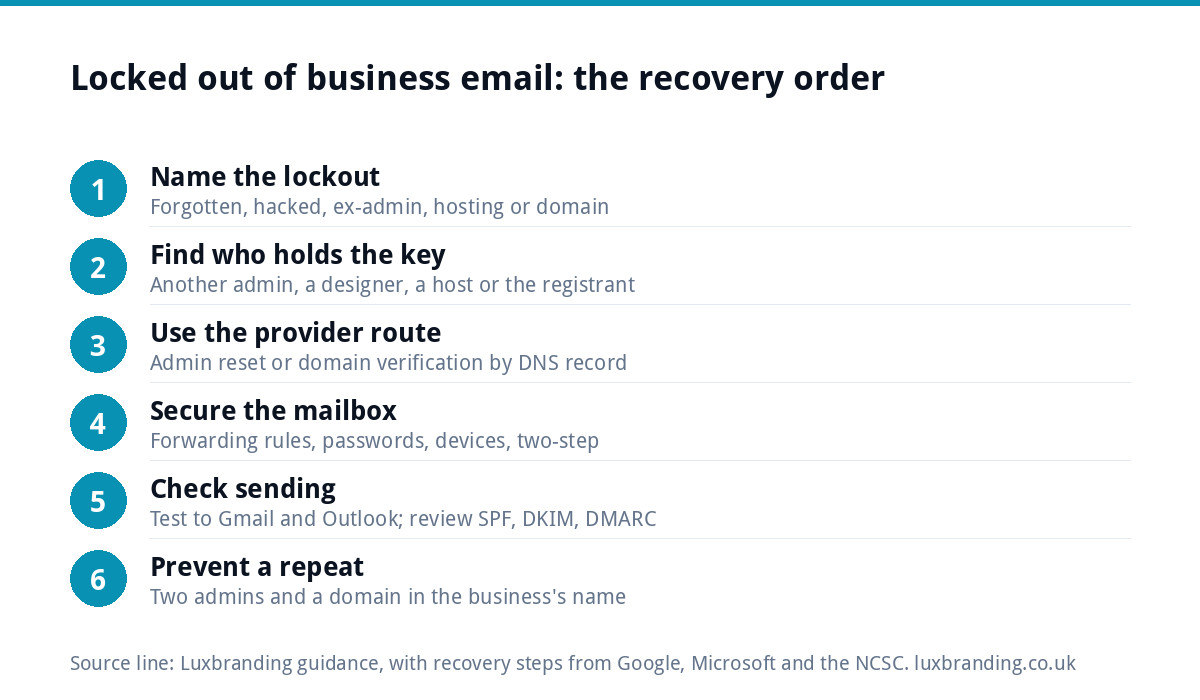
First: name your lockout
The route back depends entirely on why you are locked out. Find your row before you start clicking “forgot password”.
| What happened | Who holds the key | Your route |
|---|---|---|
| Forgot the password, recovery details out of date | You, via your domain | Provider’s admin recovery (routes 1 and 2) |
| Someone else is the only admin (ex-staff, old IT contact) | That person, or the provider | Ask them in writing; otherwise prove you own the domain |
| Mailbox hacked, password changed | The attacker, for now | Provider recovery, then the hacked-account steps (route 4) |
| Mailbox lives in a hosting account your web designer controls | The designer or host | Get the hosting login or move the email (route 3) |
| Domain expired or is in someone else’s name | The registrant | Recover the domain first (route 5) |
One thread runs through almost every row: control of the domain. Whoever can edit its DNS records can usually prove ownership to the email provider. Our guide to domain names in the UK explains how to check who the registered owner is.
Route 1: Google Workspace admin recovery
If another super admin exists, the fastest route is for them to reset your password from the Admin console. If you are the only one, Google has a recovery process that uses your domain to prove who you are. According to Google’s guide to recovering administrator access:
- Go to the recovery page, enter the admin sign-in address and choose “Try another way” until you reach the domain verification screen.
- Add the CNAME record Google gives you to your domain’s DNS settings, with whoever hosts your DNS (which may not be your registrar).
- Wait a few minutes before continuing so the record can be found.
- If Google finds it, you can set a new password. If not, you give a different contact email and get a reset link once the record is confirmed.
Google says that if the record is not found within 48 hours, you are told recovery was unsuccessful. There is also a support-assisted route using a CNAME or TXT record, and if you bought Workspace through a reseller, they can help.
Route 2: Microsoft 365
Microsoft’s process leans more on other admins and on contact details you set up in advance. Microsoft’s guide to resetting passwords in Microsoft 365 says that if you have forgotten your password and cannot sign in, you can ask your administrator to reset it, make sure alternate contact information including a mobile number is set, or call Microsoft Support.
If you are the only admin and none of that works, have your proof of ownership ready before you call: the domain registration, billing records for the subscription and the payment card used.
Route 3: email inside a hosting account
Many small businesses have mailboxes that come bundled with their website hosting. Those passwords are reset from the hosting control panel, so you need the hosting login, not just the email login.
If a web designer set up the hosting in their own account, ask them in writing for either access or a reset. If they have disappeared, contact the hosting company with proof that you own the domain. Our guide to when you cannot update your own website covers getting hosting access back in more detail, because the same account usually controls both.
Route 4: the mailbox was hacked
Use your provider’s recovery route first. Once you are back in, work through the steps in the NCSC’s guidance on recovering a hacked account:
- Check your email filters and forwarding rules. Attackers often add a rule that copies your mail, including password resets, to themselves.
- Change the password, and the password on any account that used the same one.
- Log out all other devices and apps.
- Turn on two-step verification.
- Tell your contacts, especially customers who pay invoices, to be wary of recent messages from your address.
- Check bank accounts for anything you did not authorise, and report fraud if money was lost.
If the attacker also got into your website, follow our guide to what to do when your website is hacked as well.
Route 5: the domain lapsed or is not yours
If the domain expired, email stops working because the records behind it stop answering. Renew it with the registrar as fast as you can; many registrars allow renewal for a period after expiry, so check yours straight away. If the domain is registered in a former partner’s, employee’s or web designer’s name, you need them to transfer it to you before anything else is safe. Get the request in writing and keep proof that the business has used and paid for the domain.
What to have ready before you ask for help
Whichever route you take, recovery goes faster when you can prove the business is yours in one go. Gather these before you contact a provider, host or registrar:
- Domain proof: the registrar account details, renewal invoices and the name the domain is registered to.
- Billing proof: invoices for the email subscription or hosting, and the last four digits of the card that paid them.
- Business proof: your Companies House number if you are a limited company, or a utility bill or bank statement in the business name if you are a sole trader.
- Account details: the exact admin address that is locked, roughly when the account was set up and who set it up.
- Access to DNS: a login for wherever your DNS records are edited, because most email providers will ask you to add a record to prove ownership.
Keep notes of every call and ticket number. If more than one company is involved, for example a registrar, a host and an email provider, the notes stop you repeating yourself and show exactly where the chain is stuck.
While you are locked out
Keep the business reachable so customers do not think you have vanished:
- Put a short notice and a temporary contact route on your website and Google Business Profile.
- Check your website contact form sends somewhere you can still read. If it sends to the locked mailbox, change it; our guide to contact forms that stop working shows how to test it.
- Call or text customers with open quotes or unpaid invoices so nothing goes missing.
- Warn customers not to act on payment-detail changes sent by email, if there is any chance of a hack.
Back in: check your sending setup
A lockout often comes with changed DNS records, especially after a hack or a hosting move. Once you are in, send a test to a Gmail and an Outlook address you control. If messages land in junk, our guide to business emails going to spam walks through the SPF, DKIM and DMARC records that decide it.
If you send newsletters or automated emails through a marketing tool, check it still verifies your domain as a sender. If you would rather have someone set up your sending platform for you, see our email marketing automation service.
The ten-minute prevention checklist
| Check | Why it matters |
|---|---|
| Two admins, both people you trust | One can reset the other; nobody is a single point of failure |
| Recovery email and mobile set and up to date | Self-service recovery works without support |
| Two-step verification on every mailbox | A stolen password alone does not get in |
| Domain registered in the business’s name | You can always prove ownership through DNS |
| Logins in a password manager the business controls | Access survives staff leaving |
| Written list of who has admin access | Removing a leaver takes minutes, not weeks |
Email that comes with the website
If your email and website are split across accounts you do not control, bringing them together removes most of these risks. Our website management and hosting is £20 a month with UK hosting, SSL, daily backups, security monitoring, automatic updates and up to 3 business email mailboxes. All prices are on our pricing page.
Get the UK Website Project Brief Template (free)
A two-page template for briefing any UK web designer: sitemap, integrations, audience and deliverables. Cuts revision rounds in half.
No spam. UK GDPR compliant. We only use your email to send this resource, unless you tick the box to hear from us.
Frequently asked questions
How do I get back into Google Workspace if I am the only admin? +
Google's recovery process lets you prove ownership through your domain. On the recovery page, choose Try another way until you reach domain verification, then add the CNAME record Google gives you in your DNS settings. If Google finds it, you can set a new password. Google says unsuccessful recovery is reported if the record is not found within 48 hours.
What if a former employee is the only admin on our email? +
Ask them in writing to reset your access or add you as an admin. If they will not or cannot, the provider can usually verify you through the domain instead, because whoever controls the domain's DNS records can prove ownership. Afterwards, set up two admins and keep logins in a password manager the business controls.
My business email was hacked. What should I do first? +
Recover the account through your provider, then follow the NCSC's steps: check filters and forwarding rules, change the password and any reused passwords, log out all devices, turn on two-step verification, warn contacts about recent messages from you and check bank accounts. Customers who pay invoices should be told not to act on emailed payment changes.
Why did my email stop working when the domain expired? +
Business email depends on records held with your domain. When the domain lapses, those records stop answering, so mail stops arriving and sending may fail. Renew with the registrar as quickly as you can and check what period it allows after expiry. If the domain is registered in someone else's name, get it transferred to the business.
Does Luxbranding hosting include business email? +
Yes. Our website management and hosting is £20 a month and includes UK hosting, SSL, daily backups, security monitoring, automatic updates and up to 3 business email mailboxes. Keeping the website and email together, under accounts the business controls, removes most of the reasons people get locked out in the first place.