Quick answer
A small business homepage should run in this order: a header with your phone number, a headline saying what you do and where, one clear call to action, proof such as reviews and accreditations, your main services, recent work, how it works, areas covered, a short about section, FAQs, a final call to action and a footer with company details.
The homepage is the page most visitors judge you on, and it has about one scroll to convince them to stay. This guide gives you the section order we use on small business sites, what goes in each section, how the order changes by type of business, and the mistakes that cost enquiries.
What the homepage is for
Your homepage has three jobs, in this order:
- Confirm the visitor is in the right place. What you do, where, and for whom, within a few seconds.
- Give them a reason to trust you. Reviews, accreditations, real photos, clear prices or price guides.
- Send them somewhere useful. A call, a quote form, a booking page or the right service page.
It is not where every detail lives. Detailed service information belongs on separate service pages, and the story of the business belongs on the About page. The homepage introduces and directs. If you are still deciding which pages the whole site needs, plan that list first; the homepage then summarises it.
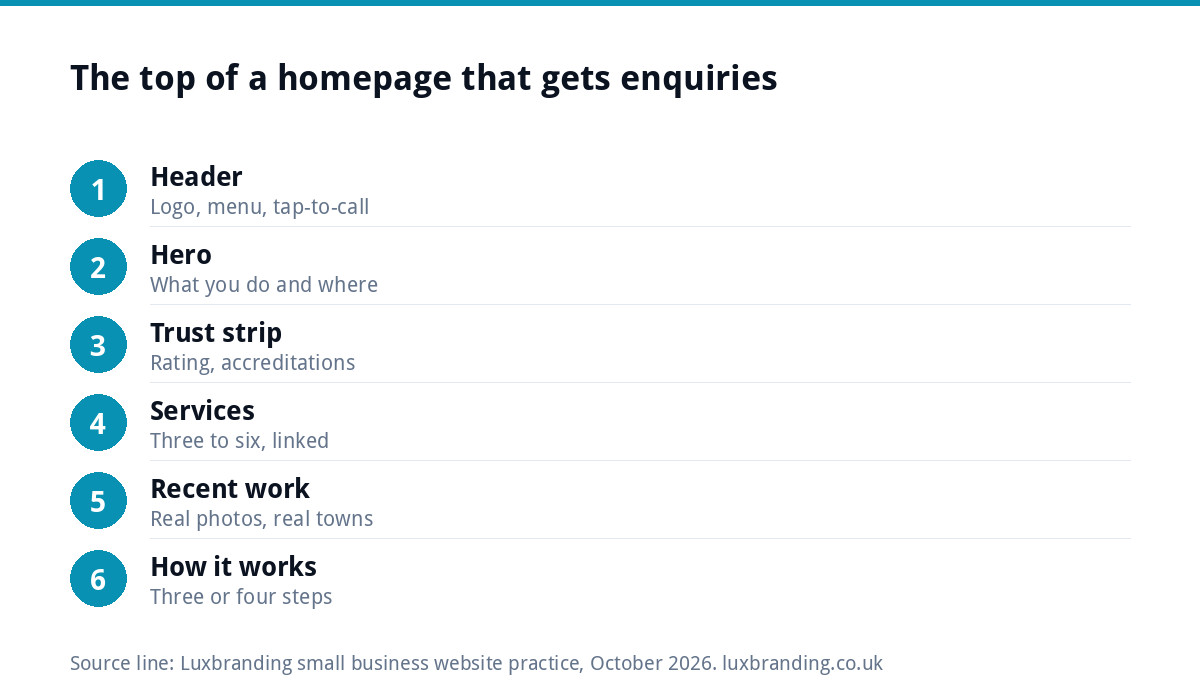
The homepage section order
| Order | Section | Its job | What to include |
|---|---|---|---|
| 1 | Header | Navigation and instant contact | Logo, menu, phone number, one button |
| 2 | Hero | Say what you do and where | Headline, one-line detail, call to action, real photo |
| 3 | Trust strip | Early reassurance | Rating, accreditations, years trading, guarantees you actually offer |
| 4 | Services | Route people to the right page | Three to six services, each linking to its own page |
| 5 | Recent work | Show the standard | Photos or short case studies with locations |
| 6 | How it works | Remove uncertainty | Three or four steps from enquiry to finished job |
| 7 | Reviews | Social proof | Three short, real reviews with first names and towns |
| 8 | Areas covered | Local relevance | Towns or postcodes served |
| 9 | About snippet | A human face | Two sentences and a link to the About page |
| 10 | FAQs | Answer objections | Four to six real questions |
| 11 | Final call to action | Catch people who scrolled | The same action as the hero |
| 12 | Footer | Legal details and links | Address, company details, privacy and cookie links |
The header and hero: the first screen
On a phone, the first screen is the header plus the top of the hero. It decides whether someone stays. Get these right:
- Headline. Plain words about the outcome: “Boiler repairs and installations across Leeds” beats “Excellence in heating solutions”.
- Supporting line. One sentence adding a detail that matters, such as same-week appointments or fixed prices.
- One call to action. “Get a quote” or “Call now”, not five buttons.
- Tap-to-call phone number in the header on mobile.
- A real photo of your work, your team or your premises. Stock photos make every business look the same.
Behind the scenes, the page title matters too. Google’s guidance on title links asks for a descriptive, concise title on every page and notes that the home page title is a reasonable place for a little extra information about the site. “Plumber in Leeds | Smith Plumbing” tells searchers more than “Home”.
Proof: trust strip, recent work and reviews
People hiring a small business are taking a risk, and proof reduces it. Spread it through the page rather than saving it for one block:
- A slim strip under the hero with your rating, accreditations and memberships.
- A recent-work section with real photos, each captioned with the job and the town.
- Three short reviews, quoted accurately, with permission.
Only show credentials you hold and can prove. Logos of bodies you are not a member of, or invented guarantees, can break advertising rules and destroy trust if a customer checks.
Services: summarise, then link
List your main services as short cards or rows: a name, one sentence and a link to the full service page. Three to six is usually right. If you offer twenty things, group them. The homepage should not try to rank for every service on its own; each service page does that job better, and the homepage links pass visitors and search engines to them.
Order the services by what earns you the most or what you want more of, not alphabetically. If boiler installations are your most profitable work, put them first, even if repairs bring in more calls. The first card gets the most attention.
How it works, areas and the about snippet
A three or four step “how it works” section answers the unspoken question: what happens if I get in touch? For example: request a quote, free survey, fixed price in writing, job done and signed off. It is especially useful for first-time buyers of a service, who often hesitate because they do not know what to expect or whether a quote commits them to anything.
The areas section can be a simple list of towns. Keep it honest: list places you actually serve. The about snippet is two sentences, ideally with a photo of the people, and a link to the full About page.
FAQs, the final call to action and the footer
Four to six FAQs near the bottom catch common objections: price, timing, guarantees, payment, whether you cover a certain area. Use the questions customers really ask on the phone.
Repeat the call to action before the footer for the visitors who read everything. Then the footer: address or service area, phone, email, opening hours, and links to privacy and cookie pages. If your site uses analytics or advertising cookies, the Information Commissioner’s Office guide to cookies and similar technologies explains the consent rules.
Limited companies have one more legal requirement. GOV.UK’s guidance on signs, stationery and promotional material says websites must show the company’s registered number, registered office address, where it is registered and that it is a limited company. The footer is the usual place.
How the order changes by type of business
| Business type | Move up | Move down or drop |
|---|---|---|
| Trades and home services | Phone number, areas covered, accreditations | Long about section |
| Online shop | Best-selling products, delivery and returns | How it works |
| Restaurant or cafe | Opening hours, menu link, booking button | Services grid |
| Professional services | Who you help, credentials, case studies | Areas list, if you work nationally |
| Salon or clinic | Booking button, price list link, team photos | Long FAQs |
For trade businesses in particular, our guide to branding for trades businesses covers how the website fits alongside the van, workwear and paperwork.
Homepage mistakes that cost enquiries
- A slider of rotating images. Most visitors see only the first slide, and the movement distracts from the headline.
- “Welcome to our website” as the headline. It says nothing about what you do.
- No phone number on mobile, or a number that is an image and cannot be tapped.
- Every service described in full, turning the homepage into a wall of text.
- Slow loading because of huge images or video backgrounds. Our guide to website speed for small businesses covers the fixes.
- Old news or a dated blog feed showing a last post from years ago, which suggests the business has gone quiet.
If your current site has several of these, it may be time for more than a homepage tweak; our guide to outgrowing a DIY website covers the signs.
Before you launch: a five-minute homepage test
Open the homepage on your phone and show it to someone who does not know your business for five seconds. Then ask them three questions: what does this business do, where does it work, and how would you get in touch? If they cannot answer all three, the first screen needs work. Then scroll to the bottom and check every link, the phone number and the form. A wider set of pre-launch checks is in our website launch checklist.
Getting it built
Our Custom WordPress Website is £499 one-off for up to eight pages, built in two to four weeks, hand-coded with no page builder and with a mobile-first design. It includes an SEO foundation, contact forms connected to your inbox, Google Analytics and 30 days of support. If one page is all you need, our One-Page Website is £299. Every price is on our pricing page.
Get the UK Website Project Brief Template (free)
A two-page template for briefing any UK web designer: sitemap, integrations, audience and deliverables. Cuts revision rounds in half.
No spam. UK GDPR compliant. We only use your email to send this resource, unless you tick the box to hear from us.
Frequently asked questions
What should be on the homepage of a small business website? +
A header with your phone number, a headline saying what you do and where, one call to action, proof such as reviews and accreditations, your main services linking to their own pages, recent work, how it works, areas covered, a short about section, FAQs, a final call to action and a footer with company details.
How long should a homepage be? +
Long enough to cover the sections that build trust and route visitors, but no longer. Each section should be short: a headline, a sentence or two and a link. Detailed service information belongs on service pages. On a phone, most small business homepages work well at eight to twelve short sections.
What should a homepage headline say? +
What you do and where, in plain words about the outcome the customer wants. For example, boiler repairs and installations across Leeds tells a visitor more in two seconds than a slogan about excellence. Add one supporting line with a detail that matters, such as fixed prices or same-week appointments.
Does a limited company have to show details on its website? +
Yes. GOV.UK guidance says a limited company's website must show its registered number, registered office address, where it is registered and the fact that it is a limited company. The footer is the usual place. Sole traders have different rules but should still show clear contact details.
How much does Luxbranding charge to build a homepage? +
A homepage is part of our Custom WordPress Website, £499 one-off for up to eight pages, built in two to four weeks and hand-coded with a mobile-first design. If one page is enough, our One-Page Website is £299. Prices are on our pricing page, and you can order online.