Quick answer: the escape routes and what they cost
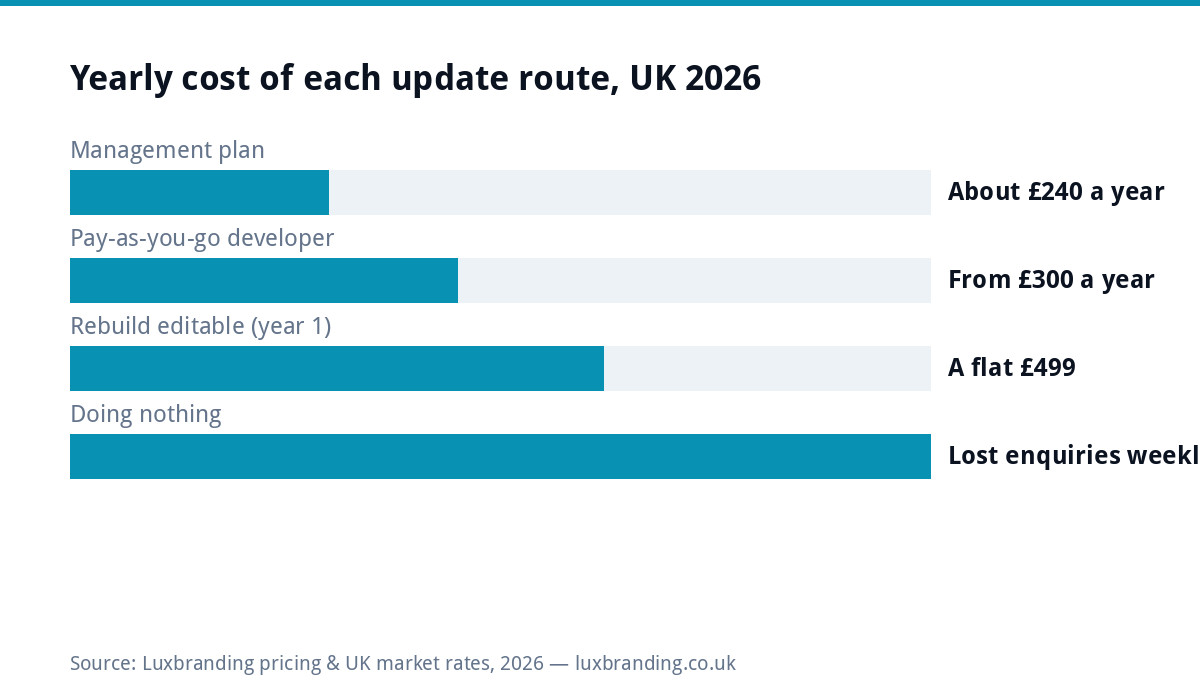
If you cannot update your own website, the fix costs between £20 a month and £499 one-off in the UK. A management plan at £20 a month hands updates to someone else within a day. Pay-as-you-go developer help runs £30 to £75 an hour in the market. If the site itself is the blocker, an old builder, a hand-coded relic, a CMS nobody can face, a £499 rebuild on an editable platform ends the problem permanently. The most expensive option is the status quo: a site showing last year’s prices quietly costs enquiries every week.
The three flavours of stuck
Stuck comes in three distinct forms, and the right fix depends on which one you have. Locked out: you know the site is editable but you have lost logins, the developer holds them, or the platform account lapsed. Too technical: you can log in, but the editor fights you, one wrong click broke the layout once and you never went back. Developer dependency: every change routes through one busy person, and a two-line price update takes three weeks. Diagnose honestly, because the solutions differ.
What being stuck actually costs
An out-of-date site is not neutral. Old prices create awkward conversations and lost margin. A dead phone number or wrong opening hours actively sends work away. Seasonal offers that never go live are marketing you paid for and never ran. And staleness compounds in search: sites that never change get crawled less and slip behind competitors that update routinely. Price the fix against that, not against zero.
Route 1: hand it to a management plan (£20/month)
The simplest escape: email your changes, someone else makes them, usually same or next working day, and the same plan covers updates, security and backups. At £240 a year this is cheaper than a single emergency developer call-out, and it converts the website from a chore you avoid into a channel you actually use. Ours is £20 a month, publicly priced; our guide to website maintenance costs maps the wider market rates.
Route 2: pay-as-you-go developer
Freelance developers charge £30 to £75 an hour for ad-hoc changes. It works when changes are rare and chunky. The failure mode is availability: your two-line update sits behind their big projects, which is exactly the dependency that made you stuck. If you go this route, agree a turnaround expectation in writing and make sure you, not they, hold the logins. Our guide on what to do when your site goes down covers why holding your own access matters when something breaks at 9pm.
Route 3: rebuild on something you can edit (£499)
When the platform is the problem, no amount of process fixes it. A rebuild on standard WordPress with a clean editor gives you a site where changing a price is typing, not surgery. At a fixed £499 with content migrated, the rebuild usually costs less than a year of repeated small developer invoices on an unmaintainable site, and it resets the security clock too. Our guide to outgrowing a DIY website covers the parallel case where a builder platform is the ceiling.
Route 4: learn your CMS, honestly assessed
If the site runs standard WordPress and you are motivated, two hours with the official WordPress documentation genuinely covers everyday edits: text, prices, images, posts. Where DIY learning fails is layout-level changes and anything involving plugins, updates or security, which is precisely where an untrained click causes the white screen. A sensible hybrid: learn content edits, leave the machinery on a plan. The NCSC’s small business security guide is blunt about what unmaintained sites attract.
The routes compared
| Route | Cost | Speed of change | Right when |
|---|---|---|---|
| Management plan | £20/month | Same/next day | You want it handled, predictable cost |
| Pay-as-you-go dev | £30 to £75/hour | Their availability | Rare, chunky changes |
| Rebuild editable | £499 one-off | Instant, forever | The platform is the blocker |
| Learn the CMS | Your time | Instant for content | Standard WordPress, motivated owner |
First: get your access back
Whichever route you pick, reclaim the keys. That means the domain registrar login, the hosting account, and the CMS admin, in your name, on your email address. If a developer or old agency holds any of them, ask in writing for transfer; reputable ones hand over promptly. Our guide to being locked out of WordPress admin walks the recovery ladder when logins are simply lost, and this matters double if the relationship that built the site has ended.
What a management plan actually includes
| Included | What it means in practice |
|---|---|
| Content changes | Email the change, live same or next working day |
| Software updates | CMS and plugins patched before holes get exploited |
| Security monitoring | Someone notices problems before customers do |
| Backups | Yesterday’s site restorable when anything breaks |
| Hosting | One bill, one responsible party, no finger-pointing |
Leaving your old developer cleanly
If dependency on one busy person is the diagnosis, exit politely and completely. Request in writing: registrar login or domain transfer, hosting account access or a full site copy, CMS admin credentials, and any licence keys the site depends on. Give a reasonable deadline and pay any genuinely outstanding invoices, because unpaid bills are the one legitimate reason access gets withheld. Most handovers complete in a week; document everything as it arrives so the next arrangement starts with you holding your own keys, whatever route you pick afterwards.
Worked example: the £45 update that took six weeks
A kitchen fitter raised his day rate in March; his website said the old price until mid-April because the only person with access was a friend-of-a-friend between jobs. Two enquiries in that window haggled from the stale number. He moved to a £20 management plan: the price change went live the afternoon he emailed it, along with three other fixes he had been sitting on for a year. The plan cost less per month than the margin lost in one haggled job.
Signs you should move before it breaks
Waiting for a crisis is the expensive strategy, so act on the early tells. You have wanted to change something for over a month and have not, because the process is too painful. Nobody in the business knows where the site is hosted or what the renewal costs. The person who built it has stopped replying within a week. The platform sends end-of-life or upgrade-required emails you delete unread. Prices, staff or services on the site are wrong right now. Any two of those together mean the question is not whether to fix the update problem but which route above you pick, and picking calmly this month beats picking desperately the week the site goes down or the developer disappears entirely.
Most of these problems are prevented by routine upkeep, and our WordPress maintenance checklist sets out what needs doing, how often and what it costs.
Costs by situation
Locked out but the site is fine: recover access, then a management plan keeps you never-stuck-again for £20 a month. Site editable but you avoid it: learn content edits, put machinery on the plan. Platform actively hostile: the £499 rebuild pays for itself in removed friction, and the website cost calculator shows where your situation lands. Everything we charge is on the public price list, including the £499 custom WordPress build.
Get the UK Website Project Brief Template (free)
A two-page template for briefing any UK web designer: sitemap, integrations, audience and deliverables. Cuts revision rounds in half.
No spam. UK GDPR compliant. We only use your email to send this resource, unless you tick the box to hear from us.
Frequently asked questions
How much does it cost to have someone update my website? +
A management plan costs £20 a month with same or next-day changes, updates, security and backups included. Pay-as-you-go developers charge £30 to £75 an hour. A £499 rebuild fixes it permanently when the platform itself is the blocker.
My developer holds all my website logins. Is that normal? +
It is common but wrong. The domain, hosting and CMS admin should be in your name on your email. Ask in writing for transfer; reputable developers hand access over promptly.
Should I learn to update the website myself? +
For standard WordPress content edits, yes: two hours with the official documentation covers text, prices and images. Leave plugins, updates and security to a plan; that is where untrained clicks break sites.
When is a rebuild better than paying for updates? +
When the platform fights every change: an old builder, hand-coded pages or a hostile CMS. A £499 rebuild on editable WordPress usually costs less than a year of small developer invoices on an unmaintainable site.
What does an out-of-date website actually cost? +
Stale prices invite haggling, wrong hours send customers away, unlaunched offers waste marketing, and unchanged sites slip in search. The cost is weekly and invisible, which is why it gets ignored.