Quick answer: what the rejection means and what fixing it costs
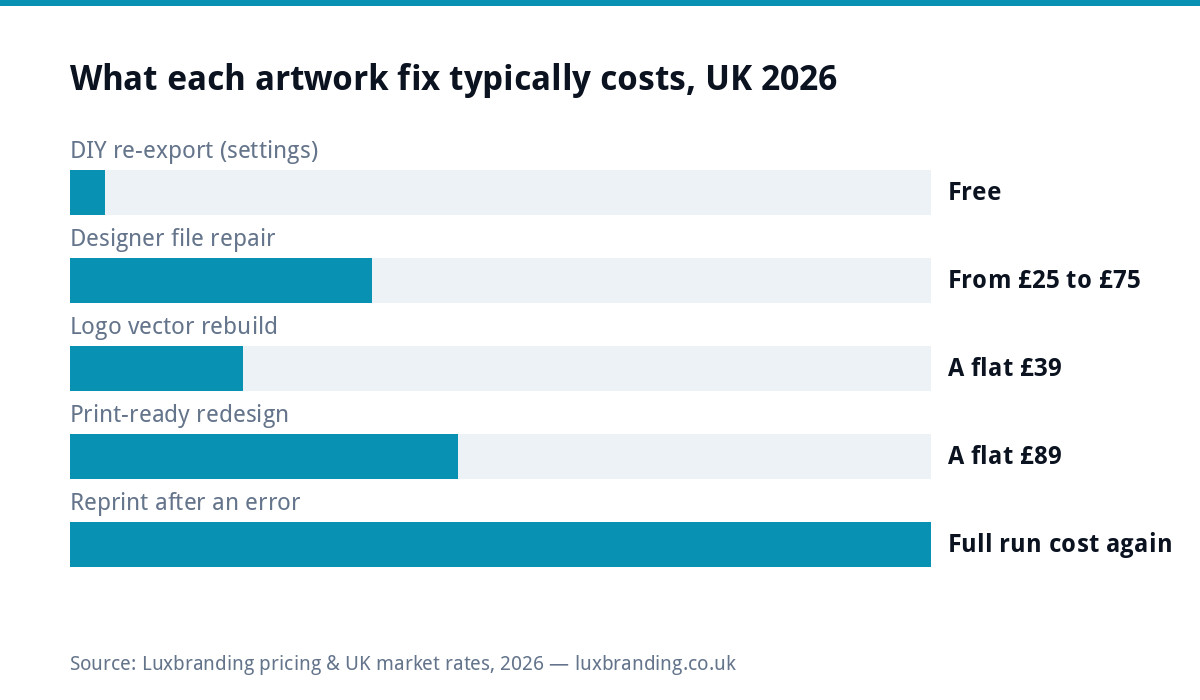
When a printer rejects your artwork, the fix costs between £0 and £89 in the UK. Roughly half of rejections are re-export problems you can fix free in ten minutes with the right settings. Low-resolution images and missing bleed are the usual culprits; a proper vector rebuild of a logo costs £79 for one layout (£39 per additional layout), professional repair of a supplied file typically runs £25 to £75 in the market, and having the piece redesigned print-ready from scratch costs £89 at our flat rate. The expensive version is ignoring it: a reprint after something slips through costs the full print run again.
Decoding the rejection email
| What they said | What it means | Typical fix |
|---|---|---|
| Resolution too low / 72dpi | Images will print blurry | Re-export at 300dpi or replace images |
| No bleed / add 3mm bleed | Risk of white slivers at edges | Extend artwork 3mm past trim, re-export |
| RGB file supplied | Colours will shift when converted | Convert to CMYK, check the shift |
| Fonts not embedded | Text may reflow or substitute | Embed or outline fonts, re-export |
| Transparency issues | Effects may flatten unpredictably | Flatten transparency on export |
| Logo is a small JPG | Cannot scale cleanly | Vector rebuild, £79 |
Resolution: why 72dpi fails on paper
Screens are forgiving at 72 pixels per inch; print is not. Paper needs around 300dpi at final size, so an image that fills your screen can still print as a postage stamp or a blur. The trap is enlarging: a photo that is fine at business-card size becomes soft on an A3 poster. Check the effective resolution at the size you are printing, not the file’s native number, and never scale a small logo up. If the only logo you have is a small JPG, that is a rebuild job, and our £79 vector rebuild service exists for exactly this.
Bleed and safe area, explained in one paragraph
Guillotines are accurate to a millimetre or two, not perfectly. Bleed is your artwork extended 3mm past the trim line so a slightly deep cut shows your background, not white paper. Safe area is the opposite: keep text and logos 3mm inside the trim so a shallow cut never clips them. Most rejected flyers fail one or both. Set document bleed at 3mm before you design, not after, and export with crop marks when asked.
CMYK vs RGB: the colour shift nobody warned you about
Screens mix light (RGB); presses mix ink (CMYK). Vivid oranges, bright blues and neon greens simply do not exist in ink, so files supplied in RGB get converted, and the printer makes the conversion choices, not you. Convert yourself before export, look at what dulled, and adjust while you still can. Our companion guide to why print colours do not match the screen goes deeper on managing the shift.
Fonts: embedded, outlined or substituted
If a font is not embedded in your PDF, the print house’s system substitutes whatever it has, and your carefully chosen type reflows. Export settings handle embedding automatically in most tools; the nuclear option is converting text to outlines, which locks the shapes but makes later edits impossible. Keep an editable master, outline the print copy. Licensing can also block embedding on some fonts, which is worth knowing before you build a brand on one.
Transparency and overprint surprises
Drop shadows, glows and semi-transparent overlaps get flattened at print time, and cheap export paths flatten them badly: white boxes behind shadows, hairlines around effects. Flatten transparency in your export settings and inspect the resulting PDF at high zoom. Overprint is the subtler cousin, where overlapping inks combine instead of knocking out; if you have never set overprint deliberately, make sure your export is not doing it accidentally. Adobe’s own print production documentation covers both checks.
When the rejected file is an AI-made logo
A growing share of rejections start with a logo made in an AI image tool. The printer’s email usually says one of three things: the resolution is too low, the file is not vector, or the text is not outlined. With an AI logo all three come from the same root: the tool produced a picture, not artwork. There is no layer to fix, no font to outline and no resolution setting to change.
Check any “SVG” or “PDF” the tool offered too. If it only wraps the same flat image, the printer will reject it for the same reason. The fix that works for every printer after this one is a hand redraw as true vector, £79 for one layout, with the garbled AI lettering respelt in a real font so it can be outlined.
What each fix costs
How to resupply fast
Reply to the printer asking for their spec sheet if they have not sent one: trim size, bleed, colour profile, PDF standard. Fix in the source file, never by editing the rejected PDF. Export fresh, run their preflight again if they offer an upload checker, and rename the file with a version number so nobody prints the old one. Total elapsed time for a settings-level fix is usually under half an hour once you know which error you are correcting.
DIY re-export or pay a designer?
Re-export yourself when the source file is yours and the error is settings: bleed, colour mode, embedding, flattening. Pay for a fix when the source file is missing, the logo only exists as a small raster, or the layout itself was built at the wrong size. Market rates for a professional file repair run £25 to £75 depending on surgery required; a full print-ready redesign of a flyer is £89 flat with us, which often costs less than two rounds of failed DIY resupply against a deadline. Print industry guidance from the BPIF is a useful reference for what professional print files should contain.
The spec cheat sheet printers expect
| Spec | Standard value | Why |
|---|---|---|
| Resolution | 300dpi at final size | Sharp images on paper |
| Bleed | 3mm all edges | Survives guillotine tolerance |
| Safe area | 3mm inside trim | Text never clipped |
| Colour | CMYK | Presses print ink, not light |
| Fonts | Embedded or outlined | No substitution surprises |
| Format | Print PDF, crop marks if asked | The standard hand-off |
Questions to ask before you resupply
One email saves a second rejection: which check failed exactly, and is there a full preflight report? What trim size are you printing, and does my document match it? Which colour profile do you want the file converted to? Do you need crop marks and how much bleed? Is there an upload checker I can run before formally resupplying? Printers answer these all day and would far rather answer them than reject the same file twice; the ones who cannot answer them clearly are telling you something useful about the print house too.
Worked example: the van decal deadline
A landscaper booked a van wrap slot, and the sign shop rejected his artwork the Thursday before: logo was a 40KB JPG from an old email, no vector anywhere. The £79 rebuild recreated the mark as clean vector paths on Friday, the sign shop had scalable files the same afternoon, and the Monday slot survived. The £79 was not the real saving; rebooking a wrap bay three weeks out and lettering a van that earns quotes daily was.
Large format plays by different rules
Banners, van wraps and signage relax the resolution rule and tighten everything else. Viewing distance does the forgiving: a banner read from five metres prints acceptably from 100 to 150dpi at full size, which is why your file is not automatically doomed. But large format often wants artwork at scale, sometimes set up at one tenth size with resolution multiplied, and sign shops frequently ask for vector wherever possible because vector scales infinitely. This is exactly where small JPG logos fail hardest and where the £79 vector rebuild earns its keep. Always ask the large-format house for their template before designing; the ones with wrap templates for your exact van model save you a day of guesswork.
Prevention: the print-ready checklist
Before any file goes to any printer: 300dpi effective resolution, 3mm bleed, CMYK, fonts embedded or outlined, transparency flattened, exported as PDF, checked at 200% zoom. Our guide to print-ready artwork in the UK expands each step, and if you would rather never think about any of this, our print-ready artwork service takes a file and returns one your printer accepts first time. Budgets for the design itself live in our flyer design cost guide and the full price list.
Get the UK Print-Ready Artwork Checklist (free)
A one-page checklist for any UK designer or printer covering CMYK, bleed, fonts and resolution. Saves you the pre-press fix-up fees.
No spam. UK GDPR compliant. We only use your email to send this resource, unless you tick the box to hear from us.
Frequently asked questions
Why did the printer reject my artwork? +
The usual reasons: images below 300dpi, missing 3mm bleed, RGB colour instead of CMYK, fonts not embedded, or unflattened transparency. The rejection email normally names the check that failed; each has a specific fix.
How much does it cost to fix rejected print artwork? +
Often £0: about half of rejections are export settings you can correct yourself. A vector logo rebuild costs £79 for one layout, professional file repair runs £25 to £75 in the market, and a full print-ready redesign of a flyer is £89 flat.
What does adding bleed mean? +
Extending your artwork 3mm past the trim line so a slightly deep guillotine cut shows background instead of white paper. Pair it with a 3mm safe area inside the trim so text never gets clipped.
Why do my printed colours look duller than on screen? +
Screens mix light (RGB), presses mix ink (CMYK), and vivid RGB colours have no ink equivalent. Convert to CMYK before export so you control the shift instead of leaving the conversion choices to the print house.
My logo is only a small JPG. Can it be printed? +
Not cleanly at size. Raster logos blur when scaled. A vector rebuild recreates the mark as scalable paths that print sharp at any size, from business card to van wrap, and costs £79 for one layout.