Quick answer
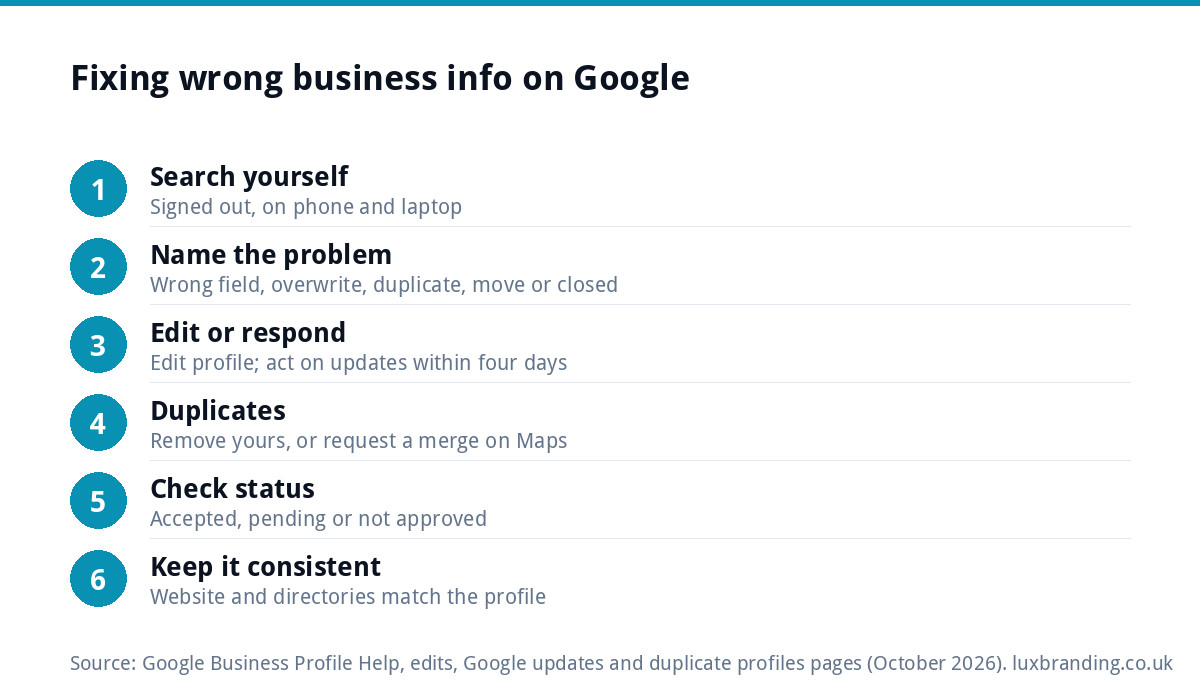
Sign in to the Google account that manages your Business Profile, open Edit profile and correct the wrong field. Google reviews every edit: most go through in about 10 minutes, some take up to 30 days. If Google or the public changed it, accept or reject the update within four days of the notification.
That fixes the simple cases. The harder ones (a duplicate listing, an old address after a move, a profile marked permanently closed) each need a different route, and the wrong route can make things worse. This guide shows you how to tell which problem you have, the fix for each, what Google itself says about timings, and a short monthly routine that stops it coming back.
First, work out which problem you have
Search your business name on Google and on Google Maps, on a phone and a laptop, while signed out or in a private window. That shows you what customers see, not what your dashboard says. Then match what you find to one of these:
- A field is simply wrong: opening hours, phone number, business name or address. Nobody else touched it; it was entered wrong or never updated.
- Your correct details were overwritten: you set it right, and it changed without you doing anything. That is a Google update or a public suggested edit.
- Two listings for one business: one may have old details, the wrong pin or a handful of old reviews.
- An old address after a move, or the listing now says permanently closed.
- The website button goes to the wrong place: an old domain, a dead page or someone else’s site.
If you cannot sign in to the profile at all, or Google has suspended it, that is a different problem. Our guide to a suspended Google Business Profile covers that route, and if your reviews have vanished rather than your details, see why Google reviews disappear.
Wrong hours, phone, name or address
This is the easiest fix and the one most people get stuck on only because they edit from the wrong account.
- Sign in with the Google account that owns or manages the profile. If you are not sure which one that is, search your business name on Google while signed in to each account you use; the one that shows the management panel is the right one.
- Select Edit profile and correct the field. For hours, check special hours too, because a bank holiday entry from last year can make you look closed today.
- Save, then check the edit status. Google lists each edit as accepted, pending or not approved.
Google’s help page on what happens to your Business Profile edits says edits on a verified profile are reviewed against its guidelines, usually take up to 10 minutes, and sometimes take up to 30 days. It also says Google might not approve a change if it cannot confirm it is accurate. That is why your website, your directories and your profile should all say the same thing: they are the evidence Google checks against.
Name edits deserve care. Use your real business name as it appears on your shopfront, van and paperwork. Adding keywords or a town to it is a risk we would not take: Google reviews every edit against its guidelines and can decline a change it cannot confirm.
When Google or the public changes your details
If you set your hours correctly and they changed by themselves, someone else’s information won. Google’s page on Google updates on your Business Profile explains that Google gathers information from sources such as user reports and licensed content, and may update your profile if those sources say your details are incorrect or outdated.
How to spot and handle it:
- Open Edit profile. Google shows a notification at the top when there are updates, and information it has changed appears in blue.
- Review each suggestion. Once notified, you have four days to accept or reject it.
- If you ignore it, Google says it may publish the update automatically if other publicly available information, such as your website, supports it.
- Google can also apply some suggested edits without prior review, so a notification is not guaranteed. You can always correct the field yourself.
The lesson: the four-day window is short, so make sure the email address on the profile is one you read. And if your website footer still shows old hours, Google may side with the website over you.
Duplicate Google listings
A duplicate usually comes from someone creating a second profile years ago, a previous manager, an old address, or a customer suggesting your business as a new place. Google’s help on resolving duplicate profiles is clear: you can have only one Business Profile for each business, and a profile treated as a duplicate will not show on Search or Maps.
Which fix depends on who controls the duplicate:
- You created it by mistake and manage both: remove the duplicate. Google says this does not affect your verified listing, but removing it deletes all of its content and linked managers, so be certain you pick the right one. Keep the verified profile.
- Both exist on Maps and you only manage one: request a merge by suggesting an edit on Google Maps. Google says merged profiles have their reviews combined, replies to reviews may be lost, and all merge requests are subject to review. It gives no timeline for that review.
- Someone else owns the profile: request ownership. Google says the current owner has three days to respond, and if there is no response after three days you may have the option to claim it.
Old address after a move, or marked permanently closed
Moving premises is where most listings go wrong. If you are staying the same business at a new address, edit the business location in the profile rather than creating a new listing, and update your website and directories the same day.
If you are a service-area business (a plumber or a mobile mechanic, say) and customers do not visit you, Google lets you hide your address and list the areas you serve instead. Only do this if you genuinely do not receive customers at the address.
A listing showing permanently closed by mistake can be reopened from the hours section of Edit profile. There is one trap. Google’s help on reopening says that if your business was marked permanently closed as part of a location or name change, you should not reopen it; instead add a new business, verify it, and contact Google if you want your reviews moved across.
Wrong website link
A wrong website link costs you enquiries quietly, because nobody tells you the button went nowhere. Check it on your phone, then:
- Correct the website field in Edit profile, and any appointment or menu links that sit separately.
- If you have changed domain, make sure the old domain redirects to the new one, so links from older directories still land somewhere useful.
- Point the profile at the most useful page. Your homepage is usually right; a location or service page works if the business has several.
If the link is right but your new site is not appearing in Google at all, that is an indexing problem, covered in our guide to a website not showing on Google.
Problem, cause, fix and how long
Timings below are only those Google’s own help pages state. Where Google gives none, we say so rather than guess.
| Problem | Usual cause | Fix | How long (per Google) |
|---|---|---|---|
| Wrong hours, phone or name | Entered wrong or never updated | Edit profile, save, check edit status | Usually up to 10 minutes; sometimes up to 30 days |
| Correct details overwritten | Google update or public suggested edit | Review the notification; accept or reject; correct the field | Four days to respond once notified |
| Duplicate you created | Second profile made by mistake | Remove the duplicate, keep the verified one | No timeline given |
| Duplicate you do not manage | Old profile, old address, public suggestion | Request a merge via Google Maps | Subject to review; no timeline given |
| Profile owned by someone else | Former manager or previous owner | Request ownership | Owner has three days to respond |
| Old address after a move | Location never edited | Edit the business location; update website and directories | Usually about 10 minutes; up to 30 days |
| Marked permanently closed | Mistaken edit or report | Reopen via hours, unless the closure was part of a move or name change | No timeline given |
| Wrong website link | Old domain or dead page | Edit the website field; redirect the old domain | Same review as other edits |
A monthly routine that stops it happening again
Most wrong information comes back because nobody checks. Ten minutes a month is enough for a small business:
| Check | What to look for | How often |
|---|---|---|
| Search yourself signed out | Name, hours, phone, pin and website as a customer sees them | Monthly |
| Edit profile notifications | Blue fields and pending Google updates | Weekly, or when Google emails you |
| Special hours | Bank holidays and seasonal closures set ahead | Before each holiday |
| Website footer and contact page | Same hours, phone and address as the profile | Whenever anything changes |
| Main directories | Old addresses or numbers on listings you control | Every quarter |
| Managers and owners | Former staff or old agencies still with access | Every quarter |
The website and directory checks matter more than they look. Google says it may publish an update when other public information supports it, so consistent details everywhere protect your profile. If your name, logo or details already differ from one place to the next, our guide to a brand that looks inconsistent everywhere explains how to pull it back into line. For the wider job of making the profile work harder, rather than just correct, read our Google Business Profile optimisation guide or work through the free GBP optimisation checklist.
When to get help
Most of the fixes above you can do yourself in an evening. Get help when:
- edits keep getting rejected and you cannot see why;
- you have several duplicates, or a duplicate with reviews you want to keep;
- a move or rename has left you unsure whether to edit, reopen or start a new profile;
- the profile is correct but still brings in few calls.
Our Google Business Profile setup and optimisation is £199 and covers categories, keywords, photos, review strategy and tracking, so the profile is set up properly once rather than patched. If you are comparing options first, our breakdown of Google Business Profile setup costs sets out what you would pay elsewhere, and all of our prices are on the pricing page. You can order online, or email us at support@luxbranding.co.uk with a link to your profile and what is wrong.
Get the UK SEO DIY Audit Checklist (free)
A 32-point checklist UK SMEs can run against their own website in an afternoon. Surfaces the quick wins before paying for a paid audit.
No spam. UK GDPR compliant. We only use your email to send this resource, unless you tick the box to hear from us.
Frequently asked questions
Why does Google keep changing my opening hours? +
Google gathers information from sources such as user reports and licensed content, and may update your profile if those sources say your details are wrong or outdated. Check Edit profile for blue fields and notifications, accept or reject updates within four days, and make sure your website shows the same hours, because Google may publish an update that public information supports.
How long does it take for Business Profile edits to show on Google? +
Google's help says edits to a verified profile are reviewed against its guidelines and usually take up to 10 minutes, but sometimes take up to 30 days. Your edit status shows as accepted, pending or not approved. Google may not approve a change if it cannot confirm the information is accurate, so keep your website and directories consistent.
How do I get rid of a duplicate Google listing? +
If you created the duplicate by mistake and manage it, remove it and keep the verified profile; removal deletes all its content and managers. If both listings exist on Maps and you only manage one, request a merge by suggesting an edit on Google Maps. Google says merged profiles combine reviews, review replies may be lost, and merges are reviewed.
My business moved. Should I reopen the old listing or create a new one? +
If you are the same business at a new address, edit the business location on your existing profile. But Google's help says that if the business was marked permanently closed as part of a location or name change, you should not reopen it; add a new business, verify it, and contact Google if you want your reviews moved across.
Can you fix my Google Business Profile for me? +
Yes. Our Google Business Profile setup and optimisation is £199 and covers categories, keywords, photos, review strategy and tracking, so the profile is set up properly rather than patched. Order online, or email us at support@luxbranding.co.uk with a link to your profile and a short note of what is showing wrong, and we will tell you what is involved.