
Quick answer
Use a 301 redirect when a page has moved for good, such as a new address, a merged page or a new domain: Google treats the new URL as the one to show. Use a 302 only for a short, temporary move. Mixing them up after a £499 redesign can quietly cost rankings that took years to build.
Redirects are one of those technical details nobody thinks about until traffic drops after a new website goes live. This guide explains the difference in plain English, when each one is right, the mistakes that cost small businesses search visibility, and a simple redirect map you can hand to whoever builds your next site.
What a redirect actually is
A redirect is an instruction from your website that says “the page you asked for is somewhere else; go here instead”. Visitors barely notice: they type or click one address and land on another. Behind the scenes, the server sends a short status code that explains why, and that code is what search engines pay attention to.
The two codes small businesses meet most often are 301 and 302. The Mozilla developer documentation defines a 301 Moved Permanently response as meaning the resource has been permanently moved to the new address, and a 302 Found response as meaning it has been temporarily moved. Permanent versus temporary: that is the whole distinction, and everything else follows from it.
301 vs 302 at a glance
| 301 (and 308) | 302 (and 307) | |
|---|---|---|
| Meaning | Moved permanently | Moved temporarily |
| What Google shows in results | Usually the new URL | Usually still the old URL |
| Signal to Google | The new URL should be the main one | The old URL is still the main one |
| Typical uses | New page addresses, merged pages, new domain, http to https | Seasonal offer, short maintenance, A/B test |
| Risk if used wrongly | Hard to undo once Google has switched | Old URL lingers in results for months |
| Browser caching | Often cached by browsers | Not usually cached |
The 307 and 308 codes are close cousins: 308 behaves like a permanent redirect and 307 like a temporary one. For a small business website, 301 and 302 cover almost every case.
How Google treats each one
Google’s own guidance on redirects and Google Search is clear. Permanent redirects (301 and 308) tell Google that the target should be the canonical, meaning the version to show in results. Temporary redirects (302, 303 and 307) are followed, but they are not a canonical signal, so the original page generally stays in the results.
Google also advises using permanent redirects only when you are sure the move will not be reversed. In practice that means a 301 is a commitment: once Google has swapped the old URL for the new one, changing your mind takes time to unwind.
For a small business, the takeaway is simple. If a page has moved and is not coming back, use a 301 so the new page inherits the old page’s place in search. If you use a 302 for a permanent move, Google may keep showing the old address, and the new page may struggle to rank in its own right.
When to use a 301
- A new website with different page addresses. If /our-services/boilers.html becomes /services/boiler-installation/, the old address should 301 to the new one.
- Merging pages. Two thin pages about the same service merged into one strong page: the retired one redirects to the survivor.
- Changing domain. A rebrand from oldname.co.uk to newname.co.uk needs every old page redirected to its new equivalent, not just the homepage.
- Moving to https. Every http address should 301 to its https version.
- Tidying www and non-www. Pick one version and 301 the other to it.
- Deleting a page that had value. If an old page had links or traffic, redirect it to the closest relevant page rather than letting it return an error.
When a 302 is the right call
Temporary redirects have a narrower job. Use a 302 when the original page will be back and you want Google to keep it in the results:
- A seasonal page, such as sending your main offers page to a Christmas offers page for December.
- A product that is temporarily out of stock, pointed at a related product for a few weeks.
- Short maintenance on one section while a page is rebuilt.
- Testing a new version of a page against the old one.
The test is a single question: will the original address be used again soon? If yes, 302. If no, or if you are not sure and it has been months, it should probably be a 301.
Redirect mistakes that cost rankings
Most redirect damage on small business sites comes from a handful of repeat mistakes, usually made in the rush of a website launch.
- No redirects at all after a redesign. Every old address returns a “page not found” error. Visitors from Google and old links hit a dead end, and the pages that ranked are effectively deleted. This is one of the most common reasons for a sudden drop in website traffic after a new site goes live.
- Everything redirected to the homepage. It looks tidy, but Google can treat mass redirects to an unrelated page much like errors. Redirect each old page to its closest match.
- 302s left in place for good. Some systems use 302 by default. A “temporary” redirect that has been running for two years should be a 301.
- Redirect chains. Page A goes to B, B goes to C, C goes to D. Each hop slows the visit and risks losing signals. Point A straight at D.
- Redirect loops. A goes to B and B goes back to A. The browser gives up with an error.
- Forgetting images and PDFs. If brochures or price lists had their own addresses and links, they need redirecting too.
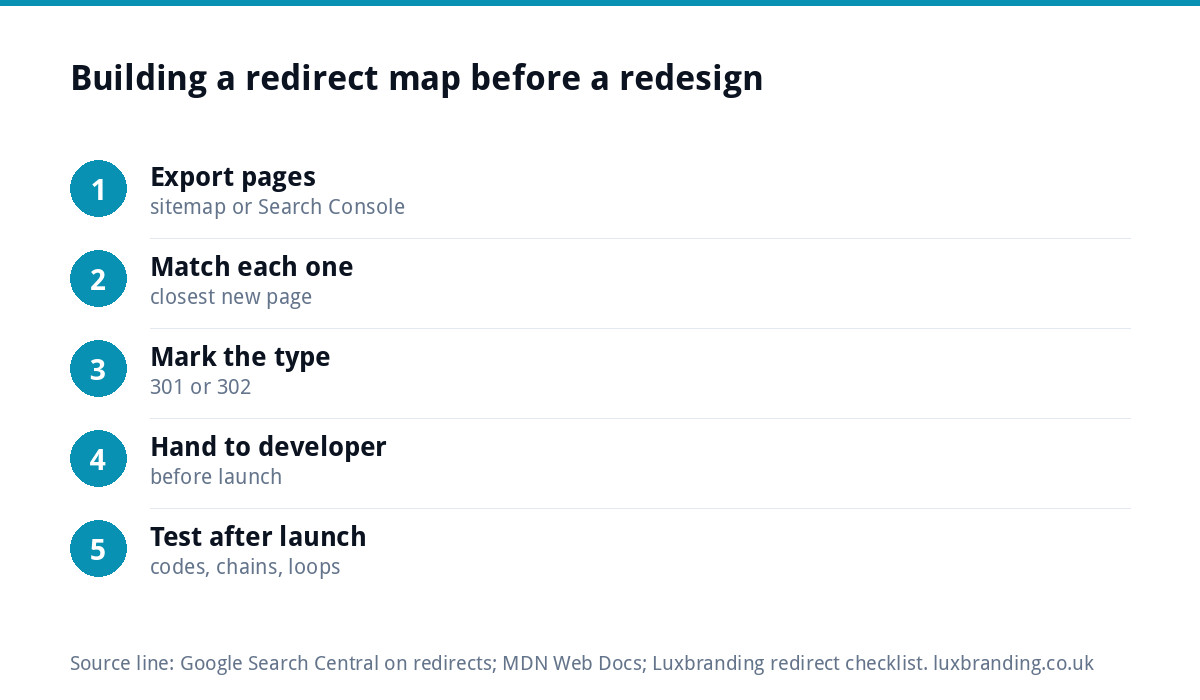
Building a redirect map before a redesign
The single most useful document in any website rebuild is a redirect map: a simple spreadsheet listing every old address and where it should go. Build it before the old site comes down.
| Old URL | New URL | Type | Reason |
|---|---|---|---|
| /services.html | /services/ | 301 | New address structure |
| /boiler-repairs.html | /services/boiler-repair/ | 301 | Same page, new address |
| /combi-boilers.html | /services/boiler-installation/ | 301 | Merged into a stronger page |
| /news/2019-open-day.html | /about/ | 301 | Old news, closest relevant page |
| /offers/ | /offers/christmas/ | 302 | Seasonal, reverts in January |
To build it: export a list of your current pages (from your sitemap or Google Search Console’s Performance report, which shows the pages that actually get impressions), match each one to a new address, and mark the type. Give the finished map to your developer and check it after launch. Our website launch checklist includes this step alongside the others that are easy to forget.
How redirects are set up
How you add a redirect depends on how your site is built.
- WordPress: redirects can be added at server level by your host or developer, or managed inside WordPress. Ask whoever maintains the site which they use, so redirects live in one place rather than two.
- Hosting control panels: many hosts have a redirects tool where you enter the old path, the new address and the type.
- Website builders: Wix, Squarespace and Shopify each have a URL redirect setting in their admin area.
- Domain changes: handled at server level, so that every old page maps to its new equivalent rather than all landing on the new homepage. Our guide to UK domain names covers the wider decisions.
How to check a redirect is working
- Visit the old address in a private browser window and confirm you land on the right new page.
- Check the code. In Chrome, open Developer Tools, go to the Network tab, tick “Preserve log” and load the old address. The first line shows 301 or 302.
- Check for chains. If you see more than one redirect before the final page, shorten it.
- Use URL Inspection in Google Search Console on important new pages a few weeks after launch to confirm Google has picked them up.
Getting help
If traffic fell after a new site launched, missing or wrong redirects are one of the first things to check, along with the issues in our guide to a website not showing on Google. Our free SEO audit is a quick way to spot technical problems, and our SEO service at £249 a month covers technical health, including redirects, alongside rankings and content. When we build a custom WordPress website (£499 for up to 8 pages) to replace an old one, the build includes an SEO foundation (schema, meta and sitemap); whoever builds your next site, ask for a redirect map before launch. All our prices are on the pricing page.
Get the UK SEO DIY Audit Checklist (free)
A 32-point checklist UK SMEs can run against their own website in an afternoon. Surfaces the quick wins before paying for a paid audit.
No spam. UK GDPR compliant. We only use your email to send this resource, unless you tick the box to hear from us.
Frequently asked questions
What is the difference between a 301 and a 302 redirect? +
A 301 means a page has moved permanently, so Google treats the new address as the main one and usually shows it in results. A 302 means the move is temporary, so Google generally keeps the original address in results. Use 301 for permanent moves and 302 only when the original will return.
Does a 302 redirect hurt SEO? +
Not when it is used for a genuinely temporary move. The problem comes when a 302 is used for a permanent change: Google may keep showing the old address and the new page may struggle to take its place. If a temporary redirect has been running for months, it should usually be a 301.
Should I redirect old pages to my homepage? +
Only if the homepage really is the closest match. Sending every old page to the homepage looks tidy, but Google can treat mass redirects to an unrelated page much like errors. Redirect each old page to the new page that best covers the same topic, and keep a list of every redirect.
How do I check whether a redirect is a 301 or 302? +
Open the old address in Chrome with Developer Tools open on the Network tab and Preserve log ticked. The first entry shows the status code. Online header checkers do the same job. Check for chains too: one redirect straight to the final page is best.
Will I lose rankings when I redesign my website? +
Not if old addresses are redirected properly. Build a redirect map listing every old page and its new home, use 301s for permanent changes, and check them after launch. Our SEO service at £249 a month covers technical health, and our free SEO audit can flag problems quickly.