Quick answer
On a small budget, keep Google Ads simple: one or two Search campaigns, each with a handful of ad groups, one per service you want enquiries for. Give each ad group 5 to 15 closely related keywords, one strong responsive search ad and a landing page about that service. Add campaigns only when budgets or locations need separate control.
Most small accounts that struggle are not underfunded; they are over-structured. Twelve campaigns sharing £20 a day means none of them gathers enough data to learn. This guide sets out a structure that suits a small UK business, how to lay out ad groups, keywords and ads, the settings that quietly waste money, and when it is worth adding more campaigns.
The three layers in plain English
Google’s help page on account organisation describes Google Ads as three layers: the account, campaigns and ad groups.
- Account: your login and billing. One per business.
- Campaigns: each has its own budget and settings, including where ads show (locations, networks, schedule) and how bids work. Think of a campaign as a budget pot with rules.
- Ad groups: inside a campaign, each ad group bundles closely related keywords with the ads that answer them. Think of an ad group as one service, one message.
The practical rule follows from that: you split campaigns when you need different budgets or settings, and you split ad groups when you need a different message.
Why small budgets need fewer campaigns, not more
It is tempting to build a campaign for every service and every town. On a large budget that gives fine control. On a small one it backfires, for three reasons.
- Budget is spread too thin. A £20 daily budget across ten campaigns is £2 each, which may not buy a single click in a competitive trade.
- Nothing learns. Automated bidding needs conversion data. Ten campaigns with two enquiries each teach Google far less than one campaign with twenty.
- You cannot manage it. A busy owner can check two campaigns properly each week. Twelve get ignored.
Fewer, better-fed campaigns almost always beat many starved ones.
Four ways to structure a small account
| Structure | How it looks | Good for | Watch out for |
|---|---|---|---|
| One campaign, ad groups by service | 1 campaign; ad groups for each core service | Most small businesses, budgets under about £1,000 a month | Cannot give one service more budget than another |
| Two campaigns: core and secondary | Main earners in one, lower-priority services in another | Businesses with one service that pays far better | Keep keywords from overlapping between the two |
| Campaigns by location | One campaign per town or area | Firms with separate bases or very different prices by area | Splits data; rarely needed for one base |
| Campaigns by service and location | Every service in every town | Large budgets with staff to manage it | Far too fragmented for a small budget |
For most owners, the first structure is the right starting point, moving to the second once one service clearly earns more than the rest.
Ad groups: one service, one message
Each ad group should cover one service that a customer would search for in their own words. A heating engineer might have:
- Boiler repair
- Boiler installation
- Boiler servicing
- Central heating power flush
Not “Heating” as one big group, and not forty tiny groups for every variation of each phrase. The test is simple: could one ad and one landing page answer every keyword in the group well? If “boiler repair” and “new boiler quote” share an ad group, the ad cannot speak to both, and one of them gets a weak answer.
Use negative keywords at ad group level to keep searches in the right place. Adding “installation” as a negative in the repair group means installation searches go to the installation ad, not the repair one.
Keywords: how many, and which match types
Five to fifteen keywords per ad group is plenty. They should all describe the same service in the different ways people search for it: “boiler repair”, “boiler engineer”, “boiler not working”, “fix my boiler”.
On a small budget, phrase match is a sensible default. It gives you reach without opening the door to every loosely related search. Exact match is useful for your most valuable, highest-intent terms. Broad match reaches furthest but works best with plenty of conversion data and Smart Bidding, which a new small account does not have yet. Whatever you choose, a shared list of negative keywords for jobs, training and DIY searches should be in place from day one.
Ads: one strong responsive search ad per group
Responsive search ads let Google combine your headlines and descriptions in different orders. Google’s guide to responsive search ads allows up to 15 headlines and 4 descriptions, with a minimum of 3 headlines and 2 descriptions.
Use as many of those slots as you can fill with genuinely different messages:
- The service and the area (“Boiler Repair in Leeds”)
- Speed (“Same-Day Call-Outs Available”, only if true)
- Proof (“Gas Safe Registered Engineers”)
- Price clarity (“Fixed Call-Out Fee, No Surprises”, only if true)
- A clear next step (“Call Now for a Quote”)
One well-written ad per ad group, with its assets filled in (call, location, sitelinks), usually beats several half-finished ones on a small budget.
Settings that quietly waste money
Some default settings suit large advertisers better than a local business. Check these in every Search campaign:
- Location options: Google’s page on location targeting explains that the default reaches people in your area and people who have shown interest in it. For a local trade, choosing “Presence: people in or regularly in your targeted locations” usually cuts out clicks from people hundreds of miles away.
- Display Network: new Search campaigns can include the Display Network. For a local service business, untick it and run Search only until you have a reason not to.
- Search partners: worth testing later, but switch off at the start so you know where clicks come from.
- Ad schedule: if nobody answers the phone at 2am, consider limiting call ads to the hours you can take calls.
- Auto-applied recommendations: review them rather than letting changes go live automatically.
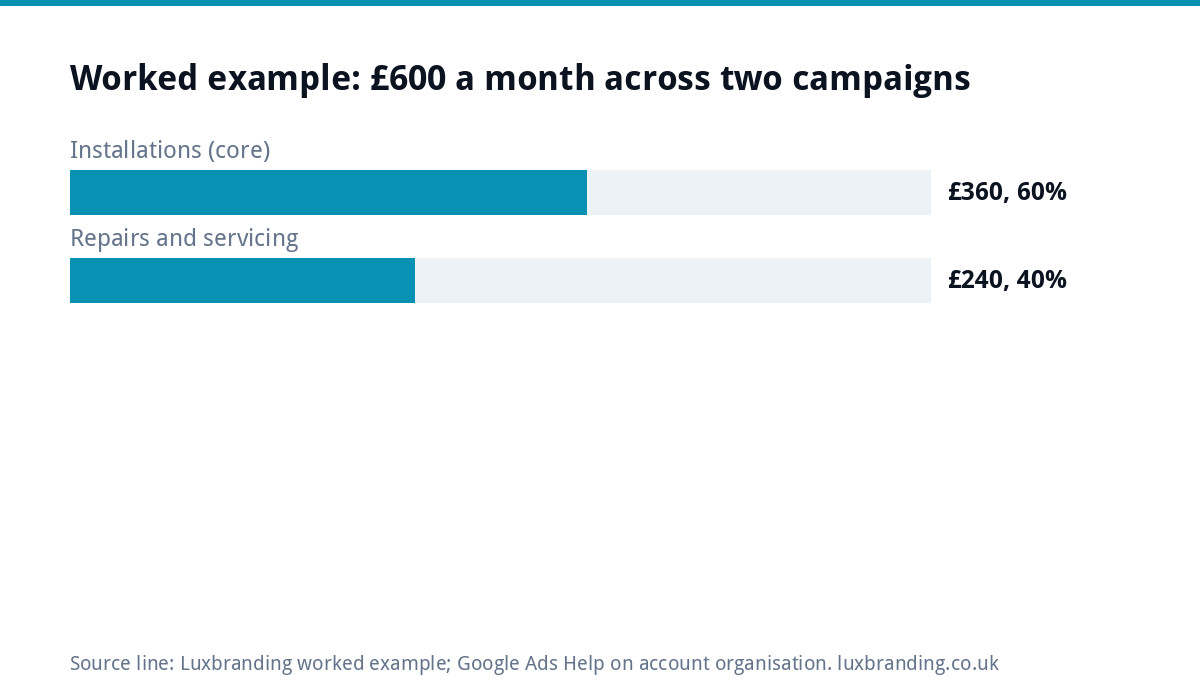
Worked example: a heating engineer with £600 a month
Take a heating engineer in Leeds with £600 a month to spend, roughly £20 a day. Boiler installations are worth far more than repairs, so the account uses the two-campaign structure.
| Campaign | Monthly budget | Share | Ad groups |
|---|---|---|---|
| Installations (core) | £360 | 60% | New boiler, boiler replacement, combi boiler installation |
| Repairs and servicing | £240 | 40% | Boiler repair, boiler service, power flush |
Each ad group sends people to a page about that service, not the homepage. Both campaigns share one negative keyword list. After two months, if installations produce enquiries at a better cost, more budget moves there. If one ad group gets almost no searches, it is merged into a neighbour rather than left empty. Search terms are checked weekly in both campaigns, and the shared negative list grows as new irrelevant searches appear.
When to add more campaigns
Split out a new campaign only when you need a separate budget or separate settings. The common good reasons:
- One service is starved of budget because another eats it all.
- You open a second base in a different town with different prices.
- You want to test a different bidding strategy without risking the main campaign.
- Your business name searches need their own small campaign so they do not mix with general searches.
“It feels more organised” is not a good reason on a small budget. And if clicks in your trade are so expensive that even a well-structured account struggles, it is worth comparing the cost of ranking for the same searches without paying per click. Our guide to how much SEO costs sets out the numbers for a small business.
The landing page matters as much as the structure
Structure is only half the job. A tidy account sending clicks to a page that does not mention the service searched for still wastes money. Each ad group should land on a page about that service, with the phone number visible and a short enquiry form. If you do not have those pages, a focused landing page is £199, or a one-page website is £299. Local customers will often check your Google Business Profile before calling, so keep that current too.
If you would rather hand the account over, our Google Ads management can run the account for you. Every price we charge is on our pricing page.
Related reading: Google Ads Quality Score Explained: 3 Parts to Improve
Get the UK SEO DIY Audit Checklist (free)
A 32-point checklist UK SMEs can run against their own website in an afternoon. Surfaces the quick wins before paying for a paid audit.
No spam. UK GDPR compliant. We only use your email to send this resource, unless you tick the box to hear from us.
Frequently asked questions
How many campaigns should a small business have in Google Ads? +
Usually one or two Search campaigns. Split into separate campaigns only when you need different budgets or settings, such as giving your most profitable service its own budget. Many campaigns on a small budget spread the money too thin and leave each one without enough data for bidding to learn.
What is the difference between a campaign and an ad group? +
A campaign holds the budget and settings: locations, networks, schedule and bidding. An ad group sits inside a campaign and bundles closely related keywords with the ads that answer them. Split campaigns for different budgets or settings, and split ad groups when you need a different message.
How many keywords should an ad group have? +
Five to fifteen is plenty for most small businesses. They should all describe the same service in different ways customers search for it, so one ad and one landing page can answer every keyword well. If two keywords need different answers, they belong in different ad groups.
Should I turn off the Display Network on a Search campaign? +
For a local service business starting out, usually yes. Running Search only keeps your budget on people actively searching for your service and makes the results easier to read. You can test other networks later, once you know what a good enquiry costs on Search alone.
Where should Google Ads send people? +
To a page about the exact service in the ad, not the homepage, with the phone number visible and a short enquiry form. If you do not have one, a focused landing page from Luxbranding is £199 and a one-page website is £299. Our full prices are on the pricing page.