
Quick answer
Quality Score is Google’s 1 to 10 rating of how relevant your keyword, ad and landing page are compared with other advertisers. It combines expected click-through rate, ad relevance and landing page experience. It is a diagnostic, not a direct auction input, but fixing those three things usually lowers what you pay per click.
This guide explains what each part means in plain English, how to find your scores, and the fixes that work for small accounts, in the order we would tackle them.
What Quality Score actually is
Google describes Quality Score as “a diagnostic tool meant to give you a sense of how well your ad quality compares to other advertisers”. Its help page on Quality Score says the score runs from 1 to 10 and is shown for each keyword, not for the account as a whole.
Think of it as a report card. A 3 tells you that, for that keyword, people searching are not finding your ad or your page as useful as your competitors’. A 7 or above tells you that you are roughly in line or better. The score itself does not change your bill. The things it measures do.
One point causes a lot of confusion. Google says plainly that Quality Score is not an input in the ad auction. What goes into the auction is Ad Rank, which uses Google’s live, search-by-search judgement of ad and landing page quality. Quality Score is a summary of that judgement averaged over past searches, which is why it is useful for spotting problems even though it is not the dial itself.
The three parts, in plain English
Each part is rated Above average, Average or Below average, based on how your ad compares with other advertisers whose ads showed for the same searches over the last 90 days.
| Part | What Google is asking | Typical cause of “Below average” |
|---|---|---|
| Expected click-through rate | How likely is someone to click this ad for this keyword? | Generic headline, no price or location, competitors look more relevant |
| Ad relevance | Does the ad match what the person searched for? | One ad covering many unrelated keywords |
| Landing page experience | Is the page useful and relevant to the person who clicked? | Sending everyone to the home page, slow mobile pages, no clear next step |
You can see each part by adding the Quality Score columns to your keywords table. Google’s guide to Quality Score for Search campaigns lists the column names, including “Landing Page Exp.”, and shows how to view the historic versions by day.
Why it still matters for your costs
Google’s page on Ad Rank lists what decides whether your ad shows and where: your bid, the quality of your ads and landing page, minimum thresholds, competition, the context of the search and the expected impact of assets such as call buttons and sitelinks. It also says that even if competitors bid more, you can still win a higher position at a lower price with highly relevant keywords and ads.
For a small business on a few hundred pounds a month, that is the whole game. You cannot outbid national firms. You can be more relevant than them for the specific jobs you do in the specific places you cover.
How to find your Quality Scores
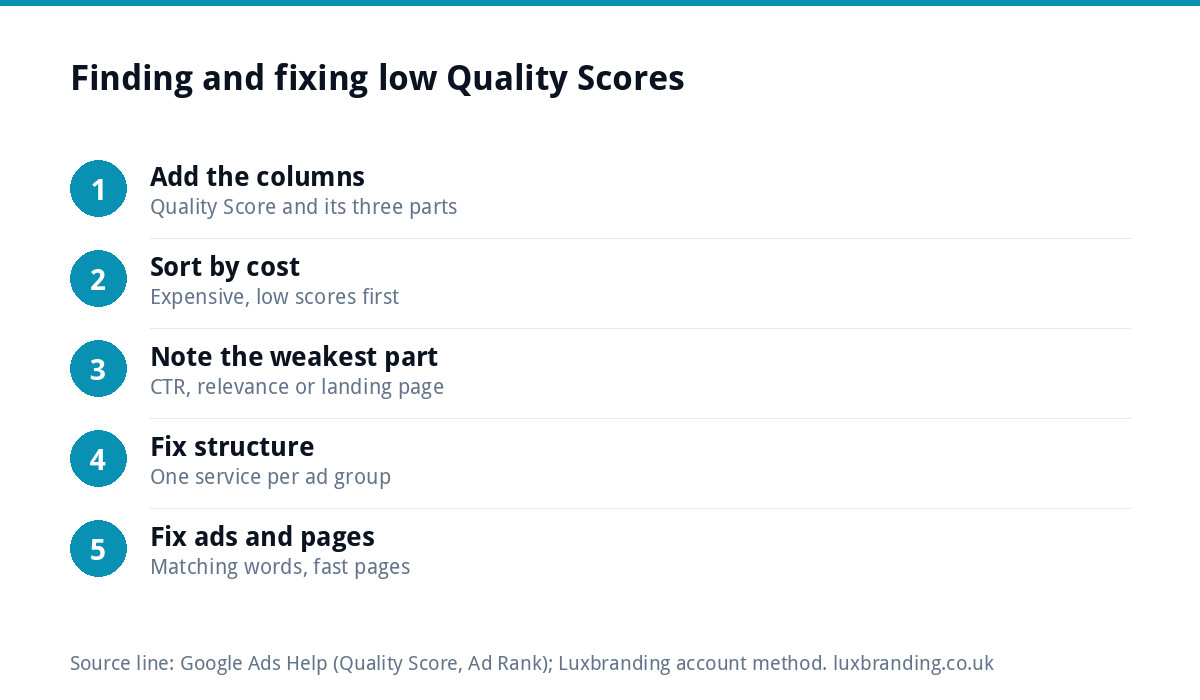
- In Google Ads, open Campaigns, then Keywords.
- Click the columns icon and choose Modify columns.
- Open the Quality Score section and add Quality Score, Exp. CTR, Ad relevance and Landing Page Exp.
- Sort by cost, highest first. Your expensive keywords with low scores are where the money leaks.
- Write down the weakest part for each of your top ten keywords. That tells you which fix to make first.
If a keyword shows a dash instead of a number, it has not had enough searches yet. Do not chase scores on keywords with a handful of impressions.
Fixing expected click-through rate
This is about making your ad the obvious one to click for that search.
- Put the job and the place in the headline. “Emergency Plumber in Leeds” beats “Professional Plumbing Services”.
- Give a reason to choose you. A fixed price, a same-day slot, a guarantee you actually offer, years trading.
- Use assets. Call buttons, sitelinks, callouts and your location make the ad bigger and more useful on a phone.
- Remove searches you do not want. Add negative keywords such as “jobs”, “course”, “DIY” and “free” so the ad stops showing to people who will never click.
Fixing ad relevance
Low ad relevance nearly always means an ad group trying to cover too much. If “boiler repair”, “bathroom fitting” and “blocked drain” all share one ad, that ad cannot match any of them well.
- Split keywords into tight groups, one service per ad group.
- Write ads that repeat the language of the keyword, naturally.
- Keep the number of keywords in each group small enough that one ad genuinely fits them all.
Fixing landing page experience
This is the part most small accounts neglect and the one with the biggest knock-on effect, because it also decides whether a click turns into a phone call.
- Send each ad group to the matching page. Boiler repair ads go to the boiler repair page, not the home page.
- Repeat the promise from the ad. If the ad says “fixed-price boiler service”, the page headline should say it too.
- Make it fast on a phone. Our guide to website speed for small businesses explains the checks, and speed optimisation is £99 if the site is the bottleneck.
- Make the next step obvious. A tap-to-call button and a short form near the top, both working. If enquiries vanish, check why contact forms stop working.
Where your current site has no page that fits a campaign, a dedicated page is often the fastest fix. Our landing page design is £199.
A worked example: one ad group split three ways
Take an electrician in Nottingham running a single ad group called “Electrician” with twenty keywords in it: fuse box replacement, EV charger installation, rewiring, socket installation, electrical safety certificates and more. One ad reads “Local Electrician, Fully Qualified, Call Today”, and every click lands on the home page. Most keywords show scores of 3 or 4, with ad relevance and landing page experience both below average.
The fix is structural rather than clever. The twenty keywords become three tight groups: consumer unit replacement, EV charger installation and landlord electrical certificates. Each group gets its own ad naming the job and the city, with a line on what the customer gets, and each ad points to a page about that one job with a call button at the top. Nothing about the budget changes.
What changes is that each searcher now sees an ad about the thing they typed and lands on a page about it. That is exactly what the three parts of Quality Score measure, so the scores tend to follow, and more importantly so do the phone calls. The same budget simply works harder.
Which fix to make first
| Your weakest part | First fix | Time to see a change |
|---|---|---|
| Expected CTR | Rewrite headlines with job, place and a reason to choose you | A few weeks of fresh data |
| Ad relevance | Split broad ad groups into one service each | Usually quickest to move |
| Landing page experience | Send each group to a matching, fast page | Slower, but the biggest effect on enquiries |
| All three low | Start with structure, then ads, then pages | Plan for one to two months |
The time column is a rule of thumb from running small accounts, not a Google figure. Scores update as new searches come in, so low-volume keywords move slowly.
Mistakes that waste money chasing the score
- Pausing every keyword under 5. A low-scoring keyword that brings profitable calls is still a good keyword.
- Stuffing the keyword into every line. Relevance is about matching intent, not repetition.
- Ignoring tracking. Quality Score tells you about clicks. Only conversion tracking tells you about calls and forms.
- Judging after a few days. Scores need volume. Make one change, then give it time.
When to get help
If your scores are mostly 3s and 4s and your cost per click keeps climbing, the account structure is usually the problem rather than your budget. Our Google Ads management is from £199 a month, with your ad spend paid directly to Google and no markup on it. We rebuild the structure, rewrite the ads, line each group up with the right page and set up tracking. Every price is on our pricing page.
Whether you hire help or not, treat Quality Score as a free monthly health check. It points straight at the part of your ads that is costing you most.
Get the UK SEO DIY Audit Checklist (free)
A 32-point checklist UK SMEs can run against their own website in an afternoon. Surfaces the quick wins before paying for a paid audit.
No spam. UK GDPR compliant. We only use your email to send this resource, unless you tick the box to hear from us.
Frequently asked questions
What is a good Quality Score in Google Ads? +
Scores run from 1 to 10 for each keyword. A 7 or above generally means your ad and landing page are in line with or better than competitors for that search. Scores of 3 or 4 point to a clear weakness. Judge keywords with real volume, and never pause a profitable keyword just because its score is low.
Does Quality Score affect how much I pay per click? +
Not directly. Google says Quality Score is a diagnostic and not an input in the ad auction. The auction uses Ad Rank, which includes live judgements of ad and landing page quality. Because Quality Score summarises those same factors, improving expected click-through rate, ad relevance and landing pages usually lowers costs.
How long does it take to improve Quality Score? +
It depends on search volume. Scores update as new searches come in, so busy keywords can move within a few weeks of a change, while low-volume keywords move slowly. Make one change at a time, such as splitting an ad group or fixing a landing page, and give it time before judging.
Why does my keyword show no Quality Score? +
A dash instead of a number means the keyword has not had enough searches for Google to calculate a score. It is common for small local accounts. Focus on the keywords that spend the most money and have real impressions, and let the quieter ones build data before you change them.
Can Luxbranding manage my Google Ads? +
Yes. Our Google Ads management is from £199 a month, with your ad spend paid directly to Google and no markup on it. We restructure ad groups, rewrite ads, match each group to the right landing page and set up conversion tracking. A new landing page, if you need one, is £199.