Quick answer
A business out-of-office reply should say when you are back, what happens to the message, and where to go if it cannot wait: a colleague, an emergency number or a booking link. Keep it under 80 words, avoid saying your premises are empty, and set the same dates on email, WhatsApp and your Google profile.
Below are eight templates you can copy for the situations small businesses and trades actually face, from a week’s holiday to the Christmas closure, plus a setup table for Gmail, Outlook and WhatsApp Business.
Why a lazy out-of-office loses work
“I’m away, back soon” tells a new customer two things: nobody will help them this week, and they should try someone else. For an existing customer it is merely irritating. For a new enquiry it is often the end of the conversation.
A good auto-reply does the opposite. It acknowledges the message, sets a clear expectation, and gives the customer a next step that keeps them with you. The extra thirty seconds it takes to write one properly can keep a job that would otherwise have gone to the next result on Google.
What every out-of-office reply needs
| Element | Example | Why |
|---|---|---|
| Return date | “I’m back on Monday 11 January” | A day and date, not “next week” |
| What happens to the message | “I’ll reply to every message by Wednesday 13th” | Tells them they do not need to chase |
| Who else can help | “For bookings, contact [name] at [email]” | Keeps urgent work inside the business |
| Emergency route, if you offer one | “For a genuine emergency, call [number]” | Stops panicked customers going elsewhere |
| A self-service option | “You can book a date online here: [link]” | Lets keen customers commit now |
Leave out where you are and why. “On holiday in Spain for two weeks” is information nobody needs, and for a sole trader it also tells strangers the house or workshop may be empty.
Templates 1 to 3: holidays and closures
Template 1: a holiday, sole trader
Subject: Thanks for your message
Hi, thanks for getting in touch with [business]. I’m away until [day, date] and will reply to every message by [day, date]. If you’re after a quote, send over a few photos and your postcode and I’ll have everything I need when I’m back. For an emergency with existing work, call [number]. Thanks, [name]
Asking for photos and a postcode turns a dead week into a head start: the customer feels progress, and you return to enquiries you can quote straight away.
Template 2: the Christmas closure
Subject: Our Christmas opening hours
Thank you for your email. [Business] is closed from [date] and reopens on [date]. Messages received while we’re closed will be answered in the order they arrived, starting on [date]. If you’d like to book work for the new year, you can choose a date here: [link]. Wishing you a good Christmas, the [business] team.
Check the dates against the official UK bank holidays. In England and Wales, Christmas Day 2026 falls on a Friday and the Boxing Day bank holiday moves to Monday 28 December, which changes when many businesses reopen.
Template 3: on site all day
Hi, thanks for your message. I’m on a job today with limited signal, so I’ll reply this evening. If it’s urgent, a text to [number] reaches me fastest. [name], [business]
This one is worth leaving on during busy weeks. It sets a same-day expectation, which most customers find perfectly reasonable.
Templates 4 to 6: teams and longer absences
Template 4: a colleague is covering
Thanks for your email. I’m out of the office until [date]. [Colleague name] is looking after my clients and bookings while I’m away and can be reached at [email] or [number]. Anything that can wait, I’ll pick up when I’m back. Kind regards, [name]
Template 5: unexpected absence
Thank you for your message. I’m unexpectedly away from work at the moment. Your email has been received and [colleague or office] will be in touch within [time]. If your enquiry is urgent, please call [number]. Kind regards, [business]
No explanation is needed. “Unexpectedly away” covers illness, family matters and anything else, without inviting questions.
Template 6: a long absence, such as parental leave
Thank you for your email. I’m on leave until [month, year] and am not checking messages. Please contact [colleague] at [email] for anything to do with [area of work], or [general address] for everything else. Your message has not been forwarded automatically, so please resend it to them.
The last sentence matters. Many people assume an auto-reply means someone else has the message.
Templates 7 and 8: WhatsApp and voicemail
Template 7: WhatsApp away message
Thanks for your message! We’re closed right now and will reply from [time] on [day]. To get a quicker quote, send a couple of photos and your postcode. For emergencies call [number].
The WhatsApp Business app lets you set away messages that respond automatically outside your business hours, along with a greeting for new customers and quick replies for common questions.
Template 8: voicemail greeting
“You’ve reached [business]. We’re closed until [day], but leave your name, number and a short message about the job and we’ll call you back on [day]. For emergencies, call [number]. Thanks.”
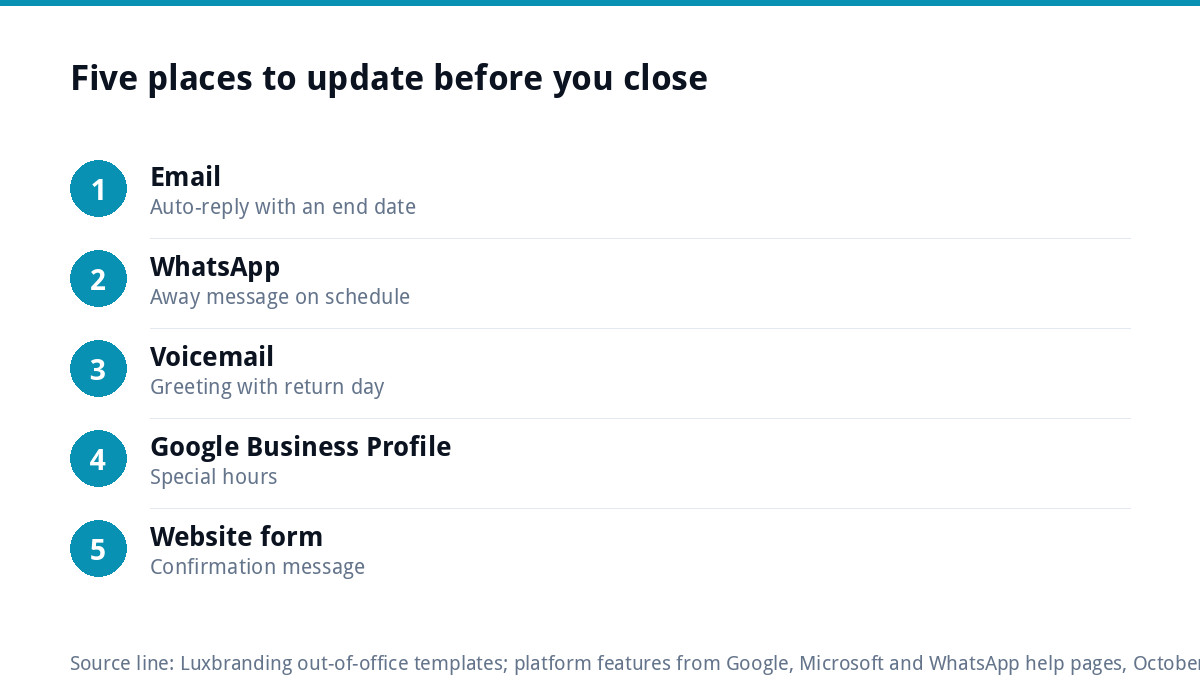
How to set it up on each platform
| Platform | Where to find it | Worth knowing |
|---|---|---|
| Gmail | Settings, See all settings, General, Vacation responder | Set a start and end date so it switches itself off |
| Outlook | Settings, Accounts, Automatic replies | Work accounts can send a different reply inside and outside the organisation |
| WhatsApp Business | Business tools, Away message | Can run on a schedule or outside business hours |
| Website contact form | The form’s confirmation email settings | Update it too, or it will still promise a reply “within the hour” |
| Google Business Profile | Edit profile, Hours, Special hours | Stops people turning up or calling when you are closed |
Two details from the official help pages are worth knowing. Google’s help page for the Gmail vacation responder says that in most cases each person receives the reply only the first time they message you, and may get it again if they write more than four days later. Microsoft’s guidance on automatic replies in Outlook suggests sending replies outside your organisation only to contacts, because replies to everyone can reach newsletters, adverts and junk.
Adapting the templates to your voice
The templates are deliberately plain so they fit most businesses. Adjust them in three ways. First, match how you normally write: a barber can be chattier than a commercial electrician. Second, use the subject line to answer the question before the email is opened, such as “Closed until Monday 4 January”. Third, read it aloud once. If it sounds like a corporate switchboard, cut words until it sounds like you on a good day.
Mistakes that make an auto-reply backfire
- Forgetting to turn it off. Always set an end date. An out-of-office still running in March tells customers nobody is minding the business.
- Different dates in different places. Email says back Monday, Google says open Saturday. Customers believe whichever annoys them more.
- Promising an emergency line nobody answers. Only offer it if someone will pick up.
- Replying to everything. Auto-replies to mailing lists and spam can confirm your address is live. Limit external replies to contacts where your platform allows it.
- A reply that lands in junk. If customers say they never see your emails, our guide to business emails going to spam covers the settings to check.
Before you go: a five-minute checklist
- Set email auto-replies with a start and end date.
- Set the WhatsApp away message.
- Update your voicemail greeting.
- Add special hours to your Google Business Profile; our Google Business Profile guide covers the rest of the profile.
- Check your website contact form still delivers, and update its confirmation message. If enquiries are not arriving at all, see our guide to a contact form that is not working.
When an auto-reply is not enough
An out-of-office is a stopgap. If you regularly lose enquiries while busy or away, the better fix is a system that follows up for you: a booking link that confirms dates, and emails that send the right next message automatically. Our email marketing automation service covers this kind of setup. If you need proper business mailboxes on your own domain, our website management and hosting at £20 a month includes up to three, alongside UK hosting, SSL and daily backups. A consistent sign-off, signature and tone also help an auto-reply look like a business rather than a personal inbox; our guide to branding for trades businesses covers the basics. All fixed prices are on our pricing page.
Get the UK SEO DIY Audit Checklist (free)
A 32-point checklist UK SMEs can run against their own website in an afternoon. Surfaces the quick wins before paying for a paid audit.
No spam. UK GDPR compliant. We only use your email to send this resource, unless you tick the box to hear from us.
Frequently asked questions
What should a business out-of-office message say? +
Say when you are back, using a day and date, what happens to the message and when you will reply, who can help in the meantime, an emergency number if you genuinely offer one, and a booking or quote link if you have one. Keep it under 80 words and leave out where you are and why.
Should a sole trader say they are on holiday? +
There is no need to. Saying you are away until a date is enough. Details such as being abroad for two weeks add nothing for the customer, and for a sole trader they can tell strangers your home or workshop may be empty. Focus the message on what happens next instead.
How do I stop my out-of-office replying to spam? +
Where your email platform allows it, send external automatic replies only to your contacts. Microsoft suggests this for Outlook because replies to everyone can reach newsletters, adverts and junk. Gmail has a similar option to reply only to people in your contacts, which you can tick when you set the vacation responder.
Should I set an out-of-office on WhatsApp? +
Yes, if customers message you there. The WhatsApp Business app can send an away message automatically outside your business hours or on a schedule. Use the same return date as your email reply, and ask for photos and a postcode so you can quote straight away when you are back.
What else should I update when my business is closed? +
Add special hours to your Google Business Profile so people do not call or turn up, update your voicemail greeting, and check your website contact form confirmation message does not promise a fast reply. Make sure every channel shows the same dates, or customers will believe whichever one suits them least.