
Quick answer
Website migration cost depends on what is moving. A WordPress site moving host is mostly labour, so ask for a fixed price. A site leaving Wix or a closed system cannot be exported, so the real cost is a rebuild (ours start at £299). Changing who holds a .uk domain costs £10 plus VAT at Nominet.
“Migration” gets quoted as if it were one job. It is really four: the website, the domain, the email and your Google rankings. This guide prices each part honestly, shows what drives the cost up, and lists what a fair migration quote should include.
What a website migration can mean
- Host move. The same website, moved from one hosting company to another. The design and address stay the same.
- Platform move. Moving from one system to another, such as Wix to WordPress. This is a rebuild, not a copy.
- Domain move. Moving the domain to a different registrar, or changing who holds it.
- Address change. Moving the site to a new domain, for example after a rebrand.
- Email move. Moving mailboxes that lived with your old host.
Most real migrations involve two or three of these at once, which is why quotes vary so much. Before you compare prices, write down which of the five you actually need.
Migration cost by situation
| Situation | What is involved | What drives the price |
|---|---|---|
| WordPress site to a new host, same domain | Backup, copy files and database, test, switch DNS | Site size, shop or not, access to the old host |
| Wix, Squarespace or a closed system to WordPress | Rebuild the pages, move content, set redirects | Number of pages, features such as bookings or a shop |
| Online shop to a new host or platform | Products, customers, orders, payments, redirects | Product count, order history, payment setup |
| Domain to a new registrar | Transfer code, DNS records copied | Registrar fees, usually small |
| Domain holder changed to your business (.uk) | Registrant Transfer | £10 plus VAT at Nominet |
| Email to a new provider | New mailboxes, old mail copied, DNS records updated | Number of mailboxes and how much old mail |
| Site moved to a new domain | All of the above plus redirects and a Google change of address | Number of pages and their rankings |
Host-to-host moves: what you pay for
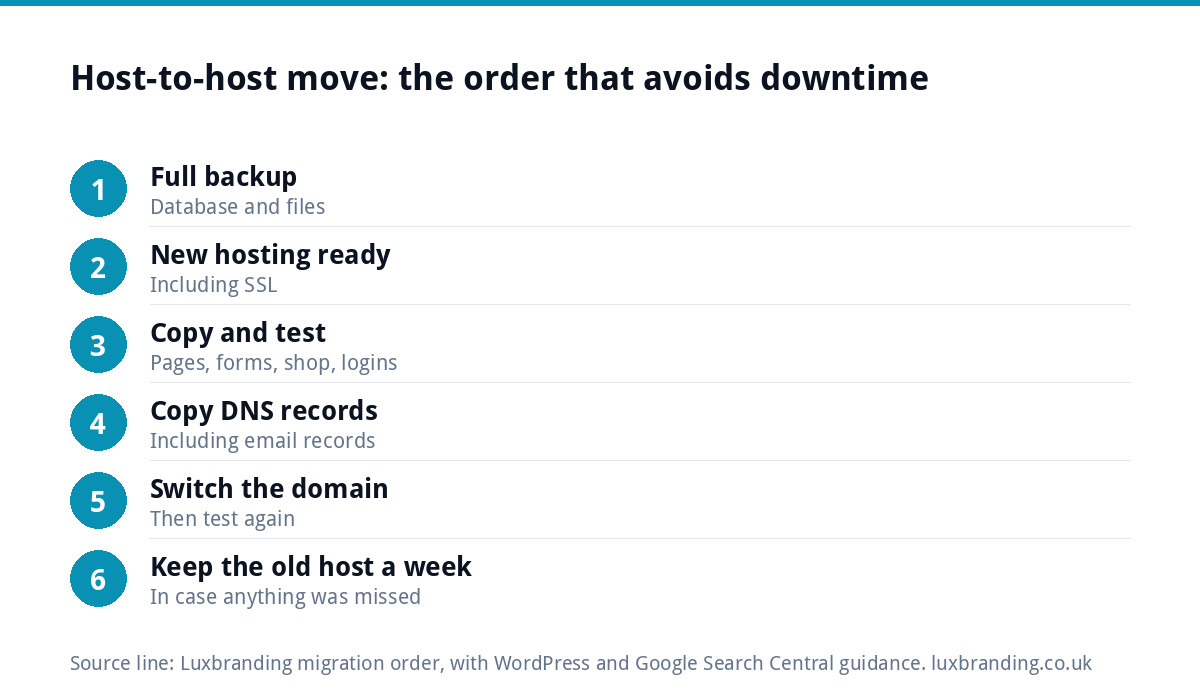
When a WordPress site moves between hosts, you are paying for careful labour, not software. A proper move follows a set order:
- Take a full backup. The WordPress guidance on backing up a site stresses that a backup has two parts, the database and the files, and you need both to restore a site fully.
- Set up the new hosting, including SSL.
- Copy the files and database across.
- Test the site on the new host before anyone sees it: pages, forms, shop and logins.
- Copy every DNS record, including email records, to wherever the domain will point.
- Switch the domain, then test again, including sending and receiving email.
- Keep the old hosting live for a week in case anything was missed.
A small brochure site with good access to the old host is the cheapest kind of move. The price rises with site size, an online shop (orders keep arriving during the move), a host that will not give access, or a site so out of date that it breaks on a newer server.
Platform moves cost a rebuild
Some systems do not let you take the website with you. Wix is clear about this: its help article on exporting a Wix site says the site cannot be moved to another host because its system does not support external hosting. You can transfer the domain, but not the site.
So “migrating from Wix” really means rebuilding the pages on a new platform and moving your words and photos across. Price it as a new website, not a migration. Our Wix vs custom website comparison sets out the longer-term numbers. The upside of a rebuild is that you can fix what was not working while you are at it.
Domain and email: the small fees
The domain itself is usually the cheapest part of a migration, but the most important to get right.
- Moving registrar. For .com and similar domains you need a transfer code from the current registrar. Check what your new registrar charges and whether the transfer adds time to your registration.
- Changing the holder. If the domain is in your old web company’s name, fix that first. For .uk domains it is a Registrant Transfer, which Nominet lists at £10 plus VAT. Our UK domain names guide explains how to check who holds yours.
- Email. If your mailboxes lived with the old host, set up the new ones and copy the old mail before switching the domain. Missing email records after a move are a common reason for mail going missing or into spam; our guide to business emails going to spam lists the records to check.
The hidden cost: lost rankings
The most expensive migration mistake does not show on an invoice. If page addresses change and nobody sets redirects, Google treats the old pages as gone and the new ones as new, and enquiries can drop for months.
Google’s guidance on moving a site with URL changes says to map every old address to its new one, use permanent server-side redirects such as 301s, and keep the redirects for as long as possible, generally at least a year. If the domain itself changes, it also recommends submitting a Change of Address in Search Console.
If your traffic has already fallen after a move, our guide to website traffic dropping suddenly covers how to find and fix the gaps.
Worked example: a trades site leaving a closed system
Say a heating engineer has a six-page site on a web company’s own system, plus two email addresses on the same account. The renewal has risen and they want to leave. Their migration has four parts:
- Domain: the .co.uk is in the web company’s name, so a Registrant Transfer to the business comes first, at £10 plus VAT.
- Website: the system cannot be exported, so the six pages are rebuilt. On our prices, a Custom WordPress Website of up to eight pages is £499.
- Email: two mailboxes recreated on the new host, old mail copied, records updated.
- Rankings: every old page address mapped and redirected to its new page.
The largest cost is the rebuild, and that is driven by the old platform, not by the move itself.
Five mistakes that make a migration cost more
- Cancelling the old hosting first. Without the old site running, there is nothing to copy and no way back.
- Moving in your busiest week. Pick a quiet period, and avoid the days your ads or seasonal rush are running.
- Forgetting the email. The website looks fine, and three days later you notice no enquiries have arrived.
- Changing everything at once. A new host, new design, new domain and new page addresses in one go makes any drop in enquiries impossible to trace.
- Paying by the hour with no cap. An open-ended rate on an old, fragile site can run on. Ask for a fixed price, or at least a written ceiling.
What a fair migration quote should include
| Item | Included? | Why it matters |
|---|---|---|
| Full backup before anything changes | ☐ | A way back if something breaks |
| Testing on the new host before the switch | ☐ | Customers never see a broken site |
| All DNS records copied, including email | ☐ | Stops email going missing |
| Redirect map from old to new addresses | ☐ | Protects Google rankings |
| SSL on the new host | ☐ | Avoids “not secure” warnings |
| Forms and checkout tested after the switch | ☐ | Enquiries and orders keep arriving |
| Domain held in your business’s name | ☐ | You control the address afterwards |
| A fixed price, in writing | ☐ | No surprise bill for “extra time” |
What we charge
We price the pieces a migration usually lands on. Our Website Management and Hosting plan is £20 a month with UK hosting, SSL, daily backups, security monitoring, automatic updates and up to three business email mailboxes. When a site cannot move, a rebuild is our One-Page Website at £299 or our Custom WordPress Website at £499 for up to eight pages; bigger sites are quoted in writing before any work starts. If a moved site is slow, Website Speed Optimisation is £99. Our hosting cost guide shows typical prices elsewhere, and every price of ours is on the pricing page.
Before you order anything, email support@luxbranding.co.uk with your current setup (platform, host, who holds the domain, where your email lives) and we will tell you in writing what moving it involves.
Get the UK Website Project Brief Template (free)
A two-page template for briefing any UK web designer: sitemap, integrations, audience and deliverables. Cuts revision rounds in half.
No spam. UK GDPR compliant. We only use your email to send this resource, unless you tick the box to hear from us.
Frequently asked questions
How much does it cost to move a website to a new host? +
For a WordPress site keeping the same domain, it is mostly labour: backup, copy, test and switch. Size, an online shop, poor access to the old host or an out-of-date site all add time. Ask for a fixed price in writing that includes testing, DNS and email records, and redirects if any addresses change.
Can I migrate my Wix website to WordPress? +
Not as a direct copy. Wix says its sites cannot be moved to another host because its system does not support external hosting. You can transfer the domain, but the pages have to be rebuilt in WordPress. Price it as a new website; our Custom WordPress Website is £499 for up to eight pages.
Will moving my website hurt my Google rankings? +
It can if page addresses change without redirects. Google advises mapping every old address to its new one, using permanent server-side redirects such as 301s, and keeping them for at least a year. If the domain changes, submit a Change of Address in Search Console. Same addresses on a new host carry little risk.
What does it cost to get my .uk domain out of my old web company's name? +
Changing the holder of a .uk domain is a Registrant Transfer. Nominet lists the fee as £10 plus VAT, even for several domains, and either side can pay. Your registrar may handle it, or the current holder can start it in their Nominet Online Services account. Do this before the rest of the move.
Will my email stop working when I move my website? +
Not if it is planned. If your mailboxes live with the old host, set up the new ones and copy the old mail first, then copy every DNS record, including the email records, before switching the domain. Send and receive test emails straight after the switch, and keep the old hosting live for a week.