Quick answer
A Canva website suits a simple, short-lived or visual page: Canva Pro costs £100 a year and you can publish a design to a free canva.site address or your own domain. A custom one-page website (ours is £299 one-off) suits a business that needs to be found on Google, take enquiries properly and own what it pays for.
Canva prices here were checked on Canva’s UK pricing page at the time of writing, October 2026, and may change. This guide is only about Canva’s website feature. For website builders in general, see our comparisons of Wix and a custom website and AI website builders and custom sites.
What a Canva website actually is
Canva is a design tool first. Its website feature lets you take a design built from a website template, press Publish, and have it live on the web. According to Canva’s own guide to publishing Canva websites, you can publish to a free canva.site address, buy a domain through Canva, or connect a domain you already own by changing its DNS settings.
The same guide lists the settings you get: a favicon, a description for each page for search engines, password protection, search visibility, and custom page addresses and titles. On the free plan a “Designed with Canva” footer appears that cannot be removed; upgrading to Pro removes it.
Two details catch people out. Designs made as Mobile or Link in Bio formats publish only to a canva.link address, with no custom domain unless you resize them to a Website template. And designs not built as websites (presentations, for example) open in a presenter view rather than as a scrolling page.
What Canva costs
Canva’s UK pricing page showed three plans at the time of writing:
- Free: £0, with the Canva footer on published sites.
- Pro: £100 a year for one person.
- Business: £180 a year per person.
A domain is extra whichever way you go. Our UK domain names guide covers what a .co.uk or .com costs and, more importantly, how to make sure it is registered in your name.
Canva vs custom, side by side
| Question | Canva website | Custom one-page website |
|---|---|---|
| Who builds it | You, in the Canva editor | A designer and developer |
| Starting cost | £0 (with footer) or £100 a year on Pro | £299 one-off with us |
| Your own domain | Yes, bought through Canva or connected | Yes |
| Search settings | Page titles, descriptions, favicon, visibility | Full control, including structured data and a sitemap |
| Contact forms into your inbox | Check current Canva features | Included and tested |
| Can you take it elsewhere | It lives on Canva | Yes, you own the code and can host anywhere |
| Ongoing cost | Your Canva plan, plus domain | Hosting, plus domain |
| Best for | Event pages, portfolios, temporary or visual pages | A business that wants enquiries from search |
Where Canva genuinely wins
There are good reasons to use it, and it would be dishonest to pretend otherwise.
- Speed. If you already design your social posts in Canva, you can have a page live the same afternoon.
- Visual control. You move things around exactly as you would on a poster, without touching code.
- Short-lived pages. A wedding fair stand, a one-off open day or a pop-up event does not need a permanent website.
- Low cash outlay. If you already pay for Pro for your graphics, the website comes with it.
For a hobby business, a portfolio to share by link or a page you will replace within a year, Canva is a sensible choice.
Where it runs out of road
The limits appear when the website has to do business work rather than look nice.
Being found on Google
Google’s SEO starter guide asks for titles that are unique and describe the page, short meta descriptions specific to each page, and text that is easy to read and broken up with headings. Canva gives you titles and descriptions, which covers the basics. A design tool tends to encourage text placed as graphic elements and layouts built for looks, so it is easy to end up with a beautiful page that says very little Google can read.
Enquiries
A trades or service website lives on its enquiry route: a form that lands in your inbox, a phone number that dials on a tap, and a clear next step on every screen. Check exactly how Canva handles each of these today before you rely on it, because a form that silently fails costs more than any website.
Ownership
A Canva site lives on Canva. On the free plan the Canva footer shows, and if you want to move, you rebuild elsewhere. That is fine for a temporary page and less fine for the main address on your van and quotes.
The real three-year cost
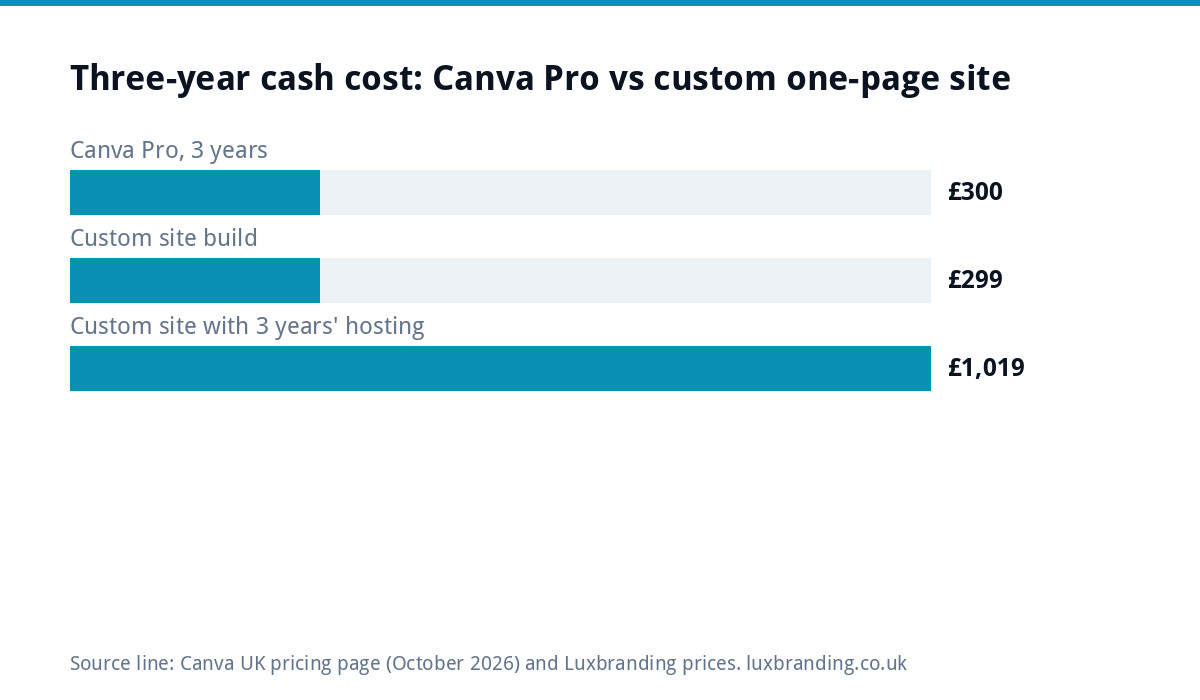
Cash cost is where Canva looks strongest, so here are the plain figures. Domain costs are left out of both columns because you pay them either way.
| Cost over three years | Canva Pro | Custom one-page site with our hosting |
|---|---|---|
| Build | £0 (your time) | £299 |
| Plan or hosting, year 1 | £100 | £240 (£20 a month) |
| Years 2 and 3 | £200 | £480 |
| Three-year total | £300 | £1,019 |
| What the hosting figure includes | Design tool plus publishing | UK hosting, SSL, daily backups, security monitoring, updates, up to 3 email mailboxes |
Canva is cheaper in cash. The custom figure buys a different thing: a site built to be found, with forms connected to your inbox, analytics set up, and code you own and can move. You can also host a custom site anywhere you like, so the hosting line is a choice rather than a lock-in. Whether that is worth the difference depends on how much of your work comes from people searching online.
A worked example: the mobile dog groomer
Say a mobile dog groomer has built a lovely Canva page with photos, prices and a phone number, published on a canva.site address. Bookings come mainly from regulars and Facebook. For that stage, the page does its job and costs nothing extra, because they already use Canva Pro for social posts.
A year later they want new customers from the next few towns, who search “dog groomer near me” rather than finding them on Facebook. Now the gaps matter: the prices sit inside an image, the address is Canva’s rather than theirs, and enquiries arrive as missed calls. The sensible move at this point is to register their own domain, write the services and areas as real text, and put a form on the page that lands in their inbox. Whether they do that in Canva or on a custom site, the work is the same list; the difference is how much control they have over it afterwards.
Which one are you?
- Choose Canva if the page is temporary, mostly visual, shared by link or QR code, and enquiries come from elsewhere (word of mouth, social messages).
- Choose custom if you want local search enquiries, you print the web address on vans, cards and quotes, and you expect the site to last several years.
- Start with Canva, move later if money is tight now. Register the domain in your own name from day one, so the move later is a change of settings rather than a change of address.
Our guide to outgrowing a DIY website covers the signs it is time to make that move.
Moving from Canva to a custom site
Moving from Canva to a custom site means rebuilding the pages on the new platform. That is less painful than it sounds when you keep the right pieces:
- Copy all your text into a document, page by page.
- Download your original photos rather than screenshots of the design.
- Note every page address, so the new site can redirect old links.
- Make sure the domain is in your name and you have the login.
- Only switch the domain once the new site is tested.
What we offer
Our One-Page Website is £299 one-off, hand-coded with no page builders, with a custom design, mobile-first build, an SEO foundation (schema, meta and sitemap), contact forms connected to your inbox, Google Analytics, a written guide to editing it and 30 days of support. You own the code and can host it anywhere. See the one-page website page. If you need more than one page, our Custom WordPress Website is £499 for up to eight pages.
Not sure which size fits? Our website cost calculator gives a quick estimate, and every price is on our pricing page.
Get the UK Website Project Brief Template (free)
A two-page template for briefing any UK web designer: sitemap, integrations, audience and deliverables. Cuts revision rounds in half.
No spam. UK GDPR compliant. We only use your email to send this resource, unless you tick the box to hear from us.
Frequently asked questions
Can I use my own domain with a Canva website? +
Yes. Canva lets you buy a domain through Canva or connect one you already own by changing its DNS settings. A free canva.site address is also available. Designs made in Mobile or Link in Bio formats publish only to a canva.link address unless you resize them to a Website template first.
Is a Canva website free? +
You can publish on the free plan, but a Designed with Canva footer appears and cannot be removed. Canva Pro removes it and cost £100 a year for one person on Canva's UK pricing page at the time of writing. A domain is extra on any plan, so budget for that too.
Are Canva websites good for SEO? +
They cover the basics: page titles, descriptions, a favicon and search visibility settings. The risk is how they are built. Design-led layouts often put text into graphics and say little that Google can read. If search enquiries matter to your business, a site built around readable content and proper structure gives you more control.
Can I move a Canva website to WordPress later? +
Yes, by rebuilding the pages in WordPress. Keep your text in a document, your original photos and a list of your page addresses, and make sure the domain is registered in your name. Then the new site can go live on the same address with redirects for any old links.
How much is a custom one-page website? +
Our One-Page Website is £299 one-off. It is hand-coded with a custom design, mobile-first build, an SEO foundation, contact forms connected to your inbox, Google Analytics, a written editing guide and 30 days of support. You own the code and can host it anywhere; our hosting plan is £20 a month if you want it.