Quick answer
A UK online shop should offer debit and credit cards, Apple Pay and Google Pay, plus PayPal. Add buy now, pay later only if your average basket is large enough to justify its merchant fee, and bank transfer or invoices for trade customers. Do not add a card surcharge: UK rules ban charging consumers extra for most card payments.
Payment options are one of the last things a customer sees before they buy, and one of the easiest places to lose them. Too few options and someone without their card to hand leaves; too many and the checkout looks cluttered and costs you in fees and admin. This guide covers which methods matter in the UK, what they cost at the time of writing, and what to offer for different types of shop.
The main payment methods compared
| Method | What it is | Why customers use it | Best for |
|---|---|---|---|
| Debit and credit cards | Visa, Mastercard, American Express entered at checkout | Universal and familiar | Every shop; the non-negotiable |
| Apple Pay and Google Pay | Wallets using a saved card on the phone | Fast on mobile, no typing card numbers | Every shop with mobile traffic |
| PayPal | Pay from a PayPal balance or linked card or bank | Trust, and not sharing card details with a new shop | New shops without an established name |
| Buy now, pay later | Klarna, Clearpay and similar; customer pays in instalments | Spreading the cost of bigger purchases | Fashion, furniture, higher-value items |
| Pay by bank | Customer approves the payment in their banking app | No card needed | Larger payments, deposits |
| Bank transfer or invoice | Customer pays by transfer after ordering | Business buyers paying on account | Trade and wholesale customers |
Stripe’s overview of payment methods groups these into families such as cards, wallets, bank debits, bank redirects, bank transfers, buy now pay later and real-time payments, and notes that customers in different regions prefer different ways to pay. For UK consumers, cards and wallets carry most of the load.
What the main options cost
Fees vary by provider and plan and change over time, so treat these as examples and check the current pricing before you choose. At the time of writing, November 2026:
- Stripe: its UK pricing page lists 1.5% + 20p for standard UK cards, 2.8% + 20p for premium UK cards, 2.5% + 20p for EEA cards and 3.15% + 20p for international cards, with a further 2% where currency conversion is needed. It says there are no setup or monthly fees for standard payments.
- PayPal: its UK merchant fees page lists 2.9% plus a fixed fee of 0.30 GBP for domestic PayPal checkout payments, and 1.2% plus the fixed fee for some card payments processed through PayPal.
- Buy now, pay later: merchants pay a fee per transaction, typically higher than card fees. Check the provider’s merchant pricing directly.
A worked example on a £40 order
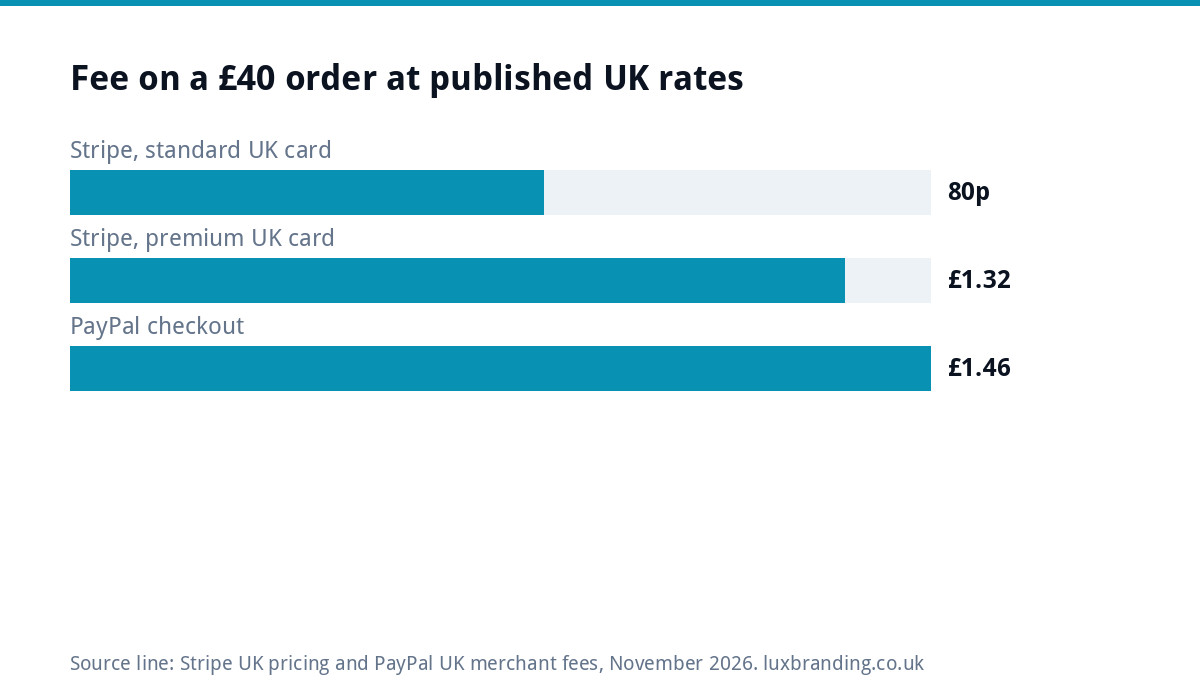
Using those published rates, a £40 order paid with a standard UK card through Stripe costs 80p (1.5% is 60p, plus 20p). If the customer uses a premium UK card, such as some rewards cards, the same order costs £1.32 (2.8% is £1.12, plus 20p). The same £40 through PayPal checkout costs £1.46 (2.9% is £1.16, plus 30p). On a £400 order the gap grows: £6.20 by standard UK card against £11.90 through PayPal checkout. That difference is real, but so is the sale you might lose without PayPal, which is why most small shops offer both.
Surcharges: the UK rule
You cannot pass card fees on to consumers as a surcharge. Regulation 6A of the Consumer Rights (Payment Surcharges) Regulations 2012 says a payee must not charge a payer any fee for payment by card-based instruments that are not commercial cards, among others. In practice, build your payment costs into your prices rather than adding “card fee 2%” at the checkout. A surprise charge at the last step is also one of the fastest ways to lose a sale.
What to offer, by type of shop
| Shop | Typical basket | Offer | Skip for now |
|---|---|---|---|
| Candle or gift shop | Small | Cards, Apple Pay, Google Pay, PayPal | Buy now, pay later |
| Clothing brand | Medium | Cards, wallets, PayPal, consider buy now pay later | Bank transfer |
| Furniture or bikes | Large | Cards, wallets, PayPal, buy now pay later, pay by bank | Nothing; options help here |
| Food or meal kits | Small, repeat | Cards, wallets, saved cards for repeat orders | Buy now, pay later |
| Trade supplies | Varies | Cards, wallets, plus invoice or bank transfer for approved accounts | Buy now, pay later for consumers |
| Deposits for services | Medium to large | Cards, wallets, pay by bank | PayPal if fees bite on large sums |
Five rules for a checkout that converts
- Show wallets prominently on mobile. Apple Pay and Google Pay let people pay without typing a long card number on a small screen.
- Show payment logos early, on product pages or in the basket, so nobody reaches the last step and discovers their preferred method is missing.
- Allow guest checkout. Forcing account creation before payment loses buyers.
- Keep total cost clear before payment: delivery, VAT where relevant, and no surprise charges.
- Test every method after setup and after updates, on a phone, with a real low-value order you then refund.
Subscriptions, deposits and repeat orders
Some shops do not sell one-off baskets. If you sell subscriptions, take deposits or have customers who reorder regularly, the payment question changes.
- Subscriptions: card payments with the card saved for future charges are the usual route, and Direct Debit through a provider that supports it suits regular fixed amounts. Make cancelling as easy as signing up, and send a reminder before each renewal of a longer plan.
- Deposits: for services such as bookings, events or made-to-order work, take the deposit by card or wallet at checkout and the balance later by invoice or a payment link. State clearly whether the deposit is refundable.
- Repeat orders: letting customers save a card, or pay with a wallet that remembers it, removes the friction from the third and fourth order. That matters more for a coffee or pet food shop than any new payment method.
- Trade accounts: approved business customers often expect to pay on invoice with agreed terms. Keep that separate from the public checkout, so consumers see a simple card and wallet choice.
Whatever the model, confirm with your provider how refunds, failed payments and disputes work before you launch. The fee on a refund, and who handles a chargeback, are easy costs to overlook until the first one arrives.
Security and trust at the payment step
Customers check for the padlock and a familiar payment page before entering card details. Using a recognised provider’s hosted fields or checkout keeps card data away from your own server, which reduces both risk and your compliance burden. Make sure your whole site runs on HTTPS; if visitors see a warning, our guide to a website showing “not secure” explains the fix. Strong customer authentication, the extra bank check on some card payments, is normal in the UK, so make sure your checkout handles it smoothly rather than timing out.
Common mistakes
- Offering only PayPal to avoid card setup. Some customers do not have or want an account.
- Adding every method available because it is free to switch on. Each one adds logos, decisions and refund admin.
- Switching on buy now, pay later for a £15 product. The fee eats the margin and customers rarely need it.
- Never placing a test order. A broken wallet button can go unnoticed for weeks.
- Ignoring payouts. Know when each provider pays you, so cash flow is not a surprise.
When sales are not coming in
If people add to basket but do not buy, payment options are only one possible cause. Delivery costs, slow pages, unclear returns and a confusing checkout are common culprits. Our guide to an online store with no sales works through them in order, and the comparison of Shopify and WooCommerce covers how each platform handles payments.
Getting the checkout built properly
Our e-commerce website is £499 one-off for up to 20 products, built on WooCommerce or Shopify with Stripe and PayPal set up, so cards, wallets and PayPal are covered from launch. It is hand-coded with no page builders, and you own it. The e-commerce website cost guide explains what bigger shops cost, the website cost calculator gives a quick figure, and every price is on our pricing page.
Get the UK Website Project Brief Template (free)
A two-page template for briefing any UK web designer: sitemap, integrations, audience and deliverables. Cuts revision rounds in half.
No spam. UK GDPR compliant. We only use your email to send this resource, unless you tick the box to hear from us.
Frequently asked questions
Which payment methods should a UK online shop offer? +
Start with debit and credit cards, Apple Pay and Google Pay, and PayPal. That covers most UK shoppers. Add buy now, pay later if your typical basket is large enough to justify its merchant fee, and bank transfer or invoices for approved trade customers. Avoid switching on every method just because it is available.
Can I charge customers a card fee? +
Not for most consumer payments. Regulation 6A of the Consumer Rights (Payment Surcharges) Regulations 2012 says a payee must not charge a fee for payment by card-based instruments that are not commercial cards, among others. Build payment costs into your prices instead of adding a surcharge at checkout.
Is PayPal worth offering if card fees are cheaper? +
Usually, yes. At the time of writing, PayPal checkout costs more per payment than a standard UK card through Stripe, but some customers prefer not to share card details with a shop they do not know. For a newer shop, the sales PayPal saves often outweigh the higher fee. Check current pricing for both.
Should I offer buy now, pay later? +
It suits higher-value baskets such as furniture, bikes or fashion, where spreading the cost helps people commit. Merchants pay a fee per transaction, typically more than card fees, so it rarely makes sense for low-value products. Check the provider's merchant pricing and test whether it lifts sales before keeping it.
Does your e-commerce website include payments? +
Yes. Our e-commerce website is £499 one-off for up to 20 products, built on WooCommerce or Shopify with Stripe and PayPal set up, so cards, wallets and PayPal work from launch. It is hand-coded without page builders and you own it. Bigger shops are quoted in writing before any work starts.