
Quick answer
A UK online shop needs, at minimum: clear product pages with good photos, a simple basket and guest checkout, card and wallet payments, delivery options with prices shown early, a returns policy covering the 14-day cancellation right, order emails, stock control, mobile-friendly pages, SSL, cookie consent, analytics and the legal pages. The full 20-point list is below.
Online shops rarely fail for lack of clever features. They fail because something basic was missing: delivery costs hidden until the last step, no guest checkout, slow pages on a phone, or no returns information. This checklist covers what a small UK shop should have before launch, split into must-haves and features that can wait.
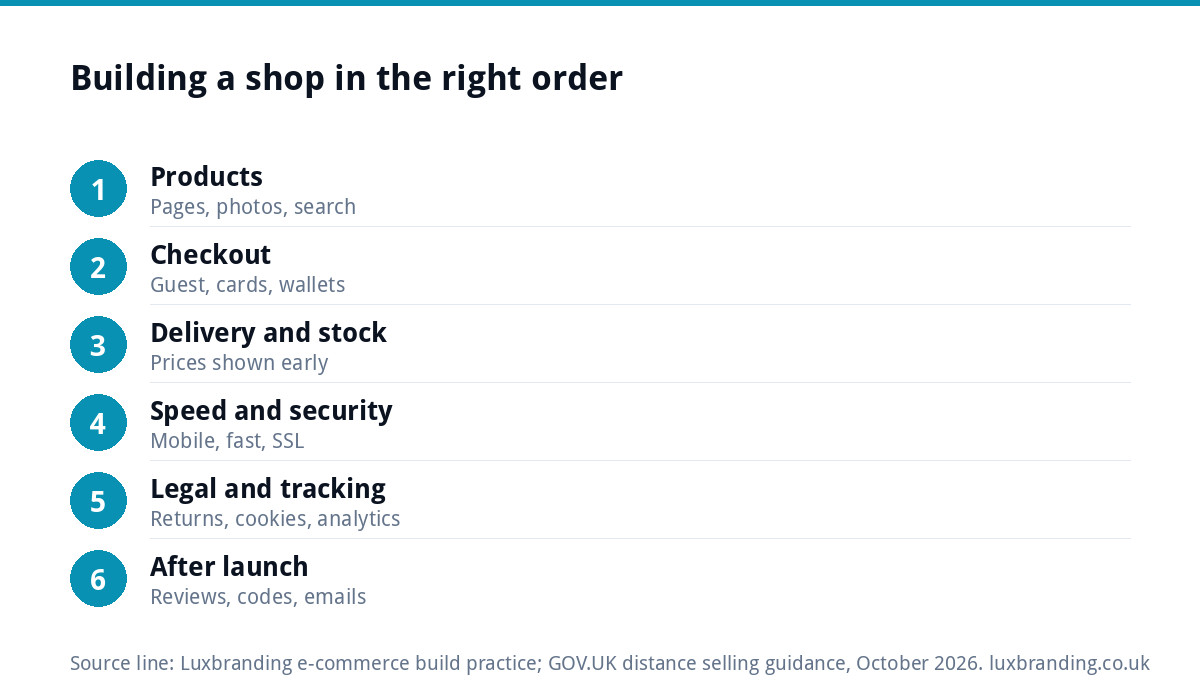
The 20-point feature checklist
| # | Feature | Why it matters | Priority |
|---|---|---|---|
| 1 | Clear product pages | Price, options, photos, description and stock status in one place | Must-have |
| 2 | Good product photography | Customers cannot touch the product | Must-have |
| 3 | Search and filters | Shoppers find products faster | Must-have above a few dozen products |
| 4 | Simple basket | Easy to change quantities and remove items | Must-have |
| 5 | Guest checkout | Forcing account creation loses sales | Must-have |
| 6 | Card and wallet payments | Cards, Apple Pay, Google Pay, PayPal | Must-have |
| 7 | Delivery options and prices shown early | Surprise costs at checkout are a common reason people leave | Must-have |
| 8 | Order confirmation and dispatch emails | Reassurance and fewer “where is my order?” emails | Must-have |
| 9 | Stock management | No selling items you do not have | Must-have |
| 10 | Mobile-first design | Many shoppers browse and buy on phones | Must-have |
| 11 | Fast loading | Slow pages lose shoppers before they see a product | Must-have |
| 12 | SSL certificate | Secure checkout and the browser padlock | Must-have |
| 13 | Returns and refunds page | Legal requirement and a trust signal | Must-have |
| 14 | Terms, privacy and cookie pages | Legal requirement | Must-have |
| 15 | Cookie consent | Needed if you use analytics or ad cookies | Must-have |
| 16 | Analytics and conversion tracking | Know what sells and where buyers come from | Must-have |
| 17 | Product reviews | Social proof on the product page | Soon after launch |
| 18 | Discount codes | Launch offers and email campaigns | Soon after launch |
| 19 | Email sign-up | Builds a list you own | Soon after launch |
| 20 | Abandoned basket emails | Recovers some lost sales | Once traffic is steady |
Product pages and photography (points 1 to 3)
The product page does the selling. Each one should show the price, every option (size, colour, finish), stock status, delivery information and a description that answers the questions a customer would ask in a shop. Photos matter more than almost anything else: several angles, a sense of scale, and the product in use. Use the same background and lighting across the range so the shop looks coherent.
Once you have more than a few dozen products, search and filters stop being optional. Customers who cannot find a product assume you do not sell it.
Basket, checkout and payments (points 4 to 6)
Keep checkout short. Offer guest checkout, ask only for information you need, and show a clear order summary. Offer the payment methods customers expect: cards plus at least one wallet such as Apple Pay or Google Pay, and PayPal if your customers use it.
Payment processing has a cost on every sale. As an example of how providers price this, Stripe’s UK pricing page lists 1.5% + 20p for standard UK cards, with higher rates for premium and international cards (at the time of writing, October 2026; prices change). Build that into your margins before you set prices.
If you are still deciding on the platform itself, our comparison of Shopify and WooCommerce covers the fees and trade-offs.
Delivery and stock (points 7 to 9)
Show delivery options and prices early: on product pages, in the basket and on a dedicated delivery page. Unexpected delivery costs at the final step are a common reason people abandon a purchase. If you offer free delivery over a threshold, say so near the top of the site.
Set up automatic order emails: confirmation when someone buys, and a dispatch email with tracking when it ships. Turn on stock management so items go out of stock automatically, and decide whether to allow back orders.
Speed, mobile and security (points 10 to 12)
Test every step of the shop on a phone: browsing, filtering, the basket and the checkout. Buttons should be easy to tap and forms easy to fill. Large images are the usual cause of slow shops; our guide to website speed for small businesses covers the fixes. An SSL certificate is essential for any shop that takes payments, and modern browsers warn visitors away from sites without one.
The legal side of a UK online shop (points 13 to 15)
Selling online to consumers in the UK comes with specific duties. GOV.UK’s guide to online and distance selling explains them; one of the most important is that you must tell customers they can cancel their order up to 14 days after it is delivered, without giving a reason.
| Page or information | What it should cover |
|---|---|
| Returns and refunds | The 14-day cancellation right, how to return, who pays return postage, refund timing |
| Terms and conditions | Prices, payment, delivery, faulty goods, exceptions |
| Delivery information | Options, costs, timescales, areas served |
| Privacy policy | What personal data you collect, why and how long you keep it |
| Cookie policy and consent | Which cookies you use and how visitors can choose |
| Business details | Your name, address and contact details; company details if limited |
If you use analytics or advertising cookies, the Information Commissioner’s Office explains the consent rules in its guide to cookies and similar technologies. This guide is not legal advice; for unusual products or terms, take professional advice.
Measurement (point 16)
Install analytics before launch, not after, and make sure purchases are tracked as conversions. Without it you cannot tell which products, pages or adverts are bringing sales. If your shop gets visitors but few orders, our guide to an online store with traffic but no sales walks through the usual leaks.
What can wait until after launch (points 17 to 20)
Reviews, discount codes, email sign-up and abandoned basket emails are valuable, but they work best once orders are flowing. Reviews need customers to review; abandoned basket emails need traffic. Add them in the first few months rather than delaying launch for them.
Features that most small shops can skip at the start include complex loyalty schemes, product configurators, multi-currency pricing and subscription billing, unless your business model depends on them.
Extra features by type of shop
The 20 points apply to almost every shop. Some types of business need a few more from day one:
- Food and drink. Allergen and ingredient information on every product page, delivery date selection for perishable goods, and clear packaging information.
- Clothing and footwear. Size guides with measurements, easy size swaps on returns, and photos of the product being worn.
- Personalised and made-to-order products. Fields for names, messages or measurements, a preview where possible, and clear wording on which items cannot be returned once personalised.
- Trade and wholesale. Account-only pricing, quantity breaks and invoices with VAT details, if you are VAT-registered.
- Bulky or heavy goods. Delivery prices by postcode area or weight, and booking of delivery slots.
- Gifts. Gift wrapping, gift messages and the option to send to a different address.
List these extras before you get quotes, because they affect the build time and the platform choice. A feature that is simple on one platform may need a paid add-on on another, and those add-ons are an ongoing cost as well as a set-up one. The same applies to packaging and labels: if the product arrives looking homemade, the shop’s design work is undone at the doorstep.
Before you launch
Place real test orders using each payment method, including a refund. Check every email the shop sends. Test the returns process from the customer’s side. Ask someone who has never seen the shop to buy something on their phone and watch where they hesitate. Our website launch checklist covers the general pre-live checks that apply to every site.
Building your shop with us
Our E-commerce Website is £499 one-off for up to 20 products on WooCommerce or Shopify, with Stripe and PayPal payments, custom design, a mobile-first build, an SEO foundation, Google Analytics, a written CMS walkthrough and 30 days of support. Larger catalogues are quoted in writing before any work starts. For the wider cost picture, see our guide to e-commerce website costs, and every price is on our pricing page.
Get the UK Website Project Brief Template (free)
A two-page template for briefing any UK web designer: sitemap, integrations, audience and deliverables. Cuts revision rounds in half.
No spam. UK GDPR compliant. We only use your email to send this resource, unless you tick the box to hear from us.
Frequently asked questions
What features does an online shop need? +
At minimum: clear product pages with good photos, search and filters for larger ranges, a simple basket, guest checkout, card and wallet payments, delivery prices shown early, order emails, stock management, a mobile-first design, fast pages, SSL, returns, terms, privacy and cookie pages, cookie consent and analytics.
Do I need guest checkout on my online shop? +
Yes. Forcing customers to create an account before they can pay adds a step many people will not take, especially on a phone. Offer guest checkout by default and invite customers to create an account after they have bought, when it feels like a convenience rather than a barrier.
What legal pages does a UK online shop need? +
A returns and refunds page explaining the 14-day cancellation right, terms and conditions, delivery information, a privacy policy, a cookie policy with consent where needed, and your business details. GOV.UK's online and distance selling guidance sets out the duties. Take professional advice for unusual products or terms.
Which ecommerce features can wait until after launch? +
Product reviews, discount codes, email sign-up and abandoned basket emails are valuable but work best once orders are flowing. Complex loyalty schemes, product configurators, multi-currency pricing and subscriptions can usually wait unless your business model depends on them. Launching with the basics done well matters more.
What does Luxbranding's e-commerce website include? +
Our E-commerce Website is £499 one-off for up to 20 products on WooCommerce or Shopify, with Stripe and PayPal payments, custom design, mobile-first build, an SEO foundation, Google Analytics, a written CMS walkthrough and 30 days of support. Larger catalogues are quoted in writing before work starts.