Quick answer
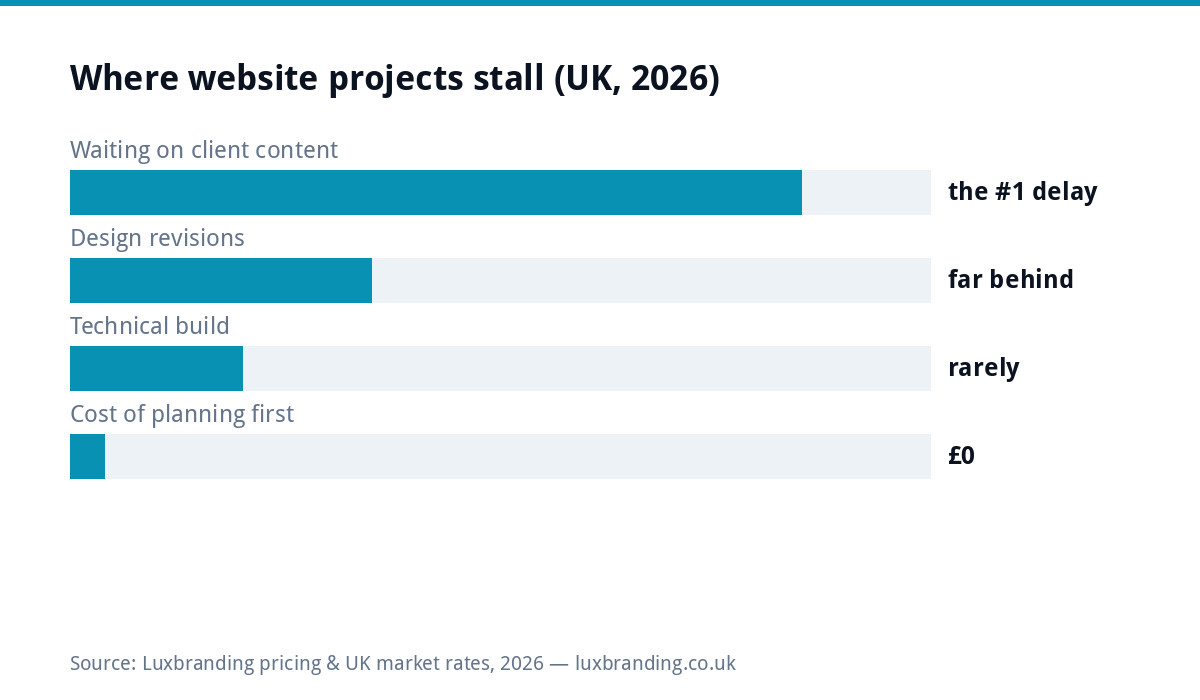
Website builds do not stall on design or code; they stall waiting for content, and they stall because “send us your text and photos” is a blank-page task nobody schedules. This planner replaces the blank page with prompts per page: answer them in rough bullets over an evening or two, hand the answers over, and a £299 to £499 build proceeds at full speed. Copy the tables, fill them in any order, and note the calibration data in the chart: content delay is the number one schedule-killer in small-business web projects, and it is entirely preventable for £0.
The planner: core pages (copy from here)
| Page | Answer these prompts (rough bullets are fine) |
|---|---|
| Home | In one sentence, what do you do and where? Who is your ideal customer? What are the three things they most need to know in the first ten seconds? What ONE action should a visitor take (call, quote form, book)? What proof can sit on this page (years trading, review score, certifications)? |
| Each service page (one table row per service) | What is the service in plain words? Who buys it and what problem triggers them? What does it cost, or from-what? What is included and what is not? How long does it take? What question do customers always ask about it? Which photos show it? |
| About | Why does the business exist (one honest paragraph, not a mission statement)? Who are the humans (names, roles, a line each)? What credentials and insurance? What would a customer be reassured to know? |
| Contact | Every way to reach you, hours you actually answer, areas covered, what happens after someone enquires (“we reply within X”), anything that prevents wasted enquiries (minimum job size, services you do NOT do) |
| Reviews/proof | Your five best reviews, copied verbatim with first names; permission noted for any customer photos; links to profiles where reviews live |
The supporting content (same sitting, ten more minutes)
| Item | Prompt |
|---|---|
| Photo shot list | 10 to 15 real photos: work/products (5+), premises or van (2), you/team (2), proof items (certificates, accreditations). Phone camera, daylight, no filters |
| The facts sheet | Exact trading name, certifications with numbers, insurance, payment methods, founding year, service areas as a list |
| Assets | Logo in vector if you have it (the handover pack if it exists), brand colours/fonts if defined, any existing photography worth keeping |
| Access | Domain registrar login location, current hosting details, Google Business Profile access, analytics if any |
Why prompts beat “send us your content” every time
The blank page asks you to be a copywriter; the prompt asks you to answer questions about your own business, which you can do in a van, at a kitchen table, by voice-note. The psychology is the whole trick: specific questions produce specific raw material, rough bullets are explicitly allowed (polishing is the builder’s job, or a light copy pass inside the build), and progress is visible row by row instead of looming as one giant task. It is the same mechanism as our design brief template, applied to the largest content job a small business faces, and the two documents together remove the most common failure modes from the entire commissioning process.
The order that gets sites live fastest
Not all rows are equal, so fill them in earning order. First the homepage prompts and the facts sheet, because every other page borrows from them. Second, your TOP TWO service pages, the ones that make the money, so the build can start on the pages that matter while the long tail follows. Third, photos, started early because daylight and job access are schedule-dependent in a way typing is not. About, contact and the remaining services can trail by days without delaying anything. Builders sequence exactly this way internally; a client who delivers in this order compresses a five-week straggle into the five-day build the one-page tier advertises, and the redesign timeline stops depending on archaeology.
Writing prompts into good answers: three rules
Rule one: write like you answer the phone. The way you explain a service to a caller is almost always better copy than the way you write it formally; if typing stiffens you, dictate. Rule two: numbers beat adjectives: “returned to fit 400+ bathrooms since 2015” outsells “high quality workmanship” in every test anyone has run, so raid your records for real figures before reaching for superlatives. Rule three: answer the objection you always hear: every business has the question that stalls buyers (price? mess? timescales?), and the page that answers it in writing converts the silent majority who would never have asked. A readability pass through a free tool like Hemingway catches the sentences that grew three clauses too long, and the builder’s polish does the rest.
Who writes what (the honest division of labour)
You own: the prompt answers, the facts, the photos, the proof, because these cannot be invented on your behalf, and every builder who claims otherwise is about to fill your site with plausible generic filler. The builder owns: structure, headline polish, calls to action, the on-page SEO layer (titles, descriptions, heading phrasing matched to real searches, per Google’s own helpful-content guidance: content written for people, structured for search). The overlap zone, tone and final wording, goes to whoever is better at it, decided honestly. This split is exactly what flat-price builds assume, which is why content readiness, not budget, is usually what separates a smooth from-£499 build from a stalled one.
Special cases: redesigns, one-pagers, and e-commerce
Redesigning rather than starting fresh? Do the planner anyway, but start each row by pasting the OLD page’s text and marking keep/update/kill, which converts audit and authorship into one pass and preserves anything currently ranking (the redirect-and-retain rules live in the redesign guide). Building a one-pager? The planner collapses: homepage prompts plus your single service’s row plus the facts sheet is the entire content requirement, one honest evening. E-commerce? Add per-product rows (title, plain description, specs, price, photos from angles) and multiply the photo discipline, because product pages live and die on it, as the no-sales diagnosis shows from the failure side.
The planner in a team (two-minute setup)
Where more than one person holds the knowledge, split the planner by rows rather than by committee: whoever runs the jobs answers the service prompts, whoever answers the phone owns the contact and objection rows, the founder does home and about, and one named person merges and owns the final document. Parallel answering turns the evening into an hour, and the merge step catches the contradictions (two different service descriptions, two claimed founding years) before the website inherits them. The one rule that keeps team planners honest: bullet answers only until the merge, because polished paragraphs written separately never join cleanly.
Keep it, reuse it, and the one habit after launch
The filled planner outlives the build: it becomes the source document for every future edit, the brief for any freelancer touching the site, and the baseline the next redesign audits against, so store it with your brand assets rather than in a dead email thread. Post-launch, one habit keeps it true: when prices, services or areas change in reality, change them in the planner and on the site in the same sitting, because drift between reality and website is how trust leaks one visitor at a time. The planner is free, the discipline is free, and together they are most of what separates websites that work from expensive brochures; the build itself, when you want it done properly, is priced flat on the price list.
Get the UK Website Project Brief Template (free)
A two-page template for briefing any UK web designer: sitemap, integrations, audience and deliverables. Cuts revision rounds in half.
No spam. UK GDPR compliant. We only use your email to send this resource, unless you tick the box to hear from us.
Frequently asked questions
What content do I need to prepare for a new website? +
Per page: the words (headline, body, call to action), the facts (services, areas, prices, credentials), and the images. The planner below prompts each page's content with specific questions, which is faster than staring at "write your homepage" ever is.
Who should write the website content, me or the designer? +
The raw truth should come from you (nobody else knows the services, prices and proof), the shaping can come from either. Answering the planner's prompts in rough bullet points, then letting the builder polish, is the fastest split and the one most flat-price builds assume.
How long should website content take to prepare? +
With prompts: an evening or two for a typical small-business site. Without them, it is the single biggest cause of projects stalling, routinely adding weeks. The planner exists to convert the blank page into a questionnaire.
What photos does a small business website need? +
Ten to fifteen honest ones: your work or products, your premises or van, you and any team, and anything that proves claims (certificates, before/afters). Phone photos in daylight beat stock everywhere; the shot list in the planner covers the set.
What is the most important content on a business website? +
The first screen of the homepage (who you are, what you do, where, and one action) and the individual service pages' opening lines, because those match what people search. Get those right in the planner and the rest is supporting cast.