Quick answer
Use a single short form when you need four or five details, such as name, contact, postcode and a message. Use a multi-step form when an accurate quote needs more, like job type, size, materials and timing: one question per screen, easy questions first, contact details last, and a back button. Then measure completed enquiries, not clicks.
Quote forms are where a lot of trades and service businesses win or lose work. Ask too little and you spend your evenings phoning people back for basic details; ask too much on one long page and people give up halfway. Multi-step forms are often presented as the answer to everything. They are not, but used for the right job they work well. This guide sets out when each format fits, how to build a good multi-step form and what to avoid.
Single form or multi-step: the comparison
| Factor | Single short form | Multi-step form |
|---|---|---|
| Best when you need | Four or five details | Eight or more details, or answers that change the next question |
| First impression | Quick and familiar | Feels easy if the first step is simple |
| Quality of enquiry | Often vague; you call back for details | Structured answers you can quote from |
| On a phone | Fine if short; long ones mean endless scrolling | One question per screen suits small screens |
| Branching | Everyone sees every field | Only relevant questions shown |
| Build effort | Low | Higher; needs testing on every path |
| Risk | Too little information | Too many steps, or contact details lost mid-way |
When a single short form is the right choice
If the job is simple, or you always want to talk to the customer before quoting, keep it short. An emergency locksmith needs a name, phone number and postcode, not a questionnaire. A solicitor or accountant usually wants a conversation before any figure is given. A short form also suits a contact page where people might be asking anything, not just for a quote.
The rule is to ask only for what you genuinely need at this stage. The ICO’s guidance on data minimisation sets the principle that personal data should be adequate, relevant and limited to what is necessary for the purpose. Good form design and good data protection point the same way.
When a multi-step form earns its place
Multi-step forms suit quotes that depend on several answers: a driveway installer needs the area, surface type and access; a cleaner needs property size, frequency and extras; a removals firm needs addresses, property size and date. Collecting that in one long page looks daunting. Broken into short steps, each answer feels small.
The UK government designs its online services this way. The GOV.UK Service Manual on structuring forms recommends starting with each page containing just one thing, such as one question or one decision, because it helps users focus and recover easily from errors. It also recommends branching, so people only answer questions relevant to them, and putting eligibility questions first so nobody wastes time.
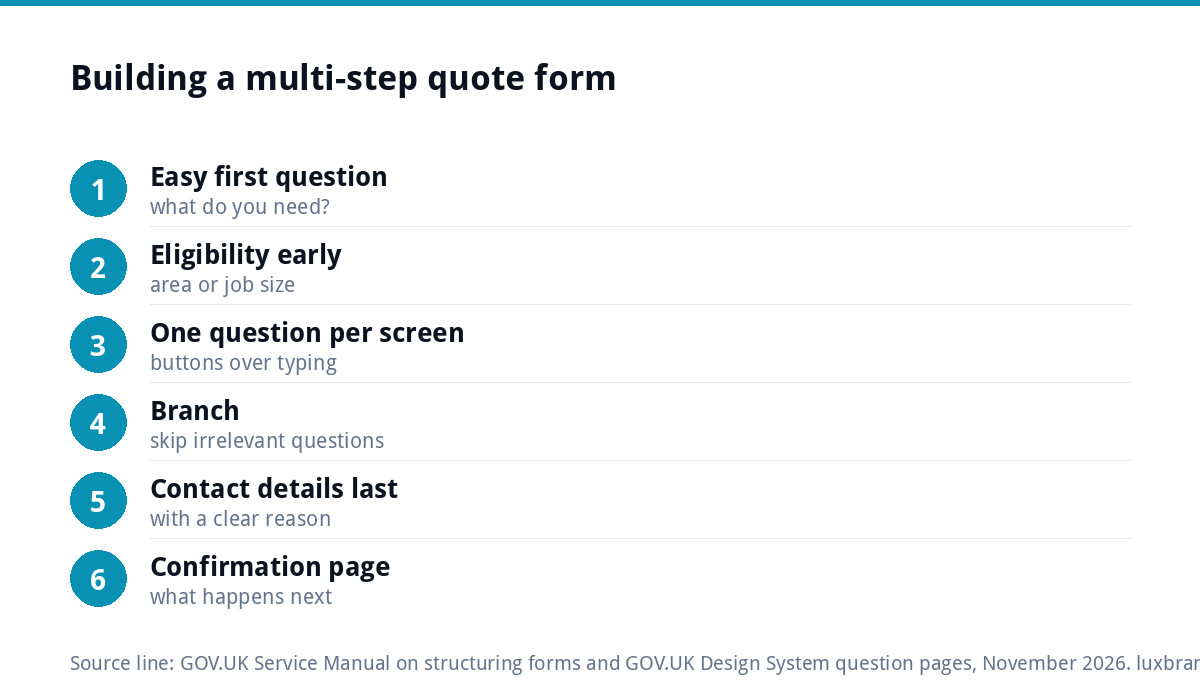
How to build a good multi-step quote form
- Start with the easiest question. “What do you need?” with a few tappable options beats “Enter your full name” as a first step.
- Ask eligibility early. If you only cover certain postcodes or job sizes, ask that near the start and say politely when it is not a fit.
- One question per screen, or one closely related group, such as the two parts of an address.
- Use buttons and choices rather than typing wherever possible. Tapping “3 bedrooms” is quicker than writing it.
- Branch. Someone who picks “boiler service” should not be asked about radiator numbers for a full installation.
- Contact details near the end, once the person has invested a little time, with a clear reason, such as “so we can send your quote”.
- Always offer a way back. The GOV.UK question pages pattern says to always include a Back link on question pages and not to break the browser back button.
- Finish with a confirmation page that says what happens next and when, which also gives you a clean way to track enquiries.
Example question sets by trade
The right questions depend on what changes your price. Here are starting points for common service businesses. Keep each to the questions you would otherwise ask on the phone.
| Business | Step 1 | Middle steps | Final step |
|---|---|---|---|
| Driveway or patio installer | Driveway, patio or both? | Rough area, surface wanted, current surface, access for machinery | Name, phone, email, postcode, photos optional |
| Domestic cleaner | Regular, one-off or end of tenancy? | Bedrooms, bathrooms, frequency, extras such as ovens or windows | Name, contact, postcode, preferred day |
| Removals firm | Home or office move? | From and to postcodes, property size, packing needed, preferred date | Name, phone, email |
| Electrician | What kind of job? | Rewire, new circuit, fault or inspection; property type; urgency | Name, phone, postcode, best time to call |
| Wedding or events supplier | Event date | Venue area, guest numbers, services wanted, budget range | Names, email, phone |
Two habits make these work. First, put the question that rules people out early: a date you are already booked, a postcode you do not cover. Second, let people upload a photo where it helps, such as a driveway or a fuse board, but make it optional. A photo can save a site visit; a compulsory upload on a phone loses people who are not at the property.
Progress bars: helpful or not?
Many multi-step forms show “Step 2 of 5”. It can reassure people, but it is not automatically helpful. The GOV.UK question pages guidance suggests testing your form without a progress indicator first, improving the order, type or number of questions before adding one, and only showing a total number of questions if you can do so reliably. If branching means the number of steps varies, a “Step 3 of 9” counter that suddenly changes does more harm than good.
Common mistakes that lose quotes
- Too many steps for the job. Ten screens for a gutter clean is worse than one short form.
- Asking for an email address on step one. It feels like a sales trap before the person has seen any value.
- Losing answers on the back button. If going back wipes previous answers, people leave.
- Compulsory fields that do not matter. Make “how did you hear about us” optional.
- No phone alternative. Some people will always prefer to ring. Keep a tappable number visible.
- Never testing on a phone. Most people filling in your form are on one.
- Forms that do not send. Test the full journey to your inbox; our guide to a contact form that is not working covers the usual faults.
Instant price or quote request?
A step further is a form that shows an estimated price at the end, like a calculator. It works well where pricing follows clear rules, and it pre-qualifies people who would balk at your prices. Our own website cost calculator and logo cost calculator work this way. The risk is showing a figure the final job does not match, so present it as a guide and say what could change it. If your pricing has too many variables to calculate fairly, stick with a structured request and a quick personal reply.
Measuring which works for you
Do not judge the form on how many people start it. Judge it on completed enquiries and, better still, on how many became paid work. Track a conversion on the confirmation page, compare a few weeks before and after a change, and ask yourself whether the enquiries arriving now are easier to quote from. A form that produces slightly fewer but far better enquiries can save hours of phone calls a week. If you can, look at where people drop out: a step that loses a large share of visitors is usually asking something awkward, unclear or too early, and is the first thing to rewrite.
Getting the form built
Every custom WordPress website we build, £499 one-off for up to 8 pages, includes contact forms connected to your inbox and Google Analytics, so enquiries can be measured from day one. A dedicated landing page with a focused quote form is £199 one-off. More complex quoting tools, such as instant price calculators or multi-path forms with lead-generation logic, are quoted in writing before any work starts, and full quoting systems fall under our web applications from £1,999. See every price on our pricing page.
Get the UK Website Project Brief Template (free)
A two-page template for briefing any UK web designer: sitemap, integrations, audience and deliverables. Cuts revision rounds in half.
No spam. UK GDPR compliant. We only use your email to send this resource, unless you tick the box to hear from us.
Frequently asked questions
Do multi-step forms convert better than single forms? +
It depends on the job. For simple enquiries needing four or five details, a short single form is usually best. Where a quote needs several answers, a multi-step form with one question per screen often feels easier and produces better-structured enquiries. Test on your own site and judge by completed enquiries, not starts.
How many steps should a quote form have? +
As few as the quote genuinely needs. Ask only what you require to price or qualify the job, combine closely related questions, and use branching so people skip irrelevant ones. Ten screens for a simple job will lose people; three to six short steps suit most trade and service quotes.
Where should contact details go in a multi-step form? +
Near the end, after the person has answered a few easy questions about the job and can see you are working towards a quote. Explain why you need them, such as to send the quote. Asking for an email address on the first step feels like a sales trap and puts people off.
Should I show a progress bar? +
Not automatically. GOV.UK guidance suggests testing a form without a progress indicator first and improving the order, type or number of questions before adding one. Only show a total number of steps if it is reliable; if branching changes the count, a shifting step counter can confuse people.
Can you build a quote form into my website? +
Yes. Every custom WordPress website we build, £499 one-off, includes contact forms connected to your inbox and Google Analytics. A landing page with a focused quote form is £199 one-off. Instant price calculators and complex lead-generation forms are quoted in writing before any work starts.