
Quick answer
A transactional email is one a customer needs because of something they did: an order confirmation, receipt, password reset or booking reminder. A marketing email promotes something. Adding a “£10 off your next order” line to a receipt can turn it into marketing, which needs consent under UK rules. Keep the two separate in content and sending.
This guide shows how to tell which is which, why the difference matters for the law and for reaching the inbox, and how to set up a small business so the two never get tangled.
The simple test
Ask one question about any email you send: would the customer expect this message even if they had never signed up for anything?
- If they bought something, booked something, reset a password or asked for a quote, they expect a confirmation. That is transactional.
- If the email exists to sell, promote, announce or tempt, it is marketing, however friendly or useful it feels.
The purpose decides the type, not the design, the sender or the software you use. A plain-text email from your own inbox offering a seasonal discount is still marketing. A beautifully designed order receipt is still transactional, as long as it sticks to the order.
Transactional vs marketing emails compared
| Question | Transactional | Marketing |
|---|---|---|
| Triggered by | Something the customer did | You deciding to send a message |
| Purpose | Complete or service a transaction or account | Promote products, services, offers or the brand |
| Consent needed | No marketing consent needed | Consent or the soft opt-in for individuals |
| Unsubscribe link | Not required, as customers need these | Required in every message |
| Timing | Instant, one to one | Scheduled, one to many |
| Typical sender | Your website or shop system | An email marketing platform |
Common emails, classified
Most small businesses send a mix of the emails below. Where an email sits in a grey area, the safest approach is to treat it as marketing.
| Type | Notes | |
|---|---|---|
| Order or booking confirmation | Transactional | Keep it to the order: items, price, delivery, contact details |
| Receipt or invoice | Transactional | No discount codes or product promotions |
| Password reset, login code | Transactional | Must arrive within seconds |
| Delivery or appointment update | Transactional | “Your engineer arrives between 8 and 10” |
| Quote follow-up you were asked for | Transactional | Stays transactional if it is about that quote |
| Abandoned basket reminder | Grey area | Treat as marketing unless you have taken advice |
| Review request | Grey area | Often treated as marketing; keep it short and offer an opt-out |
| Newsletter, offers, new products | Marketing | Consent or soft opt-in plus unsubscribe |
Why the difference matters: the law
In the UK, emails that promote things to individuals fall under the Privacy and Electronic Communications Regulations (PECR). Regulation 22 says you must not send unsolicited direct marketing by email to an individual unless they have agreed to it in advance.
There is one important exception, usually called the soft opt-in. You can email marketing without separate consent if all three of these are true:
- You got the person’s details in the course of a sale, or negotiations for a sale, to them.
- You are only marketing your own similar products and services.
- You gave them a simple, free way to refuse when you collected the details, and you offer it again in every message.
Transactional emails sit outside these rules because they are not marketing. That protection disappears the moment promotional content is added. A receipt that also pushes a sale is a marketing message, and if the customer opted out of marketing, you should not be sending it to them.
Why the difference matters: getting into the inbox
The second reason is deliverability. Mail providers watch how people react to your emails. If customers mark your newsletter as spam, the reputation of the sending domain falls, and your order confirmations can start landing in spam too.
Google’s email sender guidelines make several points that apply directly:
- Don’t mix different types of content in the same message, for example promotions in sales receipts.
- Messages of the same category should come from the same From address.
- Use different IP addresses for different message types where you can, such as one for account notifications and another for promotions.
- Bulk senders must authenticate with SPF, DKIM and DMARC, support one-click unsubscribe on marketing messages, and keep reported spam rates below 0.30%.
If your emails are already struggling, our guide to business emails going to spam walks through the checks.
Setting it up properly for a small business
You do not need complex systems, just a clean split.
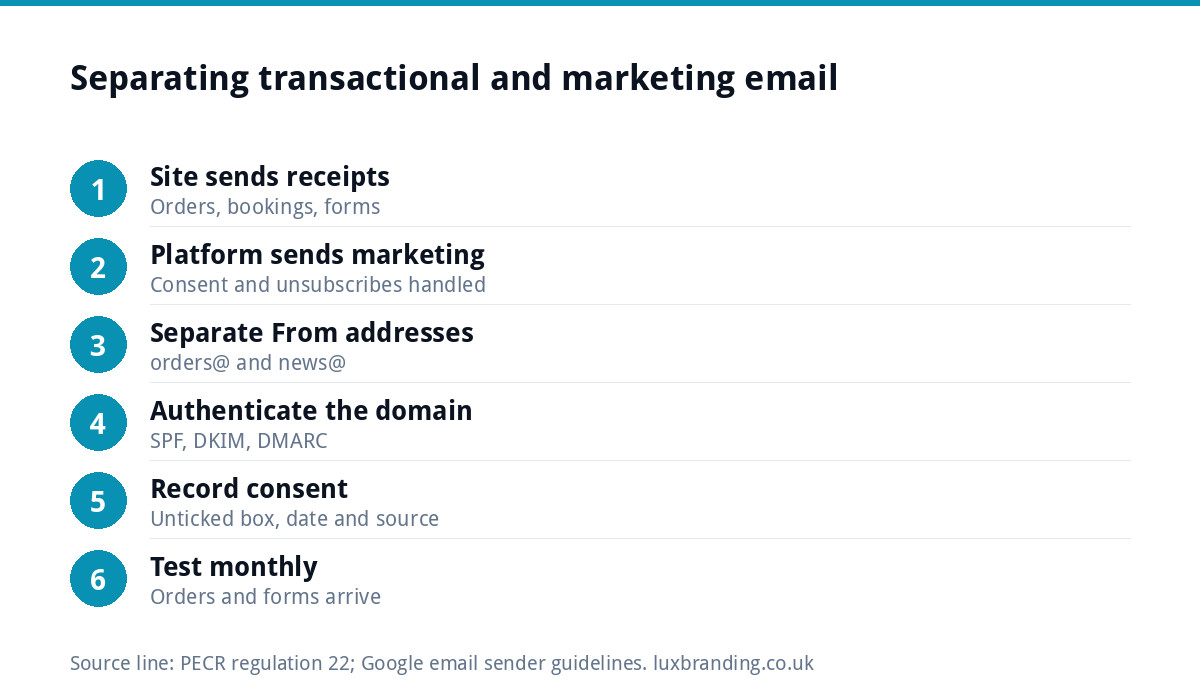
- Send transactional emails from your website or shop. Order, booking and form notifications should come from the site itself, through an authenticated mail service, not a personal Gmail account.
- Send marketing from a marketing platform. It handles consent records, unsubscribes and list hygiene for you.
- Use different From addresses. For example, orders@ for receipts and news@ for newsletters.
- Authenticate your domain. SPF, DKIM and DMARC records protect both streams.
- Record consent at the point of capture. A separate, unticked box for marketing on checkout and contact forms, plus a note of when and how each person agreed.
- Test both streams. Place a test order and submit your own forms each month. If enquiries stop arriving, see why website contact forms stop working.
Writing transactional emails that still help the brand
Keeping promotions out does not mean transactional emails have to be dull. They are the most opened emails you send, so make them useful and on-brand:
- Your logo, colours and a clear subject line such as “Your order 1042 is confirmed”.
- Everything the customer needs: what they bought, price, delivery or appointment details, how to change it.
- A real reply-to address and a phone number.
- Helpful service information, such as care instructions or what to expect on the day.
Service information is fine. Selling is not. “How to look after your new oak worktop” helps the order. “Add a matching chopping board for 20% off” is marketing.
What an order confirmation must cover
For anyone selling online or at a distance, the confirmation email is not just good manners. GOV.UK’s distance selling guidance lists the information customers must be given, including your business name and contact details, a description of the goods or services, the full price including taxes, how they can pay, delivery details and their cancellation rights. It says the information must be easy to understand and given in a form the customer can save.
In practice, a well-built confirmation email is the easiest way to meet that. A checklist for yours:
- Your trading name, address and a way to contact you.
- An order or booking reference the customer can quote.
- What was bought, quantities and the total including VAT and delivery.
- Delivery method and expected date, or the appointment date and time window.
- How to cancel or return, and the time limit, with a link to the full policy.
Notice that none of these items sells anything. That is exactly what keeps the email transactional, and it is also what customers look for when they search their inbox weeks later to check a delivery or start a return.
A worked example: a small online candle shop
A candle maker sells through her own shop. Her order confirmation used to end with a banner for her newest scent and a discount code. Some customers had unticked the marketing box at checkout, so every order sent them marketing they had refused.
The fix took an afternoon. The banner and code came out of the confirmation, which now carries the order details, delivery estimate and safe-burning tips. Customers who ticked the marketing box get a separate welcome email from the marketing platform, which offers the code there instead. Receipts come from orders@ through the shop, newsletters from news@ through the platform, and both addresses are authenticated on the domain.
Mistakes to avoid
- Sending newsletters from the same system and address as receipts.
- Pre-ticked marketing boxes or consent hidden in the terms.
- Emailing every past enquiry with offers when they never bought or agreed.
- Promotional “transactional” emails, like a shipping update that is mostly adverts.
- Ignoring unsubscribes because the message “was only a reminder”.
Getting it set up for you
Our Email Marketing & Automation setup is a fixed £149, covering automation flows, newsletter templates and segmentation for your marketing emails. If you sell online, our E-commerce Website build (£499) includes forms connected to your inbox, and our Website Management & Hosting (£20 a month) includes up to 3 business email mailboxes. Every price is on our pricing page.
Get the UK SEO DIY Audit Checklist (free)
A 32-point checklist UK SMEs can run against their own website in an afternoon. Surfaces the quick wins before paying for a paid audit.
No spam. UK GDPR compliant. We only use your email to send this resource, unless you tick the box to hear from us.
Frequently asked questions
What is a transactional email? +
A transactional email is sent because of something the customer did and is needed to complete or service it: an order confirmation, receipt, invoice, password reset, booking reminder or delivery update. It does not need marketing consent, but it must stick to that purpose. Adding promotions or discount codes can make it a marketing email.
Do I need consent to send transactional emails? +
No marketing consent is needed for genuinely transactional emails, because they are not direct marketing. You still need a lawful basis to use the customer's details under data protection law, which an order or booking normally provides. The exemption ends if you add promotional content, so keep receipts and confirmations free of offers.
Is an abandoned basket email transactional or marketing? +
It is a grey area, and the safest approach is to treat it as marketing. It is sent to encourage a purchase rather than to complete one. That means sending it only to people who have agreed to marketing or fall under the soft opt-in, with a clear unsubscribe link.
What is the soft opt-in? +
Under PECR regulation 22 you can send marketing emails without separate consent if you got the person's details during a sale or negotiations for a sale, you only market your own similar products or services, and you offered a simple, free way to refuse when collecting the details and in every later message.
Can Luxbranding set up my emails? +
Yes. Our Email Marketing & Automation setup is a fixed £149 and covers automation flows, newsletter templates and segmentation for your marketing emails. Our Website Management & Hosting at £20 a month includes up to 3 business email mailboxes. Every price is on our pricing page.