Quick answer
Most small logo changes are a simple edit: a new colour, a font swap, tighter spacing, a removed tagline or phone number, or a stacked layout turned horizontal. A designer works on the original vector file. Our Logo Edit is £50, takes 24 to 48 hours and returns every format. A JPG-only logo needs redrawing as vector first.
This guide is for a logo you want to keep. It covers what counts as an edit, what to send, who is allowed to make the change, why quick DIY fixes often fail at the printer, and the point where an edit stops being an edit.
What counts as a small logo edit
An edit changes details while the mark stays recognisable. Your customers should look at the new version and see the same business. These are the changes we treat as edits:
- Colour. A new brand colour, a darker shade for contrast, or matching the logo to your van or shopfront.
- Font swap. Replacing a dated or hard-to-read typeface in the business name while the symbol stays.
- Spacing and proportions. Letters too tight or too loose, a symbol that sits too large or too small next to the name.
- Tagline or phone number. Removing a tagline you have outgrown, or changing or removing a phone number. A number inside a logo dates it every time the number changes, so many owners take it out and put it on the van, card or website instead.
- Layout variants. A stacked version turned into a horizontal one for a website header, or an icon-only version for a social profile picture.
- One-colour version. A single-colour logo for embroidery, vinyl cutting, stamps or etching.
- Transparent background. The logo exported without the white box behind it, so it sits cleanly on photos and coloured backgrounds.
If two or three of these are on your list, that is still one edit. The test is whether the logo you get back is clearly the same logo.
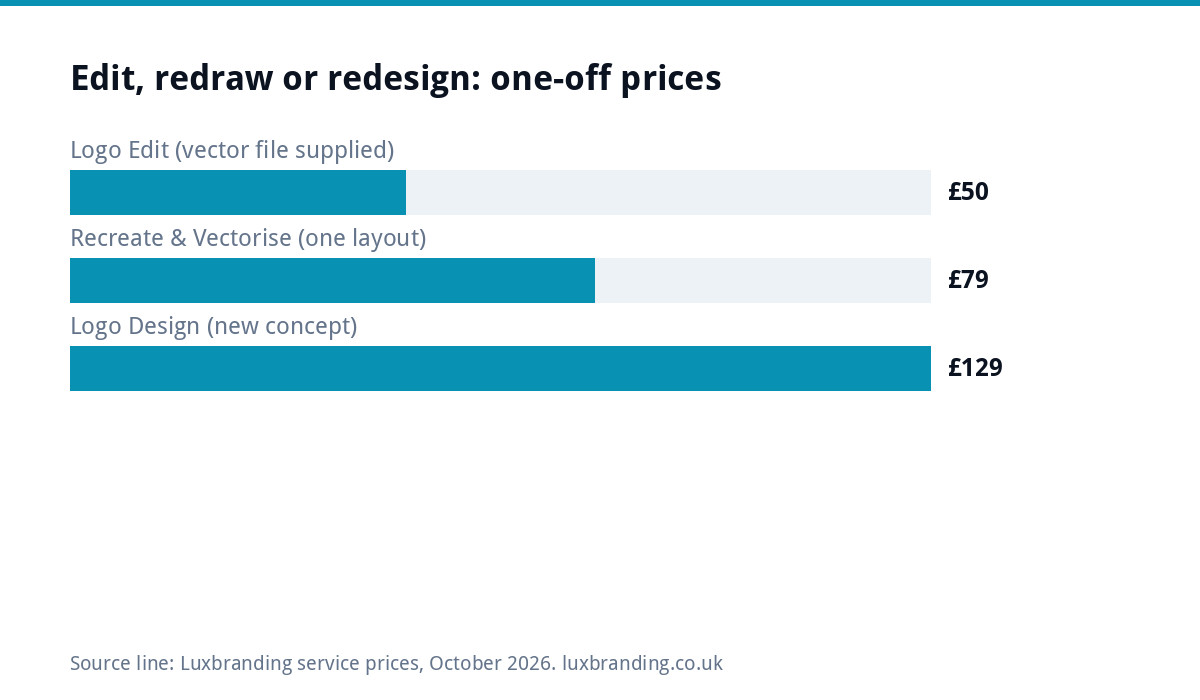
Edit, redraw or redesign: which one you need
Three different jobs get called “a small change”. The file you have and how much of the logo needs to move decide which one you need.
| Your situation | Job | Our price | What happens |
|---|---|---|---|
| You have a vector file (SVG, AI, EPS or vector PDF) and want colour, font, spacing or layout changes | Edit | Logo Edit £50 | We change the details on your existing artwork and return every format |
| You only have a JPG, PNG or screenshot, including an AI-generated image | Redraw, then edit | Recreate & Vectorise £79 for one layout, +£39 per additional layout | We rebuild the artwork as true vector first, then the changes can be made |
| You want a new symbol, a new idea, or the logo no longer fits the business | Redesign | Logo Design £129 | A new logo with unlimited concepts, with stacked, horizontal and icon-only layouts included |
If you are weighing a bigger change and want to understand refresh, redesign and rebrand budgets, our logo redesign cost guide covers that. This post stays with changes to a logo you keep.
What to send for a logo edit
The fastest edits start with the right file and a clear list. Use this as a checklist before you order.
| Send this | Why it matters | If you do not have it |
|---|---|---|
| The original vector file (SVG, AI, EPS or PDF) | Vector artwork can be changed cleanly at any size | Send the best JPG or PNG you have; it will need redrawing first |
| A numbered list of changes | Each change is checked off and nothing is missed | Write it in plain words; “make the blue darker” is fine |
| Colour codes you need to match | Matches the logo to your van, signage or website | Send a clear photo of the item and say what it must match |
| The font name, if you know it | Avoids guessing the existing typeface | Not essential; say whether the name must keep its current look |
| Where the logo will be used | Decides which layouts and one-colour versions are useful | Tell us the main uses: website, van, workwear, print |
Not sure which file you have? Our logo file formats guide explains how to tell a real vector from a JPG saved inside a PDF.
If you only have a JPG or PNG
A JPG or PNG is made of pixels. You can change it a little, but you cannot cleanly change a font, recolour an edge or resize it for a sign. The honest route is to redraw the logo as vector first, then make the edit. That is our Recreate & Vectorise service: £79 for one layout, +£39 per additional layout.
The same applies to logos made with AI image tools. They come out as PNG or JPG, often with soft edges and shapes that do not quite join. An AI-made logo that is still a PNG or JPG needs the redraw before any edit. Our guides on having only a JPG of your logo and fixing an AI logo go deeper on both.
Who is allowed to edit your logo
Before anyone changes a logo, it is worth knowing who owns it. In the UK, copyright protection is automatic when an original artistic work is created; you do not apply or pay for it, as the gov.uk copyright guidance explains. Government guidance on licensing and selling copyright also says a sale or transfer of copyright is shown by a written, signed document, sometimes called an assignment.
In practice:
- If you designed the logo yourself, you can have it edited.
- If a designer or agency made it, check your paperwork for a written transfer of the rights. If there is none, it is sensible to get one, or ask the original designer before changing the work.
- If the logo belongs to a franchise, a supplier or a brand you resell, it is not yours to change.
Our logo copyright and trade mark guide covers ownership and registration in more detail. When we edit a logo for you, you get full ownership of the amended artwork.
Why DIY edits in Canva or on a PNG go wrong in print
Changing a logo yourself feels quick. The trouble usually shows up later, at the printer or the sign maker.
- Pixels show when you enlarge. Adobe’s raster versus vector explainer notes that when you enlarge a raster image you start to see individual pixels, while vectors can be resized without losing quality. A PNG edited at screen size can look fine on a phone and soft on a van door.
- Recolouring leaves halos. The edges of a PNG blend into the old background colour. Change the fill and a faint outline of the old colour often stays around every letter.
- Fonts get swapped silently. Rebuilding the name in a template tool often means a font that is close but not the same, and the letter spacing never quite matches the symbol.
- Sign makers and embroiderers need vector. Vinyl cutting, embroidery and large signage work from paths, not pixels. Our print-ready artwork guide explains what printers ask for.
A DIY change can still work for a quick social post. For anything printed, stitched or cut, edit the vector.
How a logo edit works with us, step by step
- Order online. Order the Logo Edit at £50, one-off.
- Reply with your file and list. Reply to the order confirmation email with your logo file and the list of changes.
- We check the job is an edit. If it is bigger than an edit, we say so before any work starts, so you never pay for the wrong job.
- We make the changes. Turnaround is 24 to 48 hours from receiving the logo file and the list of changes.
- You review. Revisions are unlimited within the changes you asked for. A change of direction is quoted first.
- You get the files. The edited vector in every format, with colour codes.
What comes back and how long it takes
A finished edit comes back as the edited vector in SVG, AI, EPS, PDF, PNG and JPG, with colour codes. That covers your website, social profiles, printers, sign makers and embroiderers. You also get full ownership of the amended artwork.
Original files help but are not essential. If you only have a JPG or PNG, the edit starts once the redraw is done. The 24 to 48 hour turnaround runs from when we have your logo file and your list, so a clear list sent with the right file is the quickest route.
Save the files somewhere you control, such as a shared drive, and send a copy to whoever runs your website and print. Most “we need the logo again” emails start with files that lived in one person’s inbox.
When an edit is the wrong job
Some requests sound small but are not. If you are asking for a different symbol, a new name, a new style, or “something more modern”, the concept is being replaced. That is Logo Design at £129, which includes unlimited concepts, unlimited revisions within your brief, every file format and a 3D mockup, with stacked, horizontal and icon-only layouts all included. Concepts arrive in 48 hours.
A quick test: if a regular customer saw the new version on your van, would they think you had changed hands? If yes, it is a redesign. If they would barely notice, it is an edit. If you are unsure whether your logo has run its course, read signs your logo needs a redesign before you decide.
Next step
Write down every change you want, find the best file you have and check whether it is vector. If it is, order the Logo Edit. If it is a JPG or PNG, start with the redraw. If the list reads like a new logo, start with Logo Design. All our prices are on the pricing page, and if you are not sure which job you need, email us at support@luxbranding.co.uk with the file and your list. We are rated 4.8/5 (Excellent) and have 4,500+ projects delivered.
Get the UK Branding Budget Worksheet (free)
A printable worksheet: decide what your brand needs now and price it against fixed published prices and the IPO trademark fee.
No spam. UK GDPR compliant. We only use your email to send this resource, unless you tick the box to hear from us.
Frequently asked questions
Can I change the colour of my logo without a redesign? +
Yes. A colour change is one of the most common logo edits. The shape, symbol and lettering stay the same, so customers still recognise the business. With a vector file the change is clean at every size. Our Logo Edit is £50 one-off and returns the edited vector in every format with colour codes, so printers and sign makers can match it.
How do I remove or change the phone number on my logo? +
Send the original logo file and say what the number should change to, or that it should go. It is a quick edit on a vector file. Many owners remove the number completely and put it on the van, card or website instead, because a number inside a logo dates it every time the number changes.
Can you edit my logo if I only have a JPG or PNG? +
Not directly. A JPG or PNG is pixels, so fonts, edges and colours cannot be changed cleanly. It needs rebuilding as vector first with Recreate & Vectorise, £79 for one layout and +£39 per additional layout. AI-made logos that are still PNG or JPG need the same redraw before any edit.
Am I allowed to have someone else edit my logo? +
If you designed it, yes. If a designer or agency made it, check your paperwork. Gov.uk guidance says a sale or transfer of copyright is shown by a written, signed document. If you have none, get one or ask the original designer first. A logo belonging to a franchise or supplier is not yours to change.
How long does a logo edit take and what do I get back? +
Our Logo Edit takes 24 to 48 hours from receiving your logo file and the list of changes. You get the edited vector in SVG, AI, EPS, PDF, PNG and JPG, with colour codes, and full ownership of the amended artwork. Revisions are unlimited within the changes you asked for; a change of direction is quoted first.