Quick answer
Most checkout abandonment comes from five fixable causes: delivery costs revealed too late, forced account creation, a long or confusing form, too few payment options, and a page that feels unsafe or breaks. Test your own checkout on a phone, fix the first cause you hit, then work down the list in that order.
This guide is about shoppers who reach the checkout and leave. If your shop gets visitors but almost nobody adds to basket, that is a different problem, covered in our guide to an online store with traffic but no sales.
How common checkout abandonment is
Some abandonment is normal. The Baymard Institute, which averages 50 separate studies, puts the documented average online cart abandonment rate at 70.22%. A large share of those people were only browsing, comparing prices or saving items for later, and no checkout change will win them back.
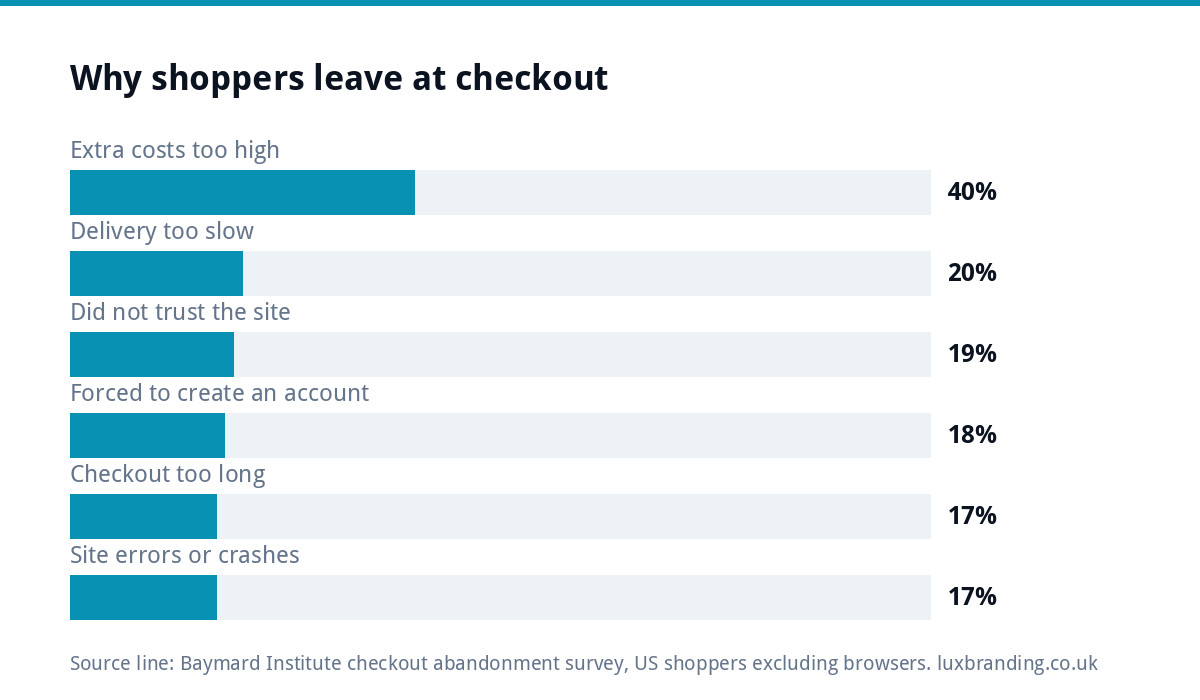
What you can win back is the shopper who had decided to buy and then hit a wall. Baymard’s checkout survey (of US shoppers, leaving out those who were just browsing) lists the reasons people gave. They line up closely with the problems that turn up when you test small UK shops.
| Reason given for leaving | Share of abandoners (Baymard) | The usual fix |
|---|---|---|
| Extra costs too high (delivery, tax, fees) | 40% | Show delivery cost on the product page and basket |
| Delivery was too slow | 20% | State dispatch and arrival times before checkout |
| Did not trust the site with card details | 19% | Recognised payment brands, padlock, real contact details |
| Site wanted an account | 18% | Turn on guest checkout |
| Checkout too long or complicated | 17% | Cut fields, one page where possible |
| Website had errors or crashed | 17% | Test on a phone after every update |
Shoppers could pick more than one reason, so the column does not add up to 100%. The order is what matters: cost surprises come first by a distance.
Fix 1: no surprise costs at the last step
The most common reason is the simplest. Someone adds a £24 item, reaches the payment page and finds £6.95 delivery they did not expect. They leave, and many never come back.
UK rules already push you towards showing this early. The government guidance on online and distance selling says customers must be told the price including all taxes, and the delivery arrangements and costs, before they order. Treat that as the minimum, not the target.
- Put a one-line delivery note under the price on every product page (“UK delivery £3.95, free over £40”).
- Show an estimated total in the basket, not only at payment.
- If you offer free delivery over a threshold, show how far away the shopper is (“£8 to go for free delivery”).
- Remove small surprise fees. A 99p “handling fee” can cost more in lost orders than it earns.
Fix 2: let people buy without an account
A forced account turns a two-minute purchase into a sign-up form, a password rule and sometimes an email confirmation. First-time buyers are the least willing to do that.
On WooCommerce this is a single setting. Under Accounts and Privacy there is an option called Enable guest checkout, which lets shoppers order without creating an account. The documentation notes that subscriptions still need an account, which is fair. For everything else, offer the account after the order is placed (“save your details for next time?”), when the customer has nothing left to lose.
Fix 3: shorten the form
Count the fields on your checkout. Many small shops ask for things they never use: a second address line made mandatory, a company name, a phone number for a digital product, a “how did you hear about us” dropdown.
- Delete any field you cannot name a use for.
- Make postcode address lookup the default for UK shoppers.
- Collect the delivery address once and tick “billing same as delivery” by default.
- Keep the order summary visible so people do not have to scroll back to check.
- Use the right keyboard on phones: number pad for card and phone fields, email keyboard for email.
Each field you remove is one less place for a thumb to slip on a phone screen, and a lot of small-shop traffic arrives on phones.
Fix 4: offer the payment methods people expect
Some shoppers will only pay by card. Others want PayPal because they do not want to type card details into a site they have never used. Apple Pay and Google Pay let a phone user pay with a fingerprint instead of a form.
You do not need every method. For most UK small shops, cards plus PayPal plus a wallet option covers almost everyone. Our comparison of Shopify and WooCommerce covers how each platform handles payment options, and every e-commerce website we build comes with Stripe and PayPal set up.
Fix 5: make it feel safe and make it work
Trust at checkout is built from small signals: the padlock in the browser, recognised payment logos, a returns policy one click away, and a real UK contact route. If your browser shows a “not secure” warning anywhere on the site, deal with that first; our guide to a website showing not secure explains the usual causes.
Then check the page actually works. Plugin updates, theme changes and caching tools can all quietly break a checkout. A slow checkout loses people too, especially on mobile data. If pages take several seconds to respond, read our guide to website speed for small businesses.
Test your own checkout in 15 minutes
You cannot fix what you have not seen. Do this once a month and after every plugin or theme update.
| Check | What good looks like | Done |
|---|---|---|
| Buy a low-price item on your own phone, on mobile data | Under two minutes, no errors | ☐ |
| Note the first moment you see delivery cost | Product page or basket, not payment | ☐ |
| Try to check out without an account | Guest checkout available | ☐ |
| Count the form fields | Only what you need to deliver and invoice | ☐ |
| Try each payment method | Card, PayPal and a wallet all complete | ☐ |
| Check the confirmation email arrives | Within a minute, not in spam | ☐ |
| Look for the returns policy and contact details | One click from checkout | ☐ |
Ask a friend who has never used your shop to do the same while you watch without helping. Where they hesitate is where customers leave.
Win back the people who still leave
Even a good checkout loses some shoppers. Two low-effort recovery steps are worth having:
- Basket reminder emails. If the shopper typed their email before leaving and agreed to marketing, a single reminder the same day is fair. Do not send a sequence of five.
- Saved baskets. Keep the basket for returning visitors so they do not have to start again on a different device.
Avoid the panic move of a discount code in every reminder. It teaches regular customers to abandon on purpose.
It also helps to know where in the checkout people stop. If your analytics records each checkout step, compare how many shoppers reach the details form, the delivery choice and the payment step. A big drop at one step points straight at the fix: a drop at delivery is usually cost or speed, and a drop at payment is usually trust, a missing method or an error. If you cannot see the steps at all, the phone test above is the next best evidence.
When the platform itself is the problem
Sometimes the fixes above are not possible. Older themes may not support guest checkout cleanly, a page builder may keep the checkout slow however you tune it, or the shop runs on plugins that are no longer updated. At that point patching costs more than rebuilding.
Our e-commerce website cost guide covers what a rebuild involves at different sizes. Our own E-commerce Website is £499 one-off for up to 20 products, on WooCommerce or Shopify, with Stripe and PayPal, hand-coded with no page builders, and you own the code. Larger catalogues are quoted in writing before any work starts. Full prices are on our pricing page.
The order to work in
If you only have an afternoon, work in this order: show delivery costs early, switch on guest checkout, remove three fields, add a wallet payment option, then run the phone test. Each step is cheap, and the first two deal with two of the most common reasons shoppers give for leaving. Then watch your orders for a fortnight before changing anything else, so you know which change helped.
Get the UK Website Project Brief Template (free)
A two-page template for briefing any UK web designer: sitemap, integrations, audience and deliverables. Cuts revision rounds in half.
No spam. UK GDPR compliant. We only use your email to send this resource, unless you tick the box to hear from us.
Frequently asked questions
What is a normal checkout abandonment rate? +
The Baymard Institute averages 50 studies and puts the documented average cart abandonment rate at about 70%. Much of that is people browsing or comparing, so a high figure on its own is not a fault. Look instead for shoppers who started entering details and then stopped, because that group usually hit a fixable problem such as a surprise cost or a forced account.
Should I force customers to create an account? +
For most small shops, no. A forced account adds a password and extra steps before someone can pay, and first-time buyers are the least willing to do that. Turn on guest checkout and offer an account after the order is placed. Subscriptions are the exception, because the customer needs a login to manage them.
Does showing delivery costs early really matter? +
Yes. Extra costs such as delivery were the most commonly given reason for leaving in Baymard's survey, at 40% of abandoners. UK guidance on distance selling also says customers must be told delivery costs before they order. A one-line delivery note on each product page and an estimated total in the basket deal with most of it.
Which payment methods should a small UK shop offer? +
Card payments plus PayPal plus a wallet such as Apple Pay or Google Pay cover most shoppers. Cards suit people who are happy to type details, PayPal suits people wary of a new site, and wallets make paying on a phone quick. Adding every method available usually adds clutter rather than sales.
When is it better to rebuild the shop than fix the checkout? +
When the fixes are not possible on your current setup: the theme cannot do guest checkout cleanly, a page builder keeps the checkout slow, or key plugins are no longer updated. Our E-commerce Website is £499 one-off for up to 20 products with Stripe and PayPal set up; larger catalogues are quoted in writing first.