Quick answer
Google is still showing your old website because it has not recrawled the new pages, or something keeps pointing it back to the old ones. Check that every old URL 301 redirects to its new page, submit an updated sitemap, then request indexing in Search Console. Google says crawling can take a few days to a few weeks.
Below are seven common causes after a redesign, a rebuild or a domain move, how to check each one, and the fix. We only quote timings Google itself publishes, because nobody outside Google can promise when a result will change.
Why the old site lingers
Google does not see your new website the moment it goes live. It keeps showing what it last crawled until it visits again, processes the change and decides the new page should replace the old one. On a small site that can be quick; on a site that moved domain, Google’s own site move guide says it can take a few weeks or more for a medium-sized site before Google gradually starts showing the new URLs instead of the old ones.
So the question is not just “how do I make Google hurry up” but “is anything telling Google the old site still matters”. Usually something is. This guide is for sites that do appear, just in the wrong version. If your site is missing from Google altogether, our guide to a website not showing on Google covers that, and if the problem is a sharp fall in visitors rather than old pages, start with website traffic dropped suddenly.
Cause 1: Google has not recrawled yet
If the launch was days ago and nothing is wrong technically, Google may simply not have been back. Google’s page on asking Google to recrawl your site sets out the tools and their limits:
- Use the URL Inspection tool in Search Console to request a crawl of individual URLs. There is a quota, so use it on your most important pages: homepage, main services, contact.
- For large numbers of URLs, submit a sitemap instead.
- Crawling can take anywhere from a few days to a few weeks.
- Requesting a crawl does not guarantee the page is included instantly or at all, and requesting the same URL several times will not make it faster.
Request once, then leave it. Repeated requests waste your quota and change nothing.
Cause 2: Missing or wrong 301 redirects
This is the big one. When a redesign changes page addresses (/our-services.html becoming /services/, say), every old address needs a permanent redirect to the closest new page. Without it, the old URL either still works or returns an error, and Google has no instruction to swap it for the new one.
Google’s site move guide recommends server-side permanent redirects from old URLs to new ones, and says to keep them for as long as possible, generally at least a year. Common mistakes to look for:
- Everything redirected to the homepage, so Google cannot match old pages to new ones.
- Temporary (302) redirects left in place from testing.
- Redirect chains, where an old URL hops two or three times before landing.
- Redirects removed a few months after launch because “nobody uses those links”.
To check: paste five or six old URLs from Google’s results into your browser. Each should land on the matching new page, not the homepage and not an error.
Cause 3: The old site or old domain is still live
A surprising number of rebuilds go live on a new server while the old one keeps running, or the new site moves to a new domain while the old domain still serves the old pages. Google sees two working websites and has no reason to drop either.
The fix is to point the old domain at redirects rather than content. If you changed domain, Search Console’s Change of Address tool exists for exactly this, but only once the move and redirects are in place. Google’s Change of Address help says you must own both the old and new properties in Search Console, that it is for moves between domains or subdomains (not http to https, and not moving pages within a site), and to keep the redirects for at least 180 days, longer if Google still sends traffic to them. Keep the old domain registered for as long as those redirects need to run. For more on choosing and owning a domain, see our UK domain names guide.
Cause 4: Old URLs in the sitemap
Your sitemap tells Google which pages you want indexed. If it still lists old addresses, often because an old sitemap file was left on the server or a plugin is generating one for pages that now redirect, you are asking Google to keep the old pages.
Open yoursite.co.uk/sitemap.xml (or whatever your sitemap address is) and scan it. Every URL listed should load directly with no redirect. Google’s site move guide says to make sure your sitemaps are updated with the new URLs and to submit the new sitemap in Search Console.
Cause 5: A staging or duplicate copy is indexed
Developers often build the new site on a staging address (staging.yoursite.co.uk or a temporary hosting URL). If that copy was open to Google, it can be indexed and outrank or confuse the real thing. The same applies to an old version still reachable on another address, or both www and non-www versions loading separately.
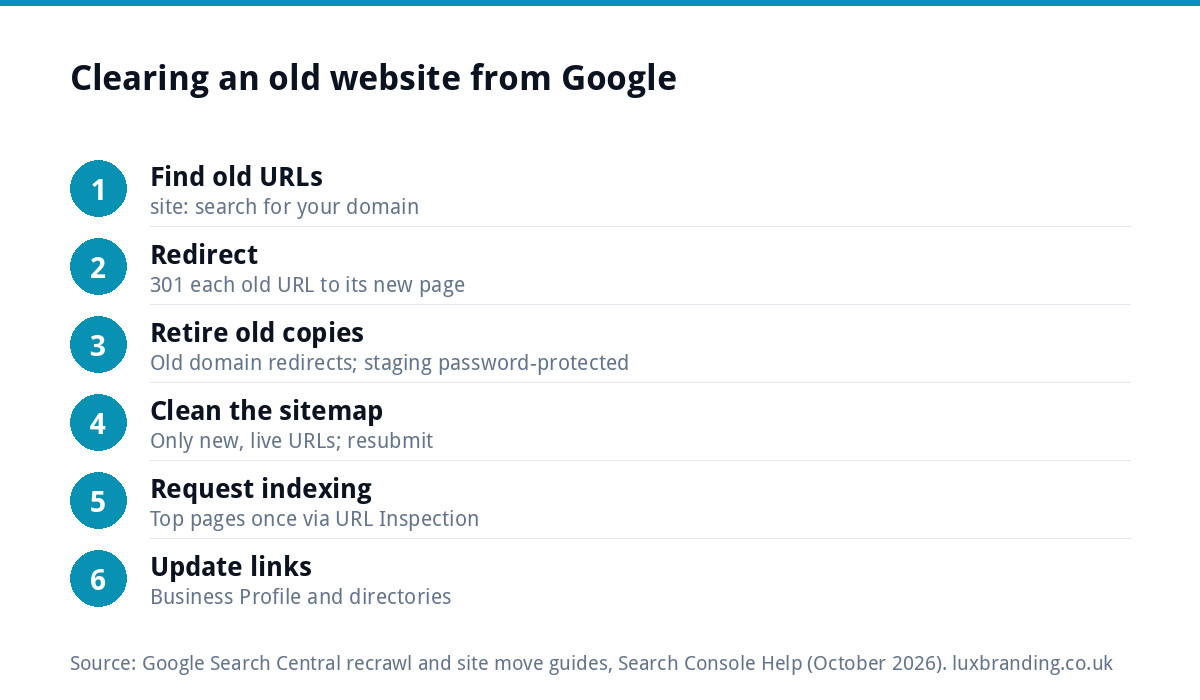
Search Google for site: followed by your domain to see what is indexed, then fix at the source. Google’s Removals tool help says permanent removal means the page returns a 404 or 410, is blocked behind a password, or carries a noindex tag. Password-protecting staging is the cleanest of the three.
Cause 6: Your profile and directories still point to old pages
Your Google Business Profile, social bios, Yell, Checkatrade and any other directory listings may all still link to the old addresses. Each link is a signal that the old URL matters, and each one sends customers to a redirect at best and a dead page at worst. Update the website link on your Business Profile first, because it is the one customers click most. Our Google Business Profile optimisation guide covers the rest of the profile.
Cause 7: An old snippet is still showing
Sometimes the link goes to the right page, but the title and description under it are from the old site. That snippet updates when Google reindexes the page, so causes 1 to 4 usually fix it. If a page has gone or changed and the old result keeps showing, Google’s Removals help points to the Refresh Outdated Content tool, and to a “Clear snippet” option that wipes the description until the page is indexed again.
Use the Removals tool itself with care. Google says a temporary removal lasts only about six months, hides the URL from results but does not stop crawling, and is not a fix on its own.
Cause, check, fix and how long
Timings are only those Google publishes. Where it publishes none, we say so.
| Cause | How to check | Fix | How long (per Google) |
|---|---|---|---|
| Not recrawled yet | URL Inspection shows the old crawl date | Request indexing once; submit sitemap | A few days to a few weeks |
| Missing or wrong redirects | Paste old URLs into a browser | 301 each old URL to its closest new page | Domain moves: a few weeks or more for medium sites; keep redirects at least a year |
| Old site or domain still live | Old domain loads old pages | Redirect the old domain; Change of Address for domain moves | Keep redirects at least 180 days |
| Old URLs in sitemap | Open sitemap.xml and scan | List only new, live URLs; resubmit | No timeline given |
| Staging or duplicate indexed | site: search for your domain | Password, noindex, or 404/410 | No timeline given |
| Profile and directories link old pages | Click each listing’s website link | Update each link to the new URL | Not applicable |
| Old snippet showing | Result shows old title or description | Fix causes above; Refresh Outdated Content | Until the page is reindexed |
The 30-minute checklist
Work through this in order with Search Console open. It assumes you can log in to your site and your domain settings.
| Minutes | Task | Done when |
|---|---|---|
| 0 to 5 | Search site: plus your domain; note old URLs still listed |
You have a list of 10 or so old URLs |
| 5 to 10 | Paste each old URL into a browser | Each lands on the matching new page |
| 10 to 15 | Load the old domain and any staging address | Old domain redirects; staging asks for a password |
| 15 to 20 | Open your sitemap; remove old or redirecting URLs | Every listed URL loads directly |
| 20 to 25 | Submit the sitemap; request indexing for your top five pages | Search Console confirms both |
| 25 to 30 | Update the Business Profile and top directory links | Every listing points to the new site |
Then leave it alone and check again in a fortnight. If you are still mid-launch, our website launch checklist builds most of these steps in before go-live.
When to get help
If you have worked through the checklist and old pages are still showing a month later, or you have hundreds of old URLs to map, get a second pair of eyes. Start with our free SEO audit, which flags crawl and indexing problems on your live site. If you want it handled, our SEO service is £249 a month and covers rankings, content, technical health, link building and reports. Our guide to SEO audit costs in the UK explains what a full audit involves, and all our prices are on the pricing page. Order online, or email us at support@luxbranding.co.uk with your old and new web addresses.
Get the UK SEO DIY Audit Checklist (free)
A 32-point checklist UK SMEs can run against their own website in an afternoon. Surfaces the quick wins before paying for a paid audit.
No spam. UK GDPR compliant. We only use your email to send this resource, unless you tick the box to hear from us.
Frequently asked questions
How long does Google take to show my new website? +
Google does not promise a date. Its recrawl guidance says crawling can take anywhere from a few days to a few weeks, and its site move guide says a medium-sized site that changes URLs can take a few weeks or more before the new URLs gradually replace the old ones. Correct redirects and an updated sitemap help Google get there.
Will requesting indexing in Search Console fix it straight away? +
No. The URL Inspection tool lets you request a crawl of individual URLs, but Google says a request does not guarantee inclusion instantly or at all, there is a quota, and asking repeatedly for the same URL will not speed it up. Request your most important pages once, submit a sitemap for the rest, then wait.
Should I use the Removals tool to hide old pages? +
Only as a stopgap. Google says a temporary removal lasts about six months and hides the URL from results without stopping Google crawling it. For a permanent fix the old page should redirect to its new equivalent, or, if it has no replacement, return a 404 or 410, sit behind a password, or carry a noindex tag.
How long should I keep redirects from my old website? +
Google's site move guide says to keep redirects for as long as possible, generally at least a year, and its Change of Address help says at least 180 days, longer if Google still sends traffic to them. In practice, keep them for as long as you own the old domain, because old links elsewhere keep sending visitors.
Can you fix old pages showing in Google for me? +
Yes. Start with our free SEO audit, which flags crawl and indexing problems on your live site. If you want it handled, our SEO service is £249 a month and covers rankings, content, technical health, link building and reports. Order online, or email us at support@luxbranding.co.uk with your old and new web addresses.