Quick answer
Local Services Ads are Google adverts for local service businesses that charge per lead, not per click. They are open across the UK for trades and home services such as plumbers, electricians, roofers, cleaners and landscapers. You pass Google’s checks, set a budget and pay when a customer calls or messages you through the ad.
Local Services Ads sit at the top of some Google searches, showing a business name, rating, area and a button to call or message. For trades, the appeal is obvious: you pay for contact from a customer rather than for clicks that may come to nothing. This guide explains how they work in the UK, who can use them, what counts as a lead you pay for and how they compare with standard Google Ads.
How Local Services Ads work
Google’s help page on Local Services Ads describes them as ads that appear in Google Search for businesses offering certain services in the areas they choose. Customers can call you, send a message or, in some cases, book through the ad. You pay only for leads related to your business and the services you offer.
Unlike standard Google Ads, you do not write ads or choose keywords. Google builds the listing from your profile: business name, services, areas, opening hours, reviews and photos. Your job is to keep that profile complete and to answer customers quickly.
Which UK businesses can use them
Local Services Ads are only available for certain categories. Google’s UK page lists trades and home services nationwide, including:
- Plumbers, electricians and heating or air conditioning engineers
- Roofers, carpenters, general contractors and handymen
- Cleaning, carpet cleaning and window cleaning services
- Landscaping, lawn care, fencing and tree services
- Flooring, worktop, garage door and window repair services
- Pest control, removals, junk removal and appliance repair
Some professional categories, including several types of lawyer and estate agents, are currently listed for Greater London only. Categories change, so check Google’s eligibility tool for your trade and area before planning around it.
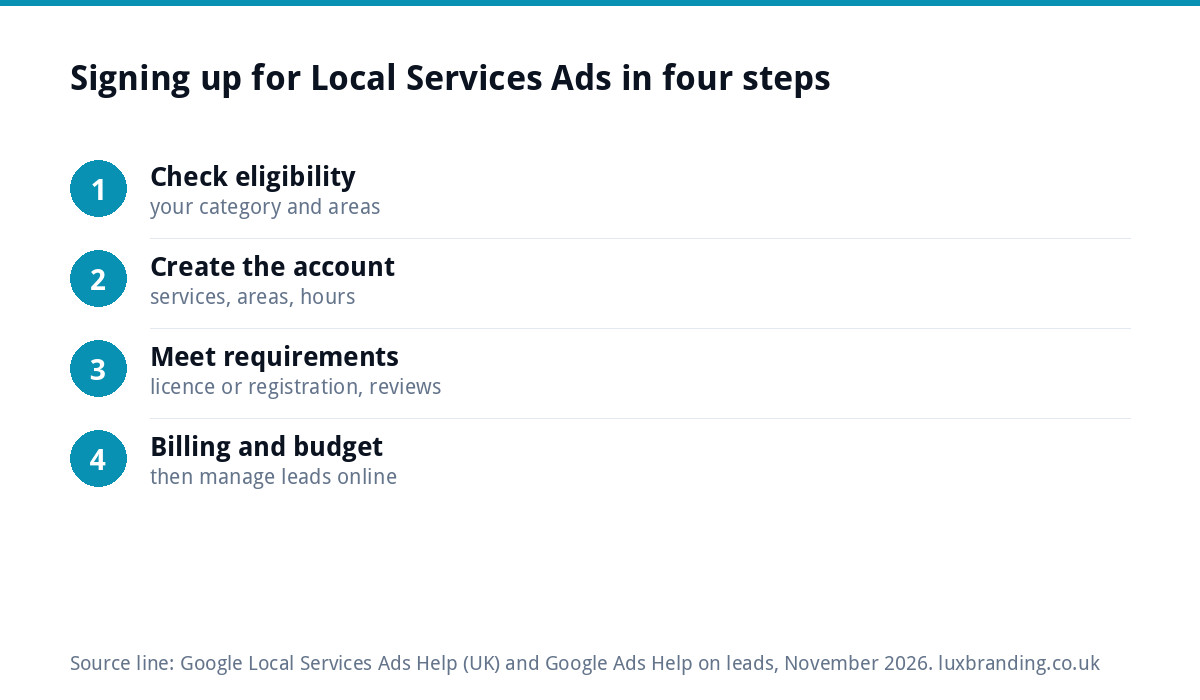
Signing up in four steps
- Check eligibility for your category and the areas you serve.
- Create your account, adding your services, areas, hours and business details.
- Complete the requirements. Google’s page says the pre-badge requirements include a licence, or business registration where no licence is needed, plus reviews depending on the category, billing and a budget. Full onboarding through Google’s screening earns the Google Verified badge.
- Set up billing and your budget, then manage leads, messages and reports online.
You can start receiving leads before the badge, but Google says pre-badge listings appear below providers who have completed onboarding and earned the badge. If you are serious about the channel, finish the screening.
Get ready before you apply
A little preparation makes the screening quicker and the first month more useful:
- Paperwork: have your business registration and any licence or insurance documents for your trade to hand, as Google’s help centre has a separate guide to uploading them.
- Reviews: ask recent customers for Google reviews now, because some categories need them before you can go live and they feed into ranking later.
- Photos: gather clear photos of real jobs, your van and your team at work.
- Phone cover: decide who answers calls during the hours you list, and set a voicemail that tells callers when you will ring back.
- Service list: write down the jobs you want, and the ones you do not, before you tick boxes in the account.
What you pay for, and what you do not
Google’s page on how Local Services Ads leads work says you are charged for each valid lead you receive through your ad. Each charged lead counts towards your budget, and once you reach your monthly maximum, your ad stops showing for the rest of the month unless you change the budget.
| Usually charged | Usually not charged |
|---|---|
| A call you answer, or a customer you call back and speak to | Leads judged invalid or low quality at first assessment |
| A missed call during your opening hours where the customer stays on the line for more than 20 seconds | Missed calls where the customer hangs up before pressing a key in your phone menu |
| A text message, email or voicemail from the customer | Follow-up contact from the same customer within 15 days of a charged lead |
| A lead related to the services you listed | Spam and duplicate contacts that Google filters out |
Google also says charged leads are reassessed over 30 days and automatic credits may be issued for poor-quality, duplicate or invalid leads. You can give feedback on each lead in your account, and it is worth doing, because it is your record of what you paid for.
What decides where you appear
Google’s page on Local Services Ads ranking names two main factors: your bid, which sets the most you will pay per lead, and how likely your ad is to result in a lead. The second depends on:
- Responsiveness: how quickly and reliably you answer calls and messages. Missed calls can hurt your position.
- The customer’s search: the service, the timing and their location.
- Relevance: how well your services and business description match the search.
- Message and booking options: turning these on gives customers more ways to reach you.
- Profile quality: ratings, reviews, response time, photos and verification checks.
Google says higher-quality profiles may rank higher and pay lower costs per lead. In plain terms: answer the phone, ask every happy customer for a review, and keep photos and services up to date.
Local Services Ads vs Search ads vs your Business Profile
| Local Services Ads | Google Search ads | Google Business Profile | |
|---|---|---|---|
| You pay | Per valid lead | Per click | Nothing |
| Who writes the ad | Google, from your profile | You or your agency | Your profile is the listing |
| Where people go | Straight to a call or message | Your website or a landing page | Call, directions or your website |
| Control | Low: services, areas, budget, bid | High: keywords, ads, pages, bidding | Content only |
| Who can use it | Eligible categories only | Almost any business | Any local business |
| Main strength | Pay for contact, not clicks | Flexible and measurable | Free and always on |
They work well together. Your Google Business Profile is free and should be in good shape whatever you run, because reviews and responsiveness feed into everything else.
Is it worth it for your business?
Local Services Ads tend to suit you if:
- Your trade is on the eligible list for your area.
- Customers usually phone rather than fill in forms.
- You or someone in the business can answer calls quickly during opening hours.
- You already have a steady flow of good reviews.
Standard Search ads may suit you better if you want to promote specific high-value services, send people to a page with prices and photos, or control exactly which searches you appear for. Many trades test both and keep the one with the lower cost per job won.
A worked example: an electrician deciding
An electrician covering one city is eligible and passes the screening. He sets a monthly budget and turns on messaging. In the first month most leads are calls for small jobs, which he answers from the van. He marks a few wrong-area calls in his lead feedback, keeps asking customers for reviews and adds photos of recent consumer unit upgrades. Alongside, he keeps a small Search campaign for rewiring, sent to a page with prices and photos, because those are the jobs he most wants. These are example details to show the approach, not a forecast.
Mistakes that waste lead budget
- Missing calls during listed opening hours, which costs leads and can hurt ranking.
- Listing services you do not want, so you pay for enquiries you turn away.
- Setting areas too wide for where you will actually travel.
- Ignoring lead feedback, so poor leads go unchallenged.
- Letting reviews stall. If reviews have disappeared from your profile, our guide to Google reviews disappearing explains why.
Getting help with Google
Our Google Business Profile Setup & Optimisation is £199 one-off, covering categories, keywords, photos, a review strategy and tracking, which strengthens the profile Local Services Ads and the map pack both draw on. For Search campaigns, our Google Ads management is £199 a month for up to £5,000 of monthly ad spend, with no markup on your budget, and a focused landing page is £199. For trades, our guide to branding for trades businesses covers how a professional look lifts every listing. Every fixed price is on our pricing page.
Get the UK SEO DIY Audit Checklist (free)
A 32-point checklist UK SMEs can run against their own website in an afternoon. Surfaces the quick wins before paying for a paid audit.
No spam. UK GDPR compliant. We only use your email to send this resource, unless you tick the box to hear from us.
Frequently asked questions
Are Google Local Services Ads available in the UK? +
Yes, for certain categories. Google's UK help page lists trades and home services nationwide, including plumbers, electricians, roofers, carpenters, cleaners, landscapers, pest control and removals. Some professional categories, such as several types of lawyer and estate agents, are listed for Greater London only. Check Google's eligibility tool, as categories change.
How do Local Services Ads charge? +
You pay for each valid lead, not for clicks. Google counts answered calls, some missed calls during opening hours where the caller waits more than 20 seconds, and messages or voicemails. Follow-up contact from the same customer within 15 days of a charged lead is not charged, and you set a budget that caps monthly spend.
What is the Google Verified badge? +
It is the badge Google shows on Local Services Ads for businesses that have passed its screening process. Google says the badge helps inspire confidence. You can receive leads before earning it, through pre-badge listings, but those appear below providers who have completed onboarding and earned the badge, so finishing the screening is worthwhile.
How do I rank higher in Local Services Ads? +
Google names two factors: your bid and how likely your ad is to bring a lead. The second depends on responsiveness, relevance to the search, message and booking options, and profile quality, including ratings, reviews, response time and photos. Answer calls quickly, keep asking for reviews and keep your services and photos current.
Should I use Local Services Ads or normal Google Ads? +
Local Services Ads suit eligible trades whose customers phone and who can answer quickly. Search ads give more control over keywords, ads and the page people land on, which helps for specific high-value jobs. Many trades test both. Our Google Ads management is £199 a month for up to £5,000 of monthly ad spend.