Quick answer
Meta Verified for business is worth paying for if people are impersonating your business, if Facebook and Instagram bring you real enquiries or sales, or if a lockout would cost you money. Plans started at US$14.99 a month per profile at the time of writing, November 2026. For a quiet local trade profile, the money usually works harder elsewhere.
Meta Verified is Meta’s paid subscription that adds a verified badge, impersonation protection and access to real support on Facebook, Instagram and WhatsApp. It is aimed squarely at small businesses, and Meta promotes it heavily inside the apps. This guide explains what you get, what it costs, who it suits and the free steps every business should take first.
What Meta Verified for business includes
According to Meta’s page on Meta Verified for business, every plan includes a verified badge on the Facebook page, Instagram account or WhatsApp number you subscribe, along with impersonation protection and enhanced support, described as the ability to chat to or email agents 24/7. Higher tiers add more business addresses, more linked devices, links in reels and protection for employees’ accounts.
Before you can subscribe, Meta reviews the business. Its page says you may be asked for your business name, address, website or phone number, and that applications are reviewed within three working days. It also says which plans you are offered depends on your activity on Meta’s apps, such as profile visits, engagement and message conversations.
The plans and prices
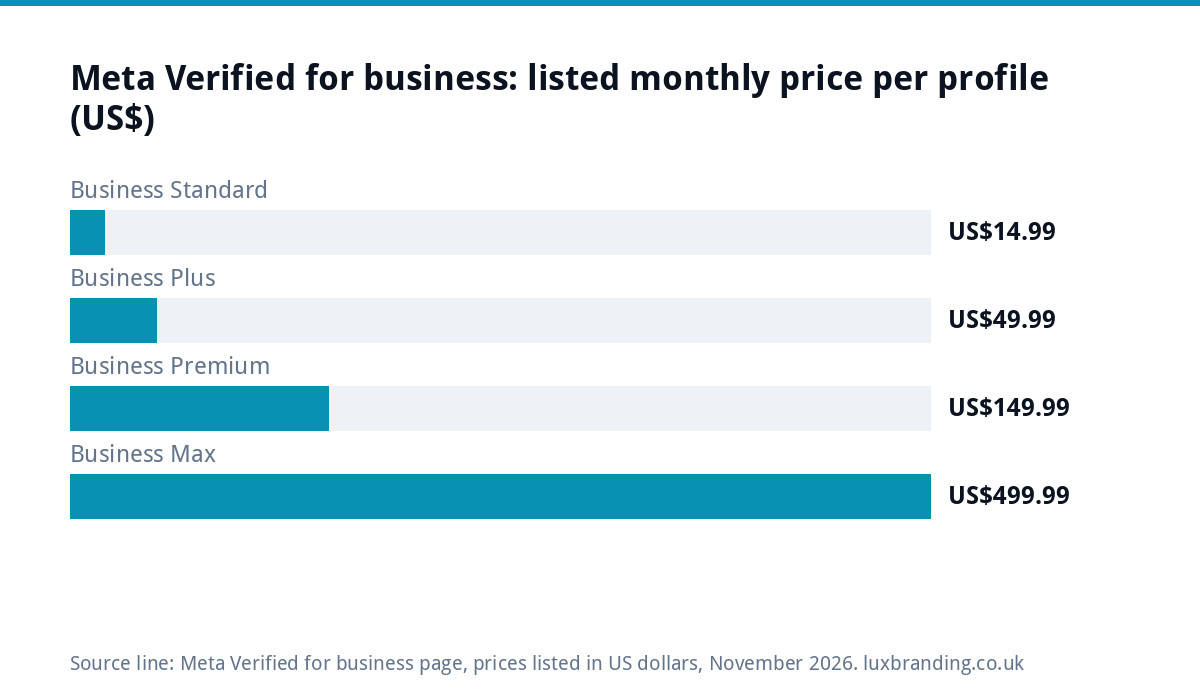
Meta lists its business plans in US dollars, per subscribed profile, and notes that plans, benefits and availability vary by region, app and account. These were the figures on Meta’s business page at the time of writing, November 2026. Meta’s main Meta Verified page repeats that features, availability and pricing may vary by region and app, so check the price shown in your own app before subscribing, as the UK price may differ.
| Plan | Listed price per month | Main additions |
|---|---|---|
| Business Standard | US$14.99 | Verified badge, impersonation protection, enhanced support, enhanced profile |
| Business Plus | US$49.99 | Up to three business addresses, links in reels, featured profile |
| Business Premium | US$149.99 | More addresses and profiles, employee impersonation protection seats |
| Business Max | US$499.99 | The most seats and protected accounts, active case monitoring |
Meta’s page also says subscribing on Facebook and Instagram together saves 20%. Remember that the price is per profile, so a business with a Facebook page and an Instagram account pays for both unless it takes the combined option.
What the badge does and does not do
The badge tells people the profile belongs to a real, checked business. That helps when customers are deciding whether a message or advert is genuine, and it makes fake copies of your page easier to spot.
It does not fix weak content, guarantee more reach or make adverts cheaper. A verified profile with three posts from last year still looks inactive. Treat the badge as a trust signal and an insurance policy, not a marketing plan.
The real value: support when something goes wrong
For most small businesses, the strongest reason to subscribe is not the tick. It is being able to reach a person when the page is hacked, an ad account is restricted, or a login stops working. Business owners who have tried to recover a page through automated forms know how long that can take, and how much it can cost in lost enquiries.
If your Facebook or Instagram brings in a meaningful share of your work, a monthly fee for faster human help can be cheap insurance. If the page is a placeholder you rarely look at, it is not.
Who it suits, and who should skip it
| Worth it if you… | Probably skip it if you… |
|---|---|
| Have found fake pages copying your business | Have never seen an impersonation attempt |
| Take bookings or sales through Instagram, Facebook or WhatsApp | Get almost all your work from Google, referrals or repeat customers |
| Run paid ads and would lose money if the account froze | Do not advertise on Meta |
| Have been locked out before and struggled to get help | Post occasionally and rarely get messages |
| Are a recognisable local brand that customers search for by name | Are just starting out with a small following |
Signs your business is being impersonated
Impersonation is the problem Meta Verified is mainly sold against, so it helps to know what it looks like. Watch for:
- A second page or account using your name, logo and photos, often with a slightly different handle.
- Customers mentioning messages or comments from “you” that you never sent.
- Fake giveaways or discount offers in your name asking people to click a link or pay a fee.
- Comments under your real posts from look-alike accounts offering to “help” or “book” people.
Search your business name on Facebook and Instagram every month or so. If copies keep appearing despite reporting them, that is one of the clearest cases for paying.
A worked example: two businesses, two answers
A wedding photographer takes most enquiries through Instagram messages, shows her portfolio there and has had a fake account copy her photos twice this year. For her, a basic plan on the Instagram account is easy to justify: the badge separates her from the copies, and a lockout during wedding season would cost far more than a year of fees.
A roofer gets nearly all his work from Google, his website and word of mouth. His Facebook page has a few hundred followers and gets the occasional message. He is better off spending the same money on photos of finished jobs and a tidy Google profile, and protecting the page with the free steps below.
Free steps to take first
Most account problems are preventable, and the free protections cover a lot of the risk the subscription is sold against.
- Turn on two-step verification for every person with admin access. The National Cyber Security Centre’s guide to using social media safely recommends 2-step verification to protect accounts.
- Manage pages through a business portfolio in Meta Business Suite, so access does not depend on one person’s personal profile.
- Have at least two trusted admins, so one lost login does not lock the business out.
- Remove old staff and agencies who no longer need access.
- Report fake pages directly to the platform as soon as you spot them; the NCSC guide links to each platform’s reporting route.
Make the profile worth verifying
A badge on a half-finished page is wasted money. Before paying, make sure the profile looks like the business people will meet: the same logo, colours and name as your website and van, a clear bio with your area and services, recent photos of real work and quick replies to messages. If your branding looks different on every channel, our guide to a brand that looks inconsistent everywhere covers how to pull it together.
Verification on Meta also does nothing for Google, where many local customers look first. Google’s Business Profile verification is free, and our guide to Google Business Profile optimisation covers getting that profile working.
How to decide in five minutes
- Add up roughly how much work came from Facebook, Instagram and WhatsApp in the last three months.
- Estimate what a week locked out of those accounts would cost you.
- Compare that with a year of the subscription at the price your app shows.
- If the lockout cost is bigger, subscribe to the basic plan on your most important profile first.
- Review it after six months: did you use the support, and did it help?
Start with the lowest plan. Most small businesses never need the higher tiers, which are built for brands with several locations and staff accounts to protect.
If your page is copied or hacked
Act quickly, whether or not you subscribe. Report the fake page or account through the platform’s reporting route, and ask regular customers to report it too. Post a short notice on your real page saying which account is genuine and that you never ask for payment by message. If your own account has been taken over, change your passwords, check which admins and connected apps have access, and use the platform’s account recovery route. Keep screenshots of everything, as they help if you need to escalate.
Getting your social profiles working properly
Our Social Media Management is £249 a month for 12+ posts a month with full management, run by a real person. If you advertise on Meta, our Meta ads management is £199 a month for up to £5,000 of monthly ad spend, with no markup on your budget. If the profile needs a consistent look first, our Brand Identity Design is £299. Every fixed price is on our pricing page.
Get the UK SEO DIY Audit Checklist (free)
A 32-point checklist UK SMEs can run against their own website in an afternoon. Surfaces the quick wins before paying for a paid audit.
No spam. UK GDPR compliant. We only use your email to send this resource, unless you tick the box to hear from us.
Frequently asked questions
How much is Meta Verified for business? +
At the time of writing, November 2026, Meta's business page listed four plans per subscribed profile: Business Standard at US$14.99 a month, Plus at US$49.99, Premium at US$149.99 and Max at US$499.99. Meta says plans and availability vary by region, and that subscribing on Facebook and Instagram together saves 20%. Check the price shown in your app.
What does Meta Verified for business include? +
Every plan includes a verified badge on the profile you subscribe, impersonation protection and enhanced support, which Meta describes as chatting to or emailing agents 24/7. Higher tiers add more business addresses, more linked devices, links in reels and protection for employees' accounts. Meta reviews each business before approving the subscription.
Does Meta Verified increase reach? +
Do not buy it for reach. The badge tells people the profile belongs to a real, checked business, which helps trust and makes fake copies easier to spot. It does not fix weak content or make adverts cheaper. The strongest reason for most small businesses is faster access to human support when something goes wrong.
How can I protect my business page without paying? +
Turn on two-step verification for every admin, which the National Cyber Security Centre recommends. Manage pages through a business portfolio in Meta Business Suite, keep at least two trusted admins, remove old staff and agencies, and report fake pages to the platform as soon as you see them. These steps prevent most lockouts.
Can you help us run our Facebook and Instagram properly? +
Yes. Our Social Media Management is £249 a month for 12+ posts a month with full management. Our Meta ads management is £199 a month for up to £5,000 of monthly ad spend, with no markup on your budget. Brand Identity Design at £299 gives your profiles a consistent look. Every fixed price is on our pricing page.