Quick answer
ERR_TOO_MANY_REDIRECTS means your site keeps sending the browser between two addresses, usually http and https or www and non-www, until the browser gives up. On WordPress the usual causes are a Cloudflare SSL setting, mismatched WordPress URLs, a duplicated redirect rule or a plugin. Test in a private window, then check each in turn.
The error looks alarming because the whole site vanishes behind a browser message, but the website itself is normally fine. Two parts of the setup disagree about the correct address and keep bouncing visitors between them. Find the two parts, make them agree, and the site comes back. This guide gives the causes in order of likelihood and a safe way to work through them.
What the error actually means
When you visit a page, the server can reply “this page has moved, go here instead”. That is a redirect, and sites use them all the time, for example to send http visitors to https. A loop happens when address A redirects to B and B redirects back to A. Chrome shows ERR_TOO_MANY_REDIRECTS, Firefox says “The page isn’t redirecting properly”, and Safari says it cannot open the page because too many redirects occurred. They are all the same problem.
It often appears straight after a change: installing an SSL certificate, turning on Cloudflare, moving host, switching to www, or adding a redirect plugin. If you know what changed last, start there.
First, rule out your own browser
Browsers remember permanent redirects and cookies. Sometimes the loop has been fixed on the server but your browser is still following the old instructions.
- Open the site in a private or incognito window.
- Try a different browser, or your phone on mobile data rather than Wi-Fi.
- If it works there, clear cookies and cached files for your domain in your usual browser.
If the site loads everywhere except your own browser, you are done. If it fails everywhere, the loop is real and the cause is on the server, the CDN or in WordPress.
The seven usual causes
| Cause | Typical sign | Fix |
|---|---|---|
| Cloudflare set to Flexible SSL while the server forces https | Started when Cloudflare was switched on | Set SSL mode to Full or Full (strict) with a certificate on the server |
| WordPress Address and Site Address do not match the real address | Started after an SSL install or move | Correct both to the exact https address, with or without www |
| Server rule and WordPress disagree on www | Loop between www and non-www versions | Choose one version and make every setting use it |
| Duplicated https redirects | Rules in .htaccess, the host panel and a plugin all at once | Keep one https redirect, remove the rest |
| Redirect plugin rules pointing at each other | Only certain pages loop | Find and delete the circular rule |
| SSL handled by a proxy that WordPress cannot see | Admin login loops after forcing https | Tell WordPress the request is https via the forwarded header |
| Cached redirect at a cache or CDN | Fixed on the server, still loops for visitors | Purge the caching plugin and CDN caches |
Cause 1: Cloudflare’s SSL mode
This is the most common cause on sites that use Cloudflare. Cloudflare’s own troubleshooting page on ERR_TOO_MANY_REDIRECTS explains that in Flexible mode, Cloudflare talks to your server over plain http. If your server then redirects all http requests to https, the request goes round in circles. Its fix is to set the SSL/TLS encryption mode to Full or higher, which needs a certificate on your server, or remove the server’s https redirect.
The same page lists other loops: Always Use HTTPS combined with a server that redirects back to http, HSTS with a mismatched setup, and conflicting redirect rules. If you use Cloudflare, check its SSL/TLS settings before anything else.
Cause 2: the WordPress URL settings
WordPress stores two addresses under Settings, then General: the WordPress Address (URL) and the Site Address (URL). The WordPress developer guide on migrating WordPress says both should include the https part and should not end with a slash. If they say http while the server forces https, or say www while the server strips it, you get a loop.
The catch is that you cannot reach Settings when the admin area is looping too. The same guide shows how to set both addresses in wp-config.php instead:
define( 'WP_HOME', 'https://example.co.uk' );define( 'WP_SITEURL', 'https://example.co.uk' );
Use your real address, matching the version, www or not, that your server redirects to. Once those values are in wp-config.php, the boxes in Settings become fixed, so remember they are there.
Causes 3 to 5: rules that disagree
Redirects can be set in several places at once: the server’s .htaccess file, your host’s control panel, Cloudflare page rules, an SSL plugin, an SEO or redirect plugin and the theme. Each one alone is fine. Two that disagree create a loop.
- Pick one version of your address, for example https with no www, and make every setting agree.
- Keep one https redirect. If the host panel already forces https, you do not also need a plugin doing it.
- Check redirect plugins for a rule that sends page A to page B while another sends B back to A. This often happens after a redesign when old and new pages swap names.
If you cannot reach the admin area, rename the plugins folder over FTP or the host’s file manager to switch all plugins off at once. If the site then loads, rename it back and reactivate plugins one at a time to find the culprit.
Cause 6: SSL handled in front of WordPress
Some hosts and setups handle the certificate on a proxy or load balancer in front of WordPress, which then receives plain http. The WordPress documentation on HTTPS warns that forcing SSL in that situation can cause an endless redirect cycle, and shows how to make WordPress read the forwarded protocol header so it knows the visitor is on https. This is a job for your host or developer; ask them whether SSL terminates before WordPress.
When only the admin area or login loops
If the public site loads but wp-admin or the login page loops, suspect cookies, a security plugin or a forced-SSL setting for the admin area. Clear cookies for the domain first. Then check wp-config.php for a FORCE_SSL_ADMIN line added by a previous developer, and temporarily disable any login-protection plugin by renaming its folder. A login loop on a shop can also come from a caching rule that caches the account or checkout pages, which should always be excluded from page caching.
Cause 7: cached redirects
Caching plugins and CDNs can store a redirect and keep serving it after the real cause is fixed. Once you have corrected the settings, purge the caching plugin, any server cache your host offers and the CDN cache, then test again in a private window.
A safe order to work through
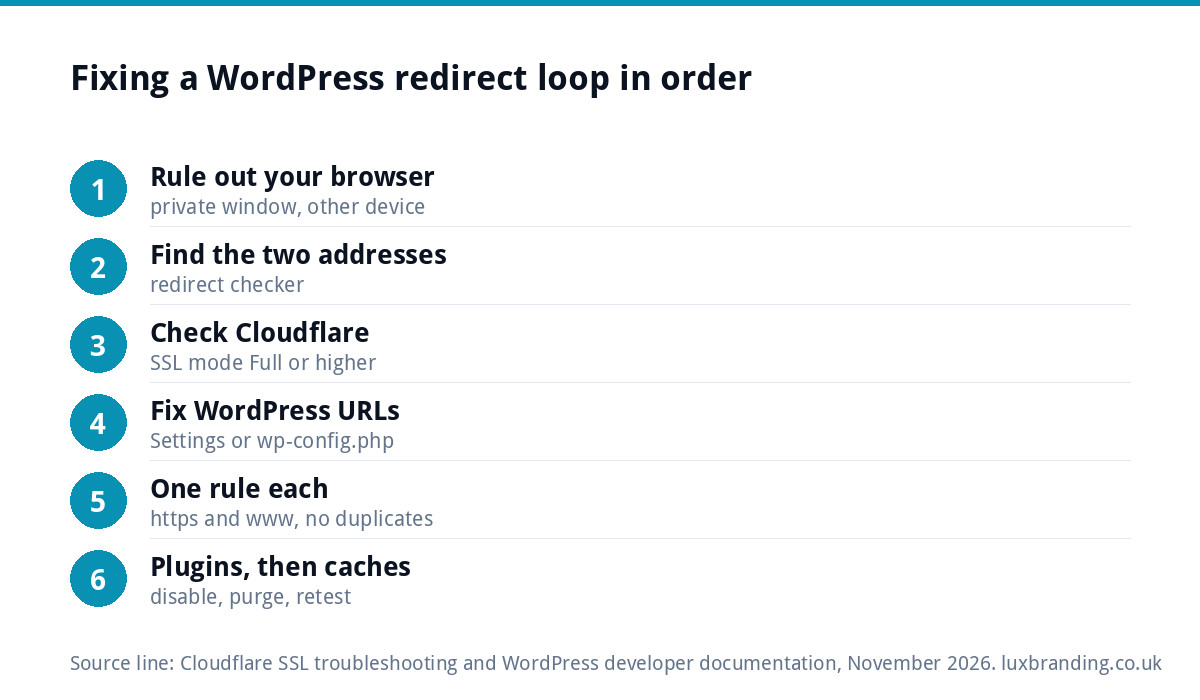
| Step | Where | What to check |
|---|---|---|
| 1 | Private window, other device | Is the loop real or just your browser? |
| 2 | A redirect checker or curl | Which two addresses is it bouncing between? |
| 3 | Cloudflare, if used | SSL mode, Always Use HTTPS, page rules |
| 4 | wp-config.php or Settings | Both WordPress addresses match the real https address |
| 5 | .htaccess and host panel | One https rule, one www rule, no duplicates |
| 6 | Plugins folder | Does disabling plugins stop the loop? |
| 7 | Caches | Purge plugin, server and CDN caches, retest |
Take a backup before editing wp-config.php or .htaccess, and change one thing at a time so you know what fixed it.
Why it matters beyond the error page
While the loop is live, nobody can reach the site, including Google. A short outage is rarely a lasting problem, but a loop that runs for days can affect how your pages are crawled, and redirect chains left behind after the fix slow every visit. Once the site is back, check the main pages load in a single hop to the https address. If your padlock or certificate is the underlying issue, our guide to a website showing “not secure” covers that side, and the traffic drop guide helps if visits have not recovered.
When to hand it over
If you have checked the settings above and the loop persists, or you would rather not edit server files, it is a quick job for someone who does it regularly. Our website management and hosting is £20 a month and includes UK hosting, SSL, daily backups, security monitoring and automatic updates, which removes most of the causes on this list. The WordPress maintenance guide explains the routine that keeps settings like these from drifting, and the WordPress security guide covers the rest. All our prices are on the pricing page.
Get the UK Website Project Brief Template (free)
A two-page template for briefing any UK web designer: sitemap, integrations, audience and deliverables. Cuts revision rounds in half.
No spam. UK GDPR compliant. We only use your email to send this resource, unless you tick the box to hear from us.
Frequently asked questions
What causes ERR_TOO_MANY_REDIRECTS? +
Your site keeps redirecting between two addresses, such as http and https or www and non-www, until the browser stops. On WordPress the usual causes are Cloudflare set to Flexible SSL while the server forces https, WordPress URL settings that do not match the real address, duplicated redirect rules, a plugin, or a cached redirect.
How do I fix it if I cannot log in to WordPress? +
Set the correct addresses in wp-config.php using WP_HOME and WP_SITEURL with your real https address. If that does not work, rename the plugins folder through FTP or your host's file manager to switch every plugin off, then test. Take a backup of wp-config.php and .htaccess before editing either file.
Why did the error start after I turned on Cloudflare? +
Most likely the SSL mode is Flexible. Cloudflare then connects to your server over http, and if your server redirects http to https, the request loops. Cloudflare's guidance is to set the encryption mode to Full or higher, which needs a certificate on your server, or to remove the server's https redirect.
The site works for others but not for me. Why? +
Your browser has probably stored an old redirect or cookie. Open the site in a private window or another browser. If it loads there, clear cookies and cached files for your domain in your usual browser. Purging your caching plugin and CDN also helps when visitors still see the loop after a fix.
Will a redirect loop hurt my Google rankings? +
A short outage rarely causes lasting harm, but while the loop is live nobody can reach the site, Google included. A loop lasting days can affect crawling. After fixing it, check that key pages reach the https address in a single redirect, because chains left behind slow every visit.