
Quick answer
DNS (the Domain Name System) is the internet’s address book. It turns a domain such as yourbusiness.co.uk into the numeric addresses computers use, and tells the world where your website and email live. You control it through DNS records, mainly A, CNAME, MX and TXT, set wherever your domain’s DNS is hosted.
Most small business owners never think about DNS until something breaks: the website disappears after a hosting move, emails stop arriving, or a new developer asks for “access to your DNS”. This guide explains what DNS is in plain English, which records matter, who controls them and how to avoid the mistakes that take sites and inboxes offline.
What DNS actually does
ICANN, the organisation that coordinates the internet’s naming system, puts it simply in its DNS explainer: the DNS is the address book of the Internet. It lets people type a text-based domain name instead of an IP address, and connects that name to the address where the content actually sits.
Mozilla’s developer documentation adds the technical detail: DNS is a hierarchical and decentralised naming system that keeps a list of domain names and the resources, such as IP addresses, associated with them. No single company runs it. Your records live on name servers you choose, and the rest of the internet asks those servers when it needs to find you.
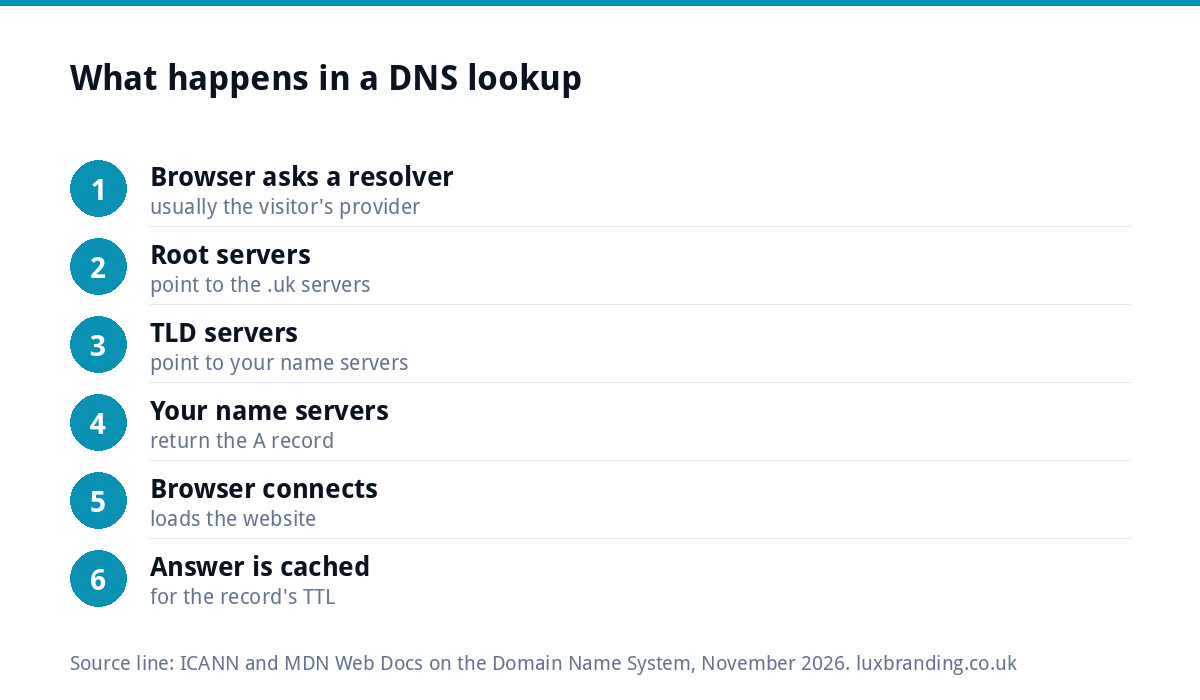
What happens when someone visits your site
Every visit to your website starts with a quick DNS lookup, usually finished in a fraction of a second:
- The browser asks a resolver, normally run by the visitor’s broadband or mobile provider, where yourbusiness.co.uk lives.
- The resolver works down the hierarchy: from the root servers to the servers for .uk, then to the name servers listed for your domain.
- Your name servers answer with the record for the website, such as an A record pointing at your hosting.
- The browser connects to that address and loads the site.
- The answer is cached for a set time, so the next visit is faster.
Email works the same way, except the sending server looks up your MX records to find where to deliver messages.
Registrar, DNS host and web host: three different jobs
Most confusion about DNS comes from mixing up three roles. Sometimes one company does all three; often it does not.
| Role | What it does | Where you see it | Typical problem |
|---|---|---|---|
| Registrar | Where you bought and renew the domain | Renewal invoices, the name server setting | Domain lapses because renewal emails go to an old address |
| DNS host | Holds your DNS records | The “DNS zone” or “DNS records” screen | Records edited at a provider that is no longer in charge |
| Web host | Stores and serves your website files | Hosting control panel | Site moved but DNS still points at the old server |
| Email provider | Runs your mailboxes | Microsoft 365, Google Workspace or host email | MX records left pointing at an old provider |
The name server setting at your registrar decides which DNS host is in charge. Edit records anywhere else and nothing changes, which is one of the most common mistakes when a business moves its website.
The DNS records that matter for a small business
A domain can hold dozens of record types, but six cover almost everything a small business needs:
| Record | What it does | Example use |
|---|---|---|
| A | Points a name at an IPv4 address | yourbusiness.co.uk to your web server |
| AAAA | Points a name at an IPv6 address | The same, for newer networks |
| CNAME | Points one name at another name | www to your main domain or a platform |
| MX | Says which servers receive your email | Microsoft 365 or Google Workspace |
| TXT | Holds text for verification and email security | SPF, DKIM, DMARC, Google verification |
| NS | Names the servers that hold your records | Set at the registrar |
DNS and your email
Email is where DNS mistakes hurt most, because nothing visibly breaks: messages just stop arriving or quietly land in spam. Google’s guide to setting up MX records explains that a sender’s mail system looks up the MX records for your domain to decide where to deliver, that you change them where you manage your domain, and that it can take up to 72 hours for new MX records to be recognised.
TXT records matter just as much. SPF, DKIM and DMARC records tell receiving servers that mail claiming to be from your domain is genuine. Missing or wrong entries are one of the main reasons business email goes to spam; our guide to emails going to spam walks through the fixes.
Propagation: why changes are not instant
Each DNS record has a TTL (time to live), which tells resolvers how long they may cache the answer. Until that time runs out, some visitors still see the old answer. That is why a website move can look finished on your phone but not on a customer’s laptop.
Two habits avoid most trouble:
- Lower the TTL a day or two before a planned move, then raise it again afterwards.
- Keep the old hosting and email running until the new records have had time to take effect everywhere.
Common DNS problems and their causes
- Website shows an old version or a holding page: the A record still points at the previous host.
- “Not secure” warning after a move: the site resolves but the security certificate was not issued for the new setup. See website showing not secure.
- Email stopped after a website change: the new DNS host was set up without copying the MX records.
- www works but the bare domain does not, or the reverse: one of the two names has no record.
- Site vanished entirely: the domain itself expired at the registrar.
Who should control your DNS
You should. The registrar account that holds your domain is one of the most valuable logins your business owns, because whoever controls it controls your website and email. Keep it in the business’s name, on an email address you will still have in five years, with two-factor authentication switched on. Give developers access as a user where the registrar allows it, rather than handing over your own password. Our UK domain names guide covers choosing and protecting a domain.
Checking your own DNS
You do not need special software to see your records. On Windows, the command nslookup -type=mx yourbusiness.co.uk shows your mail servers; on a Mac, dig yourbusiness.co.uk shows the website address. Free online DNS lookup tools show the same thing in a browser. Before any website or email change, save a screenshot of every record so you can put things back if something goes wrong.
When you look, check three things. Does the A record for the bare domain and the www version point where your website actually lives? Do the MX records match the email provider you pay for? Is there exactly one SPF record, rather than two conflicting ones added by different suppliers over the years? Those three checks catch most of the faults that cause lost enquiries.
A safe checklist for moving a website or email
Most DNS outages happen during a move. Work through this list in order and you avoid nearly all of them:
- Find out who is in charge. Check the name servers at your registrar so you know which DNS host to edit.
- Export or screenshot every record before you change anything, including TXT records you do not recognise.
- Lower the TTL on the records you plan to change a day or two ahead.
- Build the new site or mailbox first and test it on a temporary address.
- Change one thing at a time. Move the website records, confirm the site works, then deal with email separately.
- Re-create MX and TXT records exactly if you switch DNS host, or email will stop.
- Keep the old services running for at least a few days while caches expire.
- Test from a different network, such as mobile data, to see what customers see.
When to get help
DNS is simple once it is set up correctly, and stressful when it is not. If you are moving a website, changing email provider or launching a new site, it is worth having someone check the records before you switch. Our Website Management and Hosting is £20 a month and includes UK hosting, SSL, daily backups, security monitoring and up to 3 business email mailboxes. If you are building a new site, our Custom WordPress Website at £499 is hand-coded, and you own the code and can host anywhere. Our guide to website hosting costs compares the options, and all our prices are on the pricing page.
Get the UK Website Project Brief Template (free)
A two-page template for briefing any UK web designer: sitemap, integrations, audience and deliverables. Cuts revision rounds in half.
No spam. UK GDPR compliant. We only use your email to send this resource, unless you tick the box to hear from us.
Frequently asked questions
What is DNS in simple terms? +
DNS, the Domain Name System, is the address book of the internet. It turns a domain name such as yourbusiness.co.uk into the numeric address of the server that holds your website, and tells other mail servers where to deliver your email. You manage it through DNS records held by your DNS host.
What is the difference between a registrar and a DNS host? +
The registrar is where you bought and renew the domain. The DNS host holds the records that point the domain at your website and email. The name server setting at your registrar decides which DNS host is in charge, so editing records anywhere else has no effect. Often one company does both, but not always.
How long do DNS changes take? +
It depends on the TTL set on each record, which controls how long resolvers cache the old answer. Many changes show within hours, but Google's guidance says it can take up to 72 hours for new MX records to be recognised. Keep old hosting and email running until the change has fully taken effect.
Which DNS records do I need for business email? +
You need MX records pointing at your email provider, such as Microsoft 365 or Google Workspace, plus TXT records for SPF, DKIM and DMARC so receiving servers trust mail from your domain. Missing or wrong TXT records are a common reason business emails land in spam or are rejected outright.
Should my web designer control my DNS? +
No. Keep the registrar account in your business's name, on an email you control, with two-factor authentication on. Give your designer user access where the registrar allows it. Whoever controls the domain controls your website and email, so it should never sit in a supplier's personal account.