
Quick answer
A £99 website is usually a template on a builder or the seller’s own platform, with the real cost in a monthly fee, a minimum term and an exit charge. It can suit a tiny business if you own the domain and can leave. Before paying, ask who owns the domain, the monthly price, the term, and what leaving costs.
This guide is not about whether a high quote is fair; our guide to web designers who overcharge covers that. Here we look at the other end of the market: what the cheapest offers buy, the warning signs in the small print, and how to tell a fair budget website from a trap.
What a £99 website price usually means
There is nothing wrong with a low price in itself. The question is what the price leaves out. Low-price website offers tend to fall into one of three types:
- Template plus your words. A ready-made layout with your logo, photos and text dropped in. Quick and cheap to produce.
- Low build fee, high monthly fee. The headline price is small because the money comes from a monthly charge on a fixed term.
- Your site on their system. The site runs on the seller’s own platform, so it cannot be moved. Leaving means starting again.
The first can be a perfectly good deal for a very small business. The second and third are where people get caught, because the cost is not where they were looking.
It is also worth asking who will actually build the site and who you deal with afterwards. A low price often means a fixed process with little room for your input: a set number of pages, a set number of revisions, and changes after launch charged one at a time. None of that is wrong if it is written down. Problems start when you only discover the limits after paying, so ask for the inclusions in writing before you commit.
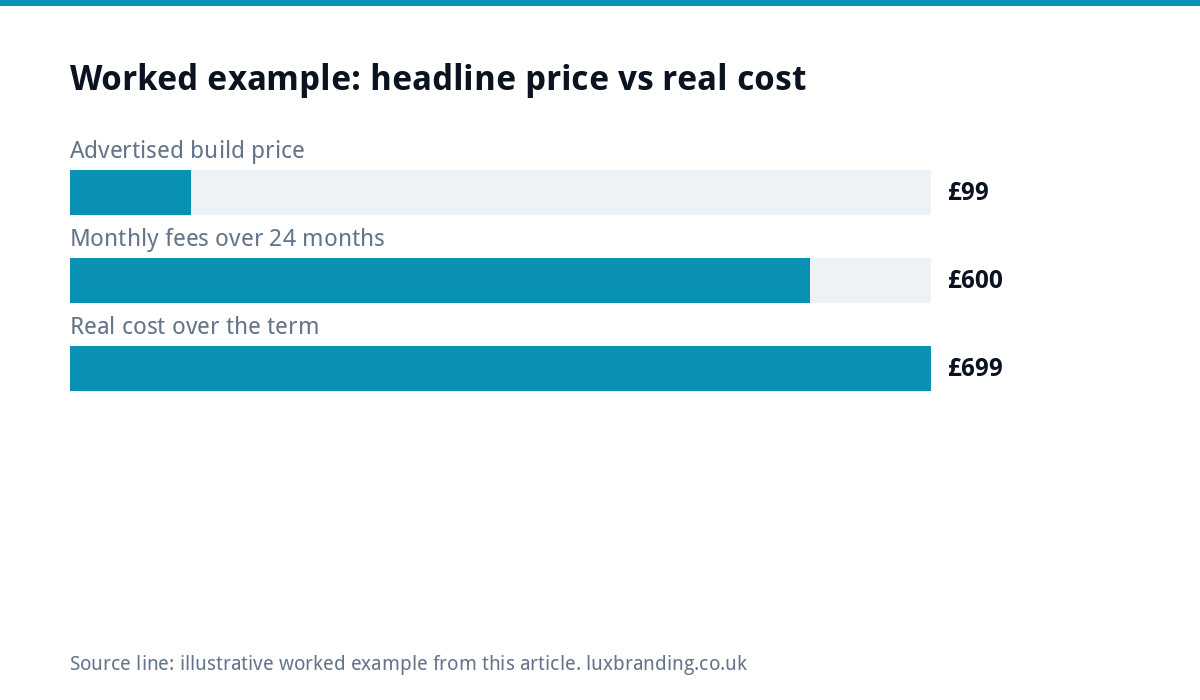
Cost: what you pay versus what the advert says
To compare offers honestly, work out the full cost over the minimum term:
Real cost = build fee + (monthly fee x months in the minimum term) + any exit or release fee.
Worked example
Say an advert offers a website for £99, and the terms add a £25 monthly fee on a 24-month contract. The real price over the term is £99 plus £600, so £699, before any charge to release the site if you leave. That may still be fair if the monthly fee covers hosting, updates and support you would pay for anyway. It is not fair if you discover in month 25 that you do not own the site or the domain.
Our guide to how much a website costs in the UK sets out the normal price bands, so you can see where an offer sits.
What the cheap price usually leaves out
| Part of a business website | Often missing or extra in budget offers | Question to ask |
|---|---|---|
| Domain in your name | Registered in the seller’s name | Will my business be the registrant? |
| Mobile layout | Desktop design squeezed onto phones | Can I see a live example on my phone? |
| SSL certificate (padlock) | Sold as a paid add-on | Is SSL included at no extra charge? |
| Contact form into your inbox | Untested, or goes to the seller | Where do enquiries go, and is it tested? |
| Search basics (titles, descriptions, sitemap) | Left blank or identical on every page | Are page titles and descriptions written for each page? |
| Cookie consent | Analytics running with no consent banner | How is cookie consent handled? |
| Backups and updates | None, or an extra fee | How often is it backed up, and who updates it? |
| Changes after launch | Charged per change | What does a text change cost? |
Warning sign 1: the domain is not yours
This is the one that hurts most later. If the seller registers your web address in their own name, they control it. Leave, and you may lose the address printed on your van, cards and quotes. Always ask, in writing, that your business is named as the registrant. Our UK domain names guide explains how to check who is listed.
Warning sign 2: a long term with no exit price
A monthly fee is not a problem. A 24 or 36-month term with no stated exit cost and no promise to hand over the site is. Ask what happens at the end of the term, what it costs to leave early, and whether you get the files and logins when you go.
Warning sign 3: the padlock costs extra
A site without https shows a “not secure” warning in browsers. Some budget sellers charge separately for the certificate. They do not need to: Let’s Encrypt, a non-profit certificate authority, states that anyone who owns a domain can get a trusted certificate at zero cost. An SSL upsell on a small brochure site is a sign of how the rest of the pricing works.
Warning sign 4: it is not really built for phones
Google’s documentation on mobile-first indexing says Google uses the mobile version of a site’s content for indexing and ranking. A site that looks fine on a laptop and cramped on a phone is weaker on both counts: harder for customers to use, and judged by Google on its mobile version. Ask for a live example and open it on your own phone.
Warning sign 5: no word about cookies and privacy
If your site uses analytics or advertising tags, UK rules apply. The ICO’s guidance on cookies and similar technologies says you must tell people if you set cookies, explain what they do and why, and get consent. A budget site that drops tracking code in with no consent banner leaves that problem with you, not the seller.
When a cheap website is the right call
Low cost is not always a trap. A budget site can be the sensible choice when:
- You are testing an idea and need something live this week.
- Your work comes from word of mouth and the site just needs to look legitimate.
- The domain is in your name, there is no long term, and you can take your content with you.
In those cases, budget well and keep your exit open. Our website launch checklist helps you check the basics before it goes live.
Budget website or trap: the checklist by situation
| Your situation | Is a budget site sensible? | What to insist on |
|---|---|---|
| Brand-new sole trader, tight budget | Often, yes | Your own domain and a monthly, not multi-year, term |
| Established trade wanting local search enquiries | Rarely | Written content per service and area, proper page titles, a tested form |
| Shop or booking business | Risky | Updated, supported software and secure payments |
| Testing an idea for a few months | Yes | No long term and easy export of your content |
| Already on a cheap site and stuck | Plan your way out | Domain control first, then exit terms, then rebuild quotes |
If you are already stuck
Do things in this order. First, look up who is listed as the registrant of your domain; if it is not you, ask in writing for it to be transferred to your business. Second, find the contract and note the end date, notice period and any release fee. Third, copy your text, photos and page list somewhere safe, because on a closed platform those are all you can take with you. Only then get rebuild quotes and book a switch date, so the new site goes live on the same address the day the old one ends. Rushing step three is how businesses lose years of photos and written content.
What we charge, and why
We are not the cheapest, and we do not try to be. Our One-Page Website is £299 one-off and our Custom WordPress Website is £499 one-off for up to eight pages, delivered in two to four weeks. Both are hand-coded with no page builders, with custom design, a mobile-first build, an SEO foundation (schema, meta, sitemap), contact forms connected to your inbox, Google Analytics, a written guide to editing it and 30 days of support. You own the code and can host anywhere, with no lock-in. Hosting is optional: our plan is £20 a month if you want us to look after it.
Compare our one-page website with any budget offer using the questions above, try the website cost calculator for your own estimate, and see every price on our pricing page.
Get the UK Website Project Brief Template (free)
A two-page template for briefing any UK web designer: sitemap, integrations, audience and deliverables. Cuts revision rounds in half.
No spam. UK GDPR compliant. We only use your email to send this resource, unless you tick the box to hear from us.
Frequently asked questions
Is a £99 website any good? +
It can be, for a very small business that just needs to look legitimate online, as long as the domain is in your name and you can leave without a large fee. The risk is usually in the small print: a long monthly contract, a site on the seller's own system, or extras such as SSL charged separately.
How do I work out the real cost of a cheap website? +
Add the build fee to the monthly fee multiplied by the months in the minimum term, then add any exit or release fee. For example, a £99 site with a £25 monthly fee on a 24-month term costs £699 over the term, before any charge for leaving. Compare that total, not the headline price.
Who should own my website's domain name? +
Your business. Ask in writing that you are named as the registrant, not the web company. If the seller registers it in their own name, they control the address on your vans, cards and quotes, and leaving them can mean losing it. Check the registrant details with a domain lookup after it is registered.
Should I pay extra for an SSL certificate? +
Rarely, for a small business website. Let's Encrypt, a non-profit, issues trusted certificates at no cost to anyone who owns a domain, and many hosts include one. Paid certificates have specific uses, but if a budget seller charges separately for the padlock on a brochure site, ask why.
How much does a proper small business website cost? +
It depends on size and features. Our One-Page Website is £299 one-off and our Custom WordPress Website is £499 one-off for up to eight pages, both hand-coded with an SEO foundation, contact forms and 30 days of support. You own the code and can host it anywhere; our hosting plan is £20 a month.