Quick answer
To fit a wide logo into a round profile picture, use the icon or initials, not the full horizontal logo. Centre it on a solid brand-colour square of at least 800 x 800 pixels and keep it inside the middle 70 percent so the circle crop never clips it. Upload as PNG and check it on a phone.
Most logos are designed as a horizontal line of icon plus name, which is perfect for a website header and terrible for a small circle. Squeezed in, the name becomes unreadable and the edges get cut off. This guide explains why it happens, the five ways to fix it, the sizes the main platforms ask for and a quick test to run before you upload.
Why wide logos fail in a circle
Profile pictures on Facebook, Instagram, LinkedIn, X, WhatsApp and Google are shown as circles or rounded squares, often only a few millimetres across on a phone screen. A horizontal logo has to shrink until its full width fits inside that circle, which leaves the lettering tiny and a large empty band above and below. If it is not shrunk enough, the circle crops the ends.
There is also simple geometry at play. A circle drawn inside a square loses the corners. The largest square that fits inside that circle is only about 70 percent of the width of the original square. Anything outside that central area risks being clipped somewhere, because different apps crop slightly differently.
Five ways to fit a logo into a profile picture
| Option | How it works | Best for | Watch out for |
|---|---|---|---|
| Icon only | Use the symbol without the name | Logos with a strong, distinctive icon | Icon must be recognisable on its own |
| Initials or monogram | Use one or two letters in your brand font | Wordmark logos with no icon | Needs consistent use so people learn it |
| Stacked layout | Icon above the name, closer to square | Short business names | Name can still be too small to read |
| Name on colour | Short name set large on a brand-colour background | Very short names of one word | Long names fail at avatar size |
| Full logo, shrunk | Horizontal logo reduced to fit | Almost never | Unreadable lettering, wasted space |
For most small businesses, the icon or initials on a solid colour wins. The name already appears in bold right next to the profile picture on every platform, so the picture does not need to repeat it.
What the platforms ask for
Each platform publishes its own guidance, and these figures change, so check them when you upload. At the time of writing, November 2026:
- LinkedIn’s image specifications for Pages give 400 x 400 pixels as the recommended logo size for a company page.
- Google’s help page on Business Profile photos asks for JPG or PNG between 10 KB and 5 MB, recommends 720 x 720 pixels and sets a minimum of 250 x 250 pixels. It also says your logo helps customers recognise your business on Google.
- Facebook, Instagram and WhatsApp crop profile pictures to a circle. Upload a square image and preview it before saving.
The simple answer is to make one square master image, at least 800 x 800 pixels, which is comfortably above all of these, and use it everywhere. Consistency across platforms helps people recognise you from one app to the next.
How to make the profile picture, step by step
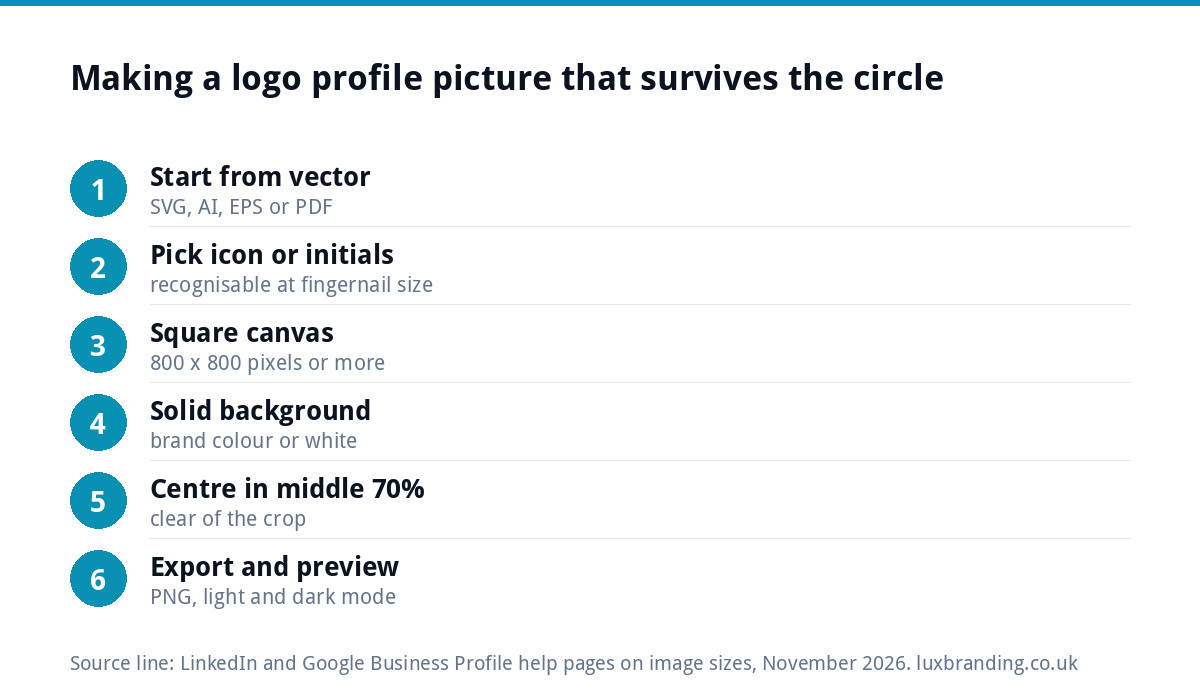
- Start from the vector logo (SVG, AI, EPS or PDF), not a screenshot or a JPG from your website, so edges stay sharp.
- Choose the icon or initials, whichever is most recognisable at the size of a fingernail.
- Create a square canvas of at least 800 x 800 pixels.
- Fill the background with a solid brand colour or white. Avoid transparent backgrounds, which some apps show as black.
- Centre the mark and scale it so it sits inside the middle 70 percent of the canvas, with clear space all round.
- Export as PNG for crisp edges.
- Preview on a phone in the actual app, in light and dark mode, before you save.
The small-size test
Before you commit, shrink the finished image to about 40 pixels across, roughly how it appears in a comment thread or a list of search results, and look at it from arm’s length. Ask three questions:
- Can you tell what it is, or at least that it is yours?
- Do thin lines and small details still show, or have they turned to mush?
- Does it stand out against a white feed and a dark-mode feed?
If the answer to any of these is no, simplify. Large organisations solve the same problem by keeping a simplified version of their logo for tiny uses. The GOV.UK brand guidelines, for example, switch to a small crown version below the main logo’s minimum size, for uses such as favicons. Your profile picture is the same kind of job.
Common mistakes
- Using the website header file. It is usually a wide, low-resolution PNG; the result is blurry and tiny.
- Transparent background. Looks fine on white, disappears on dark mode, or turns black in some apps.
- Tagline included. Nobody can read “Plumbing and Heating Since 1998” at avatar size.
- Different picture on every platform. Customers looking you up on Facebook after seeing your Google profile should recognise you instantly.
- A photo of the van or shopfront. Great for a cover image, unreadable as an avatar.
- Stretching to fill the circle. Never distort the logo; resize it proportionally.
Profile picture and cover image work together
The profile picture is the badge; the cover or banner image is the shop window. Use the cover for the full horizontal logo, a photo of real work, your service area or a current offer. LinkedIn’s guidance gives a cover image size of 1512 x 256 pixels for company pages, which shows how wide and shallow these spaces are. Keep important content away from the area the profile picture overlaps on each platform. Phones and desktops also crop covers differently, so keep any text in the centre and preview both before you publish. A cover that changes with the seasons keeps the page feeling current while the profile picture stays fixed.
When to change your profile picture
Less often than you might think. A profile picture works through repetition: people learn to spot it in a crowded feed, a group chat or a list of search results, and every change resets that. Seasonal tweaks, such as a festive hat on the icon, are fine for a week or two if the core mark stays the same. Otherwise, change it only when the brand changes.
When you do rebrand, update every platform on the same day: Google Business Profile, Facebook, Instagram, LinkedIn, WhatsApp Business, X, YouTube and any directory listings. A mix of old and new pictures makes customers wonder whether they have found the right business, or whether there are two. Keep a simple list of every account and its login so nothing is missed, and update the website favicon at the same time, since it often uses the same simplified mark.
If you are planning a fuller refresh, our guide to announcing a rebrand to customers covers the order to roll changes out.
If your logo has no icon or simple version
Some logos are a single line of text with no symbol, or have an icon so detailed it fails the small-size test. You have three routes:
| Situation | Route | Cost |
|---|---|---|
| Good logo, only a horizontal file exists | Logo edit to create a stacked or icon-only layout | £50 one-off |
| Only a JPG or PNG of the logo | Recreate as true vector first | £79 for one layout, +£39 per additional layout |
| Logo does not work small at all | New logo design, all layouts included | £129 one-off |
A logo edit changes a logo you already own, including layout, and keeps it recognisable. If all you have is a JPG, our guide to having only a JPG of your logo explains the options, and recreate and vectorise rebuilds it properly. New logo design at £129 includes stacked, horizontal and icon-only layouts in every file format, so profile pictures, headers and signs are covered from day one.
Design for social from the start
If you post regularly, consistent templates for posts and stories make the profile picture part of a recognisable whole. Our social media design service builds those templates around your brand. For which file to send where, the guide to logo file formats is a useful companion. All prices are on our pricing page.
Get the UK Branding Budget Worksheet (free)
A printable worksheet: decide what your brand needs now and price it against fixed published prices and the IPO trademark fee.
No spam. UK GDPR compliant. We only use your email to send this resource, unless you tick the box to hear from us.
Frequently asked questions
How do I fit a wide logo into a circular profile picture? +
Use the icon or your initials rather than the full horizontal logo. Place it on a solid brand-colour square of at least 800 x 800 pixels and scale it to sit within the middle 70 percent, so the circle crop cannot clip it. Your business name already appears next to the picture, so it does not need repeating.
What size should a logo profile picture be? +
Make one square master image of at least 800 x 800 pixels and use it everywhere. At the time of writing, LinkedIn recommends 400 x 400 pixels for a company page logo, and Google Business Profile recommends 720 x 720 with a 250 x 250 minimum. Platform guidance changes, so check when you upload.
Should my profile picture have a transparent background? +
No. Transparent backgrounds can appear black in some apps or vanish against dark mode. Use a solid background in a brand colour or white, and check the result in both light and dark mode on a phone before saving. Export the finished image as PNG to keep the edges crisp.
My logo has no icon. What should I use? +
Initials or a short monogram in your brand font usually work well, as long as you use them consistently. If your business name is one short word, setting it large on a colour background can work. If nothing is readable at small sizes, a logo edit to create an icon-only layout is £50 one-off.
Can you make an icon-only version of my logo? +
Yes. Our logo edit is £50 one-off for changes to a logo you already own, including layout, and keeps the mark recognisable. If you only have a JPG or PNG, it first needs recreating as vector at £79 for one layout. New logo design at £129 includes stacked, horizontal and icon-only layouts.