
Quick answer
For business, “Gmail vs Outlook” really means Google Workspace vs Microsoft 365. Workspace starts at £5.90 per user a month on an annual plan and suits teams who live in a browser and on phones. Microsoft 365 suits teams who work in Word, Excel and the Outlook desktop app. Both handle email at your own domain well.
The email itself is close to a tie: both are reliable, both filter spam well and both work on any phone. The real difference is the office around the inbox: documents, calendars, storage, meetings and how your team already works. Below are the seven differences that matter for a small UK business, a table by situation and a cheaper route if you only need a few mailboxes.
First, separate the app from the service
Two different things share each name:
- The service holds your mailbox: Google Workspace (Gmail) or Microsoft 365 (Exchange Online).
- The app is what you read mail in: the Gmail app or website, or the Outlook app or website.
They mix more than people expect. You can read a Microsoft 365 mailbox in the Gmail phone app, and Google offers Google Workspace Sync for Microsoft Outlook, which an administrator can switch on so staff keep using Outlook on Windows with a Workspace account. So “my staff like Outlook” is not on its own a reason to choose Microsoft.
What each costs
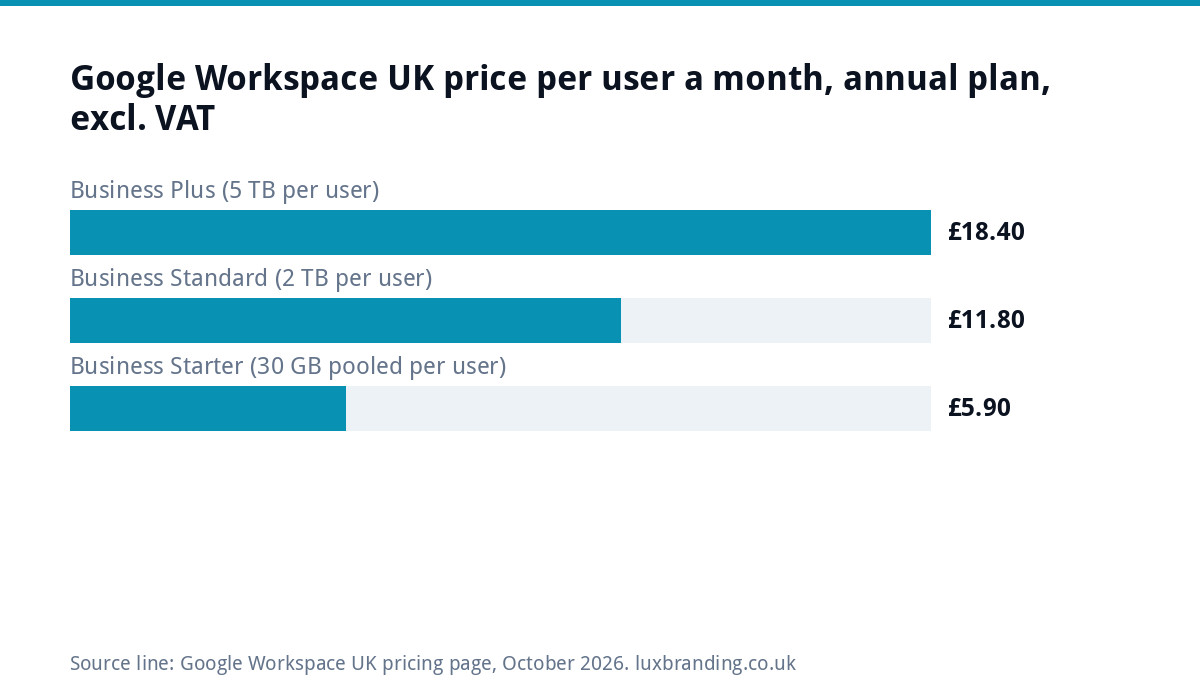
At the time of writing (October 2026), Google Workspace’s UK pricing page lists these per-user prices on an annual commitment, excluding VAT:
- Business Starter: £5.90 per user a month, 30 GB of pooled storage per user.
- Business Standard: £11.80 per user a month, 2 TB per user.
- Business Plus: £18.40 per user a month, 5 TB per user.
Google also shows introductory offers on some plans. Microsoft publishes its UK business plan prices on its own site, and both providers change tiers and offers, so check both pages on the day you buy. Either way the shape is the same: you pay per person, every month, for as long as you use it.
Seven differences that matter
| Difference | Google Workspace | Microsoft 365 |
|---|---|---|
| 1. Where you work | Browser and phone first: Gmail, Docs, Sheets, Drive | Desktop apps first: Outlook, Word, Excel, Teams |
| 2. Mailbox storage | 30 GB pooled per user on Business Starter, shared with Drive | 100 GB user mailbox on Business Basic and Standard |
| 3. Email experience | Labels, fast search, conversation view | Folders, rules and the familiar desktop Outlook |
| 4. Calendars and meetings | Google Calendar and Meet | Outlook calendar and Teams |
| 5. Sharing files with clients | Easy links to Docs and Drive | Easy with clients who also use Word and Excel |
| 6. Admin | One simple Admin console | More settings and more control, more to learn |
| 7. Switching later | Possible, with migration tools | Possible, with migration tools |
The mailbox figure for Microsoft comes from Microsoft’s Exchange Online limits page, which lists 100 GB user mailboxes on Microsoft 365 Business Basic and Standard and 50 GB shared mailboxes. Google’s storage is pooled across the organisation and shared between Gmail and Drive, so heavy file users fill it faster.
Difference 1 in practice: how your team already works
This is the one that decides most cases. If your quotes are Word documents, your pricing lives in an Excel file with years of formulas, and your accountant sends spreadsheets back and forth, Microsoft 365 fits with no retraining. If your team works on phones and laptops, shares documents by link and rarely opens a desktop app, Workspace feels lighter and quicker.
For trades businesses, the phone usually wins. A plumber or electrician checking jobs between visits needs fast mobile email, a shared calendar and photos that save straight to a shared folder. Both do this, but Workspace was built around it.
Storage: who runs out first
Email on its own rarely fills either allowance for a small business. The pressure comes from attachments and files: site photos, drawings, scanned invoices. On Workspace, mail and Drive share the pooled allowance, so a photo-heavy team on Business Starter may need to move up a tier. On Microsoft 365, the mailbox is separate from OneDrive file storage, which spreads the load differently.
Whichever you pick, archive old attachments to a shared folder once a year. It keeps search fast and storage costs flat.
Spam, security and deliverability
Both providers filter incoming spam well and both support two-step verification, which you should switch on for every user from day one. What decides whether your emails reach customers is not the provider but your domain’s records. Our guide to business emails going to spam explains the SPF, DKIM and DMARC records that both Google and Microsoft check before they decide where your message lands.
Which to choose, by situation
| Your situation | Better fit | Why |
|---|---|---|
| Sole trader or small trade team working on phones | Google Workspace | Light, fast mobile apps and simple admin |
| Office team living in Word and Excel | Microsoft 365 | Documents and email in the tools they already use |
| Clients and suppliers send Office files all day | Microsoft 365 | Fewer formatting surprises |
| Team shares lots of photos and documents by link | Google Workspace | Drive sharing is quick and simple |
| Need only one to three mailboxes, no office suite | Hosting-included email | No per-user subscription |
Worked example: a five-person roofing firm
Take an illustrative roofing business with two people in the office and three on the tools. Everyone needs email on their phone; only the office needs documents and spreadsheets.
- Everyone on Google Workspace Business Starter: 5 users x £5.90 = £29.50 a month, or £354 a year excluding VAT, at the published annual-plan price. Each person gets their own mailbox, calendar and Drive.
- Microsoft 365 for everyone: do the same per-user sum with Microsoft’s current UK price for the tier you need. The maths has the same shape.
- Shared role mailboxes with hosting: three addresses such as office@, quotes@ and accounts@, shared by the team, included in £20 a month that also covers the website’s hosting. Cheaper, but nobody gets a personal mailbox or an office suite.
There is no wrong answer here, only a trade-off between cost and how much each person needs their own space. Many firms start with role mailboxes and move to a suite once the office grows.
Set it up properly, whichever you pick
- Two administrators, so one can always reset the other.
- Two-step verification on every account from day one.
- Role addresses for anything customers use, so they survive staff changes.
- Logins kept in a password manager the business controls.
The cheaper route: email with your hosting
Not every business needs an office suite. If you want professional addresses at your domain and are happy with free tools for documents, mailboxes that come with your website hosting can do the job. Our website management and hosting is £20 a month and includes UK hosting, SSL, daily backups, security monitoring, automatic updates and up to 3 business email mailboxes. You can move to Workspace or Microsoft 365 later, because the address belongs to your domain, not the provider.
That last point applies to every route: own your domain in the business’s name. Our domain names guide explains how to check, and our website hosting costs guide covers what hosting should include.
Switching between them
Moving from one to the other is a planned job, not a disaster. Both offer migration tools for mail, calendars and contacts. The usual order is: set up the new service, copy mail across, change the domain’s MX records on a quiet day, then copy anything that arrived during the change. Tell staff the day before, and keep the old service running for a short overlap in case anything was missed.
Before you switch, list what depends on the current mailboxes: shared calendars, group addresses, scanners and printers that email documents, website contact forms, accounting software that sends invoices and any app that logs in with an email address. Each one needs updating on the day of the move. Ten minutes with that list saves a week of wondering why quotes stopped arriving.
Once the inbox is sorted
Whichever you choose, the inbox is where customers reply to your quotes, newsletters and follow-ups. If you send marketing emails, use a proper sending platform rather than blind-copying a list from Gmail or Outlook, which risks your domain’s reputation. If you would rather have someone set that platform up for you, see our email marketing automation service. All our prices are on the pricing page.
Get the UK Website Project Brief Template (free)
A two-page template for briefing any UK web designer: sitemap, integrations, audience and deliverables. Cuts revision rounds in half.
No spam. UK GDPR compliant. We only use your email to send this resource, unless you tick the box to hear from us.
Frequently asked questions
Is Gmail or Outlook better for a small UK business? +
Neither is better on email alone: both are reliable and filter spam well. Choose by how your team works. Google Workspace suits teams on phones and browsers who share files by link. Microsoft 365 suits teams who live in Word, Excel and desktop Outlook. If you need only a few mailboxes and no office suite, hosting-included email can be cheaper.
How much does Google Workspace cost in the UK? +
At the time of writing, Google's UK pricing page lists Business Starter at £5.90 per user a month, Business Standard at £11.80 and Business Plus at £18.40, on an annual commitment and excluding VAT. Storage is 30 GB pooled per user on Starter, 2 TB on Standard and 5 TB on Plus. Google also runs introductory offers, so check the page.
Can I use Outlook with Google Workspace? +
Yes. Google offers Google Workspace Sync for Microsoft Outlook, which an administrator switches on so staff can keep using Outlook on Windows with a Workspace account. You can also read a Microsoft 365 mailbox in the Gmail phone app. The app you read mail in and the service that holds the mailbox are separate choices.
How much mailbox storage does Microsoft 365 give? +
Microsoft's Exchange Online limits page lists 100 GB user mailboxes on Microsoft 365 Business Basic and Business Standard, and 50 GB for shared mailboxes. File storage in OneDrive is separate from the mailbox. Google Workspace instead pools storage across the organisation and shares it between Gmail and Drive.
Do I need Workspace or Microsoft 365 just for a business email address? +
No. If you only need professional addresses at your domain, mailboxes included with website hosting can do the job. Our website management and hosting is £20 a month and includes up to 3 business email mailboxes alongside UK hosting, SSL, daily backups and updates. You can move to a suite later because the address belongs to your domain.