Quick answer
If customers never visit your premises, remove the address from your Google Business Profile and add service areas instead. Google allows up to 20 areas, set by town, city or postcode, and advises keeping the whole area within about two hours’ drive of your base. Google may still use your address privately to verify you.
Most trades work from home and travel to the customer: plumbers, electricians, cleaners, mobile mechanics, dog groomers, gardeners. Google calls these service-area businesses, and its rules are clear that a home address should not be on show. Getting this right protects your privacy, keeps your profile within Google’s guidelines and stops strangers turning up at your door. This guide covers the setup, the rules and the mistakes that get profiles suspended.
Are you a service-area, shopfront or hybrid business?
Google treats businesses in three ways, and the right setup depends on which you are.
| Type | Customers come to you? | You go to customers? | What to show on Google | Examples |
|---|---|---|---|---|
| Service-area business | No | Yes | Service areas only, address removed | Plumber working from home, mobile dog groomer, window cleaner |
| Shopfront business | Yes, during staffed hours | No | Address shown, no service areas | Café, salon, retail shop |
| Hybrid business | Yes | Yes | Address shown plus service areas | Garage that also does mobile repairs, florist that delivers |
Google’s help page on managing service areas says that if you do not serve customers at your business address, you should remove the address from your profile and enter only your service area. Hybrid businesses can show their shopfront address and also set a service area. If you only see customers at home by appointment occasionally, think carefully: if the address is not staffed during your stated hours, it is safer to treat yourself as a service-area business.
What Google’s guidelines say
Google’s guidelines for representing your business are the rulebook, and breaking them is a common route to a suspended profile. The points that matter for service-area businesses:
- Hide your address if you are a service-area business. The guidelines say so directly.
- Keep your service area realistic. It should not extend farther than about two hours of driving time from where you are based, though Google notes larger areas may suit some businesses.
- No virtual offices. A rented postal address you do not operate from is not eligible for a profile.
- No remote PO boxes or mailboxes as your address.
- No extra words in the business name. Adding services or locations to the name, such as “Smith Plumbing Leeds Boilers Cheap”, is not permitted.
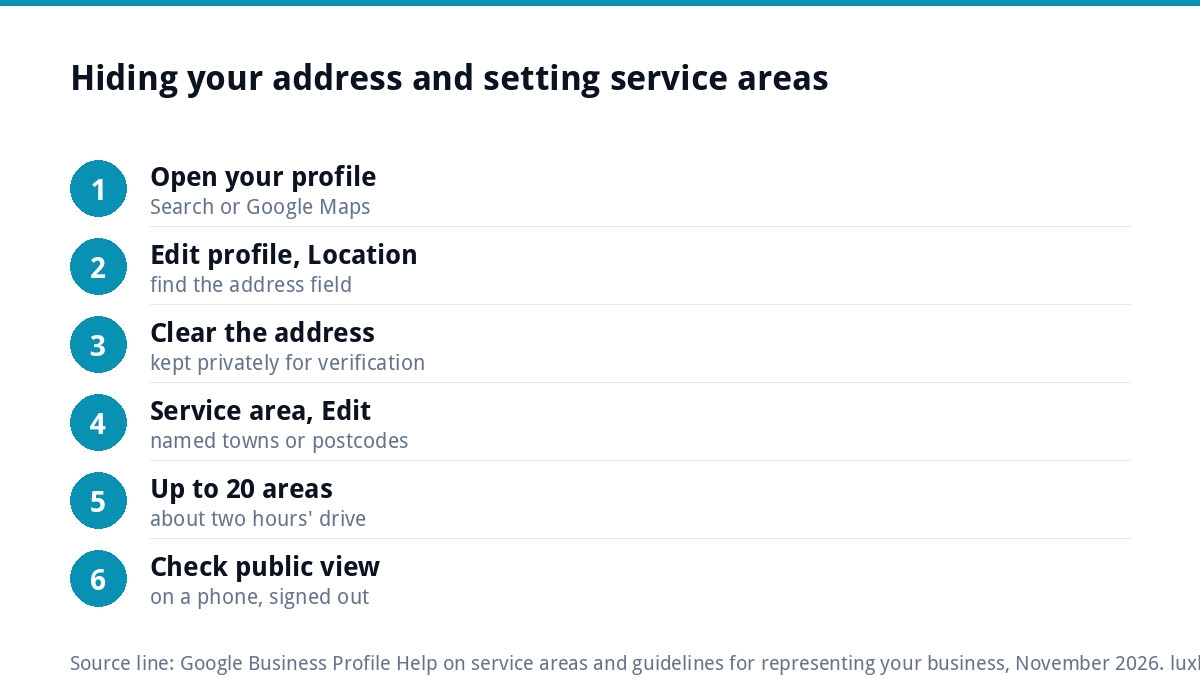
How to set up service areas and hide your address
- Open your Business Profile by searching for your business name on Google while signed in, or through Google Maps.
- Go to Edit profile, then Location.
- Clear the business address so it is not shown to customers. Google may still keep it privately for verification.
- Open Service area and choose Edit. Google’s help page describes the path as Edit profile, Location, Service area, Edit.
- Add up to 20 areas by town, city or postcode. Google no longer lets you set a radius around your base, so pick named places.
- Save and check the public view on a phone, logged out, to confirm the address no longer appears.
Edits can go into review before they appear. Make one set of changes at a time and wait, rather than editing repeatedly, which can delay things further.
Choosing your service areas
Twenty areas sounds like a lot, but it fills quickly. Choose them deliberately.
- Start with where your work actually comes from. Look at last year’s jobs and list the towns that appear most.
- Use towns and postcode districts people recognise, not obscure ward names.
- Stay within the two-hour guide, and within the distance you would genuinely travel for a typical job.
- Do not stretch to look bigger. Listing a city two hours away you never visit invites calls you will turn down.
Service areas tell Google and customers where you work. They do not guarantee you will appear in every one of those places. Visibility still depends on how relevant and prominent your profile is, which is where reviews, photos, categories and a good website come in. Our Google Business Profile optimisation guide covers those, and the free GBP checklist goes field by field.
What customers see once the address is hidden
With the address removed, your profile shows the business name, category, the areas you cover, phone number, website, opening hours, reviews and photos. Your street address is not displayed to customers, so nobody can find your home from the listing. For most customers this is all they need: they want to know you cover their town, that you are reputable and how to get hold of you.
That puts more weight on the parts you control. Set opening hours that reflect when you answer the phone, not when you are on site. Write a description that says plainly what you do and where, without stuffing in town names. Add the services you offer so they appear on the profile. And reply to reviews, because a profile with no shopfront earns trust through what other customers say.
If you move or change your base
Update the hidden address on the existing profile rather than creating a new one. Google’s help pages are clear that a business should have one profile, and a fresh profile loses your reviews. Expect a moving address to trigger re-verification, so do it when you have time to respond, and keep the same business name, phone number and website so the profile’s history carries over. If your service areas change with the move, update them at the same time and check the website’s “areas we cover” section matches.
Verification when your address is hidden
Hiding the address does not mean Google forgets it. Google’s page on verifying your business lists methods including video recording, live video call, phone, text, email and a postcard sent to your business address. Which ones you are offered is up to Google.
For video verification, Google asks service-area businesses to show the location, proof the business exists, such as tools, equipment, business cards or branded clothing, and proof you manage it, such as opening a branded van or showing a business document in the profile’s name. A plain home with no business evidence is harder to verify, which is one practical reason branded workwear and a lettered van help beyond marketing.
Mistakes that get trades profiles suspended
| Mistake | Why it causes trouble | What to do instead |
|---|---|---|
| Showing your home address | Against the guidelines for service-area businesses | Remove it and set service areas |
| Using a virtual office address | Not eligible for a profile | Use your real base, hidden |
| Separate profiles for each town | Google allows one profile per business | One profile with up to 20 service areas |
| Keywords in the business name | Unnecessary information is not permitted | Use your real trading name |
| Frequent edits to name, address or category | Can trigger reviews or re-verification | Make changes rarely and deliberately |
If your profile has already been suspended, follow our guide to a suspended Google Business Profile before changing anything else.
Your website should match your profile
Customers often check your website after finding you on Google. If the profile says you cover Leeds, Wakefield and Harrogate, the website should say the same, ideally on a clear “areas we cover” section rather than a stack of near-identical town pages. Matching information builds trust with customers, and keeps your details consistent wherever they appear. Avoid publishing your home address on the website too, or the privacy benefit is lost.
Make the profile look like a real business
With no shopfront photo, the rest of the profile has to do the work. Photos of finished jobs, your van and your team in uniform show customers you are established. A consistent look across van, workwear, cards and profile picture makes you recognisable, which our guide to branding for trades businesses covers in detail. If the van is still plain, our vehicle wrap and signage design starts from £99.
Getting it done for you
If you would rather not wrestle with categories, service areas and verification, our Google Business Profile setup and optimisation is £199. It covers categories, keywords, photos, review strategy and tracking, set up within Google’s rules. The GBP setup cost guide compares doing it yourself with paying for help, and every price is on our pricing page.
Get the UK SEO DIY Audit Checklist (free)
A 32-point checklist UK SMEs can run against their own website in an afternoon. Surfaces the quick wins before paying for a paid audit.
No spam. UK GDPR compliant. We only use your email to send this resource, unless you tick the box to hear from us.
Frequently asked questions
Can I hide my home address on Google Business Profile? +
Yes, and if customers never visit you, Google's guidelines say you should. Remove the address from your profile and add service areas instead. Google may still keep the address privately for verification, but it is not shown to customers once cleared. Check the public view on a phone, signed out, after saving.
How many service areas can I add? +
Google allows up to 20 service areas, set by city, town, postcode or other named area. It no longer lets you set a radius around your base. Google advises that the overall area should not extend beyond about two hours of driving time from where you are based, though larger areas may suit some businesses.
Will hiding my address stop me ranking on Google Maps? +
No. Service-area businesses can appear in local results. Setting service areas tells Google and customers where you work, but it does not guarantee visibility in every area listed. Relevance and prominence still matter, so reviews, photos, accurate categories and a website that matches your profile all help.
Can I use a virtual office address instead of my home? +
No. Google's guidelines say a rented postal address you do not operate from, known as a virtual office, is not eligible for a Business Profile, and remote PO boxes are not acceptable either. Use your real base and hide it. Using an ineligible address can lead to suspension.
How much does Google Business Profile setup cost? +
Doing it yourself is free. Our Google Business Profile setup and optimisation is £199 and covers categories, keywords, photos, review strategy and tracking, all within Google's rules. It suits trades who want the profile right first time, including service areas and a hidden address.