
Quick answer
A website annual check-up takes about an hour. Once a year, check six things from a customer’s point of view: your business facts, every way to contact you, your content and prices, the legal pages, how you appear on Google, and how fast the site loads on a phone. The 30 checks below cover all six.
This is the owner’s check, not the developer’s. It needs no technical knowledge, only a phone, a laptop and an hour without interruptions. Print it, tick it, and book the next one in your calendar for the same month next year.
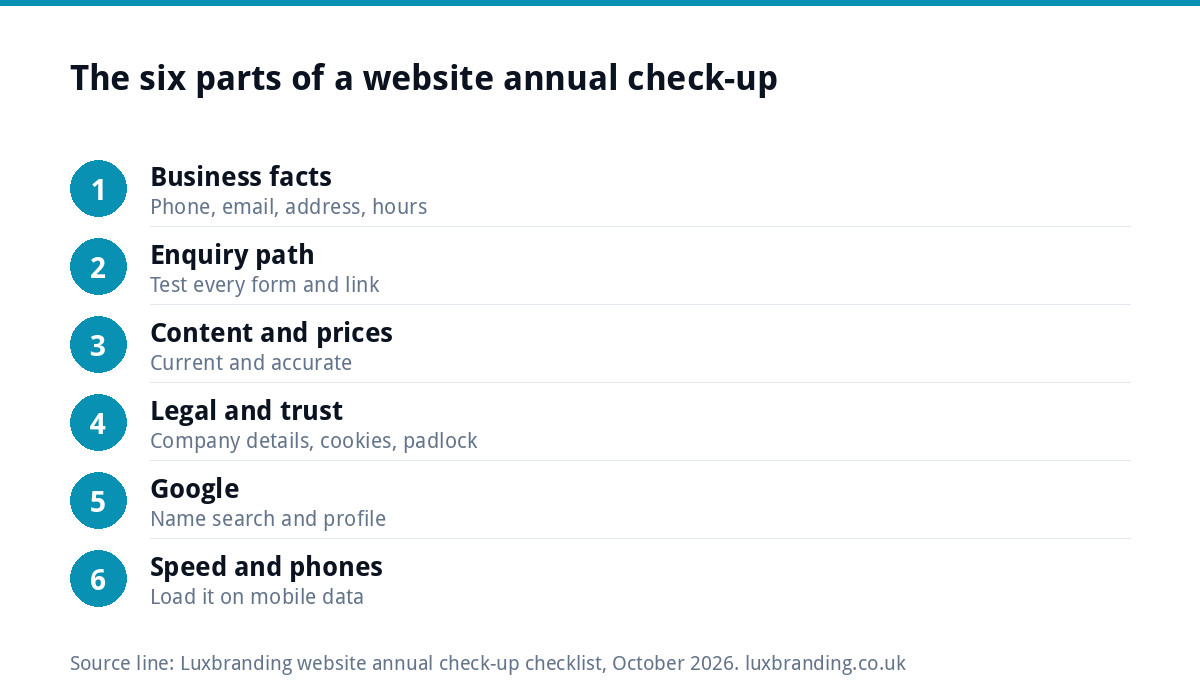
How to run the check-up
Pick a quiet month. January works for many trades, and the month after your busy season works for seasonal businesses. Then:
- Open your website on your phone, not just your laptop. Most visitors will see it that way.
- Have your website login, your Google account and your domain registrar login to hand.
- Work through the six parts in order and note every problem, however small, before you fix anything.
- Sort the list into “I can fix this today” and “someone else needs to”, using the table near the end.
The checks are written for any website, whether it runs on WordPress, Wix, Squarespace or something hand-built.
Part 1: business facts (checks 1 to 5)
These are the details a customer needs to trust you and reach you. Out-of-date facts are easy to miss, because nobody re-reads their own footer, and they are the details customers act on first.
| # | Check | Where to look | Good looks like |
|---|---|---|---|
| 1 | Phone number | Header, footer, contact page | Current number, tappable on a phone |
| 2 | Email address | Contact page, footer | An address you still read daily |
| 3 | Address or service area | Contact page, footer | Matches where you actually work now |
| 4 | Opening hours | Contact page, Google profile | Same hours in both places |
| 5 | Team, accreditations, insurance | About page | Current staff, unexpired badges |
Part 2: the enquiry path (checks 6 to 10)
Pretend to be a customer and try to get in touch every way the site offers.
- Send yourself an enquiry through every form. Check it arrives, how quickly, and that it is not in junk. If nothing comes through, our guide to a contact form that is not working covers the usual causes.
- Tap the phone number on your phone. It should open the dialler with the right number.
- Click every email link. Each should open a new message to an inbox someone checks.
- Test any booking or quote tool from start to finish, including the confirmation email.
- Read your automatic replies. Old autoresponders often promise response times or offers you stopped making years ago.
Part 3: content and prices (checks 11 to 15)
- Prices. Every price on the site matches what you charge today, including “from” prices.
- Services. You still offer everything listed, and everything you now offer is listed.
- Photos. Recent work, not the same three photos from when the site launched.
- Dates. No “new for 2023” banners, expired offers or copyright years from long ago.
- Testimonials. Real, recent and from customers who would still recommend you. Remove any that name staff who have left or services you no longer offer.
While you are on the services pages, read each one as a stranger would. Does it say where you work, what the job involves, roughly what it costs and how to book? A page that only lists a service name gives a customer, and Google, very little to go on. Add one or two sentences to the thinnest pages each year and the whole site improves steadily without a rebuild.
If changing any of these means emailing a developer and waiting weeks, that is a finding in itself. Our guide on what to do when you cannot update your own website covers the options.
Part 4: legal and trust (checks 16 to 20)
- Company details. If you are a limited company, GOV.UK says your website must show your registered number, registered office address and the part of the UK where you are registered, plus the fact that you are a limited company.
- Privacy policy. It names the forms and tools you use now, not the ones from three years ago.
- Cookies. If you use analytics or advertising cookies, the ICO’s cookie guidance says consent must be actively and clearly given; carrying on browsing is not enough. Check your banner does what it claims.
- Padlock. The site loads on https with no browser warning. If you see “Not secure”, read our guide to a website showing not secure.
- Terms. If you take payments or bookings online, your terms reflect how you work now.
Part 5: how you appear on Google (checks 21 to 25)
- Search your business name. Your site should appear near the top, with a sensible description. If the short text under your result reads like a cookie notice or an expired offer, that page needs a proper description of what you do and where you do it.
- Search your main service and town. Note where you appear, so next year you can compare.
- Check your Google Business Profile. Hours, phone, website link and categories match the site.
- Look for old pages. Services you dropped can still show in search; they should be updated or redirected.
- Run a quick audit. Our free SEO audit flags missing titles, broken links and other basics in a few minutes.
Part 6: speed and phones (checks 26 to 30)
Google’s Core Web Vitals give useful targets: the guidance on web.dev says the main content should load within 2.5 seconds, the page should respond to a tap within 200 milliseconds, and the layout should stay stable as it loads.
- Load the home page on mobile data, not wi-fi. Count the seconds until you can read it.
- Check images. Nothing blurry, stretched or slow to appear.
- Tap every menu item on a phone. Menus that work on a laptop often fail on small screens.
- Read a page at arm’s length. Text should be readable without zooming.
- Watch for jumping. Buttons that move as the page loads cause mis-taps.
If the site feels slow, our guide to website speed for small businesses explains what usually causes it.
The technical yearly jobs, briefly
Alongside the owner’s check, there is a separate set of technical jobs that come round once a year: domain renewal, the hosting software version, the security certificate and a review of who still has logins. If you run WordPress, our WordPress maintenance guide lists them in detail. One worth doing yourself today: log in to your domain registrar and confirm auto-renew is on and the account is in your name. Our UK domain names guide explains why that matters.
What to fix yourself and what to hand over
| Finding | Usually DIY? | Who fixes it if not |
|---|---|---|
| Wrong phone, hours or prices | Yes, if you can edit the site | Whoever built or manages the site |
| Form not arriving | Sometimes | Your web developer or host |
| Not secure warning | Rarely | Your host |
| Slow on mobile | Partly (image sizes) | A speed optimisation specialist |
| Missing company details or cookie consent | Often | Your web developer |
| Old pages in Google | Partly | An SEO specialist |
If the list is long, it may be simpler to have someone look after the site all year. Our website management and hosting is £20 a month and includes UK hosting, SSL, daily backups, security monitoring, automatic updates and up to three business email mailboxes. For a site that is slow, our speed optimisation service is £99. Every fixed price is on our pricing page.
Make it a once-a-year habit
Put a recurring event in your calendar for the same month every year, and keep this year’s list of findings with it. Next year, start by checking whether last year’s problems came back. That comparison is the most useful part of the whole exercise, because it shows which problems are one-offs and which keep returning because of how the site is built or run.
Keep the write-up short. A simple log with four headings is enough:
- Date of the check-up and who did it.
- Findings, numbered to match the 30 checks above.
- Fixed today, with a tick next to each.
- Handed over, with who it went to and the date they agreed to fix it.
If the same finding appears two years running, treat it as a sign that the site needs a different setup, not another reminder.
Get the UK Website Project Brief Template (free)
A two-page template for briefing any UK web designer: sitemap, integrations, audience and deliverables. Cuts revision rounds in half.
No spam. UK GDPR compliant. We only use your email to send this resource, unless you tick the box to hear from us.
Frequently asked questions
How often should I check my business website? +
Run a full check-up once a year, in a quiet month, and repeat the quick enquiry test (sending yourself a message through every form) every few months. Problems such as a broken contact form or an expired offer can cost enquiries for months before anyone notices, because owners rarely use their own website as a customer would.
What should a website check-up include? +
Six areas: business facts such as phone and hours, every route a customer can use to contact you, content and prices, legal pages including company details and cookies, how you appear on Google, and how quickly the site loads and works on a phone. The 30 checks in this guide cover all six.
Do I need technical knowledge to check my website? +
No. The owner's check-up needs only a phone, a laptop and about an hour. Technical yearly jobs, such as software versions, the security certificate and login reviews, are a separate list that your developer, host or a management plan should handle, although checking domain auto-renew is quick enough to do yourself.
What must a limited company show on its website? +
GOV.UK says a limited company's website must show its registered company number, its registered office address, the part of the UK where it is registered, and that it is a limited company, usually through Limited or Ltd in its full name. Many small company sites miss at least one of these details.
How much does website management cost with Luxbranding? +
Our website management and hosting is £20 a month. It includes UK hosting, SSL, daily backups, security monitoring, automatic updates and up to three business email mailboxes. If speed is the main problem, our website speed optimisation is a one-off £99. Every fixed price we offer is listed on our pricing page.