
Quick answer
An online price calculator, added to a website such as our £499 custom WordPress build, suits a service business whose prices follow clear rules: per room, per square metre or per visit. Show an estimated range, include every mandatory fee, and ask for contact details alongside the result. The calculator itself is quoted separately.
Customers want a rough price before they pick up the phone, and many will not contact a business that gives no clue at all. An instant estimate answers “roughly how much?” at 11pm, filters out people whose budget will never fit, and gives you better-prepared enquiries. Done badly, it promises a price you cannot honour. This guide covers when a calculator works, how to design one, the UK pricing rules that apply, a worked example and what building one involves.
When a price calculator makes sense
A calculator works when your price can be worked out from a few answers a customer can give without a site visit. Good signs:
- You already quote from a price list or a spreadsheet formula.
- The main variables are countable: rooms, windows, square metres, hours, visits, items.
- Most jobs fall inside a predictable range.
- You lose time on enquiries from people who drop out once they hear the price.
Cleaners, window cleaners, gardeners, removals firms, dog walkers, tutors, photographers and many trades with standard jobs fit this pattern. Our own website cost calculator and logo cost calculator work on the same principle: answer a few questions and get an instant estimate before you decide whether to get in touch.
When it does not
A calculator is the wrong tool when the price depends on things only you can judge on site: the state of a roof, hidden damp, access problems or a client’s changing brief. Forcing those jobs into a calculator produces numbers that are either too wide to help or too precise to be honest.
In that case, publish typical price ranges with examples, and use a structured quote form to collect the details you need. Our guide to website costs shows how ranges with worked examples can do much of the same job.
Calculator suitability by business type
| Business type | Typical pricing basis | Calculator fit |
|---|---|---|
| Domestic cleaning | Rooms, hours, frequency | Strong |
| Window cleaning | Property type, number of windows | Strong |
| Removals | Rooms or volume, distance, floors | Good, with a range |
| Gardening and maintenance | Area, visits per month | Good |
| Decorating | Rooms and surfaces, condition | Fair: rough range only |
| Roofing, building, damp work | Site survey needed | Weak: use a quote form |
| Professional services | Package or hours | Good for packages, weak for bespoke work |
What a good calculator asks
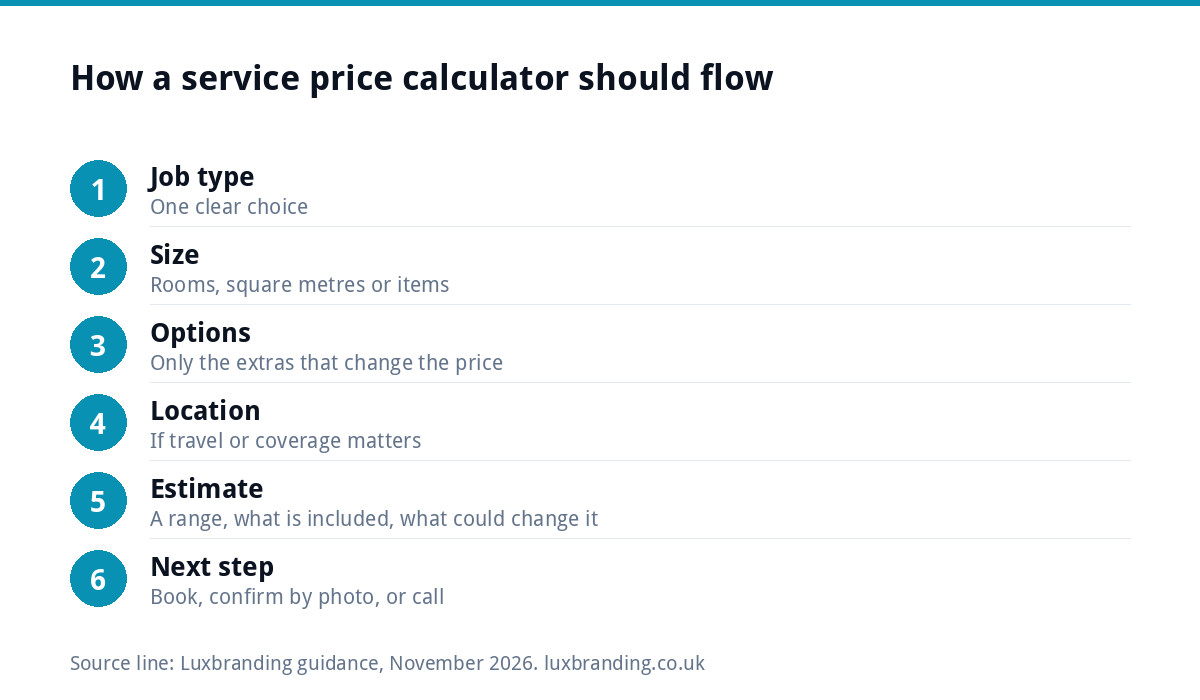
Keep the questions short, plain and in the order a customer thinks about the job:
- The job type. One clear choice, such as regular clean, deep clean or end of tenancy.
- The size. Rooms, square metres or items, with a picture or example if the term is unclear.
- The options that change the price. Oven clean, carpets, extra visits.
- Location or postcode, if travel changes the price or you only cover certain areas.
- The estimate. A range, what it includes, and what could change it.
- The next step. Book, request a confirmed quote, or call.
Five or six questions is usually enough. Every extra question loses some people, so ask only what moves the price.
How much to show: a range or a fixed price
Unless the job is genuinely standard, show a range: “Estimated £X to £Y, confirmed after a quick check of photos.” A range is honest about uncertainty and still answers the question customers came with.
Show a fixed price only where you will honour it, such as a set package. Whatever you show, say what is included and what is not, in plain words next to the figure. Customers forgive a range; they do not forgive a price that jumps at the door.
Prices, fees and the law
The Competition and Markets Authority’s price transparency guidance applies to businesses dealing with consumers. In summary, it says the price you show should be the total price, that unavoidable charges such as booking fees should be built into the headline price, and that hiding extra fees until later is illegal. Optional extras can be shown separately.
Where the price cannot be calculated in advance, the guidance says you must give customers the information they need to work out the total themselves, placed as prominently as the price. “From” or indicative prices are acceptable if they include all mandatory charges and do not mislead. The same summary notes fines of up to 10% of turnover or £300,000, whichever is greater, for breaches. This is not legal advice; if your pricing is complicated, read the full guidance.
For a calculator, that means: include call-out and booking fees in the estimate, label optional extras clearly, and say what could change the final figure.
Capturing the enquiry without annoying people
There are two common approaches, and both work:
- Estimate first, details after. The customer sees the range, then chooses to book or request a confirmed quote. Friendlier, and you get fewer but warmer enquiries.
- Details before the estimate. More leads, but some people give fake details or leave. Use this only if follow-up is central to how you sell.
Whichever you choose, the ICO’s guidance on the right to be informed says you must give people privacy information at the time you collect their personal data, in concise, plain language. A short line under the form linking to your privacy policy covers the basics.
Make the form usable for everyone, too. The W3C’s forms tutorial recommends labelling every field, giving clear instructions and telling users when something succeeds or fails, which also makes the calculator easier for everyone on a phone.
A worked example: a domestic cleaning calculator
Here is how a cleaning firm might structure its rules. The figures are made up for illustration, not market rates.
| Input | Rule | Example answer | Adds |
|---|---|---|---|
| Clean type | Deep clean base charge | Deep clean | £60 |
| Bedrooms | Per bedroom | 3 | 3 x £20 = £60 |
| Bathrooms | Per bathroom | 2 | 2 x £25 = £50 |
| Oven clean | Optional extra | Yes | £40 |
| Estimate shown | Total plus or minus 15% | £210 calculated | Range about £180 to £240 |
The result screen would show the range, list what a deep clean includes, state that the oven clean is an optional extra, note that heavily soiled properties may cost more, and offer two buttons: book a slot, or send photos for a confirmed price. That last option turns uncertainty into a reason to make contact.
What a calculator costs to build
There are three broad routes, and the right one depends on how complex your pricing rules are:
- Form tool with calculation fields. Many WordPress form tools can add up simple choices. Fine for a handful of fixed prices, fiddly once rules interact.
- Custom calculator on your website. Built to your exact rules, styled to match the site, and sending results to your inbox. This is a lead-generation tool, which we quote in writing before any work starts.
- Calculator inside a booking or quoting system. When the estimate should flow into bookings, deposits or a customer account, it becomes a small web application.
Budget for maintenance too. When your prices change, someone has to update the rules, so ask for a simple admin screen or a clear note of where the numbers live.
Measuring whether it works
Track completed estimates and the enquiries or bookings that follow, not just visits to the page. Compare the quality of enquiries before and after: are people better prepared, with budgets that fit? If many people abandon at a particular question, that question is unclear or asked too early. If estimates rarely turn into bookings, check whether your range is wider or higher than the competition. Review the rules every few months, and whenever your own prices change, so the calculator never quotes last year’s rates.
Getting a calculator built
If your website is due a rebuild, our custom WordPress website is £499 one-off for up to 8 pages, hand-coded, with contact forms connected to your inbox and Google Analytics included; a calculator is quoted on top in writing before work starts. For a single service, a focused landing page at £199 can host it. Where the estimate needs to connect to bookings, deposits or customer accounts, our web applications start from £1,999; our guide to web app development costs explains what drives that figure. All our prices are on the pricing page.
Get the UK Website Project Brief Template (free)
A two-page template for briefing any UK web designer: sitemap, integrations, audience and deliverables. Cuts revision rounds in half.
No spam. UK GDPR compliant. We only use your email to send this resource, unless you tick the box to hear from us.
Frequently asked questions
Should a price calculator show an exact price? +
Only if you will honour it, such as for a fixed package. For most service jobs, an estimated range is more honest and still answers the customer's main question. Show what the estimate includes, what could change it, and offer a quick way to get a confirmed price, such as sending photos.
Do I have to include call-out fees in an online estimate? +
The CMA's price transparency guidance says unavoidable charges should be built into the headline price and that hiding extra fees until later is illegal. In practice, include mandatory call-out or booking fees in the estimate and show optional extras separately and clearly. Read the full guidance if your pricing is complex.
Should I ask for contact details before showing the estimate? +
Either can work. Showing the estimate first is friendlier and tends to produce warmer enquiries. Asking first produces more leads but more fake details and drop-outs. Whichever you choose, give privacy information at the point you collect personal data, as the ICO requires, with a short line and a policy link.
Can I add a calculator to my existing website? +
Usually, yes. Simple calculations can sometimes be handled by a form tool with calculation fields. A calculator built to your own pricing rules is a small development job added to the site. If the estimate needs to feed bookings, deposits or accounts, it becomes a web application and is scoped separately.
Which businesses should not use an instant price calculator? +
Businesses whose prices depend on a site survey or expert judgement, such as roofing, structural building or damp work, rarely benefit. A calculator would give ranges too wide to help or figures too precise to be honest. Typical price ranges with worked examples and a structured quote form usually serve them better.