
Quick answer
For most small business websites, Microsoft Clarity is the better place to start: it costs £0, states no traffic limits and gives you heatmaps and session recordings. Hotjar is now part of Contentsquare and no longer takes new accounts; Contentsquare’s free plan lists up to 200,000 sessions a month. Either way, UK sites need cookie consent first.
Behaviour tools show you what visitors actually do on your pages: where they click, how far they scroll and where they give up. For a small business that is often more useful than another traffic report, because it explains why a page is not producing enquiries. This guide compares Clarity and Hotjar as they stand at the time of writing, November 2026, covers the UK cookie rules, and shows how to get value from either in an afternoon. Plans and limits change, so check the providers’ pages before you sign up.
What these tools actually do
Google Analytics tells you how many people visited and where they came from. Behaviour tools show what happened once they arrived. The core features are similar across both:
- Heatmaps. A coloured overlay showing where people click and how far down the page they scroll.
- Session recordings. Anonymised replays of real visits, so you can watch someone hunt for your phone number or abandon a form.
- Frustration signals. Flags for things like repeated clicking on something that is not a link, a sign a visitor expected it to work.
None of this replaces talking to customers, but it often shows the obvious problem you have stopped noticing: the quote button below the fold on phones, or a gallery nobody scrolls far enough to see.
Microsoft Clarity at a glance
Microsoft Clarity describes itself as “free forever” and says there are no limits on traffic. Its feature list includes session recordings, click and scroll heatmaps, AI summaries of behaviour trends and integrations with other tools.
For a small business, the appeal is simple: there is no plan to outgrow and no bill. You add a tracking snippet to the site, wait for visits to build up, and start reviewing recordings. The trade-off is that you are using a product a large company gives away, so read its terms and privacy settings, and decide what data you are comfortable with it collecting.
Setting it up is usually a short job. On WordPress, the snippet goes into the site header, either through your theme or through the same consent tool that manages your cookie banner, so it only fires after a visitor says yes. If someone else built your site, ask them to add it rather than pasting code into a theme file you cannot easily undo. Give it a week of normal traffic before you judge anything.
Hotjar at a glance
Hotjar was the name most people knew for heatmaps. Its website now says Hotjar is part of Contentsquare, that the two have merged into one platform, and that it is no longer possible to create a new Hotjar account. Existing users carry on; new users are pointed to Contentsquare.
Contentsquare’s pricing page lists a Free plan at $0 with up to 200,000 monthly sessions, one month of data access and one project, and paid plans above that. The same page compares the old Hotjar Free plan at 35 sessions a day with 20 survey responses a month, against 100 survey responses a month on Contentsquare Free. Prices on the pricing page are shown in US dollars.
The practical point: if you are starting today, the real comparison is Clarity versus Contentsquare’s free plan, not Clarity versus the Hotjar many older guides describe.
Clarity vs Hotjar (Contentsquare): side by side
| Factor | Microsoft Clarity | Hotjar, now Contentsquare |
|---|---|---|
| Price | Free, described as “free forever” | Free plan at $0; paid plans above it |
| Traffic limits | “No limits on traffic” | Free plan up to 200,000 sessions a month |
| Data history | Check current retention in Clarity’s settings | Free plan: one month of data access |
| Heatmaps | Click and scroll heatmaps | Heatmaps, plus attention maps |
| Recordings | Session recordings | Session replay on the free plan |
| On-site surveys | Not its focus | 100 responses a month on Contentsquare Free |
| New sign-ups | Open | Hotjar closed; new users go to Contentsquare |
| Best fit | Small sites wanting recordings and heatmaps at no cost | Teams who also want surveys and plan to grow into paid tiers |
The UK cookie rule both tools share
Behaviour tools rely on cookies or similar technologies to recognise visits, so in the UK they come under the Privacy and Electronic Communications Regulations. The ICO’s cookie guidance says consent must be actively and clearly given, and that non-essential cookies cannot be set before the user has consented. Its exemption covers cookies that are strictly necessary to provide the service the user asked for, and analytics is not in its examples.
In practice that means three things:
- Load Clarity or Contentsquare only after the visitor accepts analytics cookies in your banner.
- Name the tool in your cookie and privacy policy, and say what it records.
- Expect lower numbers than reality, because people who decline are not recorded.
That last point matters when you read the results. You are watching a sample of visitors who accepted cookies, not everyone.
Privacy settings to check before you press record
Session recordings can capture what people type if you let them. Before you go live, as general good practice:
- Check the tool’s masking settings so form fields, email addresses and any personal details are hidden in recordings.
- Exclude pages where sensitive information appears, such as account areas, checkout and anything health-related.
- Limit who in your business can watch recordings.
- Set the shortest data retention that still lets you spot trends.
If you collect enquiries through forms, our guide to contact forms that stop working is a useful companion, because recordings often reveal a broken form before the missing emails do.
Which to choose for your situation
| Your situation | Sensible choice | Why |
|---|---|---|
| Trades or service site, a few hundred visits a month | Clarity | Free, with no plan limits to manage |
| Already using Hotjar happily | Stay, but review your plan | New accounts are closed, but existing ones continue |
| Want on-page surveys as well | Contentsquare Free | Surveys are built in with a monthly response allowance |
| Online shop with growing traffic | Start with Clarity, compare paid tiers later | Learn what you need before paying for it |
| Site already slow on mobile | Fix speed first | Every extra script adds load time |
Running both at once is rarely worth it. Two scripts doing the same job add weight to every page and double the places your visitor data goes.
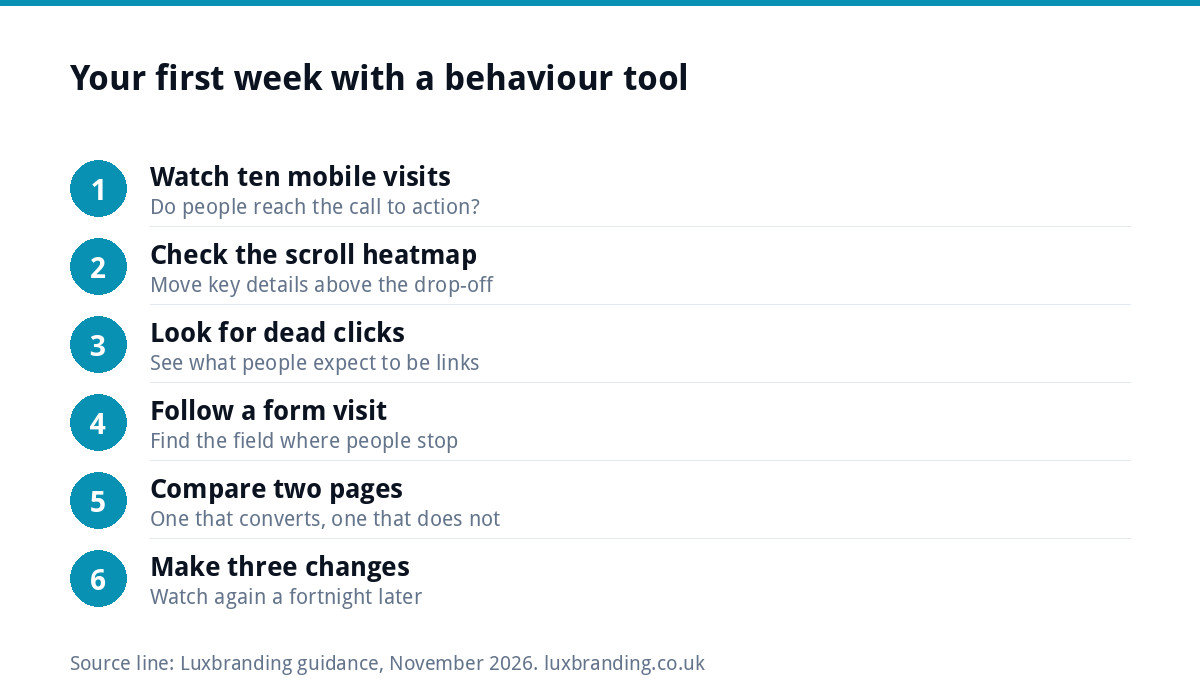
What to look for in your first week
Install, wait until you have a few dozen recordings, then work through this list:
- Watch ten mobile visits to your main service page. Do people reach the call to action? Do they pinch and zoom?
- Check the scroll heatmap. If most visitors never pass the first screen, move your phone number, prices or quote button up.
- Look for dead clicks. Repeated taps on images, headings or icons show what people expect to be links.
- Follow a form visit. Note where people stop typing. A field asking for too much, too early, is the usual culprit.
- Compare a page that converts with one that does not. The difference is usually layout, not traffic.
- Write down three changes, make them, and watch again a fortnight later.
Speed: the hidden cost of any tracking script
Every script you add is code the visitor’s phone has to download and run. One behaviour tool on a well-built site is unlikely to cause trouble, but stack it on top of chat widgets, booking embeds and several marketing pixels, and mobile load times suffer. Slow pages lose enquiries, which defeats the point of measuring them.
If your site already feels sluggish, start with our guide to website speed for small businesses. Our Website Speed Optimisation service, £99, includes reviewing which scripts are worth their weight.
When the recordings show a design problem
Behaviour tools are good at showing that something is wrong and less good at fixing it. If recordings keep showing the same issues, such as people missing the main button, scrolling past a wall of text or leaving at the form, the page itself may need rethinking rather than another tweak.
For a single campaign or service, a focused landing page from £199 is often the quickest fix. For a site that is struggling throughout, our custom WordPress website is £499 one-off for up to 8 pages, hand-coded and mobile-first, with Google Analytics and contact forms connected to your inbox included. You can run a free SEO audit first to see the technical picture, and every price is on our pricing page.
Get the UK Website Project Brief Template (free)
A two-page template for briefing any UK web designer: sitemap, integrations, audience and deliverables. Cuts revision rounds in half.
No spam. UK GDPR compliant. We only use your email to send this resource, unless you tick the box to hear from us.
Frequently asked questions
Is Microsoft Clarity really free? +
Microsoft describes Clarity as free forever and says there are no limits on traffic, at the time of writing in November 2026. There is no paid tier to upgrade to for the core heatmaps and recordings. As with any free tool, read its terms and privacy settings before you install it, and add it to your cookie policy.
Can I still sign up for Hotjar? +
Not as a new Hotjar customer. Hotjar's website says it is now part of Contentsquare and that it is no longer possible to create a new Hotjar account. Existing accounts continue. New users are directed to Contentsquare, which lists a free plan with up to 200,000 monthly sessions and one month of data access.
Do I need cookie consent for Clarity or Hotjar in the UK? +
In practice, yes. The ICO says non-essential cookies need active, clear consent and cannot be set before the user agrees, and analytics is not covered by the strictly necessary exemption. Load the tool only after visitors accept analytics cookies, and name it in your cookie and privacy policy.
Will a heatmap tool slow my website down? +
One well-configured tool on a well-built site is unlikely to cause noticeable problems, but every script adds work for the visitor's phone. Combined with chat widgets, booking embeds and several ad pixels, the delay adds up. Avoid running two behaviour tools at once, and test mobile speed after installing.
How many recordings do I need before drawing conclusions? +
There is no fixed number, but a few dozen visits to a page usually show whether a problem is common or a one-off. Look for patterns repeated across several visitors, such as missing the main button or abandoning the same form field, and test a change before assuming the cause.