Quick answer
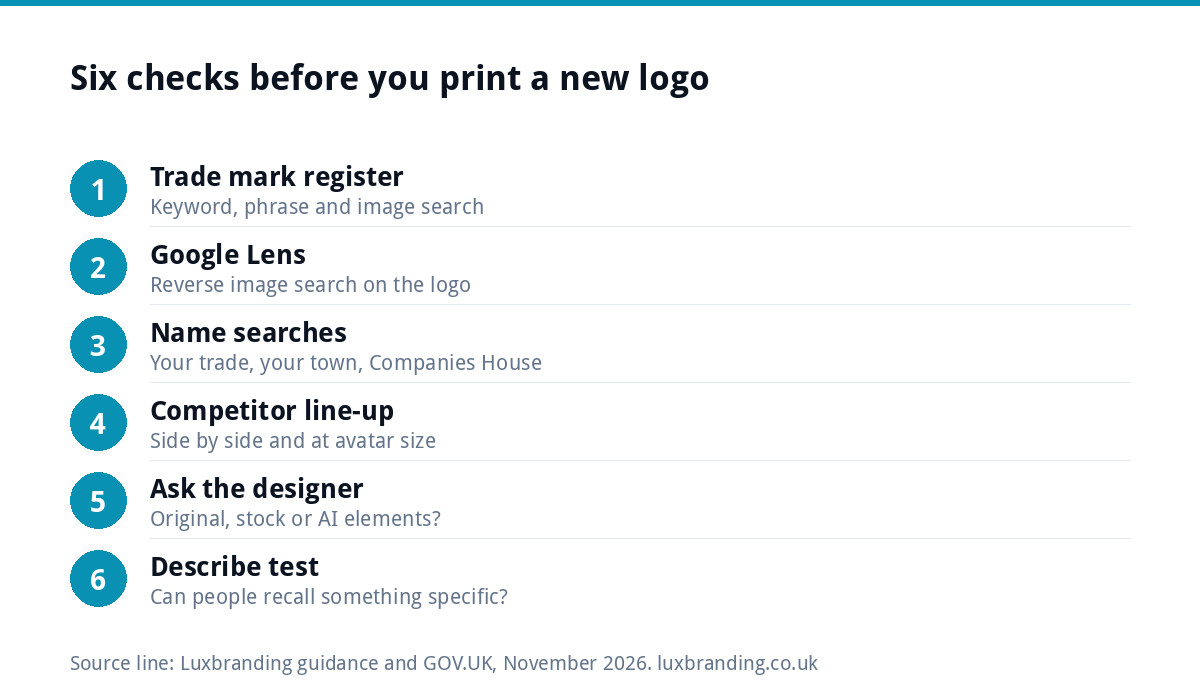
Before you print anything, run four checks: search the UK trade mark register by keyword and image, run a Google Lens search on the logo, search Companies House and Google for the name in your sector, and compare the logo side by side with your nearest competitors. Similar marks for the same goods or services are the real risk.
Finding out your new logo looks like someone else’s after the vans are wrapped and the cards are printed is expensive and stressful. Finding out before is cheap: an afternoon of searching. This guide sets out six practical checks a UK small business can do itself, explains what makes two logos “too similar” in practice, and what to do if you find a close match. It is general guidance, not legal advice; for anything borderline, speak to a trade mark attorney.
Why similarity matters
Two things can go wrong. The first is legal. GOV.UK’s guidance on what you can register as a trade mark says a mark cannot be the same as, or similar to, a trade mark of another business that sells the same goods or services. If your logo or name is too close to a registered mark in your field, your own application can fail, and the owner may object to you using it at all. GOV.UK’s guidance for sole traders also warns that if your business name is too similar to another company’s trade mark, you may have to change it if someone complains.
The second is commercial. Even without any legal issue, a logo that resembles a competitor’s sends customers their way, dilutes your reviews and makes you forgettable. Our guide to logo copyright and trade marks explains the legal background in more detail.
Check 1: search the UK trade mark register
GOV.UK’s search for a trade mark page lets you search by trade mark number, by owner, and by keyword, phrase or image, through the Intellectual Property Office’s search service. Search for:
- Your business name and any close spellings or sound-alikes.
- Distinctive words in your logo, such as a strapline you plan to keep.
- Your logo image, using the image search option.
Pay most attention to results that cover the same or related goods and services as yours. A similar name registered for software is far less of a concern for a plumber than one registered for plumbing and heating services.
Look at the status of each result as well. A mark that is registered and in use deserves more weight than an old application that was withdrawn. Note anything that looks close, with the trade mark number, so you can show it to your designer or an adviser rather than describing it from memory.
Check 2: run a reverse image search
Trade mark registers only show registered marks. Plenty of businesses trade without registering. Google’s help page on searching with an image explains how to upload an image, paste an image link or drag a file into the search box to search with Google Lens. Upload your new logo and look through the visually similar results.
This check is especially important if the logo came from a template site, an online logo maker or an AI image tool, because the same building blocks may have been given to many other businesses.
Check 3: search the name in your area and sector
Search Google for your business name plus your trade, and your name plus your town. Check Google Maps, Facebook and Instagram too. Then check the Companies House register for identical and near-identical company names. Our business name checker runs the first pass on domains and the register in one go.
A name used by a business in a different trade at the other end of the country is a lower risk than one used by a business doing what you do, twenty miles away.
While you are searching, check the matching domain names and social media handles. If a similar business already owns the obvious .co.uk and the Instagram handle, customers searching for you will find them first, which is a practical problem even where there is no legal one.
Check 4: compare against your nearest competitors
Gather the logos of the ten businesses customers are most likely to compare you with. Put yours in the middle, the same size, and look at the group from a distance. Then shrink everything to social media avatar size. If someone glancing at the page could confuse yours with any one of them, that is a problem worth fixing now, whatever the register says.
Repeat the comparison in one colour. Many logos look distinct in full colour and suddenly similar in black, which is how they will appear on invoices, embroidery and single-colour print. Check the van too: a mock-up of your livery next to a photo of a competitor’s van shows how you will look on the road.
Check 5: ask your designer where the elements came from
It is a fair question for any designer: was the symbol drawn from scratch, or built from a stock icon or template? Was any part generated by an AI tool? Stock and template elements are not necessarily a problem, but they are licensed to many people, so they are harder to call your own and harder to protect. If your logo started life in an AI generator, our guide on fixing an AI logo explains what to check.
Check 6: the describe test
Show the logo to three people for five seconds, take it away, and ask them to describe it. If they describe something generic, such as “a house with a roof and some text”, it will be easy to confuse with others. If they describe something specific to you, such as “the green circle with the big B made of two leaves”, it has a distinct identity.
What counts as too similar
There is no simple percentage. In practice, risk rises when several of these line up:
| Element | Lower risk | Higher risk |
|---|---|---|
| Name | Different words, different sound | Same or similar word, sound or meaning |
| Symbol | Different shape and idea | Same idea in a similar arrangement |
| Colour | Different main colour | Same distinctive colour in the same sector |
| Typeface and layout | Different style and structure | Same style, same layout |
| Goods and services | Unrelated trades | Same or closely related trade |
| Area | Far apart, local businesses | Same area or both trading nationally |
A shared generic element on its own, such as a leaf for a garden business, is rarely the issue. A similar name, a similar symbol and the same colour in the same trade together is a much bigger one.
If you find a close match
| Situation | Sensible next step |
|---|---|
| Only a generic element overlaps | Usually fine; consider making your version more distinctive |
| Similar symbol, different name and trade | Adjust the symbol, colour or layout before launch |
| Similar name or logo in the same trade | Rethink the logo, and possibly the name, before you print |
| Match is a registered trade mark in your field | Take advice from a trade mark attorney before going further |
| Already launched and someone has objected | Do not ignore it; read our guide to trade mark objections |
Small adjustments, such as changing the colour, redrawing the symbol or rearranging the layout, often resolve a commercial similarity without starting again. The earlier you make them, the cheaper they are: before launch it is a design change; after the vans are wrapped it is a reprint.
Protecting your logo once it is clear
Once your checks are done and you are confident, consider registering it. GOV.UK’s guide to registering a trade mark says it costs at least £205 and lasts 10 years. Keep a simple record of your checks, with dates and screenshots, in case questions come up later. Then set a reminder to repeat the searches once a year: new businesses start trading all the time, and spotting a lookalike early makes it much easier to deal with.
Getting an original logo
Our Logo Design is £129 one-off, with unlimited concepts and unlimited revisions within your brief, so if a check turns up a close match there is room to move in a different direction. If you already have a logo that needs adjusting to put clear water between you and a competitor, our Logo Edit is £50 for changes to colour, font, spacing, proportions or layout; if the concept itself needs replacing, that is Logo Design. Every fixed price is on our pricing page.
Get the UK Branding Budget Worksheet (free)
A printable worksheet: decide what your brand needs now and price it against fixed published prices and the IPO trademark fee.
No spam. UK GDPR compliant. We only use your email to send this resource, unless you tick the box to hear from us.
Frequently asked questions
How do I check if my logo is already used by someone else? +
Search the UK trade mark register by keyword, phrase and image through GOV.UK, run a Google Lens search with your logo file, search your business name with your trade and town on Google, social media and Companies House, and compare your logo side by side with your nearest competitors.
How similar can my logo be to another company's? +
There is no simple percentage. Risk rises when several things line up: a similar name or sound, a similar symbol, the same distinctive colour and the same or related trade. A shared generic element, such as a leaf for a garden business, is rarely the issue on its own.
Can I search trade marks by image in the UK? +
Yes. GOV.UK's search for a trade mark page offers searching by trade mark number, by owner, and by keyword, phrase or image, through the Intellectual Property Office's search service. Focus on results covering the same or related goods and services as your business.
What should I do if my logo is similar to a registered trade mark? +
If the match is in your field, take advice from a trade mark attorney before printing or launching. If the overlap is smaller, such as a similar symbol in a different trade, adjusting the colour, symbol or layout before launch is usually enough to put clear water between you.
Are AI-generated or template logos more likely to be similar to others? +
They can be, because template elements and AI tools draw on the same building blocks for many users. That makes them harder to call your own and harder to protect. Ask how any logo was made, and run an image search on it before you commit to vans, signs and print.