Quick answer
Catalogue design in the UK is usually quoted per page or per product, and the price is driven by product count, photography, how often prices change and whether it is printed. DIY tools cost little (Canva Pro is £100 a year), but a designer-built template you refill each season usually beats paying for a new layout every time.
A catalogue is not just a long brochure. A brochure sells an idea in a few pages; a catalogue has to present dozens or hundreds of products accurately, consistently and in a way that is easy to update when prices or stock change. That difference is where most of the cost sits. Below are the seven things that set the price, how designers quote, the print and digital choices, three examples by situation and a brief for a fair quote.
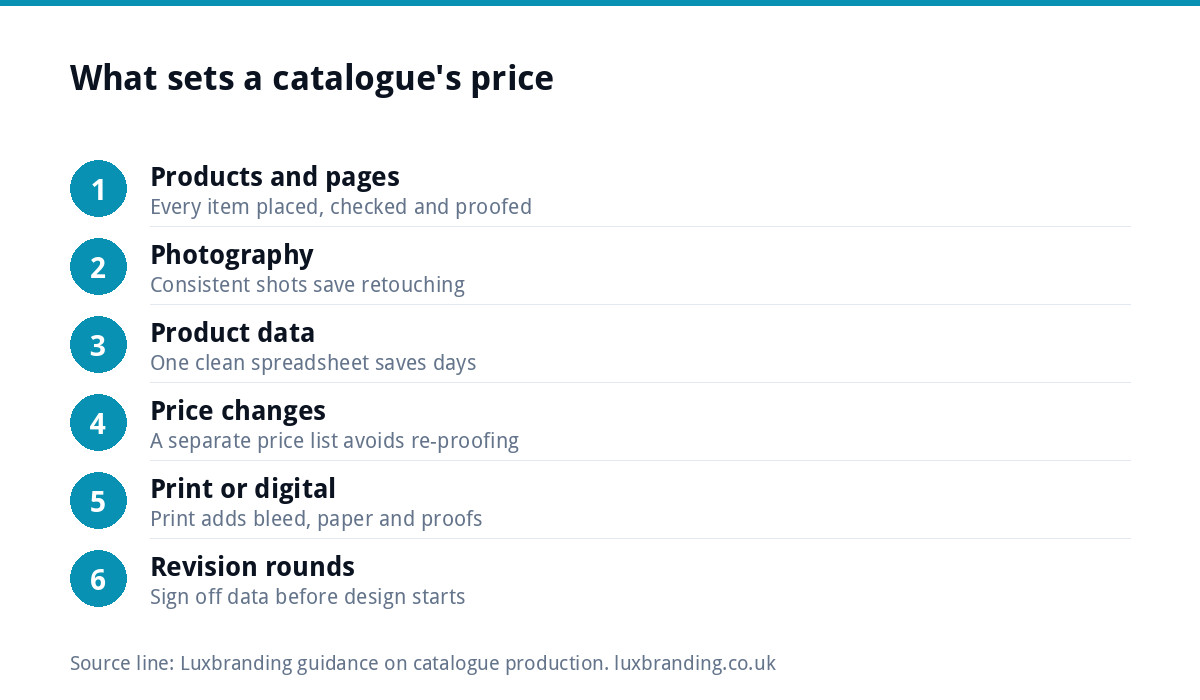
Seven things that set the price
| Price driver | Why it costs | How to keep it down |
|---|---|---|
| 1. Number of products | Every product needs placing, checking and proofing | Group variants on one entry instead of repeating them |
| 2. Page count | More pages, more layout and more print | Fewer, fuller pages with a clear grid |
| 3. Photography | Inconsistent photos need retouching or reshooting | Shoot everything on the same background and light |
| 4. Product data | Copying details by hand is slow and error-prone | Supply one clean spreadsheet |
| 5. Price changes | Every change means editing and re-proofing | Use a separate price list insert |
| 6. Print or digital | Print adds bleed, paper choice and proofing | Decide early; design once for both if possible |
| 7. Revision rounds | Late text changes ripple through every page | Sign off product data before design starts |
Most catalogue budgets that go wrong do so on numbers 3, 4 and 7: photos that do not match, product details supplied in five different emails, and changes after the pages are laid out.
How designers quote catalogues
You will usually see one of these pricing shapes:
- Per page: simple to compare, but a page with two products and a page with twenty are very different jobs.
- Per product: fairer for dense catalogues, as long as variants are counted sensibly.
- Template plus update fee: a one-off fee to design the layout system, then a smaller charge each time it is refilled with new products or prices. Often the best value for anything you reissue.
- Day rate: common where the scope is unclear, such as a catalogue with incomplete data.
Ask what is included in each quote: number of proof rounds, image retouching, print-ready files and the editable source file. Two quotes that look far apart are often pricing different amounts of work. If one designer asks lots of questions about your products and data before quoting, that is usually a good sign: they are pricing the real job rather than guessing.
Why the spreadsheet matters more than the design
For any catalogue of more than a few dozen products, the single biggest saving is clean data. Professional layout software can pull product names, codes, descriptions, prices and image file names from a spreadsheet into a designed template, which turns days of copying into hours and removes typing errors. It only works if the spreadsheet is complete, consistent and final.
Before you ask for a quote, put every product in one sheet with one row per product and one column per detail: code, name, short description, sizes or variants, price and the matching photo file name. That sheet is also exactly what you need for an online shop later.
Photography: the hidden half of the cost
A catalogue lives or dies on its photos. Products shot on different backgrounds, at different angles and in different light make even a well-designed layout look messy, and fixing them one by one in retouching is slow. A consistent product shoot, or a simple home setup with the same backdrop, light and angle for every item, saves money at the design stage and makes the catalogue easier to trust.
A simple home setup that works for most small products:
- One plain backdrop, white or a single brand colour, used for every product.
- The same light source each time, ideally a large window with the sun off it.
- A fixed camera or phone position, marked on the table with tape.
- Every product shot from the same angle, plus one detail shot where it helps.
- File names that match the product code in your spreadsheet.
That last step sounds minor, but it is what lets product photos drop into a template automatically instead of being matched by hand.
Print, digital or both
A printed catalogue needs print-ready files with bleed, the right colour setup and a paper choice. If sustainability matters to your buyers, ask your printer about certified paper; the FSC’s guide to its labels explains the difference between FSC 100%, FSC Mix and FSC Recycled. Our guide to print-ready artwork in the UK covers the technical file setup, and if a printer has already sent files back, see what to do when a printer rejects your artwork.
A digital catalogue is usually a PDF. It is cheaper to update and free to send, but PDFs are not the most accessible format. GOV.UK’s guidance on publishing accessible documents says HTML is the most accessible format and PDFs often do not work well with screen readers. For many product businesses, the best digital catalogue is simply a well-organised website.
When an online shop is the better catalogue
If your catalogue changes often, or customers want to order straight from it, a website may do the job better than a PDF. Our e-commerce website is £499 one-off for up to 20 products on WooCommerce or Shopify, with Stripe and PayPal, and larger catalogues are quoted in writing before any work starts. A printed catalogue can then point to the site for live prices, which removes the most expensive part of reprinting.
The rules if customers order from it
If customers can order from your catalogue by phone, post or online without meeting you, distance selling rules apply. GOV.UK’s guide to online and distance selling says you must give clear information before an order, including prices with all taxes, delivery costs and cancellation terms, and that customers can generally cancel up to 14 days after delivery. Build space for that information into the layout from the start rather than squeezing it in at proof stage.
Examples by situation
| Situation | Sensible approach | Where the money goes |
|---|---|---|
| A trade supplier with 200 products sold to builders and installers | Data-driven template, printed annually, separate price list | Template design and data clean-up; then cheap annual refills |
| A pottery studio with 30 pieces and a seasonal range | Short lookbook-style catalogue, digital first | Photography and layout; little data work |
| A wholesaler supplying shops across the UK | Online trade catalogue plus a printed summary for trade shows | Website build and a short print run |
Budgeting beyond the first edition
The first catalogue is the expensive one. The real budget question is what it costs to update. A layout built as a reusable template, with prices on a separate insert and products fed from a spreadsheet, makes the second and third editions a fraction of the first. A layout built page by page, with prices typed into every product box, makes each new edition almost as expensive as the original. Ask any designer how the next edition will be priced before you approve the first, and make sure you receive the editable source files so a future update does not depend on one person.
Start from a clear brand
A catalogue repeats your brand on every page: logo, colours, fonts and the way products are photographed. If those are not settled, the designer is guessing, and the catalogue will not match your packaging, labels or website. Our brand identity design is £299 and covers the logo, colours, typography, imagery and brand guidelines. For product businesses, our guides to product label design and packaging design for small brands show how the same look carries from catalogue to shelf. Every price we publish is on our pricing page.
How to brief a catalogue designer
- Number of products and expected page count.
- Print, digital or both, and the print quantity if known.
- The product spreadsheet, complete and signed off.
- Photo status: ready, needs retouching or needs shooting.
- Brand assets: logo files, colours, fonts and guidelines.
- How often it will be updated, and how the update will be priced.
Get the UK Print-Ready Artwork Checklist (free)
A one-page checklist for any UK designer or printer covering CMYK, bleed, fonts and resolution. Saves you the pre-press fix-up fees.
No spam. UK GDPR compliant. We only use your email to send this resource, unless you tick the box to hear from us.
Frequently asked questions
How much does catalogue design cost in the UK? +
It depends mostly on product count, page count, photography, how clean your product data is and whether it is printed. Designers usually quote per page, per product, or as a template plus an update fee. DIY tools cost little, with Canva Pro at £100 a year, but a reusable designer-built template is usually better value for anything you reissue.
What is the difference between a catalogue and a brochure? +
A brochure sells an idea or service in a few pages, so the cost is mostly in writing and layout. A catalogue presents many products accurately and consistently, and has to be easy to update when prices or stock change. That makes product data, photography and the layout system the main cost drivers for a catalogue.
How can I make my catalogue cheaper to design? +
Supply one complete spreadsheet with a row per product, photograph every product the same way, put prices on a separate insert, and sign off the product details before design starts. Late changes ripple through every page, so most overspends come from incomplete data and revisions after layout rather than from the design itself.
Should my catalogue be printed or digital? +
Print suits trade shows, showrooms and buyers who like to browse on paper. Digital is cheaper to update and free to send, but GOV.UK's accessibility guidance notes PDFs often work poorly with screen readers and HTML is more accessible. Many product businesses use a website as the live catalogue and a short printed version for events.
Can a website replace a printed catalogue? +
Often, yes, especially if prices change frequently or customers want to order directly. Our e-commerce website is £499 one-off for up to 20 products on WooCommerce or Shopify, with Stripe and PayPal, and larger catalogues are quoted in writing before work starts. A printed summary can then point buyers to the site for live prices.