Quick answer
Must-have website features are the ones every visitor needs to choose and contact you: clear service pages, a mobile-first layout, contact routes, speed, security and the legal basics. Our £499 custom WordPress build covers these. Nice-to-haves such as booking systems, member areas or price calculators should prove a clear return first, and are quoted separately.
Most website projects that run late or over budget do not fail on the big decisions. They fail on a steady drip of “while you are at it” requests: a gallery here, a booking widget there, a live chat, a members’ area. Each sounds small, and together they double the build. This guide sorts common features into must-haves and nice-to-haves for a UK small business, gives you a five-question test for anything else, and shows how to plan a launch now and extras later.
Why feature creep happens
Feature creep is rarely anyone’s fault. Owners see competitors’ sites, hear what a friend’s web designer did, or worry about leaving something out. Designers want to please. Without a written list of what is essential, every idea gets treated as equally important.
The cost is not just money. Every feature adds pages to design, content to write, things to test and things to maintain after launch. A site that launches in a month with the essentials usually earns more than a perfect site that launches in six.
The must-have list
These are the features almost every small business website needs from day one:
| Must-have | Why it is essential |
|---|---|
| Clear service pages | One page per main service, so people and search engines know exactly what you do |
| Mobile-first layout | Many visitors arrive on a phone, and Google indexes the mobile version |
| Obvious contact routes | Phone, form and email that work on every page |
| Proof | Photos of real work, reviews or testimonials, accreditations |
| Fast loading | Slow pages lose visitors before they read a word |
| Security and backups | SSL, updates and a way to restore if something breaks |
| Privacy notice and cookie consent | Legal requirements when you collect data or use non-essential cookies |
| Basic SEO foundation | Page titles, descriptions, a sitemap and structured data |
| Analytics | So you know which pages bring enquiries |
| An editing route you can use | So you can change prices, photos and opening hours yourself |
Our guide to launching a website covers how to check each of these before you go live.
Mobile and the legal basics are not optional
Two items on that list deserve emphasis because they are often treated as extras.
Mobile. Google says it uses the mobile version of a site’s content for indexing and ranking, known as mobile-first indexing. A site that looks fine on a desktop but awkward on a phone is weaker in search as well as harder to use.
Privacy and cookies. If your site collects enquiries, the ICO’s guidance on the right to be informed says you must give people privacy information at the time you collect their data. If you use analytics or advertising cookies, the ICO’s cookie guidance says consent must be actively given before non-essential cookies are set. These are part of the build, not add-ons.
The nice-to-have list
These features can be valuable, but only for some businesses, and only when they replace real work or bring in measurable income:
| Nice-to-have | Earns its place when | Usual route |
|---|---|---|
| Online booking | You take many fixed-length appointments | A booking tool embedded, or a custom system |
| Instant price calculator | Your prices follow clear rules | Custom build, quoted separately |
| Online shop | You sell products or fixed packages | An e-commerce site |
| Member or client area | Customers need logins, files or account history | Quoted in writing before work starts |
| Live chat | Someone can answer within minutes | Third-party widget |
| Blog | You will publish useful guides regularly | Built into WordPress |
| Multiple languages | A real share of customers needs them | Translated pages, scoped separately |
| Animations and video backgrounds | They show the work better than photos | Design choice; watch page speed |
The five-question test for any feature
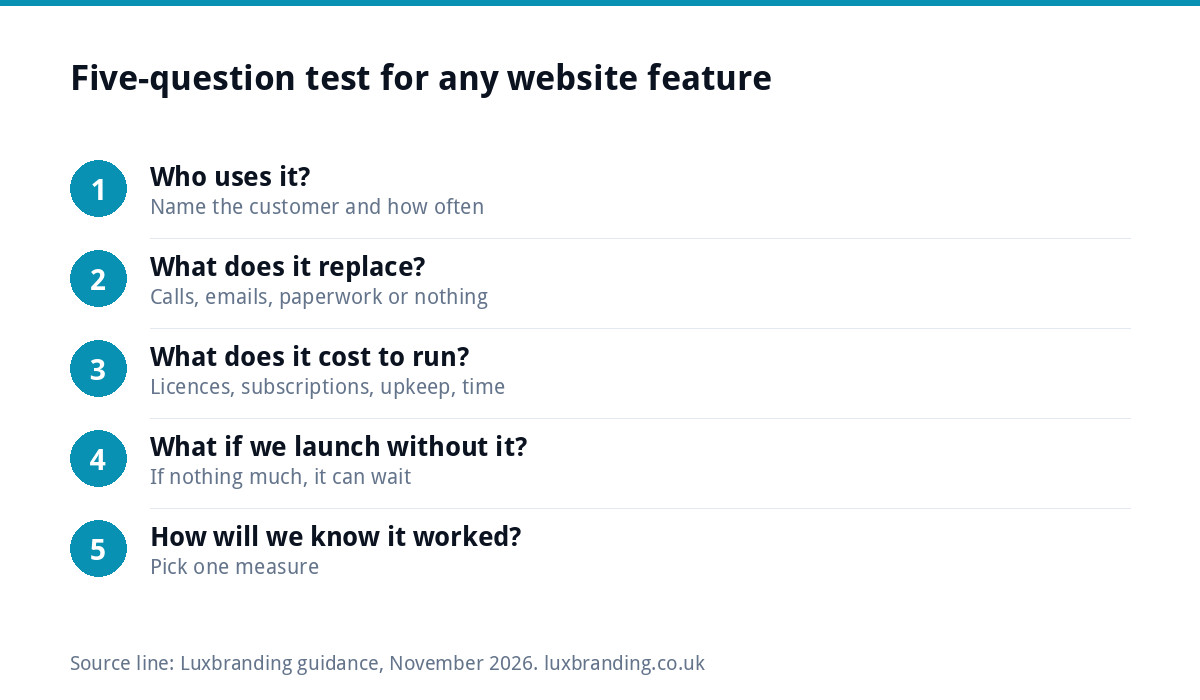
When a new idea comes up, run it through these questions before it goes into the brief:
- Who uses it? Name the type of customer, and roughly how often.
- What does it replace? Phone calls, emails, paperwork or nothing at all?
- What does it cost to run? Licences, subscriptions, maintenance and your time, not just the build.
- What happens if we launch without it? If the answer is “nothing much”, it can wait.
- How will we know it worked? Fewer calls, more bookings, more sales: pick one measure.
If a feature passes all five, it belongs in the plan. If it fails two or more, park it in a “phase two” list. That list is not a rejection; it is a promise to revisit with real data.
Launch now, add later
A phased plan keeps the first launch fast and the budget predictable:
- Phase one: launch. The must-haves, done well, with real photos and clear copy.
- Phase two: after two or three months. Review analytics and enquiries. Which questions do customers keep asking? Where do visitors drop off? Add the feature that answers the biggest gap.
- Phase three: when the business changes. New services, a shop, a client area or a booking system, each scoped on its own.
Adding features to a well-built site is normal. What causes trouble is building complicated features before anyone knows whether customers want them.
A worked example: a landscaping firm
A three-person landscaping business asks for a new site with a gallery, online booking, a price calculator, a blog, live chat and a customer login for project updates.
Running the five questions: the gallery is essential proof, so it stays in phase one as part of the service pages. Online booking fails, because jobs need a site visit, so a quote form with photo upload does the job. The calculator fails for the same reason; typical price ranges on each service page answer the “roughly how much?” question instead. Live chat fails because the team is outdoors all day; a WhatsApp button they answer at lunch replaces it. The blog moves to phase two, once the owner has time to write. The customer login is parked until there are enough long projects to justify it.
The result: a site that launches in weeks rather than months, built around the way the business actually wins work.
The running costs people forget
Every feature has a life after launch. Booking tools and chat widgets usually carry monthly subscriptions. Premium plugins often need annual licences. Custom features need someone to fix them when something they connect to changes. And every extra script can slow the site.
Before agreeing to a feature, ask what it will cost each year to keep running, and who will maintain it. Our guide to booking system costs shows how quickly subscriptions add up over a few years.
How to brief a designer with two lists
The simplest way to keep a project on track is to hand your designer two short lists at the start, rather than one long wish list:
- Must-haves, each with one line on why it matters to your customers. “Quote form with photo upload, because every job needs photos before we price it.”
- Nice-to-haves, in order of priority, each with the measure that would justify it later.
- Your budget and deadline, stated plainly, so the designer can tell you what fits.
- Examples: two or three sites you like, and one sentence on what you like about each.
Ask for the quote to separate the two lists, so you can see what each extra really adds. A good designer will also tell you when a nice-to-have is cheaper to add now than later, and when it is not. If every item comes back marked essential, ask why.
Getting the essentials built
Our custom WordPress website is £499 one-off for up to 8 pages, delivered in 2 to 4 weeks. It is hand-coded with no page builders, mobile-first, and includes custom design, an SEO foundation (schema, meta and sitemap), contact forms connected to your inbox, Google Analytics, a written CMS walkthrough and 30 days of support. Our Premium Custom WordPress site is £1,499 for up to 14 pages, and a one-page website is £299. Bigger sites, lead-generation tools and member areas are quoted in writing before any work starts.
To keep it secure after launch, Website Management & Hosting is £20 a month. Use our website cost calculator for a quick estimate, read how much a website costs for the wider market, or see every fixed price on our pricing page.
Get the UK Website Project Brief Template (free)
A two-page template for briefing any UK web designer: sitemap, integrations, audience and deliverables. Cuts revision rounds in half.
No spam. UK GDPR compliant. We only use your email to send this resource, unless you tick the box to hear from us.
Frequently asked questions
What features does every small business website need? +
Clear service pages, a mobile-first layout, working contact routes, proof such as photos and reviews, fast loading, security and backups, a privacy notice and cookie consent, a basic SEO foundation, analytics, and a way for you to edit content yourself. Most other features depend on how your particular business works.
Should I add online booking to my website? +
Add it if you take many fixed-length appointments, such as a salon, clinic or tutor, because it replaces phone tag. If your jobs need a site visit or a custom quote, a quote form with photo upload usually works better. Check the booking tool's monthly cost and how it fits your diary first.
How do I stop my website project going over budget? +
Write a must-have list before you start, and put every new idea through a simple test: who uses it, what it replaces, what it costs to run, what happens without it, and how you will measure it. Park anything that fails in a phase-two list to revisit after launch.
Can I add features after my website launches? +
Yes. Adding features to a well-built site is normal and often better, because by then you have real data on what customers ask and where they drop off. A bespoke site with clean code is usually easier to extend than one built on a heavy page builder or a theme packed with unused options.
Is a cookie banner a must-have? +
If your site uses non-essential cookies, such as analytics or advertising tags, yes. The ICO says consent must be actively and clearly given before non-essential cookies are set. A site with no non-essential cookies may not need a consent banner, but it still needs a privacy notice if it collects enquiries.