Quick answer
For a small UK shop, Squarespace suits a design-led site with a modest catalogue: its Core plan is £17 a month paid annually, with no Squarespace transaction fee. Shopify suits shops that expect to grow, with deeper selling tools and more apps: Basic is £19 a month paid yearly. Standard card fees on both start around 2% plus 25p.
Squarespace and Shopify are both hosted platforms: you pay monthly, they run the software, and you build your shop from their templates. They look similar on a pricing page but are built for different jobs. Squarespace started as a website builder that added selling; Shopify started as a shop platform that added website features. This guide compares them for UK sellers with prices and fees from their UK pricing pages at the time of writing, November 2026, before any VAT. Both change plans from time to time, so check the live pages before you commit.
Plans and monthly prices
| Plan | Paid monthly | Paid annually (per month) | Platform transaction fee |
|---|---|---|---|
| Squarespace Basic | £16 | £12 | 2% on online store sales |
| Squarespace Core | £24 | £17 | 0% |
| Squarespace Plus | £36 | £29 | 0% |
| Squarespace Advanced | £89 | £79 | 0% |
| Shopify Basic | £25 | £19 | None with Shopify Payments; 2% with a third-party provider |
| Shopify Grow | £65 | £49 | None with Shopify Payments; 1% with a third-party provider |
| Shopify Advanced | £344 | £259 | None with Shopify Payments; 0.6% with a third-party provider |
Figures from Squarespace’s pricing page and Shopify’s UK pricing page. Squarespace’s page offers a pay annually or pay monthly toggle; we have read the lower figure as the annual rate. Squarespace’s Basic plan also lists a 7% fee on digital content and memberships. Shopify Plus starts at £1,800 a month and is aimed at much larger businesses.
Card fees: the cost that grows with your sales
On top of the plan, every card payment carries a processing fee. Using each platform’s own payment service, the standard online card rates are:
- Squarespace Payments: from 2.0% + 25p on Basic and Core, 1.7% + 25p on Plus and 1.5% + 25p on Advanced, with premium cards listed at 3.0% + 25p on every plan.
- Shopify Payments: 2% + 25p on Basic, 1.7% + 25p on Grow and 1.5% + 25p on Advanced, with Amex and international cards at 3.1% + 25p on Basic.
The important difference is Squarespace’s Basic plan, which adds a 2% transaction fee on top of card fees. Squarespace’s own page invites you to upgrade for 0% transaction fees. On Shopify, the platform’s extra fee only applies if you use a third-party payment provider instead of Shopify Payments.
A worked example: what you actually pay each month
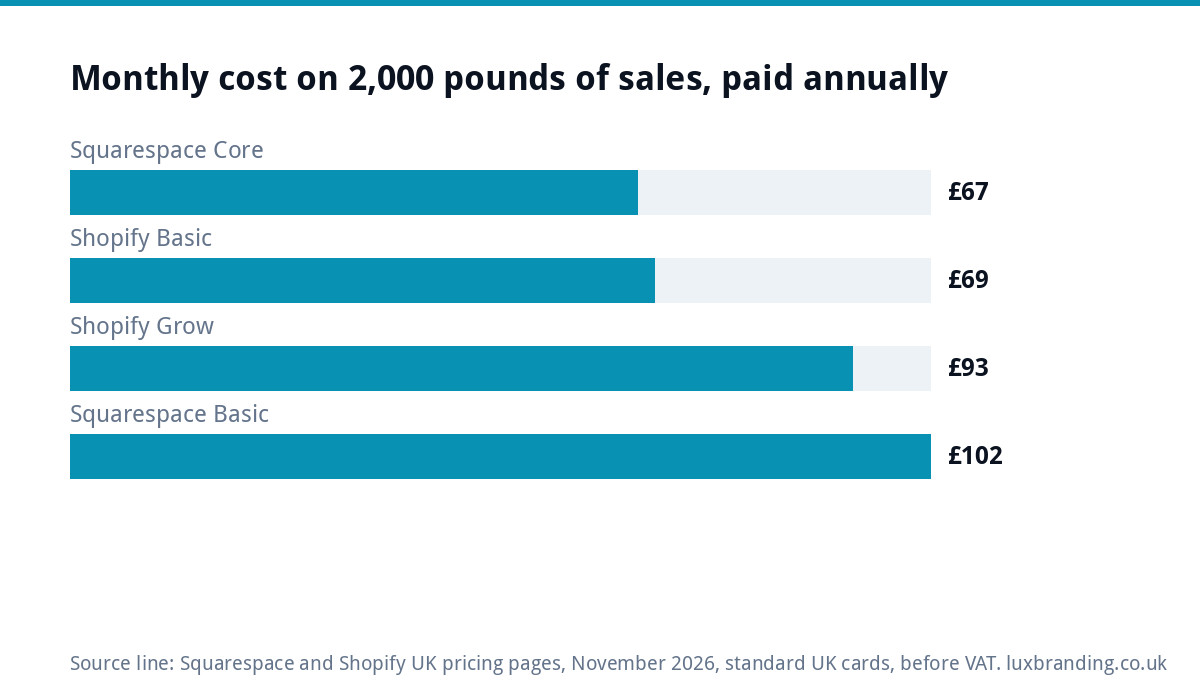
Take a small shop selling £2,000 a month online, across 40 sales of £50 each, all on standard UK cards, paying annually. Using the rates above:
| Plan | Plan fee | Card fees | Platform fee | Monthly total |
|---|---|---|---|---|
| Squarespace Core | £17 | £40 + £10 = £50 | £0 | £67 |
| Shopify Basic | £19 | £40 + £10 = £50 | £0 | £69 |
| Shopify Grow | £49 | £34 + £10 = £44 | £0 | £93 |
| Squarespace Basic | £12 | £40 + £10 = £50 | £40 | £102 |
Three lessons stand out. First, at this size the two entry-level selling plans cost almost the same. Second, the cheapest Squarespace plan is the most expensive way to sell, because of its 2% transaction fee. Third, moving up to a plan with a lower card rate only pays off at much higher sales. Apps, themes and premium cards would add to every row, so treat this as a floor, not a quote.
Squarespace vs Shopify: side by side
| Factor | Squarespace | Shopify |
|---|---|---|
| Starting point | Website builder with selling added | Shop platform with website features added |
| Design | Polished templates, strong for image-led brands | Wide theme choice, more selling-focused |
| Catalogue size | Comfortable for small to medium ranges | Built for small to very large ranges |
| Extra features | Mostly built in; fewer add-ons | Large app store; many features come from apps |
| Selling in person | Check current options for your plan | A dedicated point-of-sale system |
| Learning curve | Gentle | Gentle to start, more to learn as you grow |
| Best for | Makers, studios and services with a small range | Product businesses planning to scale |
When Squarespace is the better choice
- Your website is as much about your story, portfolio or services as about the shop.
- You sell a small range: handmade goods, prints, a few products alongside a service.
- You want a good-looking site with few moving parts and little maintenance.
- You are happy with the features built in and do not need lots of integrations.
Choose Core or above if you sell physical products, to avoid the 2% transaction fee on Basic.
When Shopify is the better choice
- Selling products is the main point of the website.
- You expect your range, sales or channels to grow, including marketplaces or in-person sales.
- You need specific features, such as subscriptions, bundles or advanced shipping, that come from apps.
- You want to switch on Shopify Payments and avoid third-party transaction fees.
Watch the app bill. Shopify’s help centre says recurring app charges are added to your Shopify bill, and some third-party apps charge you directly. A handful of paid apps can quietly cost more than the plan itself.
Costs that are easy to miss on both
- Domain renewal, if not included or after any first-year offer.
- Premium themes, usually a one-off payment.
- Email: business mailboxes are often a separate subscription.
- Apps or extensions for reviews, subscriptions, shipping rules or marketing.
- Premium and international card rates, which are higher than standard UK cards.
- Your time setting up products, photos, shipping and policies.
Setting either up properly for UK buyers
Whichever platform you choose, the same groundwork decides whether a UK shopper buys. Neither platform does this for you; it is a set of decisions you make in the settings and on your pages:
- Prices shown clearly, with VAT treated consistently if you are VAT registered, and any compulsory charges included in the price people see.
- Delivery options and costs visible before checkout, not discovered at the last step, where a surprise charge is enough to put many buyers off.
- Returns, privacy and terms pages written for your business, not copied from another shop.
- Real product photos on a plain background, plus at least one in use, so buyers can judge size and finish.
- A business email address and a contact page, so buyers can see there is a real business behind the shop.
- Payment options UK buyers expect, such as cards and the digital wallets your platform supports, switched on and tested on a phone. Check that the receipt email arrives and looks like it came from your business.
Place a test order on each device before launch, then refund it. It is the quickest way to find the broken step a customer would have found first.
Lock-in: what happens if you want to leave
Both are hosted platforms, so you rent the shop rather than own the software. You can usually export products and customer data, but the design, page layouts and any app features stay behind. Moving later means rebuilding the site and setting up redirects so search rankings carry over.
That is not a reason to avoid either platform, but it is a reason to choose with a few years in mind. Keep your own copy of product photos, descriptions and customer lists outside the platform as well, so a move never starts from scratch. If owning your code matters, our guide to Shopify vs WooCommerce compares the main self-hosted alternative, and WordPress vs Wix vs Squarespace covers the website-builder side.
How to decide in five steps
- Write down your range today and in two years.
- Estimate monthly sales and average sale value, then run the worked example with your own numbers.
- List the features you need that are not standard, and check whether each is built in or an app.
- Use each free trial, where offered, to set up three real products with photos and shipping rules.
- Pick the platform where the day-to-day jobs, such as adding products and processing sales, feel easiest.
Getting your shop built
If you would rather not build it yourself, our E-commerce Website is £499 one-off for up to 20 products, built on WooCommerce or Shopify with Stripe and PayPal. It is hand-coded with no page builders, includes a mobile-first build, an SEO foundation and a written CMS walkthrough, and you own the code and can host anywhere. Our guide to e-commerce website costs sets out the wider market, and if your shop is live but quiet, see why an online store gets no sales. Every fixed price is on our pricing page.
Get the UK Website Project Brief Template (free)
A two-page template for briefing any UK web designer: sitemap, integrations, audience and deliverables. Cuts revision rounds in half.
No spam. UK GDPR compliant. We only use your email to send this resource, unless you tick the box to hear from us.
Frequently asked questions
Is Squarespace cheaper than Shopify in the UK? +
At entry level they are close. At the time of writing, Squarespace Core is £17 a month paid annually and Shopify Basic is £19, with similar standard card fees of 2% plus 25p. Squarespace's Basic plan looks cheaper at £12 but adds a 2% transaction fee on store sales, which makes it the costlier way to sell.
Does Shopify charge transaction fees? +
Not if you use Shopify Payments, according to its UK pricing page; you pay the card processing rate instead, from 2% plus 25p on Basic. If you use a third-party payment provider, Shopify adds a transaction fee of 2% on Basic, 1% on Grow and 0.6% on Advanced, on top of that provider's own charges.
Can I sell physical products on Squarespace Basic? +
Yes, but Squarespace lists a 2% transaction fee on online store sales on its Basic plan, plus card processing fees. Its Core plan and above have no Squarespace transaction fee. For most shops selling physical products regularly, Core works out cheaper overall once sales pass a modest level.
Can I move from Squarespace to Shopify later? +
Yes, but plan for work. Products and customer details can usually be exported, while the design, page layouts and built-in features stay behind. You will rebuild the shop on the new platform and set up redirects from old addresses so customers and search engines find the new pages.
Which is better for a handmade or craft business? +
If you sell a small range and your website also tells your story, shows your process or takes commissions, Squarespace's design-led templates often suit well. If you plan to grow the range, sell at markets with card readers or add marketplaces, Shopify's selling tools and apps give more room to grow.